Hello! Welcome back.
In our last lesson, we built a powerful set of PPC campaigns to drive initial sales and visibility for your new product. As those ads start working and your sales velocity increases, the focus naturally shifts to the operational backbone of your FBA business: inventory management. Driving sales is only effective if you can consistently fulfill orders.
This lesson directly addresses the learning outcome: to monitor FBA inventory levels and performance using the Inventory Performance Index (IPI). Think of the IPI score as the primary health metric for your FBA inventory. A good score keeps your business running smoothly, while a poor score can bring it to a halt by restricting your ability to send products to Amazon's warehouses.
Your background in managing inventory for a physical shop gives you a solid foundation in concepts like turnover and stock levels. However, the IPI is an Amazon-specific system with its own set of rules, priorities, and significant consequences. Mastering it is non-negotiable for scaling on FBA.
What is the IPI and Why Does it Matter?
The Inventory Performance Index, or IPI, is a single score from 0 to 1,000 that Amazon uses to measure how efficiently you are managing your FBA inventory over time.
To get a quick but thorough introduction, let's start with a video that breaks down the essentials.
Amazon Inventory Performance Index Tutorial For New FBA Sellers 2025
The video 'Amazon Inventory Performance Index Tutorial' from LeadBoxPro clearly explains what the IPI is, why it's so important for sellers, and the consequences of a low score.
Watch the first 3 minutes and 17 seconds. Pay close attention to the impact a low IPI score has on your storage limits and the target scores Amazon recommends.
As the video highlighted, the main consequence of a low IPI score is storage limits. If your score falls below Amazon's threshold, currently 400, your ability to create new shipments to FBA will be restricted. This means you could run out of stock on your best-selling products, killing your sales momentum and organic ranking.
Here’s a breakdown of what the score ranges generally mean for your business:
| IPI Score Range | Status | Business Impact |
|---|---|---|
| 550+ | Good / Top | Unlimited FBA storage, strong business health. |
| 400-549 | Adequate | Unlimited FBA storage, but room for improvement. |
| Below 400 | Poor / At Risk | FBA storage limits will be applied. |
Source: Adapted from the 'Amazon IPI Score Guide' and common seller experience.
You can find your IPI score directly on your Seller Central homepage or by navigating to the Inventory Performance Dashboard.
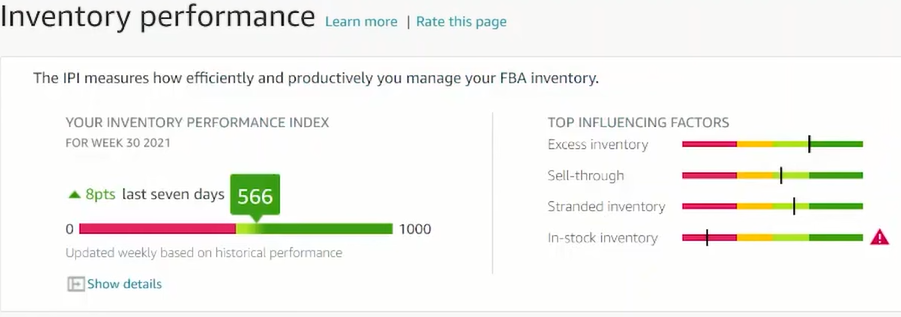
The Four Pillars of Your IPI Score
Amazon calculates your IPI score based on four underlying metrics. Crucially, these metrics are not weighted equally. Understanding their priority is the key to managing your score effectively.
The article "How to Improve Your IPI Score for Amazon FBA" by FullTimeFBA points out a key insight from Amazon employees: the factors are listed on your dashboard in their order of importance.
How to Improve Your IPI Score for Amazon FBA
To understand the hierarchy of the IPI factors, read this section from FullTimeFBA. It explains Amazon's recommended order of operations for improving your score.
Read the section that begins 'Amazon has a reason for the order...' down to '...they’re giving us specific action points to take on each individual inventory item.' Focus on the prioritized list of the four factors.
Based on that priority and data from thousands of sellers, here are the four pillars of your IPI score, their estimated weight, and what they mean:
-
Excess Inventory Percentage (Weight: ~40-45%)
This measures how much of your FBA inventory is considered "excess," meaning it has over 90 days of supply based on forecasted demand. This is the most heavily weighted factor because idle inventory clogs up Amazon's warehouses. -
FBA Sell-Through Rate (Weight: ~30-35%)
This measures how quickly you are selling through your inventory relative to the amount you keep in stock. It's calculated over the past 90 days:
\text{Sell-Through Rate} = \frac{\text{Units Sold & Shipped}}{\text{Average Units in Stock}}
Your PPC campaigns from the last lesson directly and positively influence this metric by increasing your "Units Sold." A good sell-through rate is generally considered to be 3.0 or higher. -
Stranded Inventory Percentage (Weight: ~15-20%)
This is the percentage of your FBA inventory that is not available for purchase due to a listing problem, missing information, or other errors. This is essentially dead stock that incurs storage fees without any possibility of a sale. -
FBA In-Stock Rate (Weight: ~10-15%)
This measures how often your replenishable FBA products have been in stock over the past 30 days. While important for sales, it has the lowest impact on your IPI score. Amazon cares more that you don't have excess inventory than that you are perfectly in stock at all times.
A Practical Workflow for Managing Your IPI
Managing your IPI isn't a one-time fix; it's a regular business task. A best practice is to set aside 30 minutes every week to review your Inventory Performance Dashboard and take action.
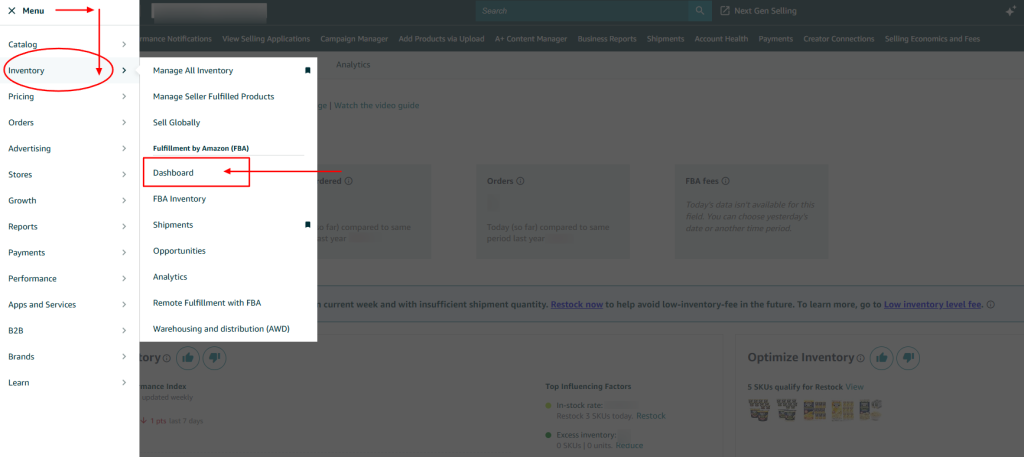
Step 1: Navigate to Your Inventory Dashboard
In Seller Central, go to the main menu, select Inventory, and then click on Dashboard under the "Inventory planning" section. From there, select the Performance tab.
Step 2: Address the Four Pillars in Order of Priority
Using the insights from the IPI dashboard, tackle each area with the following practical steps. The video from LeadBoxPro provides excellent screen-sharing demonstrations for these tasks.
Amazon Inventory Performance Index Tutorial For New FBA Sellers 2025
This video walks you through the exact pages in Seller Central to manage your inventory. We'll use it as a guide for our workflow.
Watch from 05:13 to 10:59. You don't need to perform the actions now, but focus on where the presenter clicks and what actions are available for each issue: Managing Excess Inventory (starts at 05:30): Note the options available like 'Create sale' or 'Create removal order'. Fixing Stranded Inventory (starts at 08:44): Observe how to identify the reason for stranded inventory and the actions you can take. Improving Sell-Through (starts at 09:30): Listen to the strategies for moving slow inventory, such as price adjustments or, as a last resort, removal.
Here is your weekly action plan:
-
Reduce Excess Inventory:
- Go to the Manage Excess Inventory page.
- For each item, use the dropdown menu on the right to decide on an action. Your options are to stimulate sales (e.g.,
Lower price,Create sale) or remove the inventory (Create removal order). - Prioritize removing items that have been in storage the longest and have the lowest chance of selling.
-
Improve Sell-Through Rate:
- This is improved by either increasing sales or reducing average inventory.
- Increase Sales: For slow-moving but viable products, consider increasing your PPC budget or running a promotion.
- Reduce Inventory: For dead or unprofitable inventory that is hurting your sell-through, create a removal order. Removing this inventory is often better for your IPI health than letting it sit.
- Pro Tip: For products you plan to restock, you can convert the listing to "Fulfilled by Merchant" (FBM) when it goes out of stock. As the "Beginners IPI Guide" video explains, this removes the out-of-stock listing from the sell-through calculation, preventing it from dragging down your score.
-
Fix Stranded Inventory:
- Go to the Fix Stranded Inventory page. This is your highest-urgency task.
- The page will tell you why each item is stranded. Common reasons include pricing errors or incomplete listing information.
- Follow the recommended action to either fix the listing or create a removal order immediately. Aim for a stranded inventory percentage of 0%.
-
Manage In-Stock Rate:
- Go to the Restock Inventory page.
- Amazon will recommend items to restock. Use this with caution. Amazon's goal is to maximize availability, which can sometimes lead to you sending in too much inventory, hurting your Excess Inventory score.
- For items you do not plan to sell again (e.g., a product you're discontinuing), you can select the item and choose "Hide recommendation" from the dropdown menu. This tells Amazon you don't intend to restock it, which can help your in-stock score.
Test your understanding!
Your IPI score has dropped to 415, just above the penalty threshold. You check your dashboard and see the following:
- Excess inventory: 25% (Poor)
- Sell-through rate: 4.5 (Good)
- Stranded inventory: 0% (Good)
- In-stock rate: 85% (Fair)
What is the single most important action you should take right now to improve your IPI score, and on which page in Seller Central would you take that action?
Show answer
The most important action is to address your Excess Inventory, as it has the highest negative impact on your IPI score. You would go to the Manage Excess Inventory page to either create promotions to sell the items or create removal orders for the oldest, slowest-moving stock.
Conclusion
You now have a clear understanding of what the Inventory Performance Index is and a practical, prioritized workflow for managing it. This isn't just about avoiding penalties; efficient inventory management is the hallmark of a profitable and scalable e-commerce business.
Key Takeaways:
- IPI is your FBA health score: It directly determines your ability to store products at Amazon. Keep it above 400.
- Prioritize your efforts: Focus on the four pillars in order of impact: Excess Inventory, Sell-Through Rate, Stranded Inventory, and finally, In-Stock Rate.
- Adopt a weekly routine: Regularly check your Inventory Performance Dashboard and take decisive action on problem inventory.
- Be proactive, not reactive: Don't wait for Amazon to flag inventory as "excess." If a product isn't selling after 60 days, start taking action.
Next Up:
You've learned to monitor your high-level IPI dashboard. But to make truly data-driven decisions about when and how much to restock, you need to go deeper. In our next lesson, we will explore how to use FBA inventory reports to make data-driven decisions on restocking or removing inventory, giving you the granular data needed to execute the strategies we discussed today with precision.