
In our previous lesson, you successfully installed Bun and initialized your first TypeScript project, running it with a single command. This experience gave you a glimpse of Bun's streamlined workflow. Now, we'll delve deeper into why we're choosing Bun over the familiar and robust Node.js for our Telegram bot project. This lesson directly addresses the key differences between the two runtimes, focusing on the aspects most relevant to bot development: performance, developer experience, and API design.
For a senior developer like yourself, simply knowing what a tool does is not enough; understanding the architectural decisions and trade-offs behind it is crucial. We'll use the following comparison table as a guide for our discussion, exploring each point in detail.
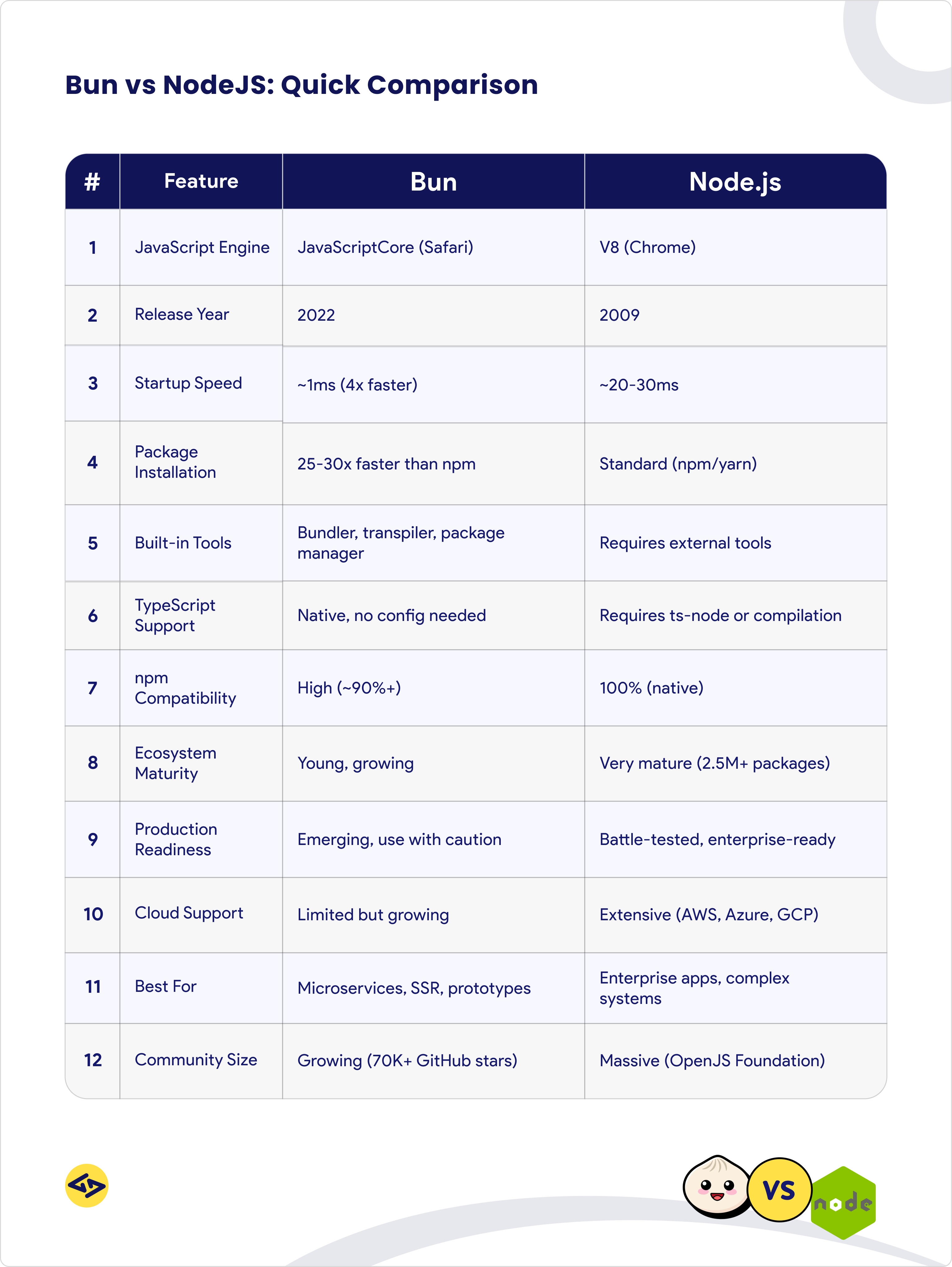
By the end of this lesson, you will have a clear mental model of Bun's value proposition and how its design choices will benefit us as we build our Telegram bot.
1. The "All-in-One Toolkit" Philosophy
The most fundamental difference is in their philosophy. Node.js is, at its core, a JavaScript runtime. The surrounding ecosystem provides the other essential tools: a package manager (npm), a bundler (webpack, esbuild), and a test runner (Jest, Vitest).
Bun, by contrast, is an "all-in-one toolkit." It integrates these components into a single, cohesive binary.
Bun Crash Course | JavaScript Runtime, Bundler & Transpiler
The "Bun Crash Course" video provides an excellent introduction to this core concept.
Watch the segment from the beginning of this section, where the presenter explains how Bun bundles the roles of a runtime, bundler, task runner, and npm client into a single tool, contrasting it with the fragmented Node.js ecosystem.
This integrated approach is a recurring theme. As we'll see, it's the foundation for many of Bun's advantages in speed and developer experience.
2. Under the Hood: Engine and Performance
The performance claims of Bun originate from deep architectural differences.
-
JavaScript Engine: Node.js is built on Google's V8 engine (from Chrome), which is renowned for its highly optimizing Just-In-Time (JIT) compiler that excels at long-running processes. Bun uses Apple's JavaScriptCore (JSC) engine (from Safari), which is optimized for faster startup times and lower memory usage. For server-side applications, and especially for serverless functions which are a common deployment target for bots, a faster startup time can significantly reduce latency.
-
Core Language: Node.js is primarily written in C++, while Bun is written in Zig, a modern, low-level language that prioritizes performance and memory control. This allows Bun to implement many of its core APIs, such as
fetchandBun.file, in highly-optimized native code rather than JavaScript.
The video "Bun vs Node.js - Everything You Need To Know!" explains this distinction clearly.
Bun vs Node.js - Everything You Need To Know!
This clip details the architectural differences between the V8 and JavaScriptCore engines and their impact on performance.
Watch from this section to understand the trade-offs between the two engines.
3. A Streamlined Developer Experience
This is where Bun's advantages become most tangible in day-to-day development. Given your extensive TypeScript experience, you'll immediately recognize the value of these improvements.
Native TypeScript & JSX Support
In the previous lesson, you ran bun run index.ts. With Node.js, this would have required installing and configuring ts-node or setting up a build step with tsc. Bun's built-in transpiler handles .ts, .tsx, and .jsx files out of the box, making the development loop faster and simpler.
Bun vs Node.js: Everything you need to know
This article section provides a clear, side-by-side comparison of running TypeScript in Node.js versus Bun.
Read the section titled Transpiler. It walks through the setup required for ts-node in a Node.js project and contrasts it with Bun's direct execution model. This reinforces the hands-on experience from our first lesson.
Flexible Module Resolution
The JavaScript ecosystem's transition from CommonJS (require) to ES Modules (import) has been a long and often complex journey for Node.js developers, typically requiring "type": "module" in package.json or using the .mjs extension.
Bun simplifies this entirely. It supports both module systems simultaneously, even within the same file, without any special configuration. This seamless interoperability is a significant quality-of-life improvement, especially when working with a mix of older and newer packages.
Bun vs Node.js - Everything You Need To Know!
This segment of the "Bun vs Node.js" video demonstrates the module handling differences with a practical code example.
Watch the section from this part. The presenter shows how Node.js errors when mixing module syntax, and then successfully runs the exact same code with Bun, using both import from chalk and require from colors in the same file.
Hot Reloading with State Preservation
For server development, tools like nodemon or Node's native --watch flag are essential. However, they typically work by restarting the entire process on a file change. This tears down existing state, such as active WebSocket connections or in-memory data.
Bun's --hot flag provides true hot reloading. It re-executes changed code in-place without terminating the process. For our bot, this means we could change a command handler and test it without losing our bot's session state or disconnecting from Telegram, leading to a much smoother development cycle.
4. APIs & Compatibility
How we interact with the web and the existing Node.js ecosystem is critical. Bun was designed to excel at both.
Built-in Web Standard APIs
Our bot will need to make HTTP requests to the Telegram API. For years, Node.js developers relied on third-party packages like node-fetch. While a native fetch API is now available in recent Node.js versions, it was a long time coming and is still marked as experimental in some contexts.
Bun implements Web-standard APIs like fetch, Request, Response, and WebSocket as stable, highly optimized built-ins. This not only avoids an extra dependency but also delivers superior performance. This alignment with browser APIs makes for a more consistent coding experience across front-end and back-end environments.
Bun vs Node.js: Everything you need to know
This article section explains the difference in fetch API support between the two runtimes.
Focus on the section on Web APIs. It covers the history of fetch in Node.js and highlights Bun's native, stable, and faster implementation.
Node.js Compatibility
A new runtime is only useful if it can leverage the existing ecosystem. Bun was designed as a "drop-in replacement for Node.js." It achieves this through several key features:
- It uses the familiar
node_modulesfolder. - It implements the Node.js module resolution algorithm.
- It supports most Node.js built-in modules (
fs,path,net, etc.) and globals (process,__dirname).
As the comparison table notes, npm compatibility is very high (~90%+), meaning you can use the vast majority of existing npm packages, including the grammY framework we'll be using.
5. Production Readiness & Ecosystem
While Bun's technical advantages are compelling, it's also important to have a balanced perspective. Node.js has been the dominant server-side JavaScript runtime for over a decade. Its ecosystem is massive, its stability is battle-tested in countless enterprise applications, and its community support is unparalleled.
Bun is the newcomer. While it's evolving at an incredible pace, its ecosystem is younger and it's considered less "battle-tested" for large-scale production systems.
Node.js vs Deno vs Bun: Comparing JavaScript Runtimes
This article provides several useful tables that give a balanced view of the runtimes' maturity.
First, review the main comparison table for a high-level summary. Then, focus on the table in the Support and community section, which contrasts Node.js's massive, mature ecosystem with Bun's rapidly expanding but smaller one. Finally, look at the table under Deployment options, which highlights Node.js's ubiquitous cloud support.
For our goal of building and deploying a Telegram bot, Bun's performance and developer experience benefits present a compelling case, and it is more than ready for this task. However, for a large, mission-critical enterprise system, the maturity of Node.js remains a significant advantage.
Conclusion
In this lesson, we've dissected the key differences between Bun and Node.js. You've learned that Bun's advantages are not superficial; they stem from fundamental architectural choices.
Key Takeaways:
- Philosophy: Bun is an all-in-one toolkit, whereas Node.js is a runtime that relies on a larger ecosystem of tools.
- Performance: Bun uses the JavaScriptCore engine and is written in Zig, prioritizing fast startup and I/O-heavy operations.
- Developer Experience: Bun offers native TypeScript support, flexible module handling (CJS & ESM), and state-preserving hot reloading.
- APIs & Compatibility: It provides built-in, fast Web Standard APIs like
fetchwhile maintaining high compatibility with the Node.js API and npm ecosystem. - Maturity: Node.js is the established, battle-tested standard with a massive ecosystem. Bun is the fast, innovative challenger that is rapidly maturing.
Now that you have a solid conceptual understanding of why we're using Bun, the next step is to start using its features to build our application. In the next lesson, we will leverage Bun's blazing-fast package manager to add our primary dependency, the grammY bot framework, and prepare our project for interacting with the Telegram API.
Can't find a good explanation? Sign up and we'll make it for you
Sign up