
Hello! Welcome back to our module on Sales Funnels & Conversion Analytics.
In the previous lesson, you designed the strategic blueprint for a 5-part lead nurturing sequence. You outlined the goal, timing, content, and call to action for each email, creating a roadmap to guide new subscribers from initial interest to becoming potential customers.
Today, we move from strategy to execution. This lesson directly addresses the learning outcome: Write the copy for a 3-part automated welcome email sequence using an AI writing assistant. We'll focus on crafting the first three crucial emails from your blueprint—the Welcome, Problem, and Solution emails—which form the core of any effective welcome sequence. Given your goal of rapidly launching multiple SaaS companies, mastering AI-assisted copywriting isn't just a skill; it's a critical lever for scaling your marketing efforts efficiently.
We'll start by defining what "great" email copy looks like, then dive into a powerful framework for instructing AI to write it for you.
What "Good" Looks Like: The Anatomy of a Powerful Welcome Sequence
Before we can ask an AI to write for us, we need a clear benchmark for quality. A great welcome sequence does more than just say hello; it builds an immediate connection, demonstrates value, and sets the stage for a long-term relationship.
Let's explore a practical structure for these first few emails.
How To Write A $1000 Email Welcome Sequence (FREE Email Copywriting Course)
This video from Tyson 4D breaks down the structure and content of a high-converting welcome sequence. Pay close attention to the specific purpose he assigns to each email.
Watch the following sections to understand the key components: Sequence Structure (03:17 - 08:38): Absorb the general flow of Introduction, Soft-Sell, and Value emails. This maps closely to the Welcome, Solution, and Problem emails we're building. The Intro Email (11:30 - 14:01): Focus on the three critical tasks of the first email: fulfill your promise (deliver the lead magnet), set expectations for future emails, and optimize deliverability. The Value/Soft-Sell Email (14:01 - 22:42): This is a masterclass in writing a problem-focused email. Notice how it builds empathy by describing the user's pain in detail before presenting a solution. This is the quality of storytelling we want our AI to replicate for our 'Problem' and 'Solution' emails.
The key insight here is that great welcome emails are built on empathy and value. They feel personal and address the user's real-world struggles, making the eventual introduction of your product feel like a natural and helpful next step, not a jarring sales pitch.
The Art of Prompting: How to Ask an AI for Great Copy
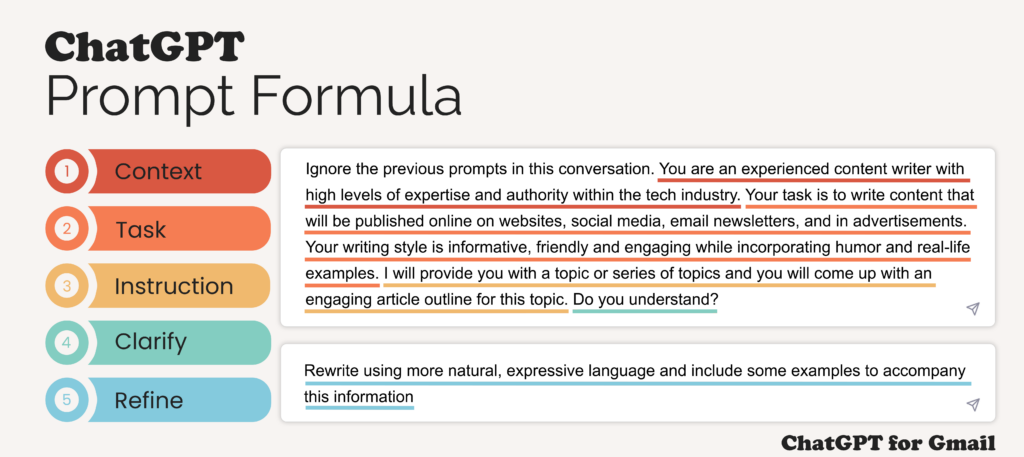
You're already familiar with tools like ChatGPT and Claude. You know they can write. The challenge is getting them to write persuasively and on-brand. The secret lies in effective prompting. A vague request like "write a welcome email" yields generic results. A structured, detailed prompt acts like a creative brief for your AI assistant.
A highly effective way to structure your prompts is the TCEPF T formula: Task, Context, Exemplars, Persona, Format, Tone.
Master the Perfect ChatGPT Prompt Formula (in just 8 minutes)!
This video from Jeff Su provides a concise and powerful framework for building high-quality prompts. It's the perfect mental model for getting consistent, high-quality output from any large language model.
Watch the entire video (it's only 8 minutes). As you watch, think about how each of the six components (Task, Context, Exemplars, Persona, Format, Tone) could be applied to asking an AI to write your email sequence.
Let's quickly recap that framework. When prompting your AI, you should aim to provide:
- Task: The specific action you want the AI to perform (e.g., "Write a 3-part email sequence").
- Context: The background information. Who is the email for (your ICP)? What problem do they have? What did they just sign up for?
- Exemplars: Examples of the desired output or structure. This could be a copywriting formula like PAS (Problem-Agitate-Solve) or a specific outline.
- Persona: Who should the AI act as? (e.g., "Act as a friendly SaaS founder who has overcome this problem themselves").
- Format: How should the output be structured? (e.g., "Label each email clearly as Email 1, Email 2, Email 3").
- Tone: The desired style and voice (e.g., "Use a conversational, encouraging, and slightly witty tone").
Your Turn: Writing the 3-Part Sequence with AI
Now, let's put this all together in a practical, step-by-step workflow.
Step 1: Start with a Proven Base Prompt
We don't need to start from scratch. There are excellent prompt templates available that we can adapt.
20+ essential AI prompts for streamlining your onboarding process
The team at Moxo has created a guide with several useful AI prompts for business communication. We're going to use their prompt for a welcome email sequence as our starting point.
Find the section titled 'Pre-boarding and document collection prompts' and locate the first prompt, 'Welcome email sequence'. This is the template we will build upon.
The base prompt looks like this:
"Write a 3-email welcome sequence for a new [role] starting on [date]. Email 1: sent immediately after offer acceptance (warm, excited). Email 2: sent 1 week before start (practical logistics). Email 3: sent day before (should detail what to expect on Day 1). Company tone is [professional/casual/startup]. Include placeholders for [company name], [manager name], and [specific details]."
This prompt is for employee onboarding, but we can easily adapt it for a new SaaS user.
Step 2: Customize and Enhance the Prompt
Let's transform this base prompt into a powerful, detailed brief for our AI assistant using the TCEPF T framework and your blueprint from the last lesson.
Imagine your SaaS is an invoice management tool for freelance writers, and the lead magnet was a "Guide to Getting Clients to Pay on Time."
Here’s how you would enhance the prompt:
[Persona]
Act as the founder of "PromptPay," a SaaS company that helps freelancers automate their invoicing and follow-ups. Your persona is a fellow freelancer who built this tool after struggling with late payments for years. You are empathetic, knowledgeable, and genuinely want to help other freelancers succeed.
[Task]
Write a 3-part automated welcome email sequence for a new user who has just signed up for our email list by downloading our free guide, "The Ultimate Guide to Getting Clients to Pay on Time."
[Context]
- Audience (ICP): Freelance writers who are great at their craft but struggle with the business side of things. They are often frustrated by late-paying clients, complex invoicing software, and the awkwardness of chasing payments.
- Product: PromptPay, a simple SaaS tool that automates invoice creation and sending, and sends polite, automated payment reminders.
- Trigger: The user just downloaded our lead magnet.
[Exemplars & Instructions]
Structure the output into three distinct emails. Follow these goals for each:
-
Email 1: The Welcome & Quick Win
- Goal: Welcome them, deliver the guide, and set expectations.
- Content: Start with a warm welcome. Provide the direct link to the guide. Tell them you'll be sending a few more emails over the next week with tips to help them professionalize their finances. Give them one "quick win" tip from the guide they can implement immediately.
- CTA: A direct link to download the guide.
-
Email 2: The Problem & Empathy
- Goal: Make them feel deeply understood. Agitate their primary pain point without mentioning our product yet.
- Content: Use the Problem-Agitate-Solve (PAS) framework, but only focus on the "Problem" and "Agitate" parts. Tell a relatable story about the stress of checking your bank account and seeing an invoice is 30 days overdue. Describe the awkward feeling of having to send a "just checking in" email.
- CTA: A soft CTA, like a link to a blog post titled "How to Word Your Payment Reminder Emails (Without Sounding Desperate)."
-
Email 3: The Solution & "Aha!" Moment
- Goal: Introduce PromptPay as the solution to the problem from Email 2.
- Content: This is the "Solution" part of PAS. Directly connect the pain of manual follow-ups to PromptPay's automated reminder feature. Explain how it works simply. The goal is to create an "Aha!" moment where they realize this process can be automated.
- CTA: A hard CTA, like "See how it works in 60 seconds" or "Start your free 14-day trial."
[Format & Tone]
- Tone: The tone should be conversational, encouraging, and empathetic. Like a knowledgeable friend giving advice. Use short sentences and paragraphs. Use emojis sparingly to add personality.
- Format: Clearly label each email "Email 1: Subject Line...", "Email 2: Subject Line...", etc. Use
[First Name]as a placeholder for the subscriber's name.
Test your understanding!
In the enhanced prompt above, which part corresponds to the "Context" element of the TCEPF T framework?
- "Act as the founder of 'PromptPay'..."
- "The tone should be conversational, encouraging, and empathetic."
- "Audience (ICP): Freelance writers who are great at their craft..."
Show answer
Option 3 is correct. It provides the essential background information about the audience, the product, and the event that triggered the email sequence, which is the core of the "Context" element. Option 1 is the "Persona," and Option 2 is the "Tone."
Step 3: Generate and Refine
Now, take the detailed prompt you've constructed and paste it into your AI assistant of choice (ChatGPT, Claude, etc.).
The output will be a very strong first draft. Your final step is to refine it:
- Read it Aloud: Does it sound like a human? Does it match your brand voice?
- Tweak Phrasing: Inject your own personality. Change a few words or sentences to make it uniquely yours. AI is great at structure, but you provide the soul.
- Check CTAs: Ensure the links are correct and the calls to action are crystal clear.
- Personalize: Double-check that placeholders like
[First Name]are correctly formatted for your future email marketing tool.
Now it's your turn. Use the blueprint you created in the last lesson and the prompt structure above to generate the copy for your own 3-part welcome sequence.
Conclusion
You have now moved from a strategic outline to a set of ready-to-use, persuasive emails. By combining a proven email framework with a structured prompting methodology, you can generate high-quality marketing copy in a fraction of the time, a crucial skill for a founder aiming to launch and scale multiple ventures.
Key Takeaways:
- A strong 3-part welcome sequence consists of a Welcome (deliver value), Problem (build empathy), and Solution (introduce your product).
- The TCEPF T (Task, Context, Exemplars, Persona, Format, Tone) framework is a powerful system for getting high-quality results from AI writing assistants.
- Start with a proven base prompt and enhance it with specific details about your ICP, product, and the goals from your strategic blueprint.
- AI provides a powerful first draft, but the final human refinement is what makes the copy authentic and effective.
Preview of the Next Lesson:
You have the strategy and the copy. What's next? In our next lesson, you will learn how to implement the sales funnel by connecting a landing page form to an automated sequence in ConvertKit or Mailchimp. We'll take the emails you just wrote and set them up in a real email marketing tool so they are automatically sent to every new subscriber, turning your strategy into a 24/7 lead-nurturing machine.