
Hello! Welcome to your next lesson in the "Learn SQL for product designers" course.
Introduction
In our previous modules, we focused on how to retrieve, filter, and connect data from different tables. You've learned how to select specific columns, filter for particular users or events, and join tables to see the bigger picture.
Today, we're moving into Module 4: Calculating Core Product Metrics. This is where SQL transitions from a data retrieval tool to a powerful analytics engine. Our goal for this lesson is to master our first aggregate function, COUNT(). By the end of this session, you'll be able to use COUNT() to calculate fundamental product metrics like the total number of signups or the number of daily active users.
This skill is a cornerstone of data-informed product design, allowing you to quantify user behavior and measure the impact of your design choices.
1. From Lists to Numbers: Understanding Aggregate Functions
So far, all our queries have returned lists of data—rows of users, events, or products. However, as a product designer, you often need a single, summary number to answer a question:
- "How many people used this new feature?"
- "What's the total number of signups this month?"
- "How many unique users logged in yesterday?"
This is where aggregate functions come in. An aggregate function takes a set of rows as input and returns a single value as output. The first and most common one we'll explore is COUNT().
2. Your First Metric: Counting Total Rows with COUNT(*)
The most straightforward use of COUNT() is to count all the rows in a table. This is perfect for getting a quick, high-level sense of your data.
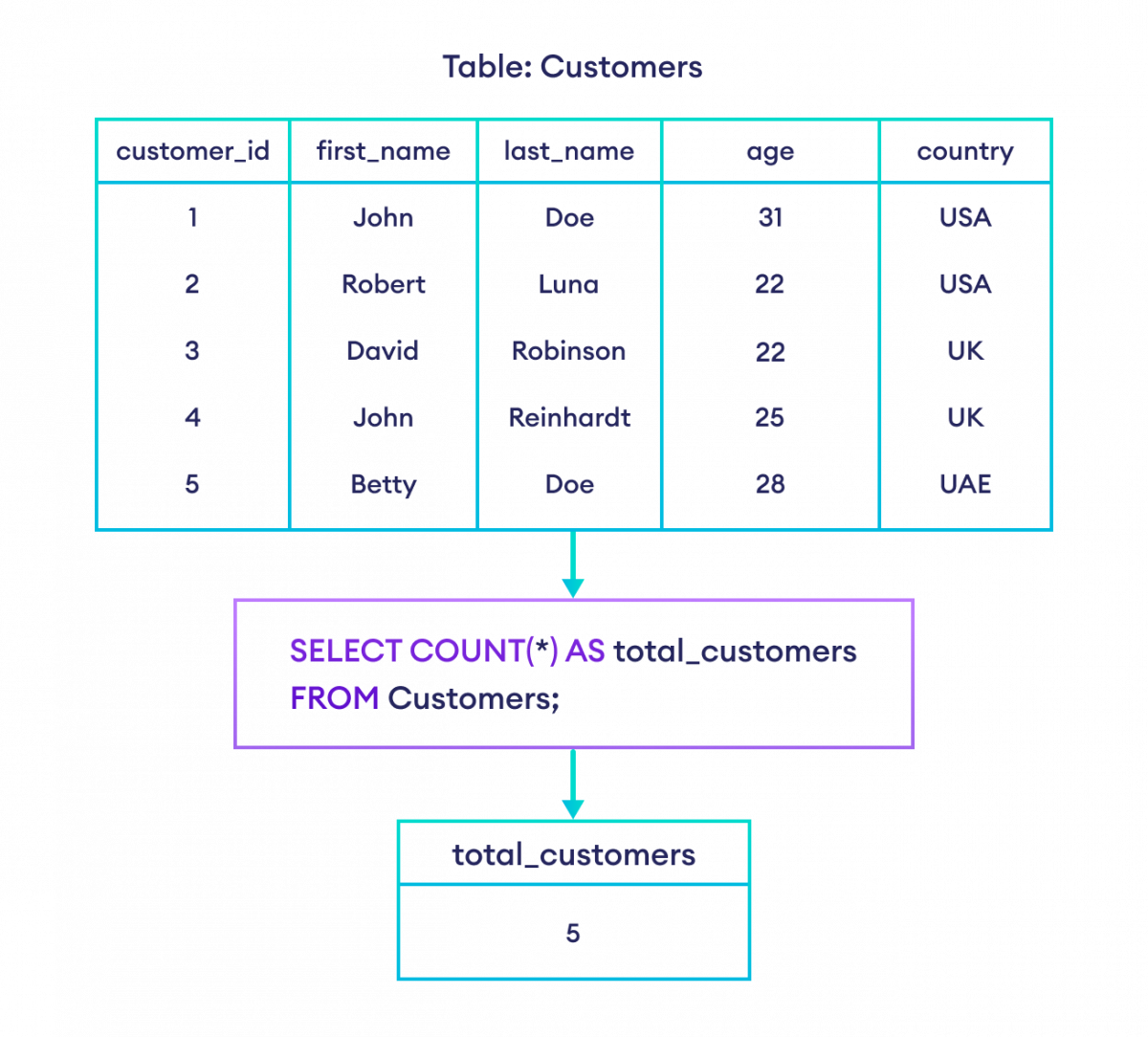
Let's imagine you want to find the total number of users who have ever signed up for your product. You would use COUNT(*):
SELECT COUNT(*) AS total_users
FROM users;
Let's break this down:
COUNT(*): The function itself. The asterisk*is a wildcard that tells the function to count every single row.AS total_users: You'll remember theASkeyword from Module 1. It's crucial here for giving your calculated number a clear, readable column name in the output. Without it, you'd get a generic name likecountor?column?, which isn't helpful in a Metabase report.
This simple query is incredibly powerful. It can instantly tell you the scale of your user base.
Of course, you'll often want to count a subset of your data. Since COUNT() operates on the results of your query, you can combine it with the WHERE clause you learned in Module 2.
For example, to count how many users signed up after the launch of a new homepage on '2023-11-01':
SELECT COUNT(*) AS new_signups
FROM users
WHERE signup_date > '2023-11-01';
To see this in action, please watch the first two minutes of the following video. It provides a clear, concise demonstration of COUNT(*) both on its own and with a WHERE clause.
Basic Aggregate Functions in SQL (COUNT, SUM, AVG, MAX, and MIN)
This video from Becoming a Data Scientist will quickly show you the basic syntax for COUNT() and how it combines with the WHERE clause.
Watch from the beginning until the 02:16 mark. Focus on how the query is structured first to count all rows, and then to count a filtered subset of rows.
3. Counting with Precision: COUNT(column) and COUNT(DISTINCT column)
While COUNT(*) is useful, product questions often require more nuance. What if you want to count how many users have filled out their profile, or how many unique users were active yesterday?
This is where specifying a column inside COUNT() becomes essential.
COUNT(column_name): Counting Non-Empty Values
Sometimes, a column in your table might have missing values (represented as NULL).
COUNT(*)will count a row even if all its columns areNULL.COUNT(column_name)will only count rows where that specific column has a value (i.e., it is notNULL).
Product Example:
Imagine your users table has a column called company_name that users can optionally fill in.
SELECT COUNT(*) FROM users;gives you the total number of signups.SELECT COUNT(company_name) FROM users;gives you the number of users who have associated themselves with a company.
This is a powerful way to quickly gauge how many users are providing certain types of information, which can inform your design decisions about optional vs. required fields.
COUNT(DISTINCT column_name): Counting Unique Values
This is one of the most important patterns for a product designer. You often don't care about the total number of actions, but the total number of unique people who performed them.
Product Example: Daily Active Users (DAU)
Your events table logs every single action a user takes. If one user clicks 5 buttons, they will have 5 rows in the events table for that day.
- If you run
SELECT COUNT(*) FROM events WHERE event_date = '2024-05-20';, you get the total number of events for that day. This is not DAU. - To get the DAU, you need to count the unique users who generated those events. You do this with
COUNT(DISTINCT user_id).
SELECT COUNT(DISTINCT user_id) AS daily_active_users
FROM events
WHERE event_date = '2024-05-20';
This query looks at all the events from May 20th, finds all the unique user_ids associated with them, and then counts how many there are. This is a core metric for measuring product engagement.
The following video explains the difference between these counting methods very well. Pay close attention to how NULL values are handled and the concept of counting distinct values.
SQL Interview Question - Difference between Count(*), Count(1), Count(colname) | Which is fastest
This video from Learn at Knowstar clearly explains the practical differences between counting all rows, counting values in a column, and counting unique values.
Watch from 05:14 to 07:20. The first part explains how COUNT(column_name) ignores NULLs, and the second part introduces COUNT(DISTINCT).
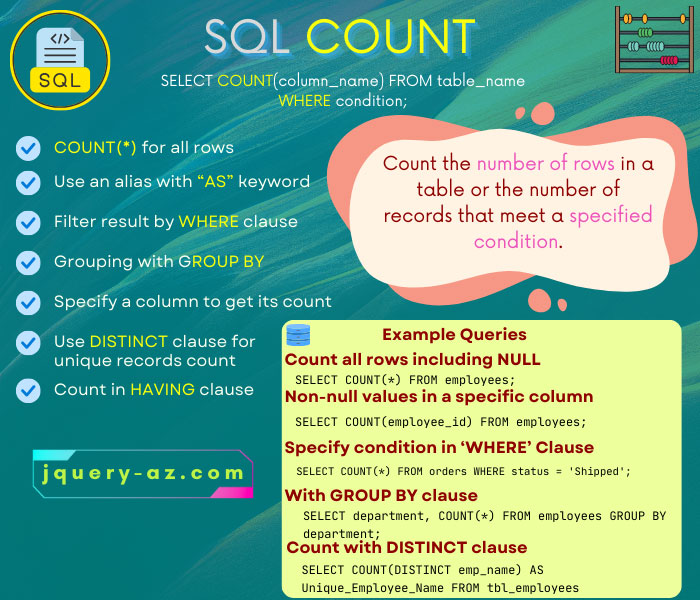
This image provides a great visual summary of the different ways you can use COUNT().
4. Practice: Answering Product Questions
Let's apply what you've learned. Imagine you are a product designer for a music streaming app. You have access to the following tables:
users(with columns:user_id,signup_date,country,last_seen_date)listening_history(with columns:log_id,user_id,song_id,timestamp)
Write a query for each of the following questions.
- How many users in total have signed up for the service?
- How many users from 'Brazil' have signed up?
- How many users were active (i.e., have a non-empty
last_seen_date)? - How many unique users listened to at least one song on May 20th, 2024? (Assume the
timestampcolumn is a full date and time, e.g., '2024-05-20 10:30:00').
Click to see the solutions
- Total users:
SELECT COUNT(*) AS total_users FROM users; - Users from Brazil:
SELECT COUNT(*) AS brazil_users FROM users WHERE country = 'Brazil'; - Active users (with
last_seen_date):SELECT COUNT(last_seen_date) AS active_users FROM users; - Daily Active Users for May 20th:
(Note: TheSELECT COUNT(DISTINCT user_id) AS dau_may_20 FROM listening_history WHERE DATE(timestamp) = '2024-05-20';DATE()function extracts just the date part from a timestamp. This is a common and useful function you'll encounter.)
Conclusion
Excellent work! You've just learned a fundamental building block for product analytics. With a single function, COUNT(), you can now move beyond simple data retrieval and start quantifying user behavior.
Key Takeaways:
COUNT()is an aggregate function that calculates a total number from a set of rows.COUNT(*)is the simplest form and counts all rows returned by your query.COUNT(column_name)counts only the rows where the specified column is notNULL, which is useful for tracking completion of optional data.COUNT(DISTINCT column_name)is essential for product metrics, as it counts unique occurrences, allowing you to calculate things like Daily Active Users (DAU).- Always use
ASto give your counted column a descriptive name for clear reporting.
Next Lesson Preview:
COUNT() is just the beginning. In our next lesson, we'll explore other essential aggregate functions: SUM(), AVG(), MIN(), and MAX(). These will allow you to answer even more sophisticated questions, such as "What is the average number of songs a user listens to?" or "What was the total revenue from subscriptions last month?".
Can't find a good explanation? Sign up and we'll make it for you
Sign up