
Welcome back. You have now chosen a bounded free-tier stack: hosted PostgreSQL with pgvector for demos, object storage for source files, and a replaceable model-provider path with a local fallback. The next step is to turn that architecture into a repository that makes its boundaries visible.
In this lesson, you will create one Git repository containing a React/TypeScript client, a FastAPI service, and Docker-based local infrastructure. The emphasis is not merely on making folders: the layout should make ownership, runtime dependencies, and future deployment choices easy to explain and change.
One repository does not mean one application
A monorepo is a single version-controlled repository containing multiple related projects. In this capstone, the projects share a product goal and evolve together, but they remain separate applications:
- The React frontend owns browser-facing UI and user interaction.
- The FastAPI backend owns API behavior, data access, authentication, and all model-provider calls.
- The infrastructure configuration owns local runtime dependencies such as PostgreSQL with pgvector.
- Documentation and shared engineering decisions live at the repository root.
This is distinct from a monolith. A monolith describes how software is structured or deployed at runtime; a monorepo describes how source code is organized and versioned. Your frontend and backend can be independently deployed even while sharing one repository.
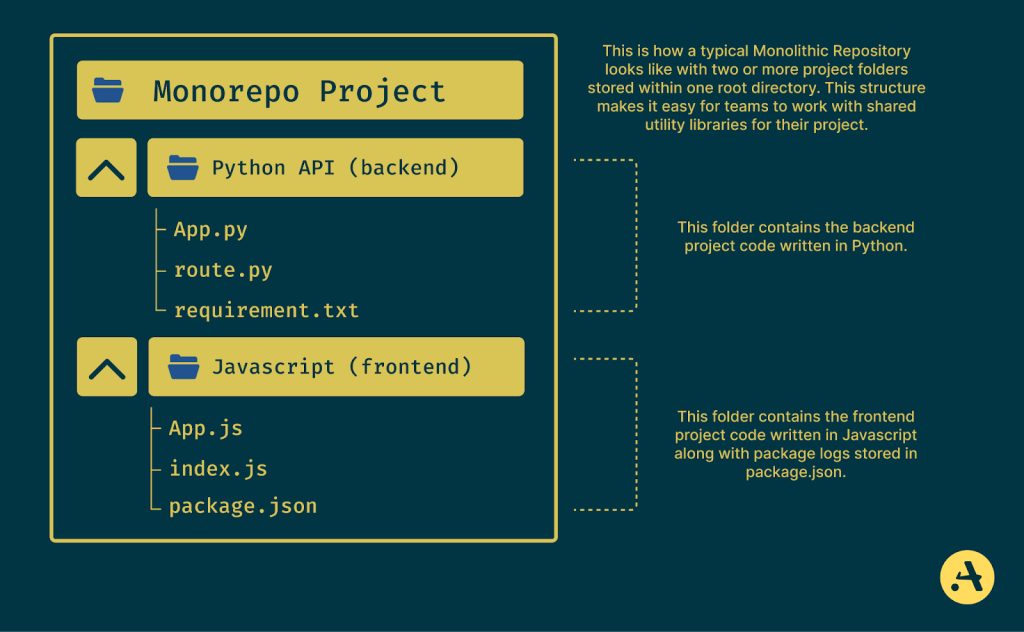
For this project, a monorepo is a practical choice because a change to the API contract often requires a corresponding frontend change. One pull request can contain the backend contract, frontend usage, documentation, and local infrastructure updates needed to support that feature.
The important boundary is not the folder name. It is this rule:
The frontend may call the API, but it must not access the database, storage provider, or model provider directly.
That one rule protects credentials, keeps authorization enforceable, and leaves space for a future mobile client or agent-facing interface to use the same API.
Choose a small, intentional repository layout
Use apps for runnable application code and infra for local stack configuration. Start with this target structure:
support-ai/
├── apps/
│   ├── api/
│   │   ├── app/
│   │   │   ├── __init__.py
│   │   │   └── main.py
│   │   └── requirements.txt
│   └── web/
│       ├── src/
│       ├── package.json
│       └── vite.config.ts
├── docs/
│   └── service-decisions.md
├── infra/
│   ├── compose.yaml
│   └── .env.example
├── .gitignore
└── README.md
The names are less important than consistent responsibility:
| Location | Owns | Must not own |
|---|---|---|
apps/web | React components, browser state, API client, accessibility | Database credentials, SQL, model-provider keys |
apps/api | FastAPI routes, domain logic, database access, provider integrations | React component code or browser-specific behavior |
infra | Local PostgreSQL/pgvector configuration, volumes, development runtime dependencies | Product business logic |
docs | Architecture notes, service choices, run instructions | Secrets or copied environment files |
| Repository root | Cross-cutting conventions and onboarding | A second application implementation |
Notice what is deliberately absent:
- No shared Python or TypeScript package yet. Create one only when two applications truly need stable shared code.
- No Dockerfile for either application yet. Full production containerization belongs later in the deployment module.
- No provider credentials in the repository. The next lesson formalizes local and hosted secret handling.
This restraint matters. A clean initial layout makes future additions explicit rather than leaving configuration scattered across application folders.
Create the repository and scaffold both applications
The commands below assume a Bash-compatible terminal, such as macOS Terminal, Linux shell, or Git Bash on Windows. You can create the same folders and files in an IDE if preferred.
From a suitable parent directory:
mkdir support-ai
cd support-ai
git init

mkdir -p apps/api/app
mkdir -p docs
mkdir -p infra
Now create the React frontend with Vite and the TypeScript template:
npm create vite@latest apps/web -- --template react-ts
Then create the minimal FastAPI application files.
apps/api/app/__init__.py can be empty:
apps/api/app/main.py:
from fastapi import FastAPI

app = FastAPI(
    title="Support AI API",
    version="0.1.0",
)
apps/api/requirements.txt:
fastapi
uvicorn[standard]
At this point, the API intentionally contains no business endpoint. You are establishing a valid, independently runnable service boundary first. The health-check route comes later, after you have introduced configuration, core domain concepts, and the intended client-to-server workflow.
Set up its local Python environment:
cd apps/api

python -m venv .venv
Activate the environment using the command for your shell:
# macOS, Linux, or Git Bash
source .venv/bin/activate
# PowerShell
.\.venv\Scripts\Activate.ps1
Install the dependencies:
python -m pip install --upgrade pip
python -m pip install -r requirements.txt
Return to the repository root when finished:
cd ../..
The frontend has its own dependency installation step:
cd apps/web
npm install
cd ../..
Do not run git init inside either apps/api or apps/web. There should be one Git repository and one coherent history for the capstone.
Keep generated files and local configuration out of Git
Create a root .gitignore:
# Python environments and generated files
apps/api/.venv/
__pycache__/
*.py[cod]
.pytest_cache/

# Node dependencies and build output
apps/web/node_modules/
apps/web/dist/

# Local environment files
.env
.env.*
!.env.example

# Operating-system files
.DS_Store
Two details are worth noticing:
apps/web/package-lock.jsonshould be committed. It records the resolved Node dependency tree.infra/.env.exampleshould be committed, butinfra/.envshould not. The example documents required configuration keys without disclosing real values.
Keep the docs/service-decisions.md record from the previous lesson in this repository. It gives the service choices a durable home alongside the implementation they constrain.
Create a minimal root README.md now:
# Support AI

A portfolio customer-support platform built with React, FastAPI,
PostgreSQL with pgvector, and configurable model providers.

## Repository layout

- `apps/web`: React and TypeScript client
- `apps/api`: FastAPI service
- `infra`: local development infrastructure
- `docs`: architecture and service decisions

## Status

Initial monorepo scaffold. The API and frontend are not connected yet.
This README is intentionally modest. Accurate status statements are more valuable than a polished description that claims features you have not built.
Put local runtime dependencies in infra
Docker Compose is useful here because PostgreSQL with pgvector is a runtime dependency of the system, not part of either application’s source code. The API will eventually connect to it, but neither the API nor React should own the database lifecycle.
Before configuring it, spend a few minutes with Docker’s model of Compose files and environment interpolation.
Docker Compose Quickstart | Docker Docs
Read Docker Docs’ “Docker Compose Quickstart” to understand why Compose configuration and local environment values should be separated, and how one Compose project can coordinate related services.
In Step 1, focus on configuration separation: values change by environment, while the Compose file remains version controlled. In Step 2, read the Compose model for services, networks, and volumes. Finally, in Step 6, read the rationale for splitting files. You will begin with one infrastructure file now; split it further only when its size or ownership makes that worthwhile.
Create infra/.env.example:
POSTGRES_DB=support_ai
POSTGRES_USER=support_app
POSTGRES_PASSWORD=change-me-local-only
POSTGRES_PORT=5432
Copy it locally without adding that copy to Git:
cp infra/.env.example infra/.env
On PowerShell, use:
Copy-Item infra/.env.example infra/.env
The values above are local-development placeholders, not production credentials. In the next lesson, you will establish a more complete convention for secrets and hosted configuration.
Now create infra/compose.yaml:
services:
  postgres:
    image: pgvector/pgvector:pg16
    environment:
      POSTGRES_DB: ${POSTGRES_DB}
      POSTGRES_USER: ${POSTGRES_USER}
      POSTGRES_PASSWORD: ${POSTGRES_PASSWORD}
    ports:
      - "${POSTGRES_PORT}:5432"
    volumes:
      - postgres_data:/var/lib/postgresql/data
    healthcheck:
      test:
        - CMD-SHELL
        - pg_isready -U ${POSTGRES_USER} -d ${POSTGRES_DB}
      interval: 5s
      timeout: 3s
      retries: 10

volumes:
  postgres_data:
This file declares three useful things:
- A
postgresservice using an image that includes the pgvector extension. - A host-port mapping so local tooling and, later, FastAPI can connect to PostgreSQL.
- A named volume,
postgres_data, so database data survives a normal container stop and restart.
The health check is important even before the API uses the database. A running container is not necessarily a ready database. Later, the API’s startup and test setup should account for this readiness boundary rather than assuming that “Docker started” means “PostgreSQL accepts connections.”
Start the local database from the repository root:
docker compose --env-file infra/.env -f infra/compose.yaml up -d
Check the resolved configuration and service status:
docker compose --env-file infra/.env -f infra/compose.yaml config
docker compose --env-file infra/.env -f infra/compose.yaml ps
Wait until the database service reports healthy. If port 5432 is already used by another local PostgreSQL installation, change POSTGRES_PORT in your untracked infra/.env, for example to 5433, and run the command again.
For now, Compose manages only infrastructure. Run the React and FastAPI applications natively during development. This keeps the iteration loop fast and establishes clear ownership:
- React runs from
apps/web. - FastAPI runs from
apps/api. - PostgreSQL runs through
infra/compose.yaml.
Later, deployment work may containerize the API and frontend as reproducible production builds. Do not confuse that future packaging concern with the current responsibility of creating clean repository boundaries.
Verify the three parts independently
Use separate terminals for each application. From apps/api, activate the virtual environment and start FastAPI:
source .venv/bin/activate
python -m uvicorn app.main:app --reload --port 8000
On PowerShell, activate the environment with:
.\.venv\Scripts\Activate.ps1
python -m uvicorn app.main:app --reload --port 8000
FastAPI should start on port 8000. Its generated documentation page at http://localhost:8000/docs will load even though you have not added routes yet.
In a separate terminal, start the frontend:
cd apps/web
npm run dev
Vite will print the local address, commonly http://localhost:5173.
At this stage, it is correct that the frontend does not yet call the API. A clean boundary is not proven by wiring everything together as fast as possible; it is proven by being able to run and reason about each piece independently before integrating them.
Perform this short verification checklist:
git statusshows one repository root, with the new source and configuration files available to commit.apps/webstarts as a Vite React application.apps/apistarts as a FastAPI application and exposes/docs.docker compose ... psshows the PostgreSQL service as healthy.git statusdoes not listinfra/.env.- No nested
.gitdirectory exists insideapps/weborapps/api.
When all checks pass, make a focused first commit:
git add .
git status
git commit -m "chore: scaffold frontend api and local infrastructure"
Before committing, always inspect git status rather than trusting .gitignore blindly. This is the simplest reliable defense against accidentally committing credentials or generated directories.
Key takeaways
You now have a monorepo designed around real engineering boundaries:
apps/webcontains the independently runnable React/TypeScript client.apps/apicontains the independently runnable FastAPI service.infracontains Docker Compose configuration for local PostgreSQL with pgvector.docsholds durable technical decisions, including your free-tier service record.- One root
.gitignoreexcludes local environments, generated dependencies, and local configuration while retaining safe example files.
The monorepo gives the capstone one coherent history without coupling the frontend to backend internals. Next, you will formalize environment-variable practices for local and hosted settings, ensuring that this clean folder structure does not become a route for leaking database credentials or model-provider keys.
Can't find a good explanation? Sign up and we'll make it for you
Sign up