
Welcome. This course develops the practical IAM judgment needed in an IT support role: understanding what an identity system is doing, handling access requests safely, documenting actions, and recognizing when a case needs escalation.
This first lesson establishes four terms that appear in nearly every identity ticket: identification, authentication, authorization, and auditing. They can occur in the same user experience, but they answer different questions. Being able to separate them prevents common support mistakes, such as treating a successful sign-in as proof that a user should have access to a sensitive resource.
Suggested study time: about 40 minutes.
Four distinct questions behind an access request
IAM exists because an organization needs reliable answers to four questions:
| Function | Core question | Typical support evidence | Common mistake |
|---|---|---|---|
| Identification | Who or what claims to be making this request? | User principal name (UPN), employee ID, device name, application/service account name | Treating a username as proof of identity |
| Authentication | Can the claimant prove that identity? | Password, MFA approval, security key, certificate, verified recovery process | Asking a user to reveal a password or MFA code |
| Authorization | Is that authenticated identity allowed to perform this action on this resource? | Group membership, role, application assignment, resource policy, approval | Assuming a signed-in user can access everything |
| Auditing | What happened, when, by whom, and with what result? | Sign-in logs, directory audit logs, application logs, approved ticket record | Treating an informal chat message as sufficient evidence |
A useful short form is:
- Identification is the claim: “I am Alex.”
- Authentication is the proof: “Here is evidence that I am Alex.”
- Authorization is the decision: “Alex may read this report but may not alter it.”
- Auditing is the record: “At this time, Alex attempted this action; it was allowed or denied.”
An identity can represent more than a person. It may be a user, device, application, script, service account, or other workload. The same four questions apply regardless of whether the request originates from a human at a help desk, a laptop connecting to Microsoft 365, or an automation job calling an API.
Identity and Access Management (IAM): Core Concepts and Benefits
Read Microsoft Learn’s overview to establish the precise distinction between identity, authentication, and authorization. It also introduces the identity provider as the central service that applies these controls.
In the “Identity” section, read the identity definition and note that an identity is a collection of attributes rather than just a username. In “Authentication,” read the authentication explanation, including the MFA examples. Then read the complete “Authentication vs. authorization” section, beginning with the opening distinction. Pay particular attention to the hotel example: reception validates identity, while each door enforces access to a particular area. Finally, in “Identity provider,” read the central IdP benefits, keeping Microsoft Entra in mind as the course’s main identity platform.
Identification: establish the claimed identity
Identification tells the system which identity record should be considered. A user entering alex.virtanen@contoso.com at a sign-in screen has identified an account. That value may be public or easily discoverable; it is not evidence that the person entering it owns the account.
In support work, identification is often the first task at ticket intake:
- Locate the relevant account using a UPN, employee ID, or another approved identifier.
- Check that the request concerns the correct person, device, group, application, or service account.
- Clarify ambiguity. “Alex from Finance” is not a unique technical identity in a sufficiently large organization.
- Record the affected identity accurately in the ticket.
Identification matters for accountability. If all administrators use a shared account, a later audit may show that an administrator account made a change, but not which person did it. Individually assigned accounts provide far stronger attribution. Shared privileged accounts are therefore normally avoided except under tightly controlled emergency arrangements.
Authentication: verify the claim
Authentication, often abbreviated AuthN, verifies that the entity claiming an identity has acceptable evidence. The familiar password is one form of evidence, but it is only one factor. MFA combines evidence from different categories, such as a password plus an authenticator prompt or security key.
For a user sign-in, authentication may include:
- a password or passphrase;
- an authenticator app prompt;
- a FIDO2 security key;
- a certificate used by a device or workload;
- a biometric used to unlock a protected authenticator or device.
For an IT support case, identity verification before an account action serves a closely related purpose: establish sufficient confidence that the requester is really the account owner before resetting a password, changing authentication methods, or disclosing account information. The exact process depends on the organization’s policy, but two rules are consistent:
- Do not ask users to share passwords, recovery codes, or MFA one-time passcodes.
- Do not treat possession of a public identifier, such as a name or email address, as adequate verification.
A user who cannot sign in may have an authentication problem, but the help-desk agent must still verify the requester before changing that user’s account.
Authorization: decide what the verified identity may do
Authorization, or AuthZ, determines whether an authenticated identity may perform a specific action on a specific resource, under the relevant conditions.
The scope matters. “Alex is authorized” is incomplete. More meaningful statements are:
- Alex may read the Finance team SharePoint site.
- Alex may not approve payments.
- Alex may create tickets in the service desk application.
- The backup automation account may write backups to a particular storage location.
- The same automation account may not delete production data.
Authorization decisions are usually implemented through groups, roles, permissions, application assignments, and resource policies. In a Microsoft environment, a user may authenticate successfully to Microsoft Entra and Microsoft 365 yet be denied access to a SharePoint site, an Azure subscription, an enterprise application, or an administrative portal. That is not necessarily a sign-in failure. It may be correct authorization behavior.
Viewing an access attempt as an IAM system does
The AWS IAM diagram below is platform-specific in its labels, but its structure is useful across IAM systems. A principal makes a request, authentication establishes the principal’s identity, policies are evaluated, and the requested operation is allowed or denied. The same general reasoning applies when Entra evaluates a sign-in and an application or resource evaluates access.
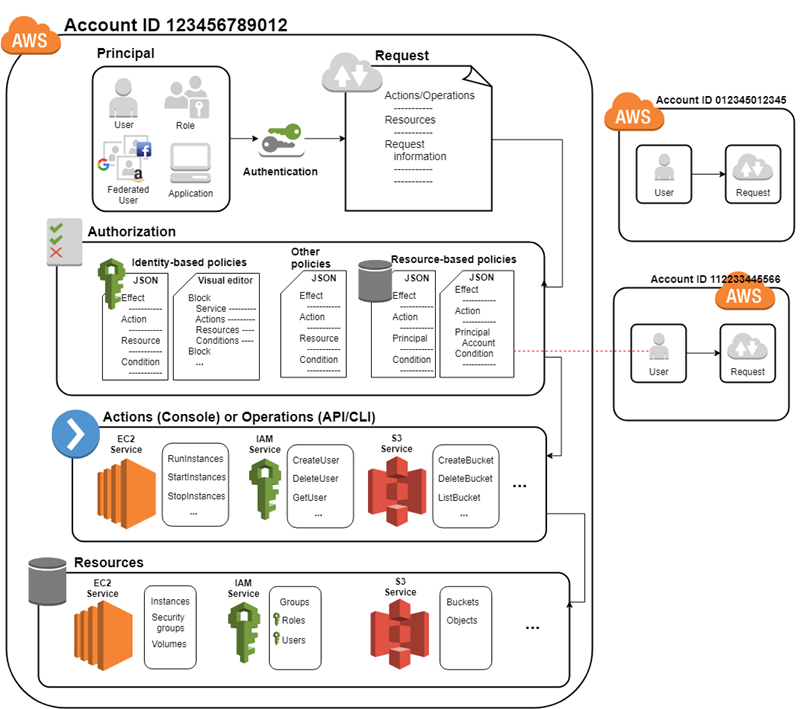
There are often two identities to consider in an IAM support ticket:
- The requester’s identity: the employee whose account or access is affected.
- The support agent’s identity: the person performing a reset, updating group membership, or assigning a license.
Consider this case:
Alex contacts the service desk: “I can sign in to Microsoft 365, but I cannot open the quarterly payroll report. Please add me to the Finance-Readers group.”
A careful analysis separates the concepts:
| Question | What the agent should establish |
|---|---|
| Identification | Which Alex account is affected? Confirm the precise account record and requested resource. |
| Authentication | Did Alex successfully authenticate to Microsoft 365? If the support channel requires it, has Alex been verified before any account change? |
| Authorization | Does Alex’s job require access to the payroll report? Is Finance-Readers the correct group? Is there documented approval from the appropriate owner? |
| Auditing | What does the sign-in record show? Was the resource access denied? Who approved and performed any group change, and when? |
The fact that Alex can use Teams is evidence that some authentication and authorization have succeeded. It is not evidence that Alex should receive access to payroll data. The request must be evaluated against business need and approved access rules. Least privilege and separation of duties, the next topics in this module, make that evaluation more rigorous.
A similarly important distinction applies to the support agent. An agent may authenticate to an administration portal, but that does not automatically authorize them to modify every user, group, or privileged role. The agent’s own administrative permissions and the request’s approval path both matter.
What is Identification, Authentication, Authorization, Auditing, Accountability| IAAA| Cybersecurity
Watch CyberPlatter’s “What is Identification, Authentication, Authorization, Auditing, Accountability” for a compact walkthrough of the IAAA model. Use it to reinforce the sequence of concepts, especially the difference between collecting audit records and using those records to establish accountability.
Watch identification for the distinction between a public identifier and a secret credential. Continue with authentication, focusing on why multiple pieces of evidence count as MFA only when they are from different factor categories. Then watch authorization and connect its examples to application permissions and group-based access. Finish with auditing and accountability. Notice the useful distinction: auditing collects the records, while accountability uses reliable attribution and those records to determine responsibility.
Auditing: the evidence that makes support work defensible
Auditing captures events and administrative activity so that an organization can reconstruct what happened. It is not merely a compliance afterthought. In support work, it is essential for troubleshooting, security investigation, quality assurance, and handoff between teams.
Depending on the system, useful audit evidence may include:
- the actor or service identity;
- the target object, such as a user, group, device, application, or file;
- the action attempted or completed;
- the timestamp and result;
- the source device, network context, or session details;
- a correlation or request ID;
- the policy or approval related to the change.
Audit evidence should include both successful and failed events. A series of failed MFA challenges, repeated denied resource requests, or a failed attempt to add a user to a privileged role can all be security-relevant.
It helps to distinguish auditing from accountability:
- Auditing is the collection, protection, retention, and reviewability of records.
- Accountability is the ability to connect an action to a responsible identity and assess that action against policy.
For example, an Entra audit log may show that an administrator added Alex to Finance-Readers at 09:16 UTC. Accountability requires the organization to be able to establish which administrator used that account, whether the action was approved, and whether it followed the access process.
A support ticket contributes to the evidence trail but does not replace system logs. The ticket explains the business context: what was reported, how the requester was verified, what approval was used, what actions were taken, and how the issue was resolved. The identity platform and application logs provide independent technical evidence that those actions occurred.
A practical support triage model
When handling an access-related ticket, classify the problem before attempting a fix:
- Identify the actor and object. Determine the exact account, device, application, group, or resource involved.
- Establish whether the requester is legitimate. Follow the organization’s identity-verification procedure before making sensitive account changes.
- Separate sign-in evidence from access evidence. A failed sign-in points toward authentication; a successful sign-in followed by a denied resource request points toward authorization.
- Check the support agent’s authority. Confirm that your role and the ticket approval permit the proposed change.
- Preserve evidence and document the result. Capture relevant timestamps, logs or IDs, decisions, actions, and user impact.
This approach reduces two opposing risks: granting access too freely and delaying a legitimate user by investigating the wrong layer of the problem.
Key takeaways
Identification, authentication, authorization, and auditing are related but separate controls:
- Identification names the claimed user, device, or workload identity.
- Authentication verifies that the claimant is genuine.
- Authorization determines whether that verified identity may take a particular action on a particular resource.
- Auditing records events and changes so they can be investigated and reviewed.
- Accountability depends on trustworthy identification, authentication, and audit records that can attribute actions to responsible identities.
For a support technician, the key habit is to avoid collapsing “the user signed in” into “the user should have access.” Treat sign-in, access, administrative authority, approval, and recorded evidence as distinct checks.
Next, the course moves from a single access attempt to the life of a workforce identity: what should happen when a person joins, changes role, or leaves an organization.
Can't find a good explanation? Sign up and we'll make it for you
Sign up