
Hello again. Last lesson framed access as something that must change with the workforce lifecycle: joiners receive a role-appropriate starting set of entitlements, movers gain and lose access as responsibilities change, and leavers must lose access promptly. This lesson adds the decision rules that prevent those lifecycle changes from quietly becoming security problems.
You will learn to evaluate an access request using two complementary controls:
- Least privilege: grant only the access required for the approved task.
- Separation of duties (SoD): do not give one person a combination of powers that should be independently controlled.
For an IAM support role, this is practical ticket work: determining whether the request is appropriately scoped, checking whether the requester already holds conflicting access, and documenting a safe decision rather than simply adding a group because someone asked.
Suggested study time: about 40 minutes.
Two controls, two different questions
An access request is rarely just a technical change. It is a request to alter what a person can do with business systems and data. Before you add a group, role, license, or application assignment, separate the questions that least privilege and separation of duties answer.
| Control | Core question | Typical risk reduced |
|---|---|---|
| Least privilege | What is the smallest set of permissions this person needs to perform the approved work? | Excessive access, accidental changes, larger impact of account compromise |
| Separation of duties | Would this access, combined with the person’s existing access, let one person perform conflicting parts of a sensitive process? | Fraud, concealment of errors, unreviewed high-risk changes |
Least privilege is about the minimum necessary entitlement. It applies to ordinary and privileged access alike. A support technician who must reset passwords does not automatically need permission to manage Conditional Access policies, edit all users, or grant tenant-wide roles.
Separation of duties is about the combination of entitlements. Each permission may look reasonable in isolation, yet the combination may defeat an important business control. For example, an employee who can both change a supplier’s bank account details and release payments could redirect funds without an independent review.
A useful support principle is:
Do not decide whether the requested group is acceptable until you know the person’s effective access already.
Effective access may come from direct role assignment, Active Directory or Entra group memberships, access packages, application-specific roles, or inherited permissions. A request that appears harmless in the ticket can create a conflict when combined with one of those existing paths.
What is the Principle of Least Privilege?
Watch “What is the Principle of Least Privilege?” from Google Cloud Tech. Although the examples use Google Secret Manager, the reasoning applies directly to Microsoft Entra, Active Directory groups, Microsoft 365 roles, and business applications: select the narrowest role and apply it at the narrowest appropriate scope.
Watch the definition for the core idea of granting only what an entity needs for its function. Then watch role granularity, focusing on how similar-looking roles deliberately separate viewing, retrieving, administering, and rotating secrets. Finish with assignment scope, which contrasts a broad project-wide assignment with access limited to one specific secret.
The important generalization is that role selection and scope selection are separate decisions. “Reader” may be a less powerful role than “Administrator,” but assigning Reader across every resource can still exceed the user’s business need. In a Microsoft environment, this could mean granting access to one SharePoint site rather than all sites, one application role rather than broad directory access, or a team-specific group rather than a company-wide group.
When assessing least privilege, define the request in six dimensions:
| Dimension | What to establish | Example |
|---|---|---|
| Identity | Which exact account needs access? | Jordan’s standard workforce account, not a shared account |
| Task | What approved work must be done? | Investigate one customer support case |
| Action | What operation is needed? | Read records, not edit or delete them |
| Resource scope | Which systems, environments, or data? | One customer tenant, not every customer tenant |
| Duration | For how long is access needed? | Until the case closes, or for a defined period |
| Conditions | What approvals or safeguards apply? | Manager and system-owner approval, audit logging |
This approach moves the conversation away from “Which powerful group should I add?” toward “What minimum capability is justified by the task?”
Separation of duties: prevent a person from controlling the whole sensitive process
SoD is often described as “different people should do different things,” but the operational IAM version is more precise: certain roles, groups, or access packages are incompatible because holding them together creates unacceptable risk.
Consider this fictional finance request:
Request: Add Jordan, an Accounts Payable Processor, to the Payment Release Approver role.
Existing access: Jordan can enter supplier invoices and create payment batches.
Requested access: Jordan would be able to approve and release payment batches.
The request might be urgent and Jordan might be trusted. Neither point answers the SoD question. If company policy requires an independent approval before payments are released, Jordan’s existing ability to create payment batches conflicts with approval authority. Granting the requested role would allow one identity to prepare and release the same payments.
A safe support response is not “deny everything permanently.” It is to stop the unapproved change and route the request through the process owner, usually Finance and the application owner. The business may choose one of several safer outcomes:
- assign the approval work to someone who does not create payment batches;
- change Jordan’s existing duties and remove the conflicting access first;
- provide a narrowly scoped, time-bound exception only if policy permits it and the required approvers accept the residual risk;
- use compensating controls, such as enhanced review and audit, when a genuine emergency process exists.
Temporary access is not automatically safe access. A ten-minute conflict can still be enough to perform a high-impact action. Time limits reduce exposure, but they do not erase an inherently incompatible combination of powers.
The supplied Entra example shows a preventive version of this control.
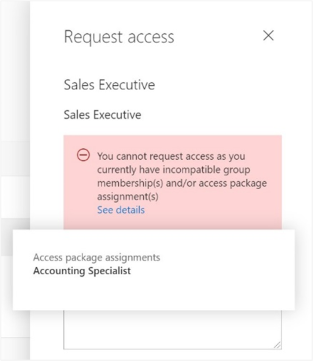
The labels Sales Executive and Accounting Specialist alone do not explain the organization’s policy rationale; job titles are not reliable evidence of a conflict by themselves. What the image does establish is the desired enforcement behavior: the access system checks existing assignments and refuses an incompatible request rather than relying on someone to notice the conflict manually.
Applying the controls to an access request
Use the following sequence whenever you receive a request to add a group, application role, administrative role, or access package.
1. Establish the authorized business need
Start with the worker’s current role, lifecycle status, requested task, affected system, and required timing. Use the approved source: an HR-driven mover event, an authorized manager request, an application-owner approval, or an established access workflow.
A vague request such as “Sam needs the same access as the previous employee” is not enough. The predecessor may have accumulated obsolete access, project access, or unauthorized privileges. Compare Sam’s request to the approved role baseline instead.
2. Inspect current access before changing anything
Determine what access the requester already holds. For higher-risk systems, this should include:
- relevant groups and nested-group effects;
- access packages and existing assignments;
- direct application-role assignments;
- privileged roles;
- existing temporary access and its expiry date;
- known access in connected systems, where the support team has visibility.
This step is especially important for movers. A person transferring from Finance to Sales might legitimately need new Sales access, but their Finance entitlements need review as well. Adding new access without considering removal of old access is a common path to privilege accumulation.
3. Reduce the request to the minimum usable entitlement
Ask whether the requested role is broader than the work requires.
For example, a support engineer needs to investigate a single customer report involving restricted data. These choices are not equivalent:
| Option | Least-privilege assessment |
|---|---|
| Give permanent access to all customer data | Excessive: broad scope and indefinite duration |
| Give a broad administrator role for one investigation | Excessive: authority does not match the task |
| Give read-only access to the relevant customer dataset for a defined case period | Potentially appropriate if approved |
| Have the data owner provide the necessary case evidence without granting access | May be safer when direct access is unnecessary |
The goal is not to make support work difficult. It is to grant access that is sufficient, not merely convenient.
4. Check for SoD conflicts
Consult the organization’s SoD matrix, role catalog, access-package rules, or application-owner guidance. The conflict might be within one application or across several systems. Common patterns include:
- creating a supplier and approving payments to that supplier;
- creating a purchase order and approving that purchase order;
- creating or changing a user account and approving that account’s privileged access;
- developing production code and deploying it to production without independent controls;
- modifying audit records and reviewing the same records;
- requesting, approving, and assigning one’s own privileged access.
For IAM support, the last example matters particularly: an administrator should not be able to unilaterally grant themselves powerful access and then approve or conceal the change. Approval workflows, separate administrative roles, and audit logs provide independent checks.
5. Make and record a controlled decision
There are four common outcomes:
| Result | Appropriate support action |
|---|---|
| Compliant and sufficiently scoped | Complete the approved assignment and verify it took effect. |
| Approved need, but request is too broad | Offer or apply the narrower approved role, scope, or duration. |
| SoD conflict | Do not grant the conflicting access. Escalate to the designated business or system owner. |
| Approved exception | Follow the formal exception process, with explicit approvers, scope, expiry, monitoring, and documented rationale. |
A manager’s approval matters, but it does not always override a formal SoD control. The approval must come through the organization’s defined exception process and include the appropriate risk owner. A help-desk technician should not bypass an access-package restriction by making a direct group or application-role assignment elsewhere. That creates an inconsistent control and makes later review much harder.
Enforcing SoD with Microsoft Entra access packages
Microsoft Entra entitlement management can prevent a user from requesting an access package when they already hold an incompatible access-package assignment or security-group membership. This turns an abstract policy into a technical guardrail.
Read Microsoft Learn’s “Configure separation of duties checks for an access package in entitlement management.” It connects the concepts in this lesson to a concrete Entra control: checking a requester’s existing group membership or access-package assignment before allowing a new request.
In “Scenarios for separation of duties checks,” read the core control, then continue through the Marketing Campaign and sales-territory examples. Notice that incompatible access can be represented by either a security group or another package. In “Configure another access package or group membership as incompatible for requesting access to an access package,” follow the configuration sequence. Focus especially on the distinction between Incompatible access packages and Incompatible groups, and on the fact that package incompatibility is unidirectional. When the conflict must be prevented in both directions, each package needs the other listed as incompatible. Finally, read “Configuring multiple access packages for override scenarios.” Begin with the enforcement example. Then read the exception design, paying attention to the use of a distinct combined package, narrower scope, shorter expiry, extra approval, and more frequent review rather than an invisible bypass.
Two implementation details are particularly important for support work:
-
Incompatibility may need to be configured both ways. If Package A blocks a request for Package B, that does not automatically mean Package B blocks a request for Package A. The resource’s Western and Eastern Territory example illustrates why both directions need configuration when the business rule is mutual exclusivity.
-
A legitimate exception should be conspicuous. Microsoft’s guidance suggests a distinct access package for the exceptional combination rather than silently overriding the normal rule. That makes the unusual access visible to approvers, reviewers, and auditors. It can also have a shorter assignment duration and stronger review requirements.
In practice, support technicians may not configure these packages themselves. Even so, understanding the mechanism helps you distinguish a routine request failure from a configuration or governance issue. If a user sees an “incompatible access” message, do not tell them to request a direct group assignment instead. Identify the conflicting assignment, confirm whether the conflict is expected, and engage the appropriate access-package manager or application owner.
A support-ready decision record
A clear ticket note explains both the technical action and the control decision. Compare these two notes:
Weak note
Added requested role. Manager approved.
This omits the business need, the scope, the requester’s existing access, the SoD check, and evidence of completion.
Stronger note
Requestor: Jordan P., Accounts Payable Processor. Authorized request and Finance manager approval verified in ticket INC-4821. Reviewed current roles: AP Processor and Invoice Entry. Requested Payment Release Approver role conflicts with the Finance SoD rule prohibiting payment-batch creation and payment release by the same user. No role assignment performed. Escalated to Finance Controls Owner and ERP application owner for decision. Existing access unchanged. Evidence attached: approval record, role-membership export, and policy reference.
Notice that the second note does not pretend the case is resolved merely because it has been escalated. It accurately records:
- who was affected;
- what evidence was reviewed;
- why the request could not be completed;
- what was and was not changed;
- who owns the next decision.
For a compliant request that you do fulfill, add the assigned entitlement, scope, expiration date if applicable, verification result, timestamp, and any approval or workflow reference. This audit discipline will become increasingly important in later modules on privileged access, access reviews, troubleshooting, and incident response.
Key takeaways
Least privilege and separation of duties are related but distinct controls:
- Least privilege grants only the permissions, resource scope, and duration necessary for an approved task.
- Separation of duties prevents one person from accumulating conflicting authority across a sensitive process.
- Evaluate existing effective access before granting new access; a role that looks harmless alone may be dangerous in combination.
- Never use a direct assignment to bypass an access-package incompatibility or other established control.
- A real exception must be explicit, approved by the right owner, limited in scope and time, and visible for review and audit.
- In an IAM ticket, record the evidence checked, the policy reasoning, the actions performed, the outcome, and unresolved ownership.
Next, you will learn to classify incoming IAM work correctly as a service request, security incident, or access incident—an essential step for choosing the right urgency, workflow, and escalation path.
Can't find a good explanation? Sign up and we'll make it for you
Sign up