
Hello! Welcome to the seventh lesson in our module on Audio Data Augmentation and Pipelines.
In our last lesson, we mastered the art of integrating on-the-fly feature extraction into a PyTorch DataLoader. We now have a robust pipeline that can convert raw audio waveforms into mel-spectrograms just in time for model training, giving us the flexibility needed for serious research and development.
Today, we'll address a crucial step in preparing high-quality data for many speech tasks. Our learning outcome is to explain the importance of forced alignment and apply a pre-trained model to generate word-level timestamps. We will explore what forced alignment is, why it's indispensable for tasks like Text-to-Speech (TTS), and how to perform it using three different powerful tools.
1. What is Forced Alignment and Why is it Important?
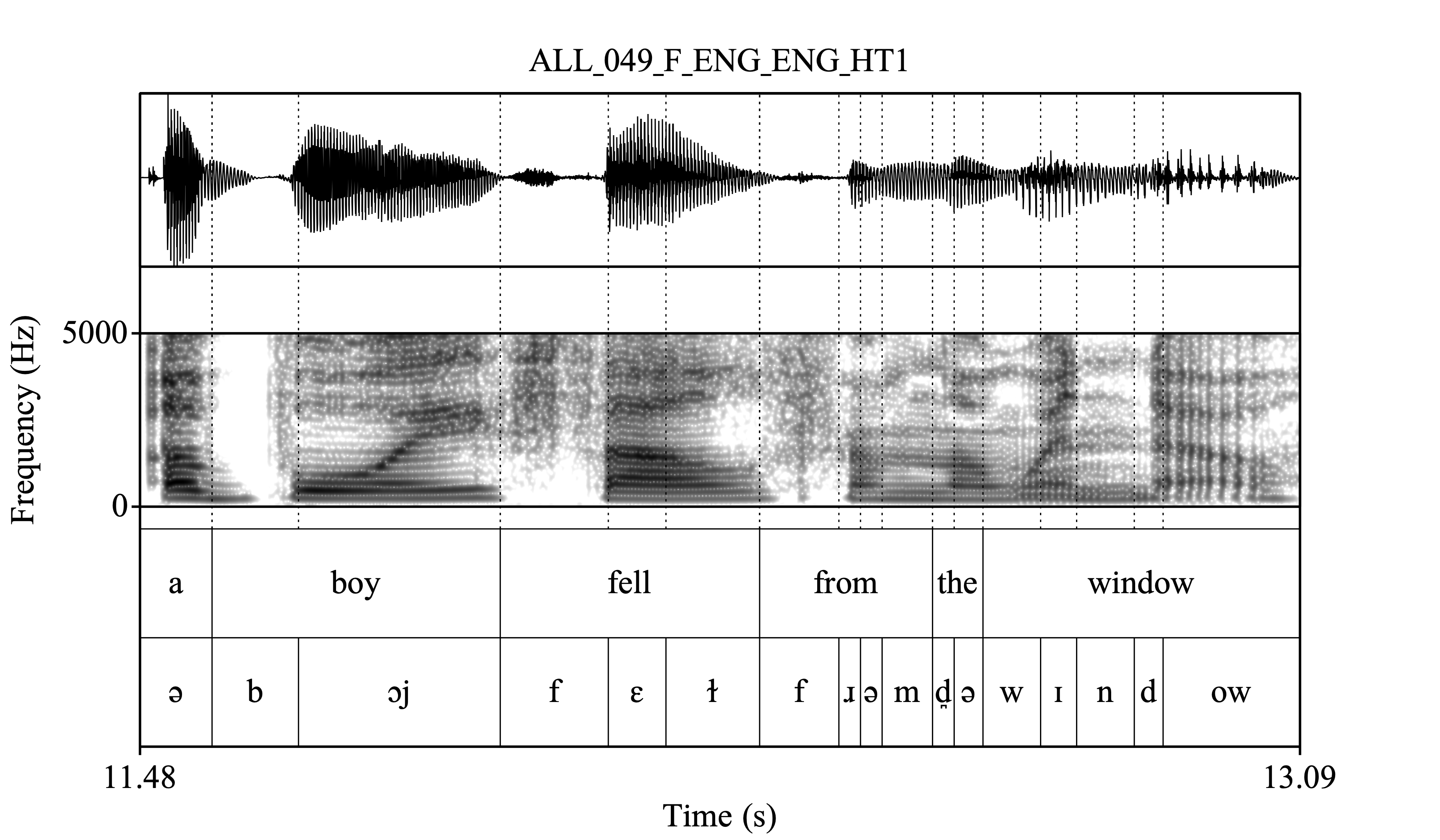
At its core, forced alignment is the process of automatically synchronizing a given audio recording with its corresponding transcript to determine the exact start and end time of each word or phoneme.
Imagine you have an audio file of someone saying "Hello world" and a text file containing that exact phrase. A forced aligner will process both and output something like:
- "Hello": starts at 0.52s, ends at 0.98s
- "world": starts at 1.10s, ends at 1.53s
To get a broader perspective on the significance of this process, please read the following article.
Why Is Timestamp Alignment Important in Speech Data?
This article from WayWithWords provides an excellent, high-level overview of timestamp alignment and its applications.
Please read the introduction ('Connecting the Dots...'), the section 'Understanding Timestamp Alignment in Speech Processing', 'The Role of Timestamp Alignment in Model Training and Evaluation', and 'Applications of Timestamp Alignment Beyond Speech Recognition'. Focus on grasping why this process is considered a 'cornerstone' of modern speech systems.
As the article highlights, forced alignment is critical for several reasons:
- Training TTS Models: To build a TTS model that can generate realistic speech, the model must learn how long each phoneme should be pronounced. Forced alignment provides this exact duration information from real speech, which is essential for models like Tacotron 2 and FastSpeech 2 that we will study later.
- Data Preparation & Analysis: It allows researchers to create high-quality, segmented speech corpora. For ASR, it enables detailed error analysis by pinpointing exactly which words or sounds the model struggles with.
- Subtitling and Dubbing: It's the engine behind perfectly synchronized captions and is invaluable for aligning dubbed audio in video production.
- Speech Analytics: It facilitates the analysis of conversational dynamics, such as turn-taking, interruptions, and speaking rate in call center recordings or interviews.
2. How Forced Alignment Works: The Core Algorithm
Forced alignment can be thought of as "speech recognition in reverse." Instead of the model figuring out the text from the audio, we provide the text and ask the model to find the most probable alignment.
The process generally relies on three components:
- An Acoustic Model: A pre-trained speech recognition model that can take audio features (like spectrograms or raw waveforms) and output the probability of different sounds (phonemes or characters) at each short time step (e.g., every 20ms).
- A Pronunciation Dictionary (Lexicon): This maps words to their sequence of phonemes (e.g.,
CURIOSITY -> K Y UH R IY AA S AH T IY). - A Search Algorithm: An efficient algorithm, typically the Viterbi algorithm, searches through all possible ways the phoneme sequence could be aligned to the audio frames and finds the single most likely path.
In modern deep learning, a CTC-based ASR model is exceptionally well-suited for this. As we'll see in a later module, CTC models output a probability matrix of tokens (characters + a special blank token) for each frame of audio. The torchaudio library provides an excellent tutorial that walks through how to use this matrix to find the optimal alignment. While the tutorial uses a now-deprecated API, its explanation of the algorithm is crystal clear and fundamental to your goal of understanding audio AI from scratch.
Let's walk through the main steps of this algorithm.
Forced Alignment with Wav2Vec2 - PyTorch documentation
This PyTorch tutorial is the best resource for understanding the algorithmic steps behind CTC-based forced alignment. We will break down its key sections.
Skim through this entire tutorial. Don't worry about running the code just yet. Focus on understanding the flow: from audio to emission probabilities, to the trellis, to backtracking, and finally to word segments. Pay special attention to the diagrams.
Here is a summary of the core logic explained in that tutorial:
-
Generate Frame-wise Probability: A pre-trained model like Wav2Vec2 processes the audio and outputs an emission matrix. This matrix has dimensions
(num_frames, num_labels), where each entryemission[t, c]contains the log-probability of observing charactercat timet. -
Generate Alignment Trellis: A trellis is a dynamic programming table of size
(num_frames, num_transcript_chars). An entrytrellis[t, j]stores the log-probability of the best possible alignment of the firstjcharacters of the transcript within the firsttframes of audio. This table is filled by considering two possibilities at each step: either the characterjis a continuation of the same character from the previous frame (a "stay"), or it's a new character transitioned fromj-1(a "change"). -
Find the Most Likely Path (Backtracking): Once the trellis is full, the algorithm starts from the final state (last frame, last character) and traces backwards, picking the path (stay or change) that had the higher probability at each step. This reconstructs the single most likely sequence of character alignments.
-
Merge and Segment: The raw path from backtracking will have many repeated characters (e.g.,
H, H, H, E, E, L, L,...). These are first merged into character segments (H,E,L, ...), and then those are merged into word segments using the word boundary token (e.g.,|).
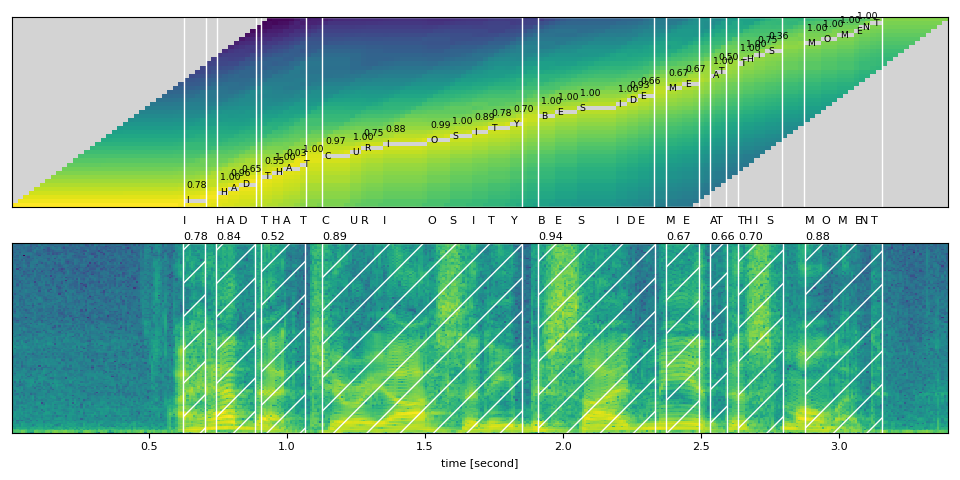
This CTC-based alignment is a powerful technique that you can implement directly within your PyTorch workflows. The tutorial itself provides all the code to do so.
3. Practical Tools for Forced Alignment
Now, let's look at three popular tools you can use to perform forced alignment.
Tool 1: Montreal Forced Aligner (MFA)
MFA is a classic, robust, and highly accurate command-line tool built on the Kaldi ASR toolkit. It is widely used in linguistics and for preparing large speech corpora.
Montreal Forced Alignment (MFA) Tutorial: Perfect Audio-Text Sync with Docker - Complete Setup Guide
This video by Dr. Elle Wang provides a complete, step-by-step guide on setting up and using MFA with Docker, which aligns perfectly with your MLOps skills.
Watch from the beginning to 10:12. You don't need to follow along and install it right now, but focus on understanding the key inputs and commands: The required inputs: a folder with WAV audio files and .txt transcripts with matching filenames. The other two crucial components: a pre-trained acoustic model and a pronunciation dictionary for your target language. The main command: mfa align and its arguments. The output format: a TextGrid file, which is a standard format for speech annotation.
MFA is an excellent choice when you need high-accuracy, phoneme-level alignments for a large dataset and are comfortable working in a command-line environment.
Tool 2: WhisperX
Since you have experience with Whisper, you'll appreciate this tool. Whisper is fantastic for transcription but its timestamp accuracy is at the segment or phrase level, not the word level. WhisperX solves this brilliantly.
It works in two stages:
- First, it uses Whisper to get a highly accurate transcription.
- Then, it performs a forced alignment using a
wav2vec2model to align Whisper's transcription with the audio, yielding precise word-level timestamps.
WhisperX - Word-level Timestamps with Whisper - Subtitles Transcription
This video from 1littlecoder gives a great demonstration of WhisperX and shows off its impressive results.
Watch the following sections: What is WhisperX? (00:00 - 01:10): Understand the problem it solves and its two-stage approach. CLI Usage (05:05 - 07:06): Observe the simple command-line interface for running WhisperX and the different output files it produces (like .srt for subtitles). Bonus: Burning Subtitles (07:14 - 08:22): This section shows how to use ffmpeg to embed the generated subtitles into a video, which connects to our earlier lessons on command-line audio tools.
WhisperX is a fantastic, state-of-the-art option for generating word-level subtitles or any application where you need accurate timestamps for a Whisper-generated transcript.
Tool 3: torchaudio's Native Pipeline
For maximum integration with your PyTorch projects, torchaudio now offers a streamlined, ready-to-use pipeline for forced alignment. This encapsulates the CTC alignment logic we discussed earlier into a convenient API. While the previous tutorial was great for learning the theory, this new API is what you should use in practice.
You can find the documentation for the recommended torchaudio.functional.forced_align function and the Wav2Vec2FABundle (Forced Alignment Bundle) on the official PyTorch website. They provide a much simpler interface for achieving the same result as the detailed tutorial.
Here's a minimal code snippet to show how you would use the modern API:
import torch
import torchaudio
from torchaudio.functional import forced_align


# 1. Load a pre-trained ASR model and the audio
bundle = torchaudio.pipelines.WAV2VEC2_ASR_BASE_960H
model = bundle.get_model()
waveform, sample_rate = torchaudio.load("your_audio.wav")
if sample_rate != bundle.sample_rate:
    waveform = torchaudio.functional.resample(waveform, sample_rate, bundle.sample_rate)


# 2. Get emissions (log-probabilities) from the model
with torch.inference_mode():
    emissions, _ = model(waveform)


# 3. Define the transcript and map characters to token indices
transcript = "HELLO WORLD"
labels = bundle.get_labels()
dictionary = {c: i for i, c in enumerate(labels)}
tokens = [dictionary[c] for c in transcript]


# 4. Run forced alignment!
aligned_result = forced_align(
    emissions,
    torch.tensor([tokens], dtype=torch.int32)
)


# aligned_result will contain the aligned segments (words) and their start/end frames.
print(aligned_result[0])


# Example output might be: [WordSegment(label='HELLO', start=10, end=35), WordSegment(label='WORLD', start=40, end=62)]
This approach is ideal when you need to programmatically integrate forced alignment into a larger Python/PyTorch-based system for data processing or analysis.
Conclusion
In this lesson, we've unpacked the crucial technique of forced alignment. You now understand not only its importance in the speech AI ecosystem but also the algorithmic foundations and how to apply it using a variety of powerful tools.
Key Takeaways:
- Forced alignment synchronizes audio and text to generate precise word or phoneme-level timestamps.
- It is essential for training high-quality TTS models and has wide applications in subtitling, data analysis, and linguistics.
- The core mechanism involves using an acoustic model to generate frame-wise probabilities and a search algorithm (like Viterbi with CTC) to find the most likely alignment path.
- You have three excellent tools at your disposal:
- Montreal Forced Aligner (MFA): A powerful, command-line tool for high-accuracy phoneme-level alignment.
- WhisperX: A modern tool that refines Whisper's segment-level timestamps to the word level.
torchaudio: A native PyTorch pipeline for seamless integration into your deep learning projects.
In our final lesson of this module, we will address a fundamental question in ASR: "How good is my model?" We will explore how to implement and interpret standard ASR evaluation metrics, specifically Word Error Rate (WER) and Character Error Rate (CER).