
Welcome back. Previously, you separated the core investigation objects: alerts are detection signals, incidents are correlated cases, entities are involved objects, evidence supports conclusions, and remediations reduce risk. This lesson steps back one layer to answer a foundational architecture question: where does the security data come from, where does it live, and what organizational boundary does each Microsoft component represent?
By the end, you should be able to interpret an SC-200 scenario involving Microsoft 365, Azure, and Microsoft Sentinel without confusing a tenant, subscription, workspace, or data connector. You will also be able to sketch the path that makes later detection and investigation possible.
Four components, four different jobs
The most useful starting point is to resist treating these names as interchangeable “containers.” They represent different scopes in the environment.
| Component | Primary role | What it contains or governs | SC-200 shorthand |
|---|---|---|---|
| Microsoft 365 tenant / Microsoft Entra tenant | Identity and organization boundary | Users, groups, identities, Microsoft 365 services, tenant-level audit and sign-in activity | Who belongs to the organization? |
| Azure subscription | Azure resource-management and billing boundary | Azure resources, such as virtual machines, storage accounts, resource groups, and Log Analytics workspaces | Which Azure resources are managed together? |
| Log Analytics workspace | Log-data storage, query, retention, and access boundary | Tables containing collected telemetry | Where does security data live for analysis? |
| Microsoft Sentinel data connector | Ingestion integration | Configuration, permissions, and collection logic for a source | How does a source send data to the workspace? |
A Microsoft 365 tenant is associated with a Microsoft Entra tenant. In most SC-200 scenarios, use “tenant” to mean the identity and organization boundary containing users and Microsoft 365 services. Entra sign-in logs, audit logs, and Microsoft 365 activity are therefore often tenant-level data sources.
An Azure subscription is different. It is a management and billing scope for Azure resources. A single Entra tenant can have multiple subscriptions: for example, one subscription for production applications, one for development, and one for a security platform. A subscription can contain resource groups, virtual machines, storage accounts, and a Log Analytics workspace.
A Log Analytics workspace is an Azure resource that lives in a subscription, resource group, and Azure region. It stores incoming logs in tables, supports KQL queries, and has its own access and retention configuration. Microsoft Sentinel is enabled on a Log Analytics workspace; it is not a separate data store floating above all Azure subscriptions.
Finally, a data connector is the integration that brings a particular source’s telemetry into the workspace. A connector is not the source itself, and it is not the destination table. It is the configured path between them.
A compact mental model is:
Tenant governs identities and tenant services; subscription hosts Azure resources; workspace stores telemetry; connector ingests telemetry; Sentinel analyzes telemetry in the workspace.
Two relationships cause frequent exam errors:
- A tenant can have many Azure subscriptions.
- A workspace can receive relevant security logs from more than one Azure subscription, provided the ingestion configuration and permissions support it.
The reverse is not automatically true: creating a new Azure subscription does not create a new tenant, workspace, Sentinel instance, or connector configuration.
The workspace is the security-data boundary
When Microsoft Sentinel is enabled on a workspace, it uses the tables in that workspace for analytics rules, hunting, incidents, workbooks, and investigations. This makes workspace design a security decision, not merely an Azure administration decision.
A workspace is commonly chosen or separated based on:
- Tenant boundaries. Tenant-level sources such as Microsoft 365 and Entra ID logs may require a Sentinel-enabled workspace in each tenant that needs to collect them.
- Data residency and region. Organizations may need European data to remain in a European region, for example.
- Access boundaries. A regional SOC might be allowed to see only its own region’s logs.
- Operational versus security data. An infrastructure Operations team may need performance telemetry but should not automatically receive access to sensitive SOC investigation data.
- Cost and scale. High-volume security telemetry may justify separate design choices, though cost optimization is a later topic.
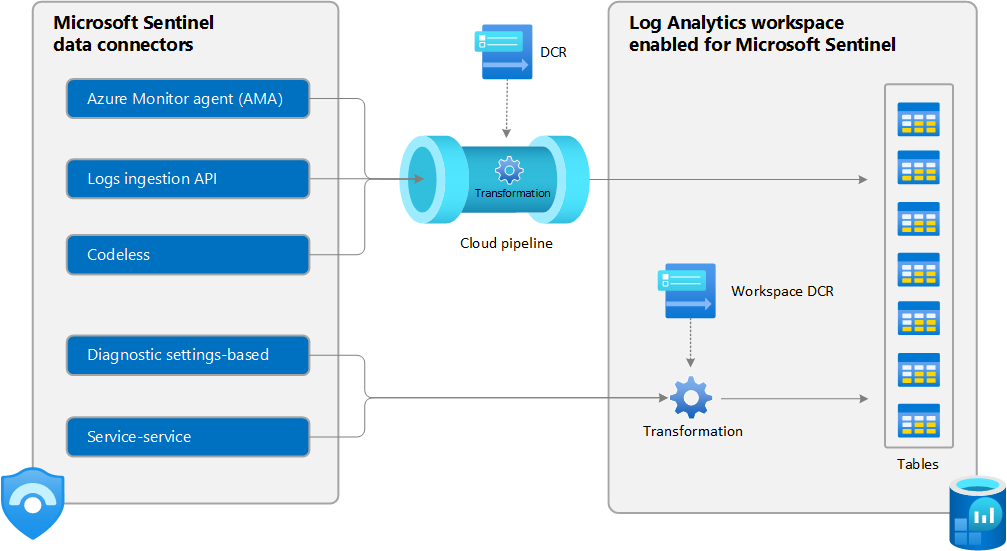
The Microsoft Sentinel data ingestion architecture image shows the key destination: tables in the Log Analytics workspace. It also shows why “data connector” should not be reduced to one technology. Some sources use the Azure Monitor Agent (AMA); some use APIs or service-to-service connections; Azure services often use diagnostic settings; and some ingestion paths can apply transformations.
At this stage, focus on the architecture rather than configuration details:
- A source produces telemetry, such as Entra sign-ins, Azure activity, Windows security events, or firewall logs.
- A connector or collection mechanism is configured with the necessary permissions and source-specific settings.
- The telemetry is ingested into tables in a target Log Analytics workspace.
- Microsoft Sentinel uses the workspace data for detection, hunting, visualization, and investigation.
The source, connector, workspace, table, and Sentinel feature are distinct layers. In an exam question, identify which layer the requirement actually targets.
Data connectors: the route into Sentinel, not Sentinel itself
A connector is best understood as a purpose-built integration. It establishes the method, authorization, and settings used to collect a source’s data into the selected workspace.
For example:
| Security requirement | Likely source | Ingestion method at a high level | Destination |
|---|---|---|---|
| Investigate suspicious Microsoft 365 activity | Microsoft 365 tenant | Microsoft 365-related connector | Sentinel-enabled workspace tables |
| Hunt unusual user sign-ins | Microsoft Entra ID tenant | Entra diagnostic settings and connector integration | Sentinel-enabled workspace tables |
| Detect activity across Azure resources | Azure subscriptions | Azure Activity connector or diagnostic settings, depending on source | Sentinel-enabled workspace tables |
| Analyze Windows Security Events | Azure or on-premises Windows hosts | Azure Monitor Agent with a data collection rule | Sentinel-enabled workspace tables |
| Monitor a third-party firewall | Network appliance | Syslog or Common Event Format collection through a Linux forwarder | Sentinel-enabled workspace tables |
| Ingest a custom application log | Application or API | Custom table and an ingestion method such as Logs Ingestion API | Sentinel-enabled workspace tables |
Notice that Microsoft Sentinel is not the producer of the log. The tenant, Azure resource, endpoint, firewall, SaaS application, or other system produces it. Sentinel becomes useful after the relevant data arrives in the workspace.
For a short visual explanation of the main ingestion patterns, watch the indicated segments of Microsoft Sentinel Data Connectors | How data ingestion happens? from Concepts Work. The presenter distinguishes prebuilt service-to-service connectors, agent-based collection, and API-based ingestion.
Microsoft Sentinel Data Connectors | How data ingestion happens?
Watch this short walkthrough to reinforce the distinction between a connector, an agent, an API, and the Log Analytics workspace that receives the data.
Watch ingestion mechanisms for the three broad collection approaches and the workspace destination. Then watch connector onboarding to see how a third-party connector is obtained through Content hub and configured for collection.
One important refinement: not every data source uses a Sentinel connector in exactly the same way. For example, Windows event collection relies on the Azure Monitor Agent and data collection rules, while Azure resource logs can be sent by diagnostic settings. What matters for this lesson is the architectural result: selected source data reaches the correct workspace tables.
Connecting tenant-level logs to an Azure workspace
Tenant-level sources create a bridge between the Microsoft 365 or Entra identity environment and Azure monitoring infrastructure. Microsoft Entra logs illustrate this relationship clearly.
To export Entra activity logs, an organization needs an Azure subscription and a Log Analytics workspace in that subscription, as well as appropriate tenant and workspace permissions. The administrator selects log categories and chooses the destination workspace in Entra diagnostic settings.
Integrate Microsoft Entra logs with Azure Monitor logs - Microsoft Entra ID | Microsoft Learn
Read this Microsoft Learn article to see the concrete relationship between an Entra tenant, an Azure subscription, and a Log Analytics workspace. It also shows how diagnostic settings establish the destination for tenant activity logs.
In the introductory material and Prerequisites, read the integration prerequisites. Focus on why both tenant permissions and an Azure workspace are required. Next, in Create a Log Analytics workspace, read the workspace design explanation. Notice that geography, subscription boundaries, and access can all influence workspace placement. Finally, in Send logs to Azure Monitor, follow the diagnostic-settings instructions beginning where you select log categories. Read the destination selection. The critical step is choosing both the subscription and the specific workspace that will receive the Entra logs.
The workflow does not mean that Entra ID is “inside” the Azure subscription. Entra remains the tenant’s identity service. The Azure subscription provides a place to host the workspace, and diagnostic settings export selected Entra logs into that workspace.
This distinction is useful when reading scenario wording:
- “A user’s risky sign-ins must be investigated in Sentinel” points toward Entra logs and their ingestion path.
- “The workspace must be created in a particular Azure region” points toward Azure workspace placement.
- “The SOC must query the resulting sign-in records” points toward tables in the workspace.
- “The integration must be enabled” points toward the connector or diagnostic settings configuration.
A unified single-tenant SOC architecture
Consider a fictional organization, Northwind Retail, with one Microsoft Entra tenant and one Microsoft 365 tenant. It has two Azure subscriptions:
- Production contains virtual machines, Key Vaults, storage accounts, and application services.
- Security contains a resource group with a Log Analytics workspace called
soc-secops.
Northwind enables Microsoft Sentinel on soc-secops. The SOC then configures collection appropriate to each source:
| Source | Organizational scope | Collection into soc-secops |
|---|---|---|
| Microsoft 365 activity | Microsoft 365 tenant | Relevant Microsoft 365 connector |
| Entra sign-ins and audit events | Entra tenant | Diagnostic settings and Entra integration |
| Azure Activity from Production | Azure subscription | Azure Activity collection |
| Windows Security Events from production VMs | Azure subscription resources | AMA and a data collection rule |
| Firewall Syslog | On-premises or cloud network device | Linux log forwarder and Syslog collection |
The resulting workspace can contain identity, Microsoft 365, endpoint, Azure, and network telemetry in separate tables. Sentinel can correlate activity across those data types. For example, a future analytic rule might relate an unusual Entra sign-in to suspicious Windows process execution and Azure resource activity.
The key point is that one workspace can provide a unified security view without erasing the different source scopes:
- The user account belongs to the tenant.
- The virtual machine belongs to an Azure subscription.
- The logs are stored in the workspace.
- The connectors and collection rules place those logs there.
- Sentinel analyzes the stored telemetry.
This is the architecture behind the “single pane” objective of a SOC. It is not a claim that every log is identical, or that every team should automatically have access to every table.
Multiple tenants: central visibility without merging boundaries
Multi-tenant organizations are common after mergers, regional expansion, or legal separation. In these cases, tenant-level logging is the architectural constraint that matters most.
Suppose an organization has separate Entra and Microsoft 365 tenants for Europe, Asia, and Africa. Each region needs local security operations, and a central SOC needs visibility across all regions. A sound design can use:
- A Microsoft Sentinel-enabled workspace in each regional tenant.
- Regional SOC access limited to its own workspace.
- Cross-workspace management for the central SOC, using delegated management such as Azure Lighthouse where appropriate.
- An optional separate central workspace for data or artifacts that local regional SOCs should not access.
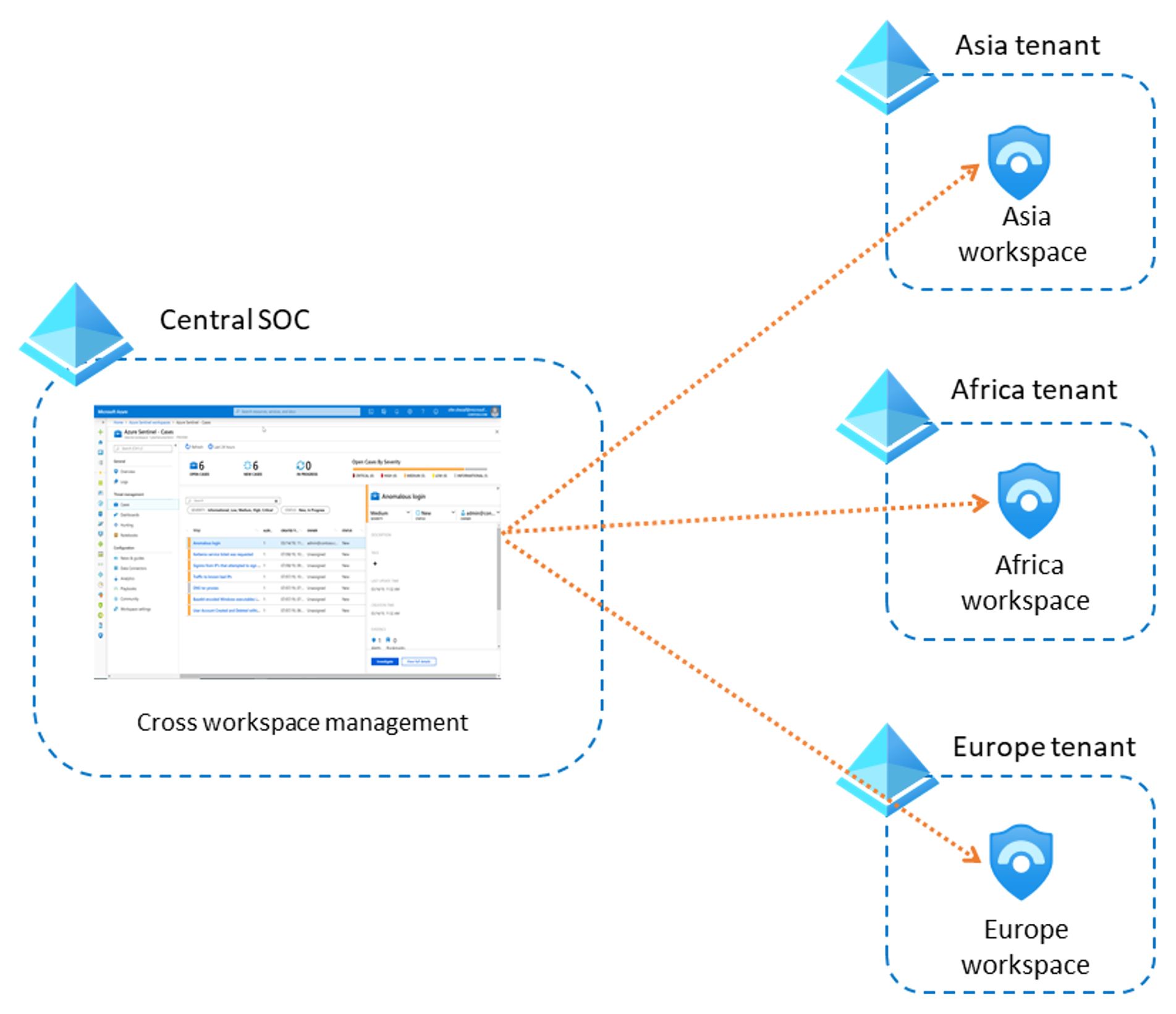
The Central SOC cross-workspace management diagram illustrates an important principle: centralized monitoring does not require placing all regional tenant logs into a single regional workspace. The central team can operate across workspaces while regional boundaries remain intact.
Read Microsoft Learn’s architecture example for the reasoning behind that design.
Sample Microsoft Sentinel workspace designs | Microsoft Learn
Read Sample 3: Multiple tenants and regions and centralized security in this Microsoft Learn deployment guide. It connects tenant-level data collection, region-based access boundaries, and centralized SOC operations in one realistic design.
In Sample 3: Multiple tenants and regions and centralized security, first read the tenancy, collection, and access requirements. Then read the workspace design considerations, especially the reason tenant-level sources lead to a Sentinel-enabled workspace in each tenant. Continue through the proposed solution, focusing on how local SOC access and central management coexist. Finish with the central workspace option. This reinforces that a workspace is also an access and data-separation decision.
For exam purposes, apply this rule carefully:
When an organization has multiple Entra tenants and must collect tenant-level sources such as Microsoft 365 or Entra logs from each one, plan at least one Sentinel-enabled Log Analytics workspace in each relevant tenant.
That does not mean every tenant must have exactly one workspace. Additional workspaces may be justified by regional residency, strict separation of SOC teams, legal requirements, or operational-data separation.
SC-200 architecture traps
Use the following checks to eliminate distractors quickly.
| If the question asks… | Think first… | Do not confuse it with… |
|---|---|---|
| Where users, Microsoft 365 services, sign-ins, and tenant audit activity belong | Microsoft Entra / Microsoft 365 tenant | An Azure subscription |
| Where Azure VMs, storage, Key Vaults, and the workspace are managed | Azure subscription | A tenant’s identity directory |
| Where logs are retained, queried with KQL, and used by Sentinel analytics | Log Analytics workspace | A connector or a subscription |
| How logs from a specific source are brought into Sentinel | Data connector or collection configuration | A table or detection rule |
| Which component Microsoft Sentinel is enabled on | Log Analytics workspace | An entire tenant or subscription |
| How a central SOC works across separate regional workspaces | Cross-workspace management and delegated access | Automatically merging tenants |
The most common incorrect statements are easy to recognize once the scopes are clear:
-
“Microsoft Sentinel is enabled directly on an Azure subscription.”
Incorrect. Sentinel is enabled on a Log Analytics workspace, which is an Azure resource within a subscription. -
“A data connector is where Sentinel stores data.”
Incorrect. The workspace tables store data; the connector enables ingestion. -
“A new Azure subscription requires a new Entra tenant.”
Incorrect. A tenant can have multiple subscriptions. -
“A central SOC must move every region’s data into one workspace.”
Incorrect. Central teams can manage multiple workspaces while preserving tenant and regional boundaries. -
“Operations and SOC telemetry must always use the same workspace.”
Incorrect. Separate workspaces may be appropriate when teams, data types, or access requirements differ.
Key takeaways
A unified Microsoft security operations architecture relies on clear boundaries:
- A Microsoft 365 / Entra tenant is the organization and identity boundary.
- An Azure subscription is the Azure resource-management and billing boundary.
- A Log Analytics workspace is the telemetry storage, query, retention, and access boundary.
- A data connector or related collection mechanism brings source telemetry into workspace tables.
- Microsoft Sentinel is enabled on the workspace and uses its tables for analytics, hunting, incidents, and investigations.
For a single tenant, one Sentinel-enabled workspace can unify relevant Microsoft 365, identity, Azure, endpoint, and network telemetry. For multiple tenants, tenant-level sources and access requirements commonly justify separate Sentinel-enabled workspaces, while a central SOC can manage across them.
Next, you will trace a security event through this architecture: from ingestion, through detection and incident creation, to investigation and response.
Can't find a good explanation? Sign up and we'll make it for you
Sign up