
Hello again. In the previous lesson, you learned to move through the directory tree with absolute paths such as /etc and relative paths such as ../archive. Now we give those paths operational meaning: when an administrator needs a service setting, an error record, a user’s files, scratch space, or a command program, the hierarchy gives a strong first place to look.
By the end of this lesson, you should be able to identify the standard locations for configuration, logs, user data, temporary data, and executable programs, and verify those locations safely on a RHEL-compatible system.
A hierarchy of purposes, not a promise that every file is identical
Linux organizes files below the single root directory, /. The Filesystem Hierarchy Standard (FHS) defines conventional purposes for the major branches. It is a map that lets administrators form useful hypotheses:
- “This service needs system-wide settings” suggests
/etc. - “Something failed recently” suggests
/var/log. - “Where are this account’s personal settings?” suggests its home directory.
- “Where does this command live?” suggests
/usr/bin, possibly through a compatibility link such as/bin.
Conventions are powerful, but they are not guarantees. A package can use its own subdirectory, a distribution can make compatibility links, and services can be configured to store data elsewhere. Start with the conventional location, then verify rather than assuming.
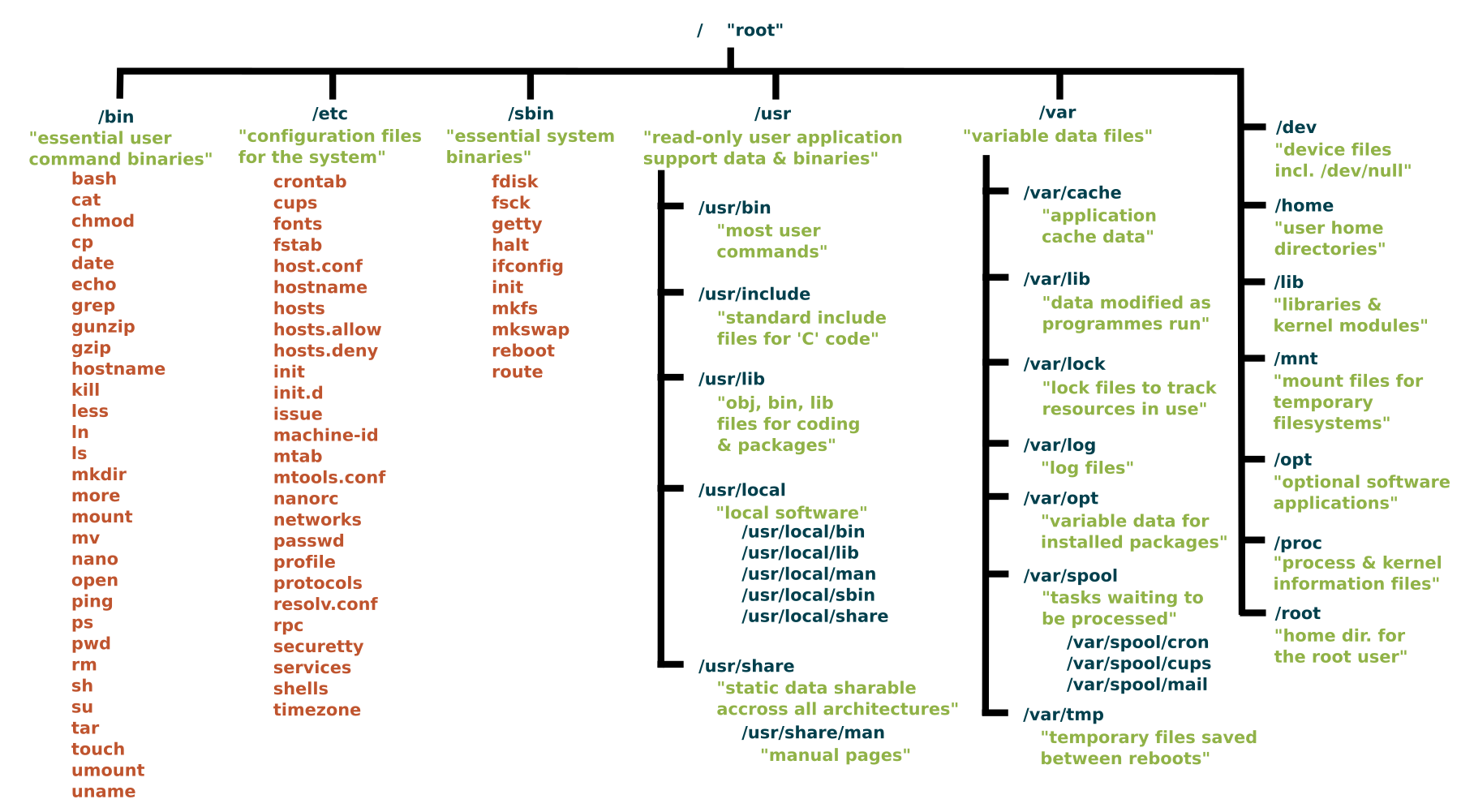
One important RHEL-family refinement: modern systems commonly use usrmerge. In practice, /bin is often a symbolic link to /usr/bin, and /sbin to /usr/sbin. You may therefore see a command described in older material as /bin/ls while your system reports /usr/bin/ls. These names still communicate the command’s traditional role; the underlying file may simply be shared.
Linux File SystemStructure Explained!
Watch “Linux File System Structure Explained!” by DorianDotSlash for a quick visual orientation to the key locations. Treat it as a tour of the conventional layout; the lesson will add the RHEL-specific caveats and verification habits.
Watch binary roles for the traditional distinction between ordinary command binaries and administration-oriented binaries. Then watch system configuration, followed by temporary data. Finish with usr and var and user homes. Focus on the question “what kind of data belongs here?” rather than trying to memorize every directory shown.
The video’s separation of /bin and /sbin is about role, not an access-control boundary. Ordinary users can commonly read and run many programs in system binary directories. Whether an operation succeeds depends on permissions and privileges, not simply on which binary directory contains the command.
Configuration: /etc for the host, home directories for the user
The central location for system-wide, host-specific configuration is:
/etc
A configuration file tells a program or service how to behave. Typical examples include:
/etc/hosts
/etc/passwd
/etc/group
/etc/fstab
/etc/ssh/sshd_config
These examples have different jobs:
| Path | What it configures or records |
|---|---|
/etc/hosts | Static hostname-to-address mappings |
/etc/passwd | Local account identity information |
/etc/group | Local group definitions |
/etc/fstab | Filesystems intended to mount persistently |
/etc/ssh/sshd_config | OpenSSH server settings, when installed |
Do not interpret /etc as “files that are safe to edit.” Many files there determine authentication, networking, boot behavior, or service behavior. For now, treat it as a location to inspect. Later lessons will cover safe editing, backups, validation, and service-specific configuration.
Configuration also exists at the user level. Normal users commonly have home directories below:
/home
For example:
/home/alex
Within a home directory, files and directories whose names begin with . are conventionally hidden from ordinary directory listings. They often hold personal application settings:
/home/alex/.bashrc
/home/alex/.config
/home/alex/.local
The same program can therefore have two levels of configuration:
/etcsupplies a system-wide policy or default.- A file under a user’s home directory supplies that user’s preferences.
For instance, a shell’s system-wide settings may be under /etc, while an individual account’s shell startup settings may be in ~/.bashrc.
Do not confuse these two meanings of “root”:
/is the filesystem’s root directory./rootis normally the home directory of therootuser.
Thus, /root is conceptually comparable to /home/alex, not to /.
The Linux Foundation’s “Filesystem Hierarchy Standard” is the formal reference behind the conventions in this lesson. Read the selected subsections to distinguish host configuration, per-user configuration, executable locations, logs, and the two kinds of temporary storage.
In Chapter 3, read Sections 3.7 “/etc: Host-specific system configuration,” 3.8 “/home: User home directories,” and 3.18 “/tmp: Temporary files.” In the /etc subsection, use the definition to anchor your reading, then continue through the subsection. In Section 3.8, read the home-directory convention. In Section 3.18, focus on the temporary-data rule. Then read Chapter 4, Section 4.4 “/usr/bin: Most user commands,” beginning with its purpose, and Chapter 5, Sections 5.10 “/var/log: Log files and directories” and 5.15 “/var/tmp: Temporary files preserved between system reboots.” In particular, note the log location and the reboot distinction.
Logs and other changing system data: /var
The name /var means variable: it holds data expected to change as the system operates. Its contents may grow over time, so it is a frequent place to inspect during troubleshooting or when disk space is low.
The usual first location for conventional text log files is:
/var/log
A log is a time-ordered record of events: service startup messages, authentication attempts, failures, warnings, and application activity. Exact file names vary by distribution and installed software. On a RHEL-compatible system, you may encounter directories such as:
/var/log/audit
/var/log/sssd
/var/log/httpd
A useful distinction: /var/log is the conventional starting point, but not every system record is necessarily a plain file there. Modern RHEL systems use the systemd journal, and journal data may be stored under /run/log/journal while the system is running or under /var/log/journal when persistent storage is configured. You will learn to query it with journalctl in the Boot, Services, and System Logs module.
Other /var subdirectories represent different kinds of changing data:
| Directory | Purpose |
|---|---|
/var/log | Logs and event records |
/var/lib | Application or system state that normally survives reboot |
/var/cache | Re-creatable cached data |
/var/spool | Work waiting for later processing, such as queued print or mail jobs |
/var/tmp | Temporary data intended to survive a reboot |
The distinction between logs and state matters. A web service’s log explains what has happened; its state lets it resume operating consistently. Both change, but they have different administrative value and backup policies.
Temporary does not mean permanent: /tmp, /var/tmp, and /run
Temporary files are working material: an editor recovery file, an installer’s intermediate download, or data an application needs only briefly. Their key property is that you must not rely on them as durable storage.
The standard short-lived location is:
/tmp
Programs may use /tmp, and users can often use it as well. However, its contents may be removed automatically, commonly at reboot or by scheduled cleanup. Never place the only copy of an important document there.
A related directory is:
/var/tmp
/var/tmp is for temporary data that is expected to remain available across a reboot. That does not make it permanent or suitable for long-term storage: site cleanup policies can still remove old files. The practical contrast is:
| Location | Appropriate expectation |
|---|---|
/tmp | May disappear quickly or after reboot |
/var/tmp | Should survive a reboot, but can be cleaned later |
| Home directory or designated application data | Appropriate place for data you intend to keep |
You may also see /run. It holds run-time state created since the current boot: process ID files, sockets, and other service information. It is intentionally cleared at boot. Although it is transient, it is not a general-purpose workspace like /tmp.
Executable commands: where programs are found
An executable is a file that Linux can run as a program. When you type:
ls
Bash must locate an executable named ls—unless ls were a shell builtin, function, or alias. For external commands, it searches the directories listed in the PATH environment variable.
The main places to recognize are:
| Directory | Conventional role |
|---|---|
/usr/bin | Most standard user commands and installed command-line programs |
/usr/sbin | Many system-administration programs |
/bin | Traditional essential command location; often a link to /usr/bin on modern RHEL |
/sbin | Traditional essential system-binary location; often a link to /usr/sbin |
/usr/local/bin | Locally installed user commands |
/usr/local/sbin | Locally installed administrator commands |
The words “user” and “system administrator” describe the program’s purpose, not necessarily who may execute it. For example, a normal account may run a program located in /usr/sbin to view status, but changing system state may require sudo or the root account.
To ask Bash how it resolves a command name, use:
command -v ls
command -v passwd
command -v systemctl
Typical output might be:
/usr/bin/ls
/usr/bin/passwd
/usr/bin/systemctl
The exact paths can differ. command -v is more reliable than guessing a location from memory.
It also prevents a common misunderstanding: some command names do not correspond to separate executable files. For example:
command -v cd
normally reports that cd is a shell builtin, because changing directory must alter the shell’s own current working directory.
A safe filesystem-location survey
Run the following commands in your lab. They only inspect directory entries and command resolution; they do not modify the system.
pwd
ls -ld /etc /home /root /tmp /var /var/log /var/tmp
The first command confirms your location. The second lists the named directories themselves rather than their full contents. You may see a permission-related limitation involving /root; that is normal for an unprivileged account and confirms that /root is a protected user home.
Next, inspect a few conventional files and locations:
ls -l /etc/hosts /etc/passwd /etc/group
ls -ld /var/log /var/lib /var/cache /var/spool
ls -ld /tmp /var/tmp /run
Some paths may be absent on a minimal system, and some files may be symbolic links. Neither outcome invalidates the hierarchy; it tells you something about that particular installation.
Finally, check executable resolution and the traditional compatibility directories:
command -v ls
command -v cat
command -v systemctl
ls -ld /bin /sbin /usr/bin /usr/sbin
If /bin or /sbin is displayed as a symbolic link, that is the usrmerge arrangement discussed earlier. Do not try to “fix” it: it is deliberate distribution design.
Use this mental triage when facing a practical task:
| You need to locate… | Start with… |
|---|---|
| A machine-wide service setting | /etc, often a service-specific subdirectory |
| A user’s documents or personal settings | /home/username, including hidden names beginning with . |
| The root account’s personal files | /root |
| Recent traditional logs | /var/log |
| Short-lived scratch data | /tmp |
| Temporary data that must survive reboot | /var/tmp |
| A standard command program | command -v commandname, expecting commonly /usr/bin or /usr/sbin |
The next lessons will add faster shell workflow and then documentation tools. Those tools make it easier to inspect unfamiliar locations without relying solely on memory.
Key takeaways
Linux’s filesystem layout is a set of purposeful conventions:
/etcholds host-specific system configuration; user-specific settings are commonly in hidden files and directories under each user’s home./homecontains normal user homes, while/rootis the root user’s home directory—not the filesystem root/./var/logis the conventional starting point for log files, and/varbroadly holds data that changes during normal operation./tmpis short-lived temporary storage;/var/tmpis temporary storage expected to survive reboot; neither is permanent storage./usr/binand/usr/sbinare the principal executable locations on modern systems./binand/sbinmay be compatibility links to them.- Use
command -vandls -ldto verify an actual system rather than relying on a directory map alone.
Next, you will improve your command-line pace with shell history, tab completion, and command chaining.
Can't find a good explanation? Sign up and we'll make it for you
Sign up