
Hello! Welcome to your third lesson in our module on Applying Choice Architecture Ethically.
In our last session, we focused on the "before" of a decision—structuring an interface to minimize cognitive load and simplify a user's choice. We covered how Information Architecture, Hick's Law, and visual hierarchy help guide users toward an action.
Today, we'll focus on the "after." Our learning outcome is to design feedback mechanisms that help users understand the immediate and long-term consequences of their choices. This is about closing the loop. Once a user acts, how does the system respond in a way that is clear, helpful, and builds an understanding of cause and effect over time? This concept is fundamental to building trust and creating products that genuinely improve users' lives.
1. The Core Concept: Feedback Loops
At the heart of communicating consequences is the feedback loop. In the context of UX, a feedback loop is a cycle where a user's action triggers a system response, which in turn informs the user's next action. Your background in systems thinking will make this concept feel very natural.
Let's start by establishing the two fundamental types of feedback loops.

As the diagram illustrates:
- Reinforcing Loops (or Positive Feedback): These amplify behavior. When a user performs an action, the feedback encourages them to do more of it. Think of earning points, maintaining a "streak" in a learning app, or receiving "likes" on social media. They create momentum.
- Balancing Loops (or Negative Feedback): These stabilize or correct behavior. The feedback signals that a limit has been reached or an error has occurred, guiding the user back on track. Examples include a validation error in a form, a low battery warning, or an alert that you're about to go over budget. They create equilibrium.
Let's ground these definitions in a UX context.
The article 'What are Feedback Loops?' from the Interaction Design Foundation provides a clear definition of these loops within UX design.
Please read the short section under the 'Questions related to Feedback Loops' heading that begins 'Feedback loops in UX design are...'. It clearly defines the concept and distinguishes between positive (reinforcing) and negative (balancing) loops with examples.
2. Levels of Feedback: Immediate vs. Long-Term
The most crucial part of this topic, and the biggest challenge for designers, is distinguishing between feedback for immediate actions and feedback for long-term consequences.
The Interaction Design Foundation article you just looked at introduces a helpful distinction between UI-level feedback and system-level feedback.
-
UI-Level Feedback (Immediate Consequences): This is feedback that happens instantly, confirming an action has been registered. It's about providing a sense of control and clarity at the micro-interaction level.
- Examples: A button changing color when pressed, a "Success!" toast message after submitting a form, a loading spinner appearing after a click.
- Purpose: Answers the user's question, "Did the system hear me?"
-
System-Level Feedback (Long-Term Consequences): This type of feedback visualizes the cumulative result of actions over time. It connects a user's individual choices to a larger goal or outcome.
- Examples: A dashboard showing progress toward a sales target, a weekly screen time report, a chart of your investment portfolio's growth.
- Purpose: Answers the user's question, "Are my actions getting me closer to my goal?"
Designing effective UI-level feedback is a core skill for any UX designer. But designing for long-term consequences through system-level feedback is what separates a good product from a great one. It's how you help users see the bigger picture.
This dashboard is an excellent example of system-level feedback in a professional context.
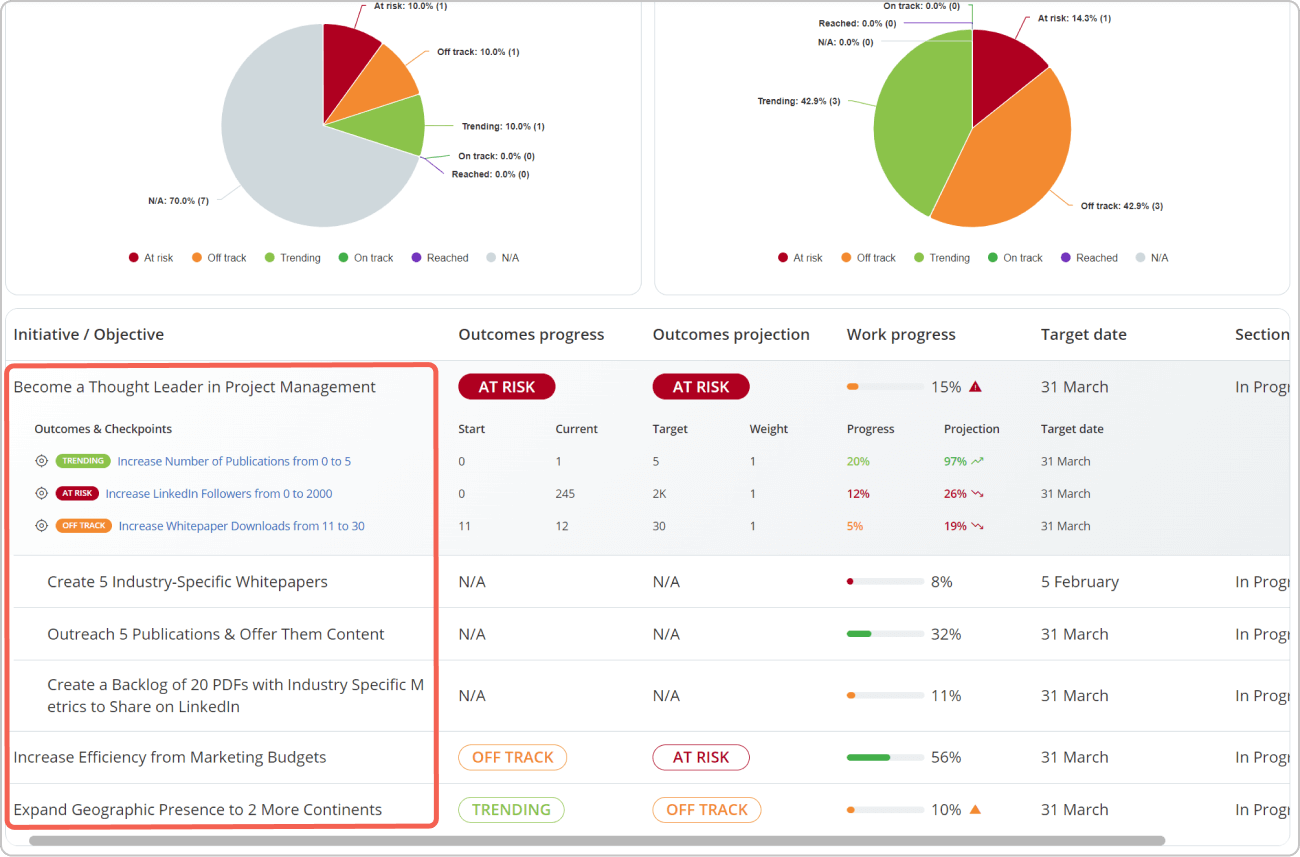
Notice how this dashboard doesn't just show a single action. It aggregates data over time to provide a strategic overview, helping users understand the long-term consequences of their team's efforts and make informed decisions about where to focus next.
3. The Challenge of Delayed Consequences
If system-level feedback is so important, why is it often poorly implemented? The main reason is the delay between an action and its ultimate consequence. When an effect is not immediate, our brains struggle to connect cause and effect. As a designer, if you only measure the immediate reaction to a feature, you might miss its disastrous long-term impact.
The following article provides a perfect, cautionary tale.
Feedback Loops and Knowledge Management in User Experience
The article 'Feedback Loops and Knowledge Management in User Experience' from UX Matters tells the story of a redesign that looked like a success in the short term but was a failure in the long term.
Read the entire article. Pay close attention to the example of the 'Share' button redesign. Notice how focusing on the immediate, positive feedback (more shares) blinded the team to the negative long-term feedback (a diminishing user base).
This story underscores a critical lesson: what you measure is what you optimize for. If you only build feedback mechanisms for immediate results, you risk creating a product that is annoying, unsustainable, and ultimately fails the user.
4. How to Design for Long-Term Consequences
So, how can we design feedback mechanisms that effectively bridge the gap between daily actions and long-term goals? Here are a few practical techniques.
1. Visualize Progress and Patterns
Just like the dashboard image, use visual elements to show cumulative progress.
- Progress Bars/Rings: For finite goals (e.g., completing a profile, reaching a savings goal).
- Historical Charts: Line or bar charts showing trends over time (e.g., monthly spending, weight loss).
- Streaks and Calendars: Visualizing consistency (e.g., Duolingo's flame, GitHub's contribution graph).
2. Provide Summaries and Projections
Don't rely on the user to connect the dots. Do it for them with periodic reports that summarize past behavior and project future outcomes.
- Weekly/Monthly Reports: Spotify Wrapped or Apple's Screen Time reports are masters of this. They reframe individual actions (listening to songs) as a meaningful, long-term pattern (your "audio aura").
- "If you continue..." Projections: A retirement calculator might say, "If you continue saving at this rate, you will have X by age 65." This directly communicates the long-term consequence of a present behavior.
3. Map Your Feedback Loops
As part of your design process, make feedback an explicit part of your artifacts. You are already skilled in user journey mapping; this is a natural extension of that practice.
Let's return to the Interaction Design Foundation article to see how to apply this in practice.
First, read the section that starts with 'To map feedback loops in service or system design...'. It provides clear instructions on how to use tools like journey maps to visualize these loops. Then, re-read the section that starts 'To shift from UI-level to system-level feedback...', as it reinforces the importance of mapping feedback over time, not just per screen.
When creating your next journey map, add a new lane: "System Feedback." For each user action, document both the immediate UI feedback and any system-level feedback that will occur later. This forces you to think about the long-term consequences from the very beginning.
5. The Ethics of Feedback
Feedback is a powerful tool for influencing behavior, which means it carries significant ethical weight. Designed poorly, a feedback loop can create anxiety, promote addiction, or mislead users.
Finally, let's consider the ethical dimension of this work. This last reading highlights the line between responsible guidance and manipulation.
Please read the sections titled 'Designers use feedback loops to influence behavior...' and 'Poorly designed feedback systems pose serious ethical risks...'. Focus on the principles of transparency, user autonomy, and designing to empower rather than coerce.
The key to ethical feedback is alignment with the user's goals. A notification that you've reached your daily step goal is empowering. A notification using a fake timer to pressure you into a purchase is manipulative. Your role as a choice architect is to design feedback that serves the user, building trust and providing genuine value over the long term.
Conclusion
In this lesson, we explored the crucial role of feedback in helping users understand the consequences of their choices. You learned that effective design requires moving beyond simple, immediate feedback to create systems that reveal long-term outcomes.
Key Takeaways:
- Feedback loops are cycles of action and reaction that guide user behavior. They can be reinforcing (amplifying) or balancing (correcting).
- Distinguish between UI-level feedback (immediate confirmation) and system-level feedback (long-term consequences).
- Designing for long-term consequences is difficult due to the delay between cause and effect, but it is essential for creating meaningful products.
- Use practical techniques like visualizing progress, providing summaries, and explicitly mapping feedback loops in your design process.
- Always design feedback ethically, aiming to empower users and align with their goals, not to manipulate them.
Next Up
We've touched on the line between ethical feedback and manipulation. In our next lesson, we will cross that line to study its anatomy. We will systematically identify and deconstruct common 'dark patterns' that exploit decision-making biases unethically. Understanding how these patterns work is the first step toward avoiding them in your own practice and advocating for more ethical design.
Can't find a good explanation? Sign up and we'll make it for you
Sign up