Hello! Welcome back to our course on designing high-load distributed systems.
In our last lesson, we configured a master-replica topology for Redis. This provided us with read scalability and a hot standby for the master instance. However, the process of promoting a replica to a new master in case of failure was still a manual one, requiring operator intervention. For the high-availability demands of the systems you build, this is a significant single point of failure and a source of downtime.
Today, we will automate this process. The learning outcome for this lesson is to set up Redis Sentinel for automatic failover and high availability. We will introduce Redis Sentinel, a separate, distributed system that acts as a guardian for your Redis master-replica setup. You will learn how to configure a robust Sentinel deployment, understand its failure detection and failover mechanisms, and see how clients can use it for service discovery.
This lesson builds directly on our previous work and transforms our replicated Redis setup into a self-healing system, a critical step towards production readiness.
1. The Role of Redis Sentinel
Redis Sentinel is not part of the Redis server itself but a separate process that runs alongside your Redis instances. It forms a distributed system of its own to manage your Redis deployment.
Its primary capabilities are:
- Monitoring: Sentinel continuously checks the health of your master and replica instances.
- Automatic Failover: If the master is deemed unavailable, Sentinel orchestrates a failover process: it promotes a suitable replica to become the new master and reconfigures other replicas to follow the new master.
- Notification: It can notify system administrators or other programs about events in the Redis cluster.
- Configuration Provider: Sentinel provides a reliable endpoint for clients to discover the address of the current master. This is crucial, as the master's address will change after a failover.
The following image illustrates a typical Sentinel architecture.
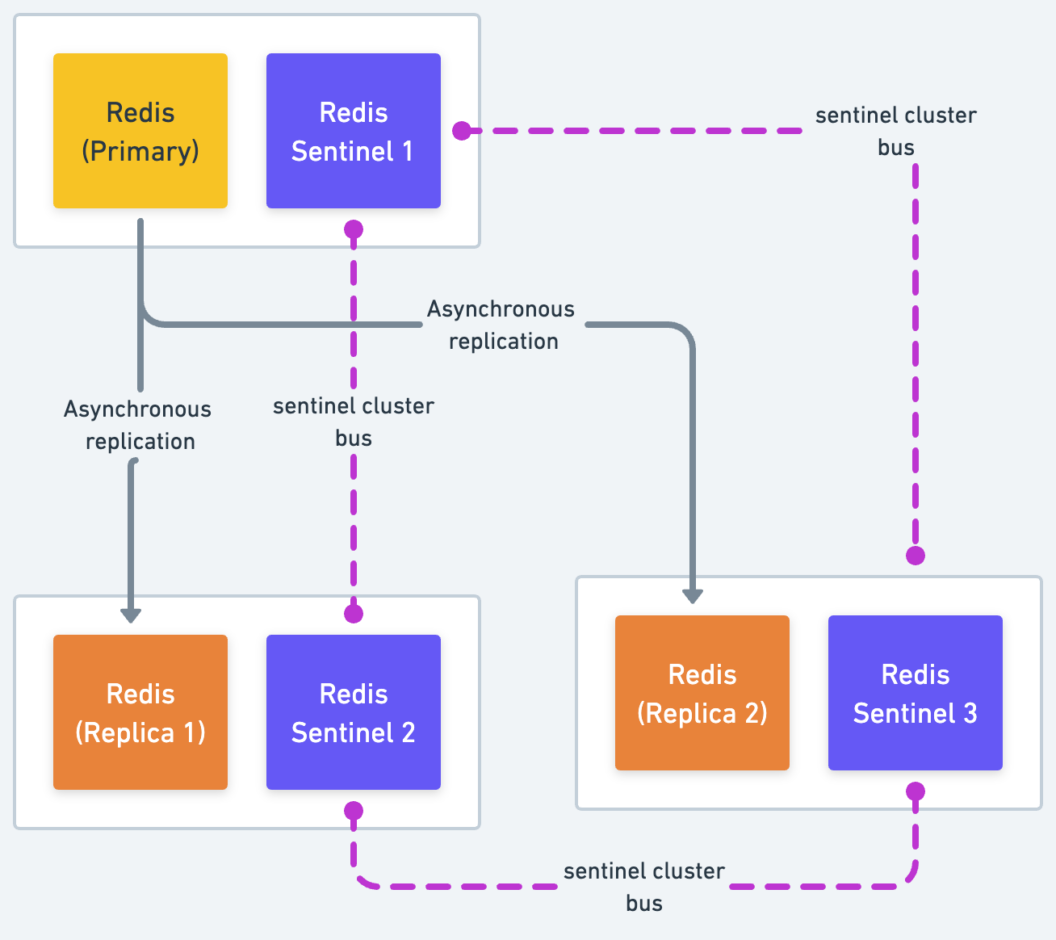
To understand Sentinel's design philosophy, please read the introductory sections of the official Redis documentation.
High availability with Redis Sentinel | Docs
This reading from the official Redis documentation introduces Sentinel's core capabilities and explains why it is designed as a distributed system.
Read the sections 'High availability with Redis Sentinel' and 'Sentinel as a distributed system'. Focus on the four main capabilities and the two key advantages of running multiple cooperating Sentinel processes.
As you read, note that running multiple Sentinels is not just for redundancy. It's fundamental to its design for preventing "false positives". A single Sentinel might lose connectivity to the master due to a local network issue. Requiring agreement among multiple Sentinels ensures that a failover is only triggered when the master is truly unavailable to a significant portion of the system.
2. Sentinel Deployment and Configuration
A robust Sentinel deployment requires careful planning. Given your background in distributed systems, you'll recognize these principles as best practices for avoiding common failure modes like split-brain.
Deployment Principles
Before configuring Sentinel, it's critical to understand the deployment topology.
High availability with Redis Sentinel | Docs
The official documentation outlines several fundamental rules for a robust Sentinel deployment. These are non-negotiable for a production environment.
Read the section 'Fundamental things to know about Sentinel before deploying'. Pay close attention to the minimum number of instances, their placement in independent failure domains, and the warning about Docker/NAT.
The key takeaways are:
- Deploy at least three Sentinel instances. This is the minimum required to achieve a majority vote during a failover, even if one Sentinel instance is down.
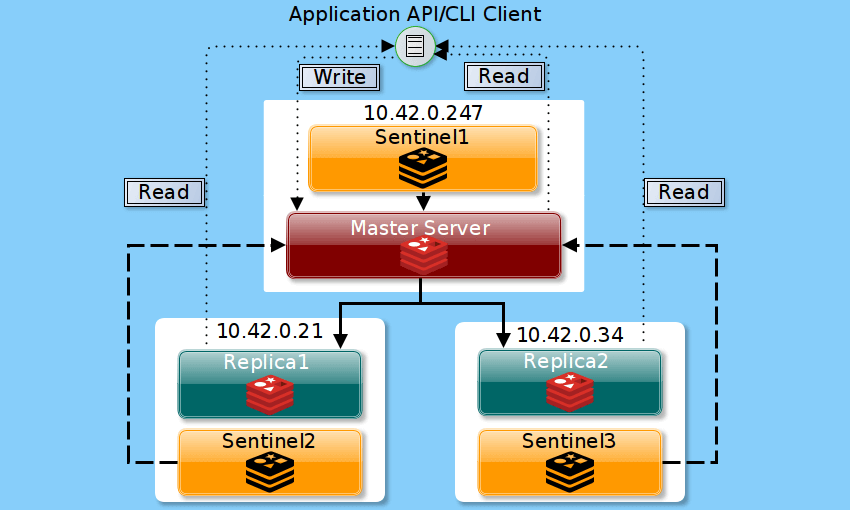
- Place Sentinels in independent failure domains. This means running them on different physical machines, virtual machines in different availability zones, or containers on different hosts. Colocating a Sentinel with the Redis instance it monitors is a common pattern, as shown in the diagram below, but ensure the three pairs (Master+S1, Replica1+S2, Replica2+S3) are on independent hardware.
Configuring Sentinel
Each Sentinel process is configured using a sentinel.conf file. The most important directive is sentinel monitor.
sentinel monitor <master-name> <ip> <port> <quorum>
<master-name>: An arbitrary name for the master-replica set (e.g.,mymaster,billing-cache).<ip> <port>: The address of the current Redis master.<quorum>: The number of Sentinels that must agree that the master is down before a failover can be initiated.
Let's dive into the core configuration parameters and the crucial distinction between quorum and majority.
High availability with Redis Sentinel | Docs
This section of the documentation details the essential configuration directives and explains the concepts of quorum and majority, which are central to Sentinel's failover logic.
First, read the section 'Configuring Sentinel' to understand the sentinel monitor, down-after-milliseconds, and parallel-syncs directives. Then, read the sections 'SDOWN and ODOWN failure state' and 'Quorum' to grasp the difference between subjective down (SDOWN), objective down (ODOWN), the role of the quorum in reaching ODOWN, and the role of the majority in authorizing the failover.
To summarize this critical concept:
- SDOWN (Subjective Down): A single Sentinel's local observation that a Redis instance is unreachable.
- ODOWN (Objective Down): The state reached when a master is flagged as SDOWN by a number of Sentinels equal to or greater than the configured quorum. Reaching ODOWN is the trigger for a failover.
- Majority Vote: After a master is in the ODOWN state, one of the Sentinels will attempt to become the failover leader. To proceed, it must receive authorization from a majority of the total Sentinel instances.
For example, in a 5-Sentinel deployment with quorum = 2:
- If 2 Sentinels flag the master as SDOWN, the master enters the ODOWN state, and a failover is triggered.
- The Sentinel initiating the failover must then get votes from at least 3 Sentinels (the majority of 5) to be authorized to perform the promotion.
This two-step process ensures that a failover doesn't happen in a minority network partition, preventing split-brain scenarios.
Example sentinel.conf
Here is a practical example of a sentinel.conf file. You would create a similar file on each of your three Sentinel nodes.
Understanding Redis High Availability: Cluster vs. Sentinel
This article provides a clear, practical example of a sentinel.conf file and the steps to run it as a system service.
Review the section 'Configure Redis Sentinel'. Examine the example sentinel.conf file. Note that you would use the same configuration on all Sentinel instances, as they will auto-discover each other. The steps for creating a systemd service are also a valuable practical reference.
A minimal sentinel.conf would look like this:
# Run as a daemon
daemonize yes

# Sentinel listens on port 26379 by default
port 26379

# Log file location
logfile "/var/log/redis/sentinel.log"

# Monitor the master named 'mymaster' at 10.0.1.10:6379 with a quorum of 2
sentinel monitor mymaster 10.0.1.10 6379 2

# Time in ms before a master is considered subjectively down
sentinel down-after-milliseconds mymaster 5000

# Number of replicas that can be reconfigured to sync with the new master simultaneously
sentinel parallel-syncs mymaster 1

# Timeout for the failover process itself in ms
sentinel failover-timeout mymaster 60000
3. Interacting with Sentinel and Testing Failover
Once your Sentinels are running, you can interact with them using redis-cli, connecting to the Sentinel port (default 26379). This allows you to inspect the system's state and, most importantly, allows your clients to find the current master.
This final reading provides a step-by-step tutorial for interacting with a live Sentinel setup and testing a failover.
High availability with Redis Sentinel | Docs
This tutorial from the official documentation walks through the essential commands for querying Sentinel's state and demonstrates how to simulate and verify an automatic failover.
Read the section 'A quick tutorial'. Focus on the commands sentinel master mymaster, sentinel get-master-addr-by-name mymaster, and the process for testing the failover by making the master unresponsive.
Key Sentinel Commands:
-
Check master status:
redis-cli -p 26379 SENTINEL master mymasterThis command returns detailed information about the master, including its flags, number of replicas, and the number of other Sentinels detected.
-
Get current master address (for clients):
redis-cli -p 26379 SENTINEL get-master-addr-by-name mymasterThis is the command your application's client library will use. It returns the IP and port of the current master. After a failover, this command will return the address of the newly promoted master.
-
List replicas:
redis-cli -p 26379 SENTINEL replicas mymaster
Testing the Failover
- Set up your master, replica(s), and at least three Sentinel instances.
- Verify the initial state using
SENTINEL master mymaster. - Simulate a master failure. A simple way is to connect to the master Redis instance and issue a debug command that makes it sleep:
redis-cli -p 6379 DEBUG sleep 30 - Monitor the Sentinel logs. You will see events as the master is marked
+sdown, then+odown, followed by leader election and the failover process (+switch-master). - After a few seconds, query Sentinel again for the master address:
The command should now return the address of the former replica that was promoted.redis-cli -p 26379 SENTINEL get-master-addr-by-name mymaster - When the old master comes back online (after its 30-second sleep), Sentinel will detect it and reconfigure it as a replica of the new master, ensuring it rejoins the topology in the correct role.
Conclusion
In this lesson, we have automated Redis failover, creating a genuinely high-availability setup.
Key Takeaways:
- Sentinel provides automatic failover: It's a distributed system that monitors a Redis master-replica set, promotes a replica if the master fails, and reconfigures the topology.
- Robust deployment requires at least 3 Sentinels: They should be placed in independent failure domains to achieve a reliable majority for authorizing failovers.
- Quorum vs. Majority: The
quorumis for detecting an objective failure (ODOWN), while amajorityof all Sentinels is required to authorize the failover, preventing split-brain. - Clients must be Sentinel-aware: Applications should not hardcode the master's address. Instead, they should query a Sentinel to discover the current master's address at connection time.
- Configuration is key: Parameters like
down-after-millisecondsandfailover-timeoutallow you to tune the trade-off between detection speed and sensitivity to transient network issues.
Preview of the Next Lesson:
Redis Sentinel provides high availability for a single master's dataset. However, it does not solve the problem of scaling a dataset that is too large to fit in the memory of a single machine. For that, we need to shard the data across multiple masters. In our next lesson, we will explore Redis Cluster, the native solution for horizontal sharding, and analyze how it provides both scalability and high availability.