
Welcome back. Last lesson established the basic rhythm of a Python program: Python runs statements from top to bottom, and print() makes text, values, and calculation results visible in the console.
Now we add a capability that makes programs genuinely useful: remembering information under meaningful names. By the end of this lesson, you will be able to create variables, use them in calculations and output, replace their values, and update a value using its previous value. Plan on about 35–40 minutes, including time to run and alter the programs in Replit.
Names for changing information
A variable is a name that refers to a value. It lets a program keep track of information it will need later, such as a score, a price, a title, or a number of completed tasks.
Consider this statement:
completed_sessions = 2
Read it as:
“
completed_sessionsgets the value2.”
This is an assignment statement. Its three parts are:
| Part | Role |
|---|---|
completed_sessions | The variable name |
= | The assignment operator |
2 | The value being assigned |
The = symbol does not mean “is equal to” in the mathematical sense. It tells Python to evaluate what is on the right and associate the result with the name on the left. Later, when Python sees the name completed_sessions, it can retrieve its current value.
completed_sessions = 2

print(completed_sessions)
Output:
2
Compare that with:
print("completed_sessions")
Output:
completed_sessions
The quotation marks make completed_sessions into text. Without quotation marks, Python treats it as the variable name and displays the value currently associated with it.
2.4. Variables — How to Think like a Computer Scientist: Interactive Edition
Read this short Runestone Academy introduction to connect Python assignment statements with a useful picture of program state. It also introduces the important idea that a variable can be assigned a new value later.
In Section 2.4, “Variables,” begin with the opening explanation and the examples assigning values to message, n, and pi. Read the assignment foundations, paying particular attention to which side of = contains the name and which contains the value. Continue in the same section through the reference-diagram discussion. Read the paragraph immediately before the diagram as well as evaluation and state. Finally, in the later part of Section 2.4, read from the paragraph beginning “We use variables in a program to remember things” through changing values over time.
A reference diagram gives a snapshot of which values names currently refer to.
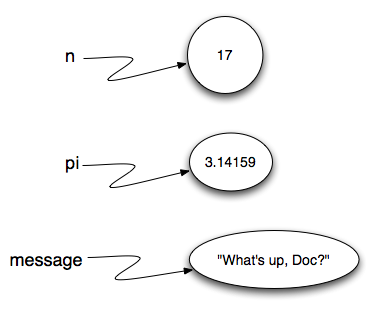
You do not need to draw these diagrams every time you code. But when a program’s state becomes confusing, a quick sketch of each variable and its current value can make execution much easier to follow.
Choosing valid, readable names
A variable name should describe the information it represents:
book_title = "The Hobbit"
pages_read = 48
daily_goal = 20
Python has rules for names:
- A name can contain letters, digits, and underscores.
- A name must begin with a letter or underscore, not a digit.
- Spaces, hyphens, and punctuation are not allowed.
- Names are case-sensitive:
score,Score, andSCOREare three different names. - A name cannot be a Python keyword, such as
if,while, orclass.
These are valid:
score = 10
player2 = "Ari"
total_cost = 24.50
These are not valid:
2player = "Ari"
total-cost = 24.50
total cost = 24.50
For names with several words, use snake case: lowercase words separated by underscores. total_cost is easier to read than totalcost.
Assignment evaluates the right side first
The value on the right side of = can be a literal value, another variable, or a calculation.
price = 12
quantity = 3
total = price * quantity

print("Total:", total)
Output:
Total: 36
When Python reaches this line:
total = price * quantity
it finds the current values of price and quantity, calculates their product, and assigns the result to total.
A reliable way to read an assignment statement is:
- Evaluate the expression on the right.
- Assign the resulting value to the name on the left.
The left side must be a variable name. This is invalid:
17 = score
Python cannot assign a value to the number 17; a number is a value, not a name for storing information.
The following Khan Academy segment gives a compact walkthrough of assignment, retrieval, and changes to a variable as Python proceeds through a program.
Variables and assignment | Intro to CS - Python | Khan Academy
Watch “Variables and assignment” from Khan Academy to reinforce the step-by-step meaning of assignment. The whiteboard model is a useful mental picture: a named place whose displayed value can be replaced.
Watch assignment and retrieval. Focus on the distinction between creating a name, assigning a value, and printing the value associated with that name. Then watch the whiteboard model, using it as a mental model for why a later assignment changes what a name currently represents.
Reassignment: a name can refer to a new value
Variables are designed to change as a program runs. Assigning a different value to an existing variable is called reassignment.
status = "not started"
print(status)

status = "complete"
print(status)
Output:
not started
complete
At the first print, status refers to "not started". By the second print, the later assignment has replaced that current value with "complete".
Python allows a variable to be reassigned to a value of a different kind:
item = "notebook"
item = 3
That is valid Python, though it is usually clearer to preserve a variable’s meaning. A name such as item_name should generally continue to store text, while item_count should continue to store a number. You will explore value types more deliberately in the next lesson.
Updating from an old value
A particularly important reassignment is an update, where the new value depends on the old value.
pages_read = 48
pages_read = pages_read + 12

print(pages_read)
Output:
60
At first glance, this may look impossible if you read it as algebra. It is not claiming that one thing is permanently equal to itself plus 12. It is an instruction executed in order.
Trace the program line by line:
| Statement | Current value of pages_read afterward |
|---|---|
pages_read = 48 | 48 |
pages_read = pages_read + 12 | 60 |
print(pages_read) | still 60 |
For the update statement, Python first evaluates the right side using the old value:
pages_read + 12
That produces 60. Only then does Python assign 60 as the new value of pages_read.
Adding one is called an increment:
count = 0
count = count + 1
Subtracting one is called a decrement:
lives = 3
lives = lives - 1
Before you can update a variable, you must assign it an initial value. This will cause an error:
count = count + 1
At the beginning of the program, Python does not yet know what count means. Initialize it first:
count = 0
count = count + 1
Later, you will often see the compact update form:
count += 1
For a number, it has the same effect as:
count = count + 1
For now, use the longer form whenever you are learning or tracing a program; it makes the two-stage process visible.
Build a small progress tracker
Create a fresh version of main.py in Replit and enter this program:
weekly_goal = 5
completed_sessions = 2
minutes_per_session = 25

print("Weekly study tracker")
print("")
print("Goal:", weekly_goal)
print("Completed before today:", completed_sessions)

completed_sessions = completed_sessions + 1

print("Completed after today:", completed_sessions)
print("Sessions remaining:", weekly_goal - completed_sessions)
print("Minutes studied today:", minutes_per_session)
Run it. You should see:
Weekly study tracker

Goal: 5
Completed before today: 2
Completed after today: 3
Sessions remaining: 2
Minutes studied today: 25
Notice what this short program does:
- It stores several values under descriptive names.
- It prints the value before an update.
- It updates
completed_sessionsbased on its former value. - It uses the updated value in a later calculation.
- It avoids repeating the number of completed sessions throughout the program.
Now make the program yours by changing:
weekly_goalto a goal that makes sense for you.completed_sessionsto a starting number.minutes_per_sessionto your planned practice duration.
Then add this final line:
print("Planned total minutes:", weekly_goal * minutes_per_session)
Because the expression uses variables, Python calculates the new total automatically when you edit either value. This is why variables are preferable to scattering the same hard-coded number throughout a program.
When a result surprises you, use print() as a diagnostic tool:
print("Current completed sessions:", completed_sessions)
A carefully placed print() lets you inspect the program’s state at that exact point in execution. This habit will become central when you debug longer programs.
Key takeaways
A variable is a name that refers to a current value. You create or change one with an assignment statement:
variable_name = value
Keep these ideas straight:
- Read
=as “gets” or “is assigned,” not as a mathematical equality claim. - Python evaluates the right side of an assignment before assigning its result to the name on the left.
- Use a variable without quotation marks to retrieve its value; quotation marks create text instead.
- A later assignment can replace a variable’s current value.
- An update such as
count = count + 1uses the old value to calculate a new one. - Initialize a variable before attempting to update it.
- Choose valid, descriptive names such as
total_costandcompleted_sessions.
Next, you will look more closely at the kinds of values variables can hold: integers, floating-point numbers, strings, and Boolean values.
Can't find a good explanation? Sign up and we'll make it for you
Sign up