
Hello again. In the previous lesson, you learned to distinguish integers, floats, strings, and Boolean values. Arithmetic works with the numeric types: integers and floats. You also saw that the right side of an assignment can produce a new value, as in score = score + 1.
This lesson makes that calculation step explicit. You will use Python’s arithmetic operators, evaluate expressions in the correct order, and use parentheses to make calculations both correct and readable. These skills will soon let your programs calculate totals from values entered by a user.
Expressions: calculations Python can evaluate
An expression is code that Python can evaluate to produce a value. A number by itself is an expression:
42
So is a calculation:
4 + 7
And so is a calculation using variables:
minutes_per_session * session_count
An operator is a symbol that tells Python to perform an operation. The values it works with are called operands.
12 + 3
Here, + is the operator, and 12 and 3 are operands.
You will usually put an expression on the right side of an assignment:
pages_read = 18
pages_remaining = 42 - pages_read
Python first evaluates 42 - pages_read, giving 24, then stores that result in pages_remaining.
You can also ask Python to display an expression result directly:
print(6 * 7)
print(10 - 3)
The output is:
42
7
Core arithmetic operators
Python uses the following operators for numeric calculations:
| Operator | Meaning | Example | Result |
|---|---|---|---|
+ | addition | 8 + 3 | 11 |
- | subtraction | 8 - 3 | 5 |
* | multiplication | 8 * 3 | 24 |
/ | division | 8 / 3 | 2.6666666666666665 |
// | floor division | 8 // 3 | 2 |
% | remainder (modulo) | 8 % 3 | 2 |
** | exponentiation (power) | 2 ** 3 | 8 |
A few details matter immediately:
- Python uses
*, notx, for multiplication. - Python uses
**, not^, for powers.2 ** 3means “two to the power of three.” /produces a float, even when the answer is a whole number.
print(12 / 3)
print(type(12 / 3))
Output:
4.0
<class 'float'>
This happens because / represents ordinary division, where a decimal result must always be possible.
Division, floor division, and remainder
These three operators are related, but they answer different questions. Consider dividing 17 pages into groups of 5:
print(17 / 5)
print(17 // 5)
print(17 % 5)
Output:
3.4
3
2
17 / 5gives the exact quotient:3.4.17 // 5gives the number of complete groups:3.17 % 5gives the amount left over:2.
For now, especially when working with positive numbers, think of // as “complete groups” and % as “the leftover amount.”
Watch this concise overview before continuing. Bro Code demonstrates the operators in a Python program, including division, powers, and remainder.
“Math in Python is easy!” by Bro Code introduces the arithmetic operators through short, concrete examples. Pay particular attention to the difference between division and remainder.
Watch the operator overview. Notice that / can create a decimal result, ** means power, and % reports what remains after division. The brief discussion of shorthand updates such as += connects to the variable updates from the previous lesson; you do not need to memorize that shorthand yet.
Python does not simply calculate left to right
Consider this expression:
4 + 2 * 3
If Python calculated strictly from left to right, it would add first:
4 + 2 = 6
6 * 3 = 18
But Python’s actual answer is:
print(4 + 2 * 3)
10
Multiplication happens before addition. This is not a Python quirk; it follows the same general convention used in mathematics. The rules that determine which operation happens first are called operator precedence.
Read the short explanation below for the core precedence rules and a useful mnemonic.
2.7. Order of operations — Python for Everybody
“2.7. Order of Operations” from Python for Everybody explains the calculation order Python follows and illustrates why apparently similar expressions can produce different results.
In Section 2.7, “Order of operations,” read the precedence overview. Then continue through the final 5-3-1 example. Focus on the distinction between an operator having a higher priority and two operators sharing a priority level.
A useful beginner version of Python’s arithmetic precedence rules is:
| Priority | Operators | What to do |
|---|---|---|
| Highest | parentheses: () | Evaluate the contents first |
| Next | exponentiation: ** | Calculate powers |
| Next | multiplication and division: *, /, //, % | Work from left to right within this group |
| Lowest | addition and subtraction: +, - | Work from left to right within this group |
The mnemonic PEMDAS summarizes the main idea:
- Parentheses
- Exponents
- Multiplication and Division
- Addition and Subtraction
One important refinement: PEMDAS does not mean multiplication always happens before division, or addition always happens before subtraction. Operators on the same row have equal precedence. Python resolves that tie by working from left to right.
For example:
print(20 / 4 * 2)
Python first evaluates 20 / 4, because division appears first among the equal-priority operations. Then it multiplies the result by 2.
20 / 4 = 5.0
5.0 * 2 = 10.0
Likewise:
print(20 - 6 - 4)
is evaluated as:
20 - 6 = 14
14 - 4 = 10
not as 20 - (6 - 4).
Trace a mixed expression carefully
When an expression contains several operations, do not try to calculate it mentally all at once. Reduce it one operation at a time.
The Operator Precedence and Associativity visual traces a mixed expression to its final result.
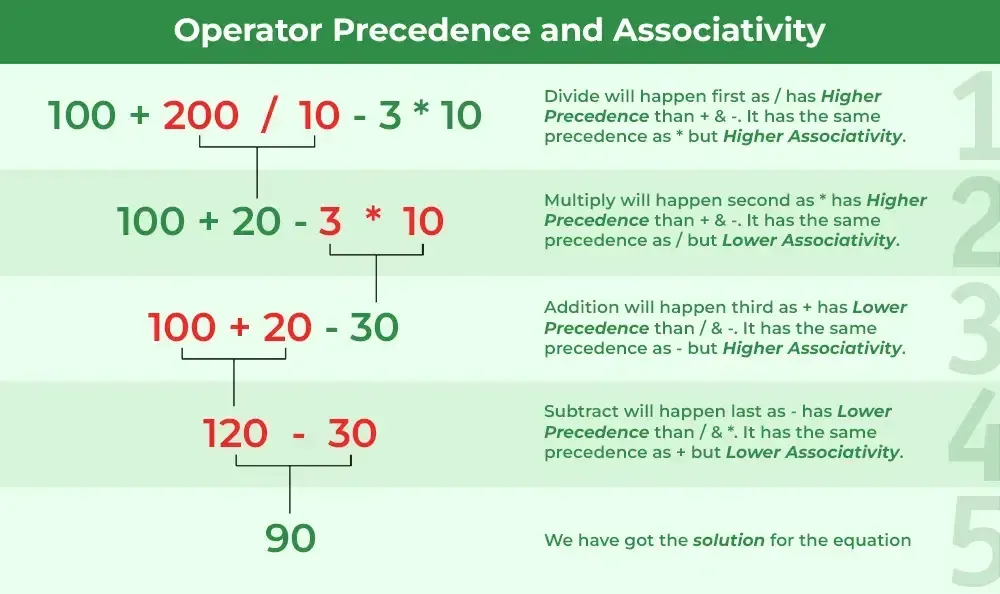
Let’s trace that same expression:
100 + 200 / 10 - 3 * 10
First, handle multiplication and division. They have equal priority, so scan from left to right:
100 + 20 - 3 * 10
100 + 20 - 30
Then handle addition and subtraction, again from left to right:
120 - 30
90
So Python produces:
print(100 + 200 / 10 - 3 * 10)
90.0
Notice the .0. Division occurred during the calculation, so the value became a float.
There is a small but useful correction to make to the text in the visual: division does not have higher precedence than multiplication in Python. They have the same precedence. Division is evaluated first in this particular expression because it appears first when scanning from left to right.
Parentheses change the meaning
Parentheses let you override Python’s default priority.
Compare these two expressions:
print(4 + 2 * 3)
print((4 + 2) * 3)
Output:
10
18
The first expression multiplies before adding:
4 + 6 = 10
The second expression adds first because parentheses have the highest priority:
6 * 3 = 18
Parentheses also communicate your intention to another person reading the program. For example, both expressions below work, but the second makes the intended grouping especially clear:
total_cost = item_price * quantity + shipping
total_cost = (item_price * quantity) + shipping
Extra parentheses are usually harmless when they make a calculation easier to understand.
A special note on powers
Exponentiation has higher precedence than multiplication, division, addition, and subtraction:
print(2 ** 3 + 1)
Python calculates the power first:
2 ** 3 = 8
8 + 1 = 9
Powers also have a special grouping rule when more than one ** appears:
print(2 ** 3 ** 2)
Python treats this as:
2 ** (3 ** 2)
The result is 512, because 3 ** 2 is 9, then 2 ** 9 is 512.
If you instead mean “calculate two cubed, then square that result,” use parentheses:
print((2 ** 3) ** 2)
That result is 64.
For everyday beginner programs, the reliable habit is simple: whenever grouping could be unclear, write the parentheses you mean.
A repeatable method for evaluating expressions
Use this process whenever you need to trace a calculation:
- Evaluate parentheses first. For nested parentheses, begin with the innermost group.
- Evaluate powers using
**. - Evaluate
*,/,//, and%, moving left to right when more than one appears. - Evaluate
+and-, again moving left to right. - Check the result’s type when division or floats are involved.
Here is a full example:
result = 18 + 14 // 4 * 3 - 5
print(result)
Start with the middle priority group:
18 + 14 // 4 * 3 - 5
18 + 3 * 3 - 5
18 + 9 - 5
Then move to addition and subtraction from left to right:
27 - 5
22
The output is:
22
Python can calculate these expressions quickly, but tracing them yourself is valuable. It lets you predict outcomes, spot errors in formulas, and decide where parentheses belong.
Build a study-time calculator
Create or replace a file in your browser-based Python workspace with the following program:
sessions = 4
minutes_per_session = 25
breaks = 3
minutes_per_break = 5

total_study_minutes = sessions * minutes_per_session
total_break_minutes = breaks * minutes_per_break
total_minutes = total_study_minutes + total_break_minutes

whole_hours = total_minutes // 60
remaining_minutes = total_minutes % 60
average_minutes_per_session = total_study_minutes / sessions

print("Study time:", total_study_minutes)
print("Break time:", total_break_minutes)
print("Total minutes:", total_minutes)
print("Whole hours:", whole_hours)
print("Remaining minutes:", remaining_minutes)
print("Average study minutes per session:", average_minutes_per_session)
With the values shown, the main calculations are:
4 * 25 = 100
3 * 5 = 15
100 + 15 = 115
115 // 60 = 1
115 % 60 = 55
So the program reports one whole hour and 55 remaining minutes.
The calculation:
total_minutes = total_study_minutes + total_break_minutes
could also be written as one expression:
total_minutes = sessions * minutes_per_session + breaks * minutes_per_break
Both versions give the same result. The first version is longer but creates intermediate variables that describe each part of the calculation. In beginner programs—and often in professional code—that clarity is worthwhile.
Make a few controlled changes, running the program after each one:
- Change
sessionsorminutes_per_sessionand observe how every dependent result changes. - Set
total_minutesto a value below 60, such as45, and inspect the//and%results. - Add parentheses around the multiplications in the one-line version of
total_minutes. The result stays the same, but the grouping becomes more visible.
Key takeaways
Python arithmetic expressions use familiar operations with programming-specific symbols:
+,-,*, and/perform basic arithmetic./performs ordinary division and produces a float.//gives the number of complete groups, while%gives the remainder.**raises a number to a power.
Python evaluates mixed expressions according to precedence:
- Parentheses
- Exponents
- Multiplication, division, floor division, and remainder
- Addition and subtraction
When operators share a precedence level, Python generally works from left to right. Parentheses override the default order and make your intent clear.
Next, you will make programs interactive by collecting keyboard input. Since input() initially provides text, you will also learn to convert that text into numbers before using it in arithmetic.
Can't find a good explanation? Sign up and we'll make it for you
Sign up