
Hello! Welcome back to our course on asyncio.
Introduction
In our previous lesson, we defined the coroutine as a cooperative unit of work, created with the async def syntax. We established that calling a coroutine function returns a coroutine object, which must be run on an event loop. We also introduced the await keyword as the mechanism that enables a coroutine to pause and "cooperate."
Today's lesson focuses squarely on that mechanism. Our learning outcome is to explain the function of the await keyword in pausing a coroutine and yielding control to the event loop. We will dissect what happens when Python encounters await, how it facilitates concurrency, and what happens when it's used incorrectly. This is the key to unlocking the power of asyncio.
1. The await Keyword: A Formal Definition
At its core, await is a keyword that does two things:
- It can only be used inside an
async deffunction (a coroutine). - It tells Python to pause the execution of the current coroutine until the "awaitable" object it's waiting on is complete.
An awaitable object is something that can be used in an await expression. For our purposes, there are three main types:
- A coroutine: The object returned from calling an
async deffunction. - A Task: A wrapper around a coroutine that schedules it to run on the event loop (we'll see more on this later).
- A Future: A low-level object representing the eventual result of an asynchronous operation. You have likely encountered similar concepts like "Promises" in JavaScript.
Let's start with a formal reading to solidify these definitions.
Python's asyncio: A Hands-On Walkthrough
The article 'Python's asyncio: A Hands-On Walkthrough' from Real Python provides a concise and accurate definition of the async and await keywords.
Please read the section titled 'The async and await Keywords'. Focus on the bulleted list defining the keywords and the explanation that follows: '...await tells the event loop: suspend the execution of g() until the result of f() is returned. In the meantime, let something else run.'
To hear this explained with a focus on the different types of awaitables, watch the following clip.
Python Tutorial: AsyncIO - Complete Guide to Asynchronous Programming with Animations
This segment from Corey Schafer's 'AsyncIO - Complete Guide' explains the concept of awaitables and the role of the await keyword.
Watch from 05:17 to 09:29. Pay attention to the explanation of what await does: it pauses the current function and yields control back to the event loop. Also, note the three types of awaitable objects he mentions: coroutines, tasks, and futures.
2. Yielding Control: The Heart of Cooperation
The phrase "yield control to the event loop" is central. When a coroutine awaits something, it effectively hands the CPU's execution pointer back to the asyncio event loop. The event loop, which acts as a scheduler, can then look at its list of tasks and run a different one that is ready.
This is the essence of cooperative multitasking. The running coroutine voluntarily gives up control at await points, allowing other coroutines to make progress.
The diagram below illustrates this flow. When coroutine 1 hits an await, it suspends. Control returns to the event loop, which can then run other tasks (task 2, ..., task n) while coroutine 1 waits for its I/O operation to complete.
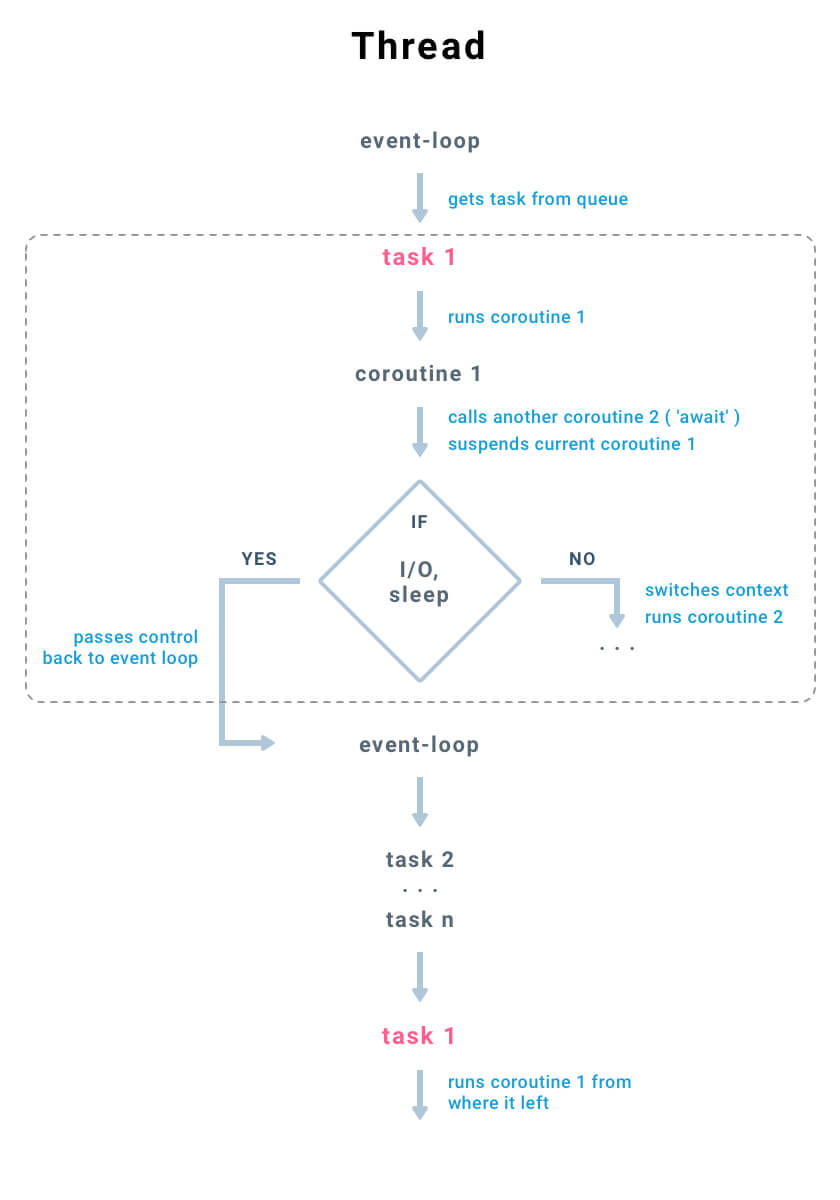
3. await in Action: A Sequential Execution Trace
Understanding the theory is one thing; seeing it in action is another. A common misconception is that just by using async and await, code automatically becomes concurrent. This is not true. The way you use await determines the execution flow.
Consider the following code snippet within a main coroutine:
async def main():
    print("Fetching data 1...")
    result1 = await fetch_data(1)  # fetch_data sleeps for 1 second
    print("Fetching data 2...")
    result2 = await fetch_data(2)  # fetch_data sleeps for 2 seconds
    print("Done.")
Let's trace the execution:
mainstarts and prints "Fetching data 1...".- It encounters
await fetch_data(1).mainis suspended. - Control returns to the event loop, which starts executing the
fetch_data(1)coroutine. fetch_data(1)runs until it completes (after its 1-second sleep).- Once
fetch_data(1)is done, the event loop resumesmainright where it left off. The result is assigned toresult1. maincontinues, printing "Fetching data 2...".- It encounters
await fetch_data(2).mainis suspended again. - The event loop runs
fetch_data(2)to completion (2 seconds). - The event loop resumes
mainagain. mainprints "Done."
The total execution time will be approximately 3 seconds. The await calls force a sequential execution because main is paused until each awaited coroutine finishes completely before proceeding to the next line.
The following video provides an excellent animated visualization of this exact scenario.
Python Tutorial: AsyncIO - Complete Guide to Asynchronous Programming with Animations
Corey Schafer's video provides a fantastic animation that makes the sequential nature of direct await calls very clear.
Watch the segment from 17:56 to 25:41. This is the most important part of the lesson. Follow the animation closely. Notice how the main coroutine is marked as 'suspended' on the event loop while the fetch_data coroutine runs. main only becomes 'ready' again after the awaited coroutine is fully complete.
To reinforce this point, here is another short video that demonstrates the same concept.
Asyncio in Python - Full Tutorial
This clip from 'Asyncio in Python - Full Tutorial' by Tech With Tim also demonstrates how awaiting coroutines one after another leads to sequential execution.
Watch from 09:04 to 10:25. The key takeaway here is his conclusion: 'a code routine doesn't start running until it's awaited... we actually wait for the first co-routine to finish and only once this has finished do we even start executing the second co-routine.'
4. The Critical Error: Blocking the Event Loop
What happens if you call a regular, blocking function inside a coroutine? For example, using time.sleep() instead of asyncio.sleep().
import time
import asyncio

async def blocking_coro():
    print("About to block...")
    time.sleep(2)  # This is a synchronous, blocking call
    print("Finished blocking.")

async def main():
    await blocking_coro()
When blocking_coro is executed, it calls time.sleep(2). This is a standard synchronous function. It does not know how to cooperate with the asyncio event loop. It simply tells the operating system to pause the entire thread for 2 seconds.
Since the event loop runs in that single thread, the entire event loop is blocked. No other coroutines can run. All the benefits of asyncio are lost. The await keyword is the designated mechanism for a coroutine to yield control; without it (or an equivalent mechanism), cooperation is impossible.
This next video segment animates this exact problem, showing how a blocking call freezes the event loop.
Python Tutorial: AsyncIO - Complete Guide to Asynchronous Programming with Animations
This final clip from Corey Schafer's guide demonstrates the danger of using blocking synchronous calls within an async function.
Watch from 38:52 to 46:54. Observe in the animation how the call to time.sleep() causes the event loop to become 'BLOCKED'. The task never gets suspended, it just hangs, preventing the event loop from scheduling any other work.
5. Optional: A Deeper Look Under the Hood
Given your background, you might be interested in how await is implemented at a lower level. The await keyword is not just syntactic sugar; it translates to a specific bytecode instruction, GET_AWAITABLE, which is different from the GET_YIELD_FROM_ITER used by older, generator-based coroutines. This distinction is what allows Python to enforce the rules of async programming, ensuring you don't accidentally await a plain generator, for instance.
If you're curious, the following article provides a superb deep dive into the CPython internals.
How the heck does async/await work in Python 3.5?
Brett Cannon's article 'How the heck does async/await work in Python 3.5?' is a classic text that explains the mechanics of async/await down to the bytecode.
This is optional reading. If you're interested, read the section 'Going from yield from to await in Python 3.5'. It contrasts the bytecode for yield from and await, explaining the role of the GET_AWAITABLE opcode. This provides a fundamental understanding of why await is a distinct and more restrictive construct than yield from.
Conclusion
This lesson was dedicated to the single most important keyword in asyncio. A solid grasp of await is non-negotiable for writing correct and efficient asynchronous code.
Key Takeaways:
- The
awaitkeyword suspends the execution of the current coroutine. - When a coroutine is suspended, it yields control back to the event loop.
- The event loop can then run other tasks that are ready, achieving concurrency on a single thread.
- The suspended coroutine resumes only after the awaitable it was waiting on is complete.
- Awaiting coroutines sequentially (
await coro1(),await coro2()) results in sequential execution, not concurrent. - Using blocking synchronous calls (like
time.sleep()) inside a coroutine blocks the entire event loop, defeating the purpose ofasyncio.
Preview of the Next Lesson:
We've repeatedly mentioned the "event loop" as the master scheduler. In our next lesson, we will focus on it directly. We'll describe the role of the asyncio event loop in orchestrating coroutine execution and see how asyncio.run() serves as the main entry point to start and manage the loop for our entire program.
Can't find a good explanation? Sign up and we'll make it for you
Sign up