Hello! Welcome back to our module on Retrieval-Augmented Generation (RAG).
In the last lesson, we built the foundation of our RAG system: a dense retriever. We learned how to convert documents into numerical embeddings and use a vector store like FAISS to efficiently find the documents that are semantically closest to a user's query. Our retriever returns a ranked list of relevant documents.
However, a list of documents is not the user-friendly answer we're aiming for. The goal of this lesson is to complete the pipeline by adding the "Generation" component. We will take the documents retrieved by our system and use a Large Language Model (LLM) to synthesize them into a single, coherent, and factually-grounded answer.
By the end of this 60-minute lesson, you will be able to build a complete RAG pipeline that combines retrieval with generation.
1. The Anatomy of a RAG Pipeline
A complete RAG system can be broken down into several modular components that work in concert. In the previous lesson, we focused on building the retriever. Now, let's look at the full picture.
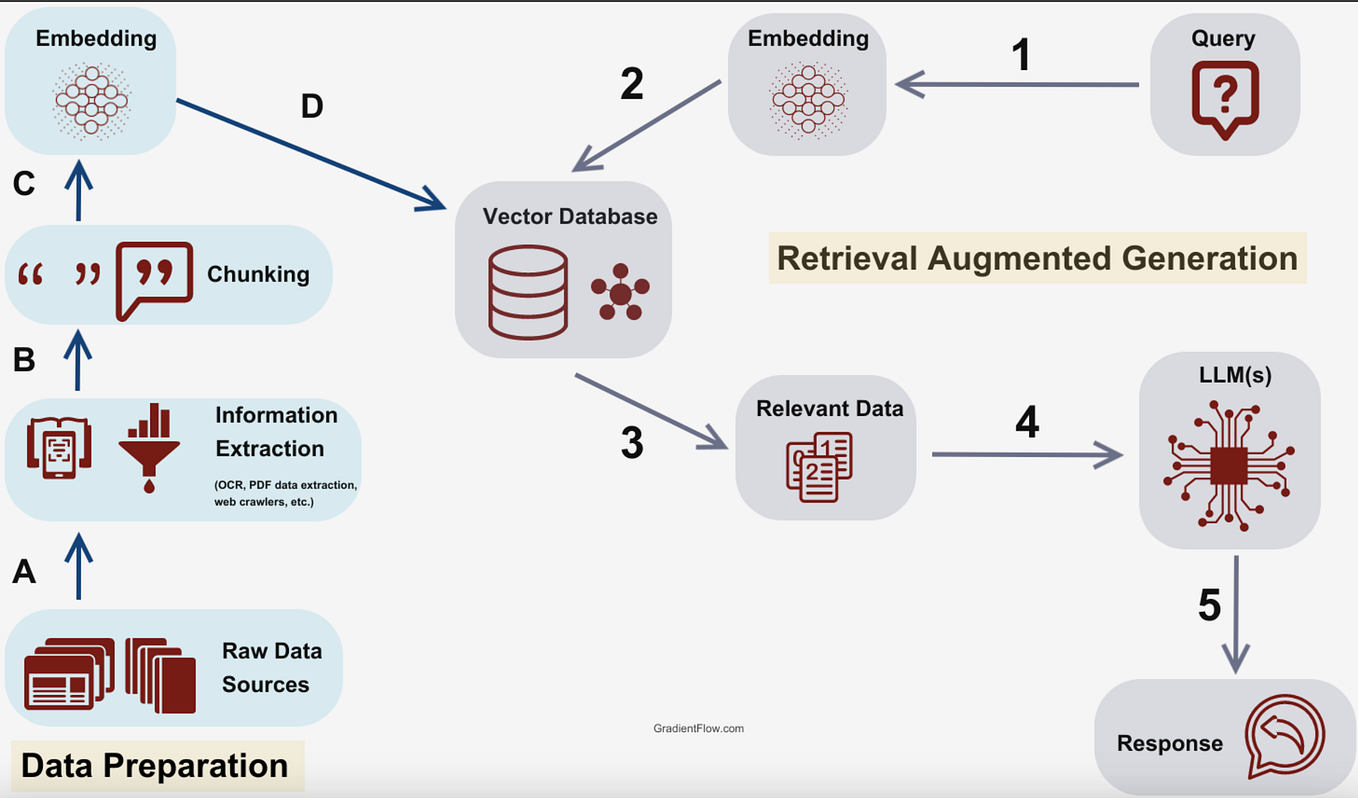
To understand the role of each component and the importance of a modular design, let's watch a segment from the following video. A modular approach, as you know from your software engineering experience, makes it much easier to swap out, test, and improve individual parts of the system.
Build a Simple RAG Pipeline in 30 Minutes!
This video from pixegami, 'Build a Simple RAG Pipeline in 30 Minutes!', provides an excellent breakdown of the key components of a RAG pipeline.
Watch from 01:58 to 04:48. The video details the role of the Indexer, Data Store, Retriever, and Response Generator. Pay attention to how these components interact.
As the video explained, our pipeline consists of:
- Indexer: Processes and chunks documents before storing them.
- Data Store (Vector Database): Stores the document chunks and their embeddings.
- Retriever: Searches the data store for relevant chunks based on a query.
- Response Generator: Uses an LLM to create an answer from the query and the retrieved chunks.
We've already built the core of the retriever. Now we'll focus on the Response Generator and wire everything together into a single pipeline.
2. The Generation Step: Crafting Prompts for Grounded Answers
The Response Generator's job is to take the user's original query and the text from the top-k documents retrieved in the previous step, and use them to prompt an LLM.
The structure of this prompt is critical for the success of the RAG system. A well-designed prompt instructs the LLM to adhere strictly to the provided information, which is the key to mitigating hallucinations and ensuring the answer is grounded in your specific data.
A typical RAG prompt template looks something like this:
You are a helpful assistant. Use the following pieces of retrieved context to answer the question.
If you don't know the answer, just say that you don't know. Don't try to make up an answer.
Keep the answer concise.

Context:
{context}

Question:
{question}

Answer:
Here, {context} is a placeholder for the concatenated text of the retrieved documents, and {question} is the user's original query. This explicit instruction encourages the model to function as a synthesizer of the provided information rather than a speculative creator.
Test your understanding!
Imagine you build a RAG system for a customer support chatbot. You use a very simple prompt: Context: {context}\nQuestion: {question}\nAnswer:.
A customer asks, "What is your return policy for items bought on sale?" The retriever finds a document stating, "Full-price items can be returned within 30 days." It finds no information about sale items.
What is a likely, and problematic, response the LLM might generate with this simple prompt, and how does the more detailed prompt template above help prevent this?
Show answer
With the simple prompt, the LLM might "helpfully" generalize from the provided context and respond with something like: "You can return items within 30 days." This is a hallucination because it incorrectly applies the policy for full-price items to sale items, potentially misleading the customer.
The more detailed prompt template helps prevent this by including the instruction: "If you don't know the answer, just say that you don't know." With this instruction, a well-behaved LLM is much more likely to respond: "I'm sorry, but the provided information does not specify the return policy for sale items." This is a much safer and more accurate response.
3. Implementing the Full Pipeline
Let's now integrate our DenseRetriever from the previous lesson with a generator component to form a complete RAG pipeline. We'll structure our code with modularity in mind, creating a central RAGPipeline class that orchestrates the different components.
Setting up a Local LLM with Ollama
For the generator, we'll use a locally running LLM. This gives you full control, privacy, and avoids API costs. Ollama is a fantastic tool that makes it incredibly easy to run open-source models like Llama 3, Mistral, and others on your own machine.
If you haven't already, please follow these steps:
- Install Ollama: Visit the Ollama website and download the installer for your OS.
- Pull a model: Open your terminal and run the following command to download and run the Llama 3 8B instruction-tuned model. It's a powerful and versatile model for this task.
ollama pull llama3:8b-instruct - Install the Python client: We will use the
ollamaPython library to interact with the running model.pip install ollama
With Ollama running in the background, you can now call LLMs from your Python code with just a few lines.
Integrating the Components
We will now create a RAGPipeline class. This class will use the DenseRetriever we built last time and a new Generator component that calls our local llama3 model.
The logic will be:
- The
RAGPipelinereceives a query. - It passes the query to the
DenseRetrieverinstance to get the top-k relevant document texts. - It formats these texts and the query into a single prompt using our template.
- It passes this prompt to the
Generator, which sends it to Ollama. - It returns the final generated answer.
Let's look at the complete, runnable code.
import numpy as np
import faiss
from sentence_transformers import SentenceTransformer
import ollama

# --- Component 1: The Retriever (from last lesson) ---
class DenseRetriever:
    def __init__(self, documents, model_name='all-MiniLM-L6-v2'):
        self.documents = documents
        self.model = SentenceTransformer(model_name)
        self.index = None
        self._build_index()

    def _build_index(self):
        embeddings = self.model.encode(self.documents, convert_to_tensor=True).cpu().numpy()
        embedding_dim = embeddings.shape[1]
        self.index = faiss.IndexFlatL2(embedding_dim)
        self.index.add(embeddings)

    def search(self, query, k=3):
        query_embedding = self.model.encode([query])
        distances, indices = self.index.search(query_embedding, k)
        # Return the text of the top-k documents
        return [self.documents[i] for i in indices[0]]

# --- Component 2: The Generator ---
class Generator:
    def __init__(self, model='llama3:8b-instruct'):
        self.model = model
        self.prompt_template = """
You are a helpful assistant. Use the following pieces of retrieved context to answer the question.
If you don't know the answer, just say that you don't know. Don't try to make up an answer.

Context:
{context}

Question:
{question}

Answer:
"""

    def generate_answer(self, query, retrieved_docs):
        context_str = "\n---\n".join(retrieved_docs)

        prompt = self.prompt_template.format(context=context_str, question=query)

        print("\n--- Generating Answer ---")
        print(f"Prompt sent to LLM: {prompt}")

        response = ollama.chat(
            model=self.model,
            messages=[{'role': 'user', 'content': prompt}]
        )

        return response['message']['content']

# --- Component 3: The RAG Pipeline ---
class RAGPipeline:
    def __init__(self, retriever, generator):
        self.retriever = retriever
        self.generator = generator

    def query(self, query_text):
        print(f"--- Querying for: '{query_text}' ---")

        # 1. Retrieve relevant documents
        retrieved_docs = self.retriever.search(query_text, k=3)

        print("\n--- Retrieved Documents ---")
        for i, doc in enumerate(retrieved_docs):
            print(f"Doc {i+1}: {doc}")

        # 2. Generate an answer based on the retrieved documents
        answer = self.generator.generate_answer(query_text, retrieved_docs)

        return answer

# --- Example Usage ---
if __name__ == "__main__":
    # A small corpus of documents
    corpus = [
        "The Tokyo Olympics 2020 were held in 2021 due to the COVID-19 pandemic.",
        "Japan is known for its beautiful cherry blossoms in the spring.",
        "Basketball is a popular sport played with a ball and a hoop.",
        "The NBA finals are the championship series of the National Basketball Association.",
        "The capital of Japan is Tokyo, a bustling metropolis."
    ]

    # 1. Initialize components
    retriever = DenseRetriever(documents=corpus)
    generator = Generator() # Uses llama3 by default

    # 2. Initialize the pipeline
    rag_pipeline = RAGPipeline(retriever=retriever, generator=generator)

    # 3. Ask a question
    question = "When did the Tokyo Olympics happen and why were they delayed?"
    final_answer = rag_pipeline.query(question)

    print("\n--- Final Answer ---")
    print(final_answer)

    question_2 = "What is the biggest competition in the NBA?"
    final_answer_2 = rag_pipeline.query(question_2)

    print("\n--- Final Answer ---")
    print(final_answer_2)
When you run this script (make sure Ollama is running!), you'll see the full process in action. For the first question, the retriever will find the document about the Olympics. The generator will then receive this document as context and use it to construct a precise answer, explaining that the games were held in 2021 due to the pandemic. This demonstrates the power of combining retrieval and generation.
4. Beyond Standard RAG: The Evolving Landscape
What we've built is a "Standard RAG" pipeline. It's powerful, but it has limitations. For instance, how does it handle follow-up questions in a conversation? What if the initial retrieval is poor? The field is rapidly evolving with more advanced techniques to address these issues.
To understand one of the key limitations and how it's being addressed, let's watch the beginning of this video on "Agentic RAG."
Finally a Local RAG That WORKS!! (+ FULL RAG Pipeline)
The video 'Finally a Local RAG That WORKS!!' by Thomas Janssen starts by clearly explaining a major flaw in naive RAG systems and introduces Agentic RAG as a solution.
Watch from the beginning to 03:59. Focus on the example of the follow-up question ('When was it created?') and why the naive RAG system fails. This introduces the idea of an 'agent' that can rewrite queries based on conversational history.
As the video illustrates, an Agentic RAG system adds a reasoning layer. Instead of just passing the query to the retriever, an agent can first analyze the query, look at the conversation history, and decide to reformulate it (e.g., changing "it" to "LangChain").
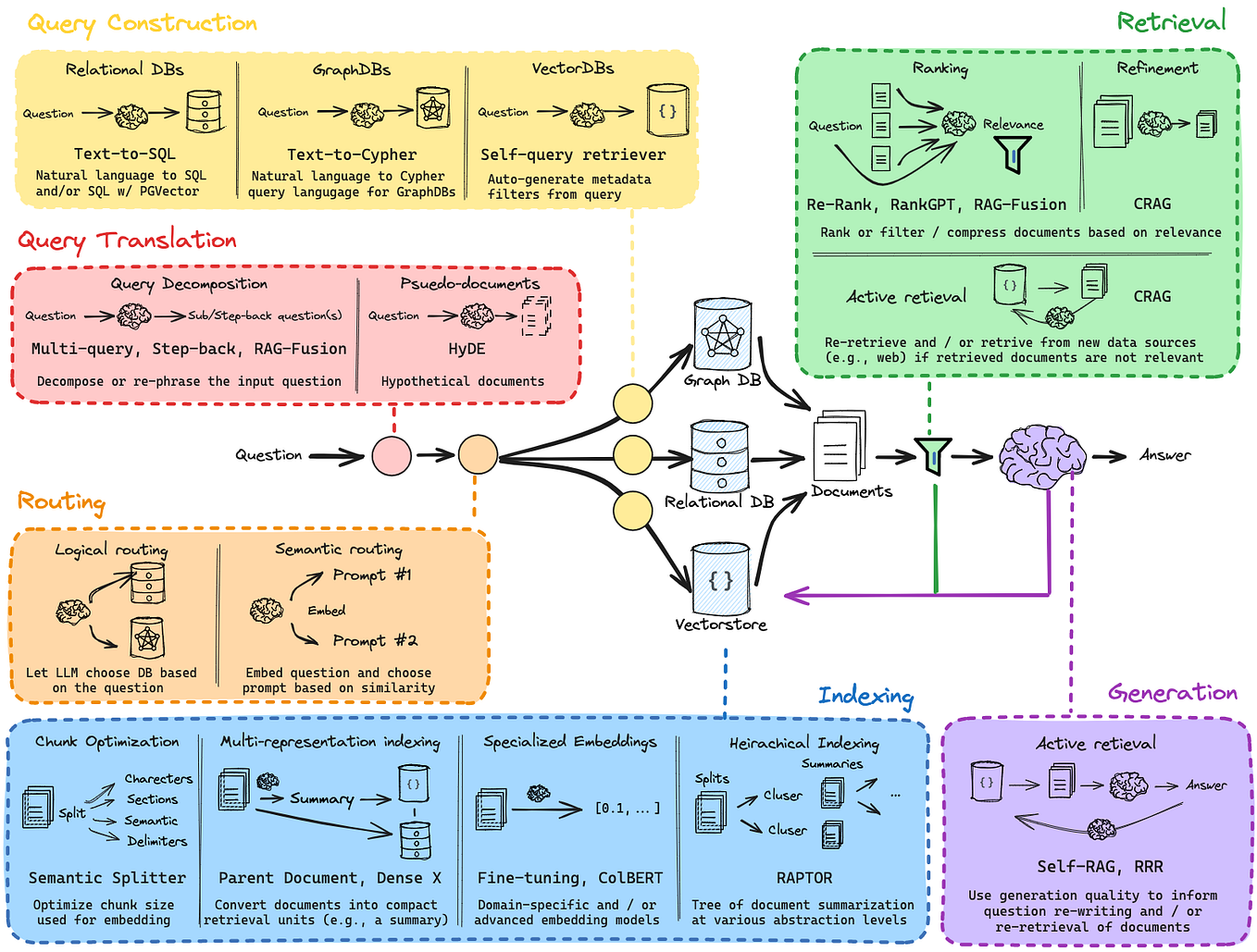
This is just one of many advanced RAG patterns. Others include:
- Corrective RAG: Adds a loop to check the quality of retrieved documents. If they seem irrelevant, it rewrites the query and tries again.
- Self-RAG: The LLM itself decides when to retrieve documents and evaluates the quality of the retrieved content.
- Reranking: A secondary, more powerful model (a cross-encoder) is used to re-rank the initial list of retrieved documents for better relevance before passing them to the generator.
The following article and diagram provide a great overview of this expanding landscape.
RAG: Retrieval Augmented Generation In-Depth with Code ...
The article 'RAG: Retrieval Augmented Generation In-Depth...' provides an excellent summary of various advanced RAG techniques.
Skim through the descriptions of the different RAG types: Standard RAG, Corrective RAG, Speculative RAG, Fusion RAG, Agentic RAG, and Self RAG. You don't need to read in-depth, just get a sense of the different strategies being developed to improve the basic pipeline.
This diagram provides a useful mental map of these techniques.
Conclusion
In this lesson, you successfully built a complete, end-to-end RAG pipeline. You've connected the retrieval component from our last lesson with a powerful generation component using a locally-run LLM.
Key Takeaways:
- A RAG pipeline combines a Retriever (to find relevant information) and a Generator (to synthesize an answer).
- The prompt is a crucial element that guides the LLM to generate answers grounded in the retrieved context, minimizing hallucinations.
- Building a modular pipeline with distinct components for retrieval and generation is a good software engineering practice that facilitates experimentation and upgrades.
- The field of RAG is evolving beyond the standard model, with advanced techniques like Agentic RAG and reranking offering significant improvements in quality and robustness.
Preview of the Next Lesson:
Our current retriever is fast but can sometimes return documents that are only superficially relevant. How can we improve the quality of the documents we feed to the LLM? In the next lesson, we will dive into one of the most effective ways to do this: we will implement a cross-encoder model for reranking retrieved documents. This will add a crucial quality-control step between our retriever and our generator.