
Welcome back. In the previous lesson, you built the dependency map behind a connected planning flow: organizations, items, sourcing, transactions, plan setup, and run sequence. This lesson turns the first part of that map into hands-on implementation work: enabling the correct planning source and collecting a deliberately chosen set of data into the Planning Data Repository.
The objective is not merely to submit a collection job. By the end, you should be able to explain and demonstrate why a source system is enabled, which organizations belong to it, why you selected each collection entity, and how you prove that the collected data is usable before a plan is run.
A planning source system is a data-governance boundary
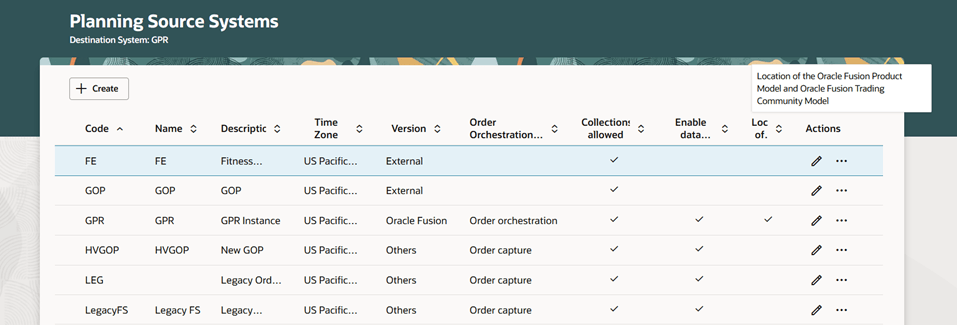
A planning source system identifies where planning data originates and whether Planning is permitted to collect it. It is more than a technical connection: it provides the source identity attached to organizations, items, demand, supply, and other collected records.
For your practice environment, the normal starting point is the predefined Oracle Fusion source system. You generally enable the appropriate organizations under that source system rather than creating a new source system merely because data is missing.
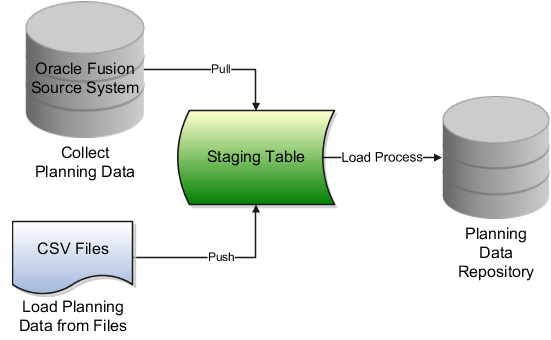
The collection process then moves selected source records through a staging area before they become available in the Planning Data Repository.
Keep three controls distinct:
| Control | What it answers | Practical implication |
|---|---|---|
| Source system | Which application or external system owns this data? | Select the Oracle Fusion source system for native Fusion collection. |
| Organizations enabled for collection | Which organizational nodes may contribute data? | Enable the plant, DC, and any other organizations required by the planning scope. |
| Collection filters | Which portion of eligible data should this particular run collect? | Narrow a development or test run to the organizations, items, categories, or other relevant records. |
A filter is not a substitute for organization enablement. If a plant is not enabled under the source system, selecting it in a collection filter will not make its data collectible.
Manage Planning Source Systems for Data Collections
Read this Oracle documentation before opening your environment. It distinguishes the predefined Oracle Fusion source system from external source systems and gives the precise process for enabling Fusion organizations.
In the opening section, read from the source-system overview. Note the Setup and Maintenance navigation under Supply Chain Planning Configuration. Then, in Organizations Enabled for Data Collections, read the Oracle Fusion instructions beginning with the organization-list steps. Focus on the required sequence: refresh the organization list, enable the intended organizations, collect organizations first, and validate them in the Supply Network Model.
Native Fusion versus external source systems
For interview purposes, state the distinction cleanly:
| Source-system version | Appropriate use | Typical data-acquisition approach |
|---|---|---|
| Oracle Fusion | Data originates in the same Oracle Fusion environment, such as Product Management, Inventory Management, Manufacturing, Procurement, or Order Management. | Native planning data collection. |
| External | A completely external system is not integrated with Oracle Fusion business applications. | File-based import into Planning. |
| Others | An external system is connected to selected Oracle Fusion applications, such as Product Management, Trading Community Model, or Order Management. | Combination of integrated application records and file-based imports as applicable. |
For this lesson, work with Oracle Fusion unless your practice environment is intentionally configured with an external source. Introducing a parallel external source system in a native Fusion test case often creates duplicate-source and data-lineage confusion rather than solving a planning problem.
Configure the Oracle Fusion source system
Use a narrow business scenario so that you can validate every result. For example:
- one manufacturing organization;
- one distribution organization;
- one finished item assigned to both organizations;
- one on-hand balance at the distribution organization;
- one open sales order, transfer order, purchase order, or work order, depending on what your environment contains.
Step 1: Open the source-system setup
Navigate through either route:
- In a Supply Chain Planning work area, open the relevant Tasks panel and access Manage Planning Source Systems.
- Or use Setup and Maintenance:
- Offering: Supply Chain Planning
- Functional Area: Supply Chain Planning Configuration
- Task: Manage Planning Source Systems
Locate the row whose version is Oracle Fusion. Confirm that Collections Allowed is enabled. If your security role does not permit editing this page, document the missing privilege rather than trying to bypass it; source-system maintenance is commonly restricted in implementation environments.
Step 2: Refresh and enable the organization list
For the Oracle Fusion source system:
- Select the Oracle Fusion source-system row.
- Open Manage Organization List.
- Click Refresh Organization List. This retrieves recently created or changed Fusion organizations into the selectable list.
- Find the organizations required by your test scenario.
- Select Enable for Collections for each required organization.
- Save the changes.
For a connected planning flow, enable the entire minimum network required to interpret the result. If DC East is supplied from Plant A, enabling only DC East can produce misleading results: demand and inventory may appear, but the source organization needed for transfer or manufacturing logic is unavailable to Planning.
Step 3: Collect organizations as the first validation gate
Oracle recommends collecting organizations first after enabling them. This is a small but high-value check because every later record depends on the organization context.
Your validation evidence should show:
- the manufacturing organization is visible;
- the distribution organization is visible;
- each organization is associated with the expected source system;
- the organizations appear in the Supply Network Model or relevant Plan Inputs view.
Do not yet judge the planning result. At this stage, you are proving that the network nodes exist in the Planning repository.
Targeted collection: refresh the data you intend to test
A Targeted collection is the correct collection type when you need to select specific reference, demand-planning, and supply-planning entities for refresh. It is particularly important for Demand Management because historical demand data can be collected only through the Targeted collection type.
Think of a targeted collection as a controlled test package:
- Reference data supplies the definitions and relationships.
- Demand planning data supplies history used for statistical forecasting.
- Supply planning data supplies the current operational position, including inventory, demand, supply, and capacity-related information.
A successful job is not sufficient evidence. The selected entities must match the plan you intend to run.
Collect Data Using the Targeted Collection Type
This Oracle guide is the operational reference for the lab. Read it once before submitting your first collection, then keep it open while you configure the collection parameters.
First, in the opening instructions, read the navigation and reference-data setup. Use the named Collect Planning Data task and confirm that the collection type is Targeted. Next, under Demand Planning Data, read from the history collection choices. Pay particular attention to the prerequisite scheduled process Load Filter Names for Planning Data Collection, the difference between fixed and rolling date ranges, and the history measures you select. Under Supply Planning Data, read the supply and resource-availability options. If your scenario includes capacity, note the fixed versus relative collection window and the option to regenerate resource availability. Finally, read submission and monitoring. The critical habit is to validate the data in Plan Inputs after the scheduled process completes.
Design the minimum viable collection package
For an initial test, do not select every available entity simply because the page makes it possible. Select the entities required to establish a complete, explainable planning chain.
| Collection area | Typical selections for a plant-to-DC supply test | Why they matter |
|---|---|---|
| Reference Data | Organizations, items, units of measure, calendars, item categories where used, customers, suppliers, item structures, work definitions, resources, sourcing-related reference entities | Makes items, organizations, dates, network relationships, and manufacturing logic interpretable. |
| Demand Planning Data | Shipment history and/or bookings history measures relevant to the forecast design | Provides the historical signal for statistical forecasting. |
| Supply Planning Data | On-hand inventory, reservations where relevant, sales orders, transfer orders, purchase orders, purchase requisitions, work orders, resource availability | Establishes the current demand, supply, inventory, and capacity position. |
The exact entity names shown in the collection screen can vary by release and enabled offerings. Use the functional intent, not an assumed generic checklist.
For example:
- If you are testing a Demand Plan, history measures and the product/customer dimensions that support them are essential.
- If you are testing a Supply Plan, on-hand, open demands, existing supplies, sourcing, item structures, work definitions, and resource availability may be required.
- If you are testing Replenishment Planning, prioritize the item-location setup, inventory position, demand, lead-time-related data, source relationships, and applicable supply documents.
Use collection filters deliberately
Select Select Collection Filters after choosing the source system and Targeted collection type. In a practice environment, filters help you avoid collecting a large enterprise dataset when you only need one item across two organizations.
Use a filter only when you can explain its consequence. For example:
| Filter decision | Appropriate reason | Risk if used carelessly |
|---|---|---|
| Restrict to Plant A and DC East | You are testing a defined two-node supply network. | You exclude the actual supplying organization or a dependent destination. |
| Restrict to one product category | Your test item and its relevant components belong to that category. | Components outside the category may be absent from a manufacturing test. |
| Restrict to selected transactional organizations | You need a fast functional test of one operating flow. | Existing supply or demand at another required node may be missing. |
| No restrictive filter for the first small environment test | The environment is already limited and you need to establish a baseline. | More data is collected than needed, increasing runtime and review effort. |
For an interview, describe filters as a way to control scope, runtime, and test isolation. Do not describe them as a corrective action for missing master data.
Hands-on lab: configure and run a targeted collection
Reserve roughly 25 minutes for this lab. Capture screenshots or notes at each validation point; they become useful interview evidence and revision material.
Part A: Prepare the scenario
Before opening the collection page, record the following values:
| Evidence to capture | Your value |
|---|---|
| Source system | Oracle Fusion |
| Manufacturing organization | |
| Distribution organization | |
| Item number | |
| Item category, if filtering by category | |
| Existing on-hand quantity and organization | |
| One current demand or supply document | |
| Intended planning use | Demand, supply, replenishment, or connected test |
Then confirm that the two organizations are enabled for collection under the Oracle Fusion source system.
Part B: Run an organization-focused baseline collection
Navigate to Plan Inputs, open the Tasks panel, and select Collect Planning Data.
On the Parameters tab:
- Select the Oracle Fusion source system.
- Set Collection Type to Targeted.
- Open Select Collection Filters and restrict the scope only if you can safely identify the organizations required for the test.
- On Reference Data, move Organizations to the selected-entities area.
- Submit the collection with As soon as possible on the Schedule tab.
When it completes, validate that both organizations are available in the Supply Network Model or Plan Inputs. If this step fails, stop before attempting to collect items, inventory, orders, or history. Every one of those records depends on an organization being established in the repository.
Part C: Collect the functional planning baseline
Create a second Targeted collection for the same source system. This time select the remaining data needed for your scenario.
Reference Data selection
At minimum, select the entities needed to make the item usable in its organizations:
- items and item-organization context;
- units of measure;
- calendars;
- customers and suppliers if the scenario uses them;
- item structures and work definitions for a make-item Supply Planning scenario;
- resources and relevant capacity definitions where capacity is in scope.
Demand Planning Data selection
If you are validating a forecast flow:
- Confirm that the scheduled process Load Filter Names for Planning Data Collection has completed successfully before collecting historical demand.
- Choose a Fixed Date Range when testing a known, static historical period.
- Choose a Rolling Date Range when you are establishing a repeatable process based on the most recent number of days.
- Select shipment-history and/or booking-history measures that align with the demand signal your Demand Plan will use.
For example, a fixed historical period is useful when comparing two forecast runs during testing. A rolling window is useful for an ongoing collection process where the retained history must move forward with time.
Supply Planning Data selection
Select the operational records that establish the present supply-demand position:
- on-hand inventory;
- applicable reservations;
- sales orders or transfer orders that represent demand;
- open purchase orders, purchase requisitions, work orders, or transfer orders that represent existing supply;
- resource availability if the Supply Plan is expected to consider capacity.
If you collect resource availability, use a relative-to-collection-run-date window when the horizon should move forward automatically with each collection. Choose a window that covers the portion of the plan horizon for which capacity matters. If availability is stale and your test requires newly derived availability, choose the option to regenerate it before collection.
Submit the job and note its process ID, start time, completion time, and status.
Part D: Validate the collection before running a plan
After a successful collection, open the relevant seeded tables in Plan Inputs. Search for your deliberately chosen test data rather than browsing broadly.
Use this verification sequence:
- Organizations: Confirm the plant and DC exist and have the expected source system.
- Items: Confirm the item is present at both organizations, with a usable planning status and expected attributes.
- Supply network: Confirm that the source and destination organizations appear in the Supply Network Model.
- Inventory: Confirm the on-hand quantity is present at the correct organization.
- Demand and supply: Confirm your chosen sales order, transfer order, purchase order, or work order is visible with the correct quantity and date.
- History: If historical demand was collected, confirm the intended history measures and date range are available for the relevant item and organization.
- Capacity: If selected, confirm that the expected resource availability is present for the intended period.
A useful evidence note has this structure:
“Targeted collection from Oracle Fusion completed successfully at [time]. Item [item] was collected for [plant] and [DC]. On-hand of [quantity] appears at [DC]. Existing [purchase order/work order/transfer order] appears with receipt date [date]. Therefore the repository is ready for the planned test.”
This wording separates a verified input state from a future plan result.
Save the proven configuration as a template
After you have a successful collection definition, save it as a collection template. A template is appropriate only after validation. Saving an untested selection set simply makes an untested error repeatable.
Use a purposeful template name, such as:
SCP_FUSION_REF_BASELINESCP_DEMAND_HISTORY_24_MONTHSSCP_SUPPLY_DAILY_DC_NETWORK
Include the source system, functional purpose, and cadence or horizon where useful.
What a senior-consultant explanation sounds like
If asked how you configure and run collections, give a dependency-led answer:
“I begin by confirming the Oracle Fusion planning source system is collection-enabled and that all organizations in the planning network are enabled. I collect and validate organizations first in the Supply Network Model. Then I run a Targeted collection because it lets me select the reference, historical-demand, and supply entities needed for the specific planning flow. I apply filters carefully so I collect the required network without unnecessarily loading unrelated data. After the job completes, I validate item-organization records, inventory, demand, supply, history, and capacity in Plan Inputs before running any plan. Finally, I save the validated selection as a template and schedule it only after the data lineage is proven.”
That response demonstrates configuration knowledge, operational discipline, and an understanding that collection success does not by itself prove planning readiness.
Key takeaways
A planning source system establishes the origin and eligibility of data collected into Oracle Cloud SCM Planning. For a native Fusion implementation, the key configuration activity is usually enabling the correct organizations under the predefined Oracle Fusion source system.
For a controlled Targeted collection:
- collect and validate organizations first;
- select reference entities before relying on dependent transactional data;
- use Targeted collection for Demand Planning history;
- choose historical ranges and measures that match the forecast design;
- collect the current supply-demand position required by the downstream plan;
- validate the records in Plan Inputs and the Supply Network Model before running the plan;
- save a template only after the collection definition has been proven.
Next, you will use collection status, scheduled-process logs, and data-validation checks to diagnose a collection that is failed, incomplete, or technically successful but functionally unusable.
Can't find a good explanation? Sign up and we'll make it for you
Sign up