Recommended resources
The freely available resources this lesson will direct you to.
- How To Make an Influencer Media Kit (FULL Tutorial in Canva) 🎨www.youtube.com
- How to Create a Simple Media Kit | Get Your FIRST Brand Deal as a Content Creatorwww.youtube.com
- Creating an Influencer Media Kit in 5 Steps [Free Template] - Impactimpact.com
- Influencer media kit 101: Free template and expert tipsblog.hootsuite.com
Introduction
Welcome to the next step in your journey to becoming a successful creator! In our last lesson, you created a promotional post for your freebie, a crucial skill for building your audience and email list. Now that you're starting to gather an audience, it's time to prepare for one of the most exciting parts of being a creator: working with brands.
To present yourself professionally to potential partners, you need a creator "resume" or portfolio. This is known as a media kit. In this lesson, you will learn how to create a one-page media kit that showcases your brand, audience demographics, and key stats.
Think of this media kit as your key to opening doors for paid collaborations. It's a document you'll send to brands to show them who you are, the value you provide, and why they should work with you.
1. What is a Media Kit?
Before you start building, let's clarify what a media kit is and why it's so important. It's more than just a list of your follower counts; it's a strategic tool designed to make a powerful first impression.
Creating an Influencer Media Kit in 5 Steps
To understand the fundamentals, please read a short section from the article 'Creating an Influencer Media Kit in 5 Steps' from Impact.com. This will explain what a media kit is and how it differs from a simple price list (a rate card).
Read from the beginning down to the heading 'How to Build a Professional Creator Portfolio in 5 Easy Steps'. Focus on the definitions of a media kit and a rate card, and the five reasons why a strong portfolio helps you land brand partnerships.
As you've just read, a media kit serves several key purposes:
- Professionalism: It shows brands you are serious about your work.
- Efficiency: It provides all the key information upfront, saving time for both you and the brand.
- Storytelling: It communicates your unique brand and niche—your "cheap and cheerful lifestyle" focus.
- Trust Building: It uses data (your stats) and past work to prove your value.
2. The Essential Components of Your Media Kit
A standard one-page media kit should be clean, on-brand, and easy to read. It packs a lot of information into a small space. While templates vary, they almost all contain the same core sections.
Here are the key elements you need to gather before you start designing:
- A Professional Headshot & Bio: A high-quality photo of you and a short, compelling "About Me" section. This should be your elevator pitch, summarizing your niche and your mission to help people live a "cheap and cheerful" lifestyle.
- Social Media Statistics: Your follower/subscriber counts for all your platforms (Instagram, TikTok, YouTube, Pinterest, X).
- Audience Demographics: This is crucial for brands. It includes data like:
- Age range of your followers
- Gender breakdown (e.g., 80% female)
- Top countries or cities where your audience lives
You can find this information in the "Analytics" or "Insights" section of your creator/business accounts on each platform.
- A List of Your Services: What can brands hire you to do? Even as a new creator, you can offer services like sponsored posts, videos, or user-generated content (UGC).
- Contact Information: A professional email address where brands can reach you.

3. Action Step: Build Your Media Kit in Canva
Now it's time for the hands-on part of the lesson. You will use Canva to create your media kit, building on the skills you've developed in previous lessons.
The following video is a complete, step-by-step tutorial that will walk you through the entire process, from choosing a template to filling in your information. It's the perfect "do this, then do that" guide.
How To Make an Influencer Media Kit (FULL Tutorial in Canva) 🎨
Austen Tosone, a content creator, provides a fantastic tutorial on creating a media kit in Canva. I want you to watch the video in a few parts as you build your own kit.
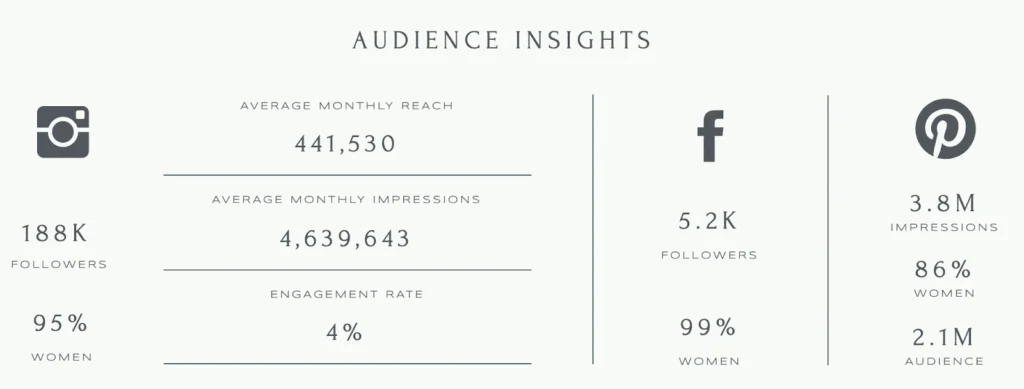
This video will be your main guide. I'll break down how to watch it. Part 1: Preparation (Watch 00:00 - 03:01)\nListen to her introduction and the list of the five essential things to include. Before you start designing, gather this information in a separate document (like a notes app): Your bio (2-3 sentences) Your current follower counts for each platform. Screenshots of your audience demographics (age, gender, location) from your most developed platform. A list of services you can offer (e.g., Instagram Reel, TikTok video, Pinterest Pin, YouTube video). Your professional email address. Part 2: Design and Build (Watch 03:01 - 13:26)\nNow, open Canva and follow along with the video. Pause as needed to complete each step: Search for a 'media kit' template that you like. Replace the template's text and photos with your own headshot and bio. Add your social media icons and follower counts. Insert your audience demographic stats. You can use screenshots like she does, or type them out as shown in the template image above. Add your list of services. Part 3: Finalizing and Saving (Watch 13:26 - 14:46)\nOnce your media kit is complete, follow her instructions to download it. Save it as a 'PDF Standard' file, as this is a smaller file size that is easy to email to brands. Name the file something professional, like [YourName]_Media_Kit_2024.pdf.
A Closer Look at Audience Demographics
When you get to the section on audience demographics, you want to present the data clearly. Brands need to see if your audience aligns with their target customers.
A Note for New Creators
If you don't have previous brand collaborations to show, that's completely normal. The article "Influencer media kit 101" by Hootsuite gives great advice for this situation. In the section "4. Share content examples," it states:
"If you’re new to the game and don’t have brand partnership examples to share yet, don’t sweat it. You can share examples of your highest-performing posts or UGC content, instead. The goal is to showcase posts that best represent your content style so brands know what to expect when working with you."
So, in place of a "Previous Partners" section, you could have a "Best Performing Content" section with screenshots of a few of your most successful posts.
Conclusion
Congratulations! You have now created one of the most important professional tools in your creator toolkit. Your media kit is a living document; you will update it regularly as your stats grow and you complete collaborations.
Key Takeaways:
- A media kit is your professional resume that you send to potential brand partners.
- It must be visually appealing and consistent with your brand identity (colors, fonts).
- The essential components are your bio, social stats, audience demographics, a list of services, and contact information.
- Canva is an excellent free tool for creating a polished, one-page media kit using their templates.
- Always save and share your media kit as a PDF.
Preview of the Next Lesson:
Having a great media kit is the first step. Knowing how to use it is the next. In our next lesson, you will learn how to write a professional pitch email to a brand. You'll discover how to find the right contact person, what to say in your email, and how to attach your new media kit to make the strongest possible impression.