Introduction
Welcome back. In our last lesson, you successfully wrapped your custom inference engine in a stateless, OpenAI-compatible API. This was a crucial step in making your engine accessible to the wider ecosystem. However, its "stateless" nature means it has no memory; every API call is a brand new conversation, which is a major limitation for any real-world chatbot.
Today, we'll fix that. Your learning outcome for this lesson is to design and implement an in-memory session store for managing concurrent, multi-turn conversation states.
We will start by designing a simple but effective session store in Python to manage conversation histories. We'll then address the critical issue of concurrency to ensure our store is safe to use in an asynchronous environment. Finally, and most importantly, we will connect this high-level application concept directly to the low-level system optimizations that make stateful inference fast, specifically focusing on how conversation history relates to the KV cache.
The Conceptual Model of Conversation Memory
At its core, a multi-turn conversation requires the model to have access to the history of the dialogue. The standard mechanism for this is to re-send the entire chat history with each new user message.
A session_id is used to distinguish one conversation from another. The server maintains a separate history for each active session. The flow is as follows:
- A user starts a conversation, and a unique
session_idis created. - The user sends a message.
- The server retrieves the history for that
session_id(which is initially empty). - It appends the new user message to the history.
- This full history is sent to the LLM.
- The LLM generates a response.
- The server appends the LLM's response to the history, saving the new state.
- For the next turn, this process repeats, but the history is no longer empty.
To see this concept in action, let's watch a short video that explains it using Redis as a backend. While we'll be using a simple in-memory dictionary for now, the principle is identical.
Building LLM Chatbots | LangChain & Redis Memory
This video from Code with Irtiza clearly illustrates the fundamental logic of using an external store for conversation memory. Pay close attention to how the history is built up turn by turn.
Watch the segment from 00:00:00 to 02:32. Focus on the diagram that shows messages being added to the Redis memory before being sent to OpenAI, and how the model's response is also stored back.
As the video demonstrates, the session_id is the key that unlocks the context for a given conversation. Without it, you can't distinguish between concurrent users.
Designing a Pythonic In-Memory Session Store
Let's design a simple class to manage these sessions in memory. For a single-process application, a Python dictionary is a perfectly suitable in-memory database.
However, since our FastAPI server is asynchronous, we need to handle potential race conditions. If two requests for the same session arrive at nearly the same time, they might both read the same old history, and the last one to write would overwrite the other's changes. The standard solution for this in asyncio is a Lock.
Here is a basic design for a thread-safe (or rather, task-safe) session store:
import asyncio
import uuid
from typing import List, Dict, Any, Tuple


# We'll re-use the message format from the OpenAI spec
# A simple TypedDict or Pydantic model would work well here.
ChatMessage = Dict[str, Any]

class InMemorySessionStore:
    def __init__(self):


        # The store will map a session_id to its lock and history
        # e.g., {"session_123": {"lock": asyncio.Lock(), "history": [...]}}
        self._sessions: Dict[str, Dict[str, Any]] = {}

    def create_session(self) -> str:
        session_id = str(uuid.uuid4())
        self._sessions[session_id] = {
            "lock": asyncio.Lock(),
            "history": []
        }
        return session_id

    async def get_history(self, session_id: str) -> List[ChatMessage]:
        session = self._sessions.get(session_id)
        if not session:
            return [] # Or raise an error

        async with session["lock"]:
            return list(session["history"]) # Return a copy

    async def update_history(self, session_id: str, user_message: ChatMessage, assistant_message: ChatMessage):
        if session_id not in self._sessions:


            # Or handle this more gracefully
            raise ValueError("Session not found")

        session = self._sessions[session_id]
        async with session["lock"]:
            session["history"].append(user_message)
            session["history"].append(assistant_message)
This implementation provides basic session creation and safe, asynchronous access to the history of each session.
From In-Memory to Production-Scale
This InMemorySessionStore with asyncio.Lock works perfectly for a single server process. However, in a production environment where you run multiple instances of your API server for scalability and redundancy, this design fails. Each process would have its own separate, inconsistent memory.
To solve this, you need a distributed session store and a distributed lock manager. The most common tool for this is Redis.
The following article demonstrates a production-grade approach using Redis to manage both session state and concurrency locks.
Developing a scalable Agentic service based on LangGraph - Medium
This article, 'Developing a scalable Agentic service based on LangGraph', shows how to transition from an in-memory approach to a robust, multi-instance service using Redis.
Read the section 'WebSockets to Redis Queue'. You don't need to worry about the WebSocket part, but focus on the implementation of RedisQueueManager. Specifically, examine the acquire_processing_lock and release_processing_lock methods. These functions use redis_client.set(..., nx=True) to implement a distributed lock, which is the production-grade equivalent of our asyncio.Lock.
The key takeaway is that the pattern remains the same (acquire lock -> read/write -> release lock), but the implementation tool changes from a local asyncio.Lock to a distributed Redis command to support scaling.
Integrating the Session Store with the API
Now, let's integrate our InMemorySessionStore into the FastAPI endpoint from the previous lesson. We'll need to modify the ChatCompletionRequest model to accept an optional session_id and update the endpoint logic.
-
Update the Pydantic Model: Add a session ID field.
class ChatCompletionRequest(BaseModel): # ... all previous fields session_id: Optional[str] = None -
Instantiate the Store and Update the Endpoint:
# In your api_server.py
# ... imports and pydantic models ...

session_store = InMemorySessionStore()

@app.post("/v1/chat/completions")
async def create_chat_completion(request: ChatCompletionRequest):


    # 1. Get or create a session
    session_id = request.session_id or session_store.create_session()


    # 2. Get history and prepare the new message list
    history = await session_store.get_history(session_id)
    new_user_message = request.messages[-1] # Assuming the last message is the new one
    full_message_history = history + [new_user_message]


    # 3. Apply chat template
    # Your custom logic to convert the list of messages to a prompt string
    prompt = your_tokenizer.apply_chat_template(full_message_history, tokenize=False)


    # 4. Generate response (example for non-streaming)
    # We'll collect the full response before updating history


    # Let's assume your engine returns a full text string and finish reason
    # result_text, finish_reason = await engine.generate_non_stream(prompt, request)


    # This is a placeholder for your engine's output
    result_text = "This is a stateful response."
    finish_reason = "stop"


    # 5. Create the assistant message and update history
    assistant_message = {"role": "assistant", "content": result_text}
    await session_store.update_history(session_id, new_user_message, assistant_message)


    # 6. Format and return the response
    # The response should include the generated message and the session_id
    # so the client can continue the conversation.


    # response = ChatCompletionResponse(...)
    # response.session_id = session_id # Add session_id to response model if needed
    # return response


    # Dummy response for now
    return {
        "session_id": session_id,
        "response": assistant_message,
        "full_history_sent_to_model": full_message_history
    }
This skeleton code shows the complete lifecycle: get session, retrieve history, call the model with full context, and update the history with the new turn.
The System-Level View: Conversation State is KV Cache
We have now implemented state at the application level. But with every turn, we are sending a longer and longer prompt string to the engine. From a systems perspective, this seems incredibly wasteful. Does the GPU really have to re-process the entire conversation history for every single new token?
The answer is no, and this is where your role as a systems engineer becomes critical. A well-designed inference server performs this state management at a much lower level using the KV cache.
The conversation history you maintain in your Python dictionary is logically equivalent to the prefix of a prompt. An optimized inference system will automatically cache the Key-Value tensors for this prefix and reuse them on the next turn, only performing computation for the new tokens.
This is precisely what techniques like RadixAttention, introduced in the SGLang paper, are designed to do automatically.
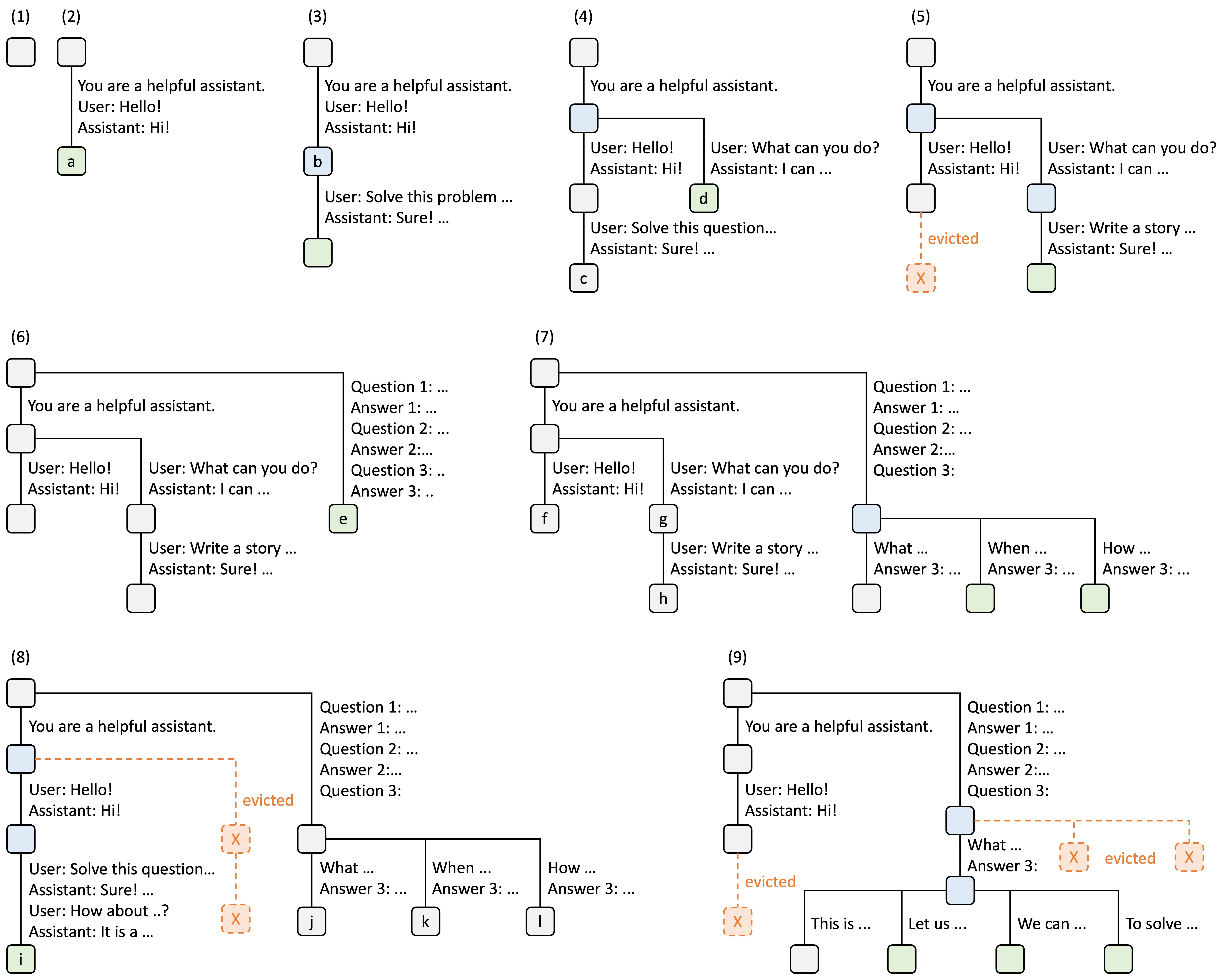
To dive deeper into this crucial optimization, let's look at the paper that introduces it.
SGLang: Efficient Execution of Structured Language Model Programs
The SGLang paper provides a deep dive into runtime optimizations for complex LLM programs, including multi-turn chat. We will focus on the section describing RadixAttention, its system for advanced KV cache reuse.
Read Section 3, 'Efficient KV Cache Reuse with RadixAttention'. Pay close attention to the description of the radix tree and how it maps token sequences to KV cache tensors. Also, look at Figure 9(c) in Appendix A, which explicitly shows the sharing pattern for 'Multi-turn chat'. Finally, read the 'Multi-turn chat' paragraph in the 'Workloads' part of Section 6.2, which confirms the performance impact: 'In multi-turn chat, SGLang reuses the KV cache of the chat history.'
By reading this, you can see the direct link:
- Your application-level session store holds the
List[ChatMessage]. - An optimized system-level KV cache manager (like RadixAttention) holds the corresponding
Tensordata in a highly structured way (a radix tree) on the GPU, ready for instant reuse.
This eliminates the redundant computation that would otherwise make multi-turn conversations prohibitively slow.
Conclusion
In this lesson, you designed and implemented a stateful service layer on top of your inference engine. You've moved from a simple, stateless API to one capable of handling concurrent, multi-turn conversations.
Key Takeaways:
- Stateful Services need a Session Store: A session store, identified by a
session_id, is the standard pattern for managing conversation histories. - Concurrency is Critical: For a single-process async application,
asyncio.Lockis sufficient for managing concurrent access. For scalable, multi-process applications, a distributed lock manager like Redis is required. - Application State Mirrors System State: The message history managed at the application level is a high-level representation of the state that needs to be managed at the system level.
- KV Cache is Stateful Inference: The most efficient way to handle the state of a conversation is by reusing the KV cache of the conversation history, avoiding massive re-computation during the prefill stage. Systems like SGLang with RadixAttention automate this process.
Preview of the Next Lesson:
We've established how to maintain conversation state. Now, let's make our agent more capable. In the next lesson, you will implement stateful multi-turn tool-calling, focusing on KV cache reuse across tool-call rounds and its impact on the scheduler. This will explore a more complex stateful workflow where the conversation involves not just chat but also interactions with external tools.