
Hello! Welcome back to our exploration of Solana's core concepts.
In the last lesson, we looked at the big picture: the transaction, which acts as an atomic container for actions on the Solana network. We saw that a transaction is essentially a message (containing instructions and accounts) wrapped with signatures for authorization.
Today, we're going to zoom in on the most crucial part of that message: the instruction. An instruction is the fundamental unit of execution on Solana. Understanding its structure is the key to both interacting with existing programs and building your own.
Your learning outcome for this lesson is to identify the components of a Solana instruction: program_id, accounts, and instruction data. By the end, you'll have a precise model of how a client tells a program what to do, which will be the foundation for writing our first program in the next module.
The Anatomy of an Instruction
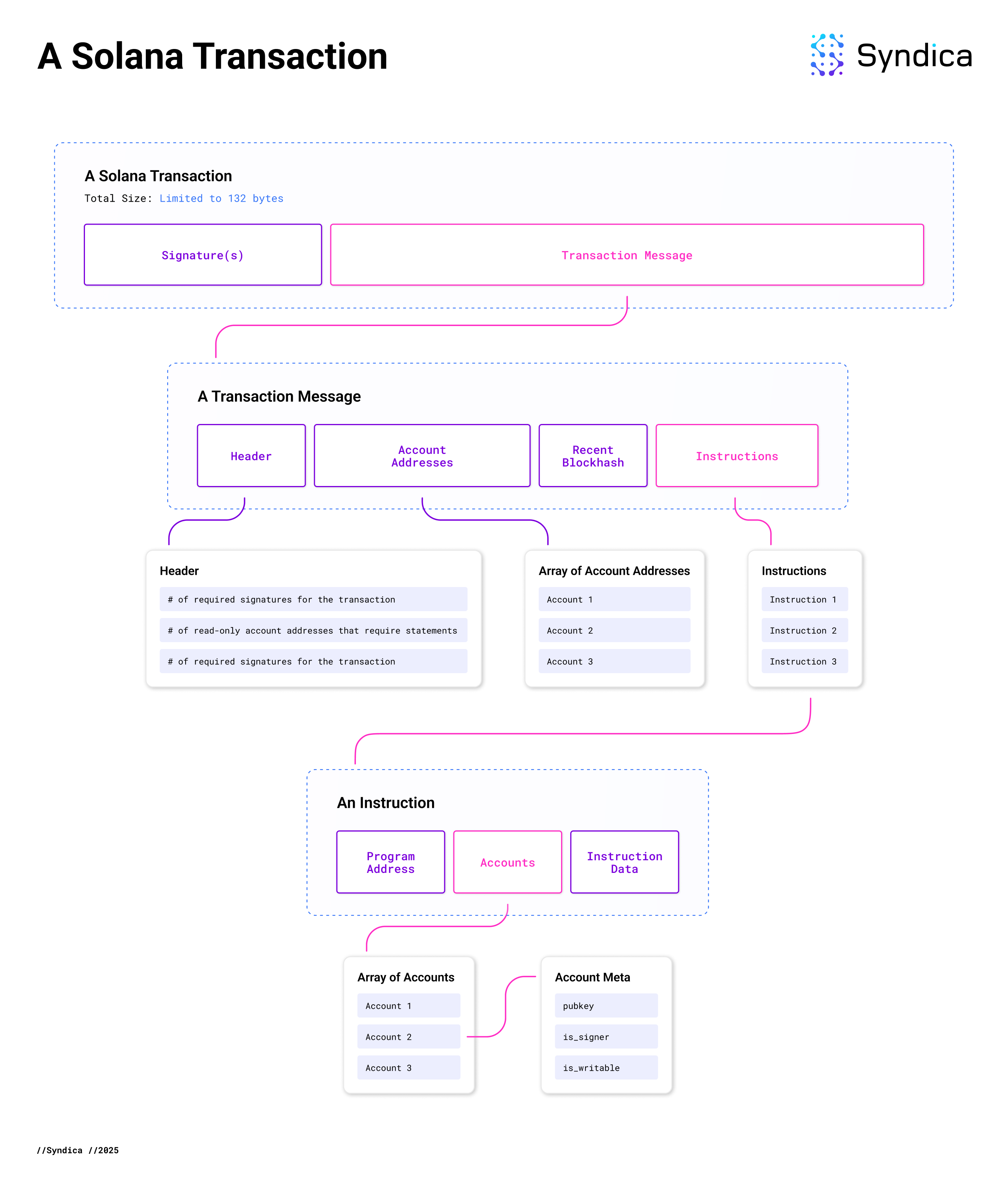
Think of a transaction as an API call batch. Within that batch, each instruction is a single, specific endpoint call. Just like an API call, it needs to specify which service to call, what data to operate on, and what action to perform with it. On Solana, these three parts are the program_id, accounts, and data.
Let's get a quick visual and verbal overview of these components.
What is Solana? The Basics - Nov 13th '23
The following clip from the "What is Solana? The Basics" video by Solandy gives a concise introduction to the three parts of an instruction.
Watch the segment from 22:13 to 23:35. Pay attention to how the speaker introduces the three core pieces of information an instruction needs to provide.
As the video explained, every instruction is composed of:
program_id: The address of the program you want to execute.accounts: A list of all accounts the program will need to read from or write to during its execution.data: A byte array containing any additional information the program needs, such as which internal function to run and what arguments to use.
Let's solidify this with a more formal definition and see how it's represented in Rust.
Solana: Transactions & Instructions
The article "Solana: Transactions & Instructions" provides a clear, text-based definition of these components and shows the underlying Rust struct.
Read the section titled 'Instructions'. This will show you the official Instruction struct and reinforce the definitions of its three fields.
Now that we have the basic definitions, let's examine each component more closely.
program_id: The "Who"
This is the simplest component. It's a Pubkey (a 32-byte address) that points to an executable account on the blockchain. When the Solana runtime processes your instruction, it uses this ID to load the corresponding program's code and execute it.
accounts: The "What"
This component is a list of all the accounts that your instruction needs to access. This is a key part of Solana's architecture. By requiring all accounts to be listed upfront, the runtime can determine which transactions can be processed in parallel. If two transactions don't touch any of the same writable accounts, they can be executed simultaneously.
Each account in the list is described by a structure called AccountMeta, which includes:
pubkey: The address of the account.is_signer: A boolean indicating if this account's owner must have signed the transaction. This is required to authorize debits or changes to data owned by the account.is_writable: A boolean indicating if the program is allowed to modify this account's data (or its lamport balance).
Let's look at a concrete example of an instruction to transfer SOL. This will make the roles of program_id and accounts very clear.
Solana: Transactions & Instructions
The same article has a great example of creating a SOL transfer instruction. The output clearly shows the program_id, the accounts with their metadata, and the raw data.
Study the 'Example Instruction Structure' section. Look at the Rust code that creates the transfer instruction and then analyze the JSON output. Notice: The program_id is '11111111111111111111111111111111', the address of the native System Program. The accounts array contains two accounts: the sender and the recipient. The sender has is_signer: true and is_writable: true (since their balance will decrease). The recipient has is_signer: false and is_writable: true (their balance will increase).
Instruction data: The "How"
This is arguably the most interesting component, especially given your background in both front-end development and electronics. The data field is simply a byte array (Vec<u8>). It is an opaque payload that is passed directly to the program specified by the program_id. It's up to the client and the program to agree on a format for this data.
From your front-end perspective, this is analogous to the body of a POST request. You serialize a JavaScript object into a format like JSON to send it to a server. Here, you serialize your instruction's parameters into a byte buffer.
From your electronics and radiophysics perspective, you're already familiar with low-level data representation. You know that to transmit information, you need a defined protocol. The instruction data is exactly that—a protocol defined by the program developer.
A very common pattern is to use the first byte (or first few bytes) as an instruction discriminator or tag. This is a number that maps to a specific function inside the program, like a Rust enum. The rest of the byte array contains the arguments for that function, serialized in a specific order and format (e.g., little-endian for numbers).
The next video provides an excellent, detailed explanation of how this works in practice.
Solana Smart Contract Tutorial: Sending and Unpacking Instruction Data
In this video from Josh's DevBox, you'll see a detailed walkthrough of how instruction data is structured, packed on the client, and prepared for unpacking inside a program. The explanation of byte layout and endianness should be very familiar.
Please watch these two segments: Understanding Instruction Data Format (08:02 - 12:24): This part explains how a 'set' instruction with a numeric value is laid out in a byte array. It covers the instruction tag and the little-endian representation of the u32 value. Client-Side Data Packing (21:18 - 28:29): This segment shows how to construct this byte array on the client-side using TypeScript and a library called buffer-layout. This directly connects to your front-end experience, showing how you'd build the instruction payload in a dApp.
Test your understanding!
Let's say you're designing a program with two instructions:
Initialize(max_score: u16)SubmitScore(player_name: String, score: u16)
You decide to use a single u8 as the instruction discriminator: 0 for Initialize and 1 for SubmitScore. How would you conceptually lay out the data byte array for an instruction SubmitScore("Alex", 500)? You don't need to get the exact byte values, just describe the structure.
Show answer
The data byte array would be structured as follows:
- Byte 0: The instruction discriminator, which would be the byte
0x01to signifySubmitScore. - Bytes 1-4: The length of the string "Alex" (which is 4), encoded as a
u32. - Bytes 5-8: The ASCII/UTF-8 bytes for the string "Alex" itself.
- Bytes 9-10: The score
500, encoded as au16in little-endian format.
This is a common serialization format (used by borsh), where a string is preceded by its length. The key is that the client and program must agree on this exact layout to communicate successfully.
This image provides a final visual summary, putting the instruction back into the context of the overall transaction.
Conclusion
In this lesson, we've dissected the anatomy of a Solana instruction. It is the core message that drives all activity on the network.
Here are the key takeaways:
- An instruction is a single command sent to a program on the Solana blockchain.
- It has three essential components:
program_id: The address of the program to execute (the "who").accounts: The list of accounts the program will read or write, each with metadata specifying if it's a signer and/or writable (the "what").data: A custom-formatted byte array that tells the program what specific action to perform and provides the necessary arguments (the "how").
- The
datapayload is opaque to the Solana runtime; it is an agreed-upon protocol between the client that creates the instruction and the program that processes it.
You now have the complete conceptual model of how to "talk" to a Solana program.
In our next module, we will finally dive into writing code. The very first lesson, "Write a basic Solana program entrypoint that processes an instruction," will have you on the receiving end of one of these instructions. You will write the Rust code that takes in the program_id, accounts, and data we discussed today and begins to act on them.
Can't find a good explanation? Sign up and we'll make it for you
Sign up