Hello! Welcome to our next lesson.
In our previous session, we focused on micro-level resilience, configuring retry policies in nginx to handle transient failures with upstream servers. We saw how proxy_next_upstream can improve availability but also carries the risk of "retry storms" if not managed carefully.
Today, we're scaling up our perspective from managing individual servers in a pool to managing traffic flow across entire datacenter clusters. This is a critical aspect of building globally available, fault-tolerant systems.
By the end of this lesson, you will be able to configure nginx as an edge proxy to distribute traffic across simulated datacenter clusters using weighted routing. We will explore how to model a multi-DC architecture in nginx and use weighted distribution for strategic traffic management, such as canary releases, datacenter draining, and failover.
1. The Multi-Datacenter Architecture and the Edge Proxy
In a high-load, globally distributed system, relying on a single physical location is a significant risk. A network outage, power failure, or natural disaster could take your entire service offline. To mitigate this, services are often deployed across multiple datacenters (DCs).
An edge proxy sits at the perimeter of your network, acting as the primary entry point for all incoming user traffic. It is responsible for making the initial routing decision: which datacenter should handle this request?
The goals of a multi-DC architecture are typically:
- Fault Tolerance: If one DC fails, traffic can be redirected to healthy DCs, keeping the service online.
- Performance: By directing users to the geographically closest DC, you can reduce latency. (We'll touch on this but focus on weighting today).
- Capacity Management & Maintenance: You can perform major maintenance on an entire DC without downtime by gradually shifting traffic away from it.
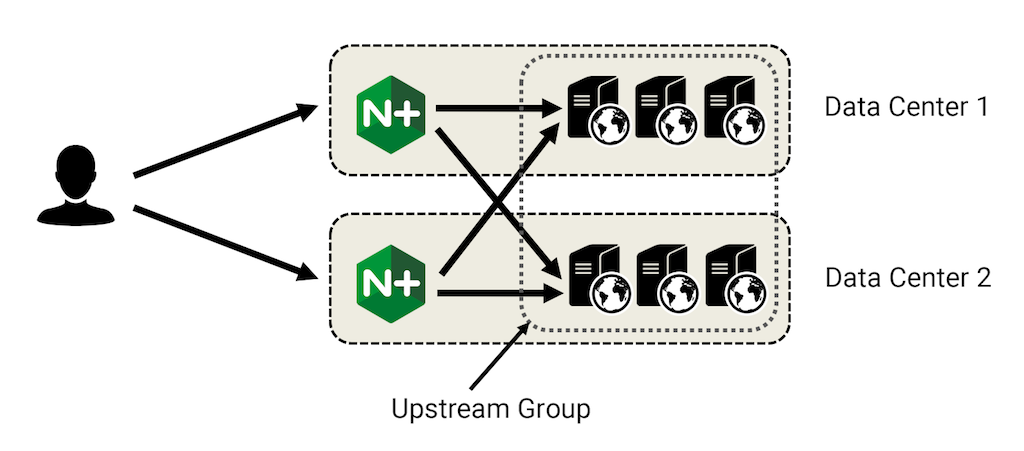
In our last lesson, we discussed how retries help contain the "blast radius" of a single failing server. A multi-DC architecture applies the same principle at a macro scale: the blast radius of a full datacenter outage is contained, as other DCs can take over the load.
2. Implementing Weighted Routing in Nginx
The simplest and most direct way to control traffic distribution across datacenters in nginx is through weighted routing. We can configure an upstream group where each server entry doesn't represent a single application server, but rather the entry point (e.g., a regional load balancer) for an entire datacenter.
The weight parameter on the server directive becomes our primary tool for controlling the percentage of traffic sent to each DC.
To understand the mechanics, let's start with the official NGINX documentation.
HTTP Load Balancing | NGINX Documentation
This document from the NGINX admin guide provides a clear and concise explanation of how to use the weight parameter. It's a great starting point for understanding the core concept.
Please read the section titled 'Server Weights'. It shows the basic syntax and provides a simple example of how nginx distributes requests based on the assigned weights.
Now, let's see a video demonstration that brings this concept to life.
This video from the official NGINX channel explains the default weighted round-robin algorithm and then demonstrates how changing weights in the configuration dynamically alters traffic distribution.
Please watch the first segment (03:30–05:12) for a conceptual explanation of how weights are calculated. Then, watch the second segment (19:18–23:42), which provides a live demo of changing weights and observing the resulting traffic flow using a curl loop. This practical view is very effective.
Configuration Example: Multi-DC Weighted Routing
Let's apply this to a multi-DC scenario. Imagine we have two datacenters, one in the US (Virginia) and one in the EU (Frankfurt). We want to send 80% of our traffic to the US-DC and 20% to the EU-DC.
The nginx configuration at the edge would look like this:
# /etc/nginx/nginx.conf

http {
    # Each 'server' here represents the entry point for an entire DC.
    # This could be a DNS name that resolves to the load balancers in that DC.
    upstream global_service {
        server us-va.myapp.com weight=80;
        server eu-fra.myapp.com weight=20;
    }

    server {
        listen 80;
        server_name www.myapp.com;

        location / {
            proxy_pass http://global_service;
            proxy_set_header Host $host;
            proxy_set_header X-Real-IP $remote_addr;
            proxy_set_header X-Forwarded-For $proxy_add_x_forwarded_for;

            # We can reuse the timeout and retry policies from our previous lesson
            proxy_connect_timeout 2s;
            proxy_read_timeout 5s;
            proxy_next_upstream error timeout http_503;
            proxy_next_upstream_tries 3;
        }
    }
}
In this configuration:
- The
upstream global_serviceblock defines our two datacenters. - Nginx adds the weights (80 + 20 = 100).
- Out of every 100 requests, approximately 80 will be sent to
us-va.myapp.comand 20 toeu-fra.myapp.com. - If
us-va.myapp.combecomes unavailable (fails health checks or returns errors defined inproxy_next_upstream), nginx will automatically send requests toeu-fra.myapp.com.
3. Practical Use Cases for Weighted Routing
The ability to precisely control the percentage of traffic flowing to each datacenter is a powerful tool for operations and release management. Given your experience in managing high-load systems, you'll recognize these patterns.
Use Case 1: DC Draining and Canarying
When you need to perform maintenance on a datacenter or are bringing a new one online, you want to shift traffic gradually.
-
Draining a DC: To take
eu-fra.myapp.comoffline for maintenance, you wouldn't just shut it down. Instead, you would gradually decrease its weight over time:weight=20->weight=10weight=10->weight=5weight=5->weight=1weight=1-> Mark server asdownor remove it.
This graceful "draining" prevents abrupt traffic shifts and allows existing connections to complete, ensuring a smooth user experience.
-
Canarying a New DC: When bringing a new DC online (e.g.,
ap-sng.myapp.com), you start with a very low weight to send a small fraction of live traffic to it.upstream global_service { server us-va.myapp.com weight=80; server eu-fra.myapp.com weight=20; server ap-sng.myapp.com weight=1; # Canary }This allows you to validate the new DC's performance, correctness, and stability with real traffic before committing more load.
Use Case 2: Active-Passive Failover
For simpler disaster recovery, you might run in an active-passive model. One DC handles 100% of the traffic, and the other is on standby. The backup parameter is a special case of weighted routing for this exact purpose.
Module ngx_http_upstream_module
The official nginx module documentation details several useful parameters for the server directive. Let's focus on the backup parameter.
In this documentation, find the description for the backup parameter within the server directive section. Understand its function as a failover mechanism.
The configuration is straightforward:
upstream global_service {
    server us-va.myapp.com;          # Active DC
    server eu-fra.myapp.com backup;   # Passive DC
}
Here, all requests go to us-va.myapp.com. Only when it is considered unavailable will nginx start sending traffic to eu-fra.myapp.com.
Use Case 3: Capacity and Cost Optimization
Datacenters are not always equal. One might have more server capacity, or the operational costs (e.g., bandwidth, electricity) might be lower. You can use weights to skew traffic towards the more capable or cheaper DC while still keeping the other one active and ready for failover.
For example, if the US DC is 30% cheaper to operate during its off-peak hours, you might adjust weights to send 70% of traffic there and 30% to the EU.
4. Limitations and A Glimpse Forward
This weighted routing approach is powerful but has a key limitation: it is not geographically aware. A user in Germany might be routed to the US datacenter simply because its weight is higher. This increases latency for that user.
The next level of sophistication is to introduce a layer of routing that is geographically aware. This is typically handled by GeoDNS (or Geolocation-based routing). With GeoDNS, a DNS query for www.myapp.com is resolved to different IP addresses based on the geographic location of the user's DNS resolver.
- A user in Europe gets the IP of the Frankfurt edge proxy.
- A user in North America gets the IP of the Virginia edge proxy.
This GeoDNS layer performs the coarse-grained, latency-based routing. The weighted routing we've discussed today is then used within a region or as a fallback, giving you fine-grained control for operations like DC draining and failover. We will cover DNS in more detail in future lessons.
Conclusion
Today we elevated our view from server-level load balancing to datacenter-level traffic distribution. By using nginx as an edge proxy, you can implement robust and flexible traffic management strategies that are essential for building resilient, large-scale systems.
Key Takeaways:
- Edge Proxy Role: Nginx can act as the front door to your entire infrastructure, distributing traffic across multiple datacenters.
- Weighted Routing: The
weightparameter in theupstreamblock is the primary mechanism for controlling the percentage of traffic sent to each DC. - Practical Applications: Weighted routing is not just for load balancing; it's a critical operational tool for canarying new infrastructure, draining DCs for maintenance, implementing failover strategies (
backupdirective), and optimizing for cost and capacity. - Geographic Limitation: Simple weighted routing at a single edge location is not latency-aware for a global user base. It is often combined with GeoDNS for a complete global traffic management solution.
In our next lesson, we will pivot from the network and proxy layer to the persistence layer. We'll dive deep into one of the most popular relational databases, PostgreSQL, and start by analyzing the trade-offs of ACID properties for high-throughput workloads.