
Hello! Welcome back to your course on building and scaling your SaaS ventures.
In our last lesson, we focused on crafting and A/B testing high-impact social media hooks and captions. You learned how to grab your audience's attention and drive traffic to your core content. Now, we're going to expand on that by building a complete, scalable system.
Today's lesson is all about leverage. You'll learn how to take a single, high-effort piece of long-form content—like a blog post—and efficiently transform it into a multitude of assets for different platforms. This addresses the learning outcome: Establish a workflow for repurposing a single long-form article into multiple assets (social posts, a newsletter, and a video script) using AI.
This is one of the most powerful strategies a founder can employ. It maximizes the return on your content creation efforts, ensures a consistent presence across multiple channels, and saves you an enormous amount of time, allowing you to focus on product and customers.
1. The "Create Once, Publish Everywhere" Framework
The core idea behind content repurposing is to start with one significant piece of "pillar content" and atomize it into smaller, platform-native formats. A single in-depth article can become the source for a week's worth of marketing across all your channels.
This visual illustrates the concept perfectly. While it starts with a podcast, the principle is the same whether your source is a video, a webinar, or, in our case, a blog post.
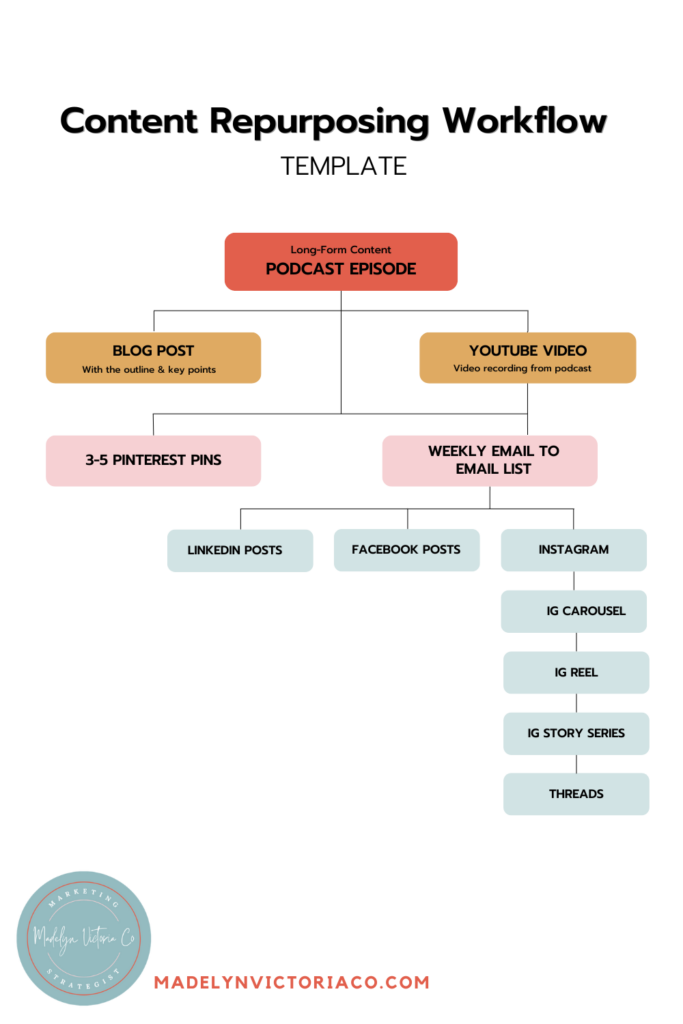
Why is this so effective? Because different people prefer to consume content in different ways and on different platforms. A potential B2B customer might engage with a detailed LinkedIn post, while another prospect might discover your brand through a quick, insightful tip on a YouTube Short. This strategy allows you to meet your audience where they are.
2. The AI-Powered Repurposing Engine in Action
Now, let's get into the practical workflow. We'll see how to use AI to systematically deconstruct a core piece of content and generate the various assets we need.
The following video from HubSpot, while starting with a video as its source, provides an outstanding demonstration of the end-to-end repurposing process using AI tools. The principles and prompts are directly applicable to transforming a long-form article.
The Latest AI-Powered Content Creation Workflow for Business (Speed Challenge!)
In 'The Latest AI-Powered Content Creation Workflow for Business', the presenter takes on a speed challenge to turn one idea into over a dozen content assets. We'll focus on the part where they use AI to generate text-based and visual content from the core transcript.
Watch the following segments to see the workflow in action: From Transcript to Text-Based Assets (11:54 - 14:17): Pay close attention to how the presenter uses the transcript (which is analogous to your article) and ChatGPT to generate a blog post, an email newsletter, a LinkedIn newsletter, an X (Twitter) thread, and a LinkedIn post. Note the prompts they use. Generating Short-Form Video Ideas (09:13 - 10:09): Although the tool here creates video clips directly, observe the logic. The AI is identifying short, punchy, self-contained ideas from the main content. This is the exact same logic we will use to generate video scripts.
This video showcases a powerful, repeatable process. Let's formalize it into a step-by-step workflow you can use with an article as your starting point.
3. Your Step-by-Step Repurposing Workflow
This workflow uses a large language model like ChatGPT or Claude, which you're already familiar with. The key is to provide the full article as context and then issue a series of specific prompts to generate each asset.
Source Material: Your long-form blog post.
Step 1: Set the Context
Start your chat session by uploading your article or pasting the text with this instruction:
Prompt:
"You are an expert content marketer. I am providing you with a long-form article I have written. Use this article as the single source of truth to generate a variety of content assets based on my follow-up requests. Do not use outside information. Here is the article: [Paste your full article text here]"
Step 2: Generate Social Media Posts
Now, ask the AI to create posts tailored for each platform.
- LinkedIn Post (for thought leadership):
Prompt:
"Based on the article, write a thought-leadership post for LinkedIn. It should start with a strong hook, break down the main argument into 3-4 bullet points, and end with an open-ended question to encourage comments. The tone should be professional and insightful." - X (Twitter) Thread (for engagement):
Prompt:
"Deconstruct the core argument of the article into a 5-tweet thread for X. The first tweet must be a powerful hook to get people to click 'Show more'. Each subsequent tweet should build on the last. The final tweet should include a call-to-action to read the full article." - Instagram Post/Carousel Ideas (for visual storytelling):
Prompt:
"Extract 5 key, tangible tips or surprising statistics from the article. For each one, write a short, punchy title and a 1-2 sentence description. This will be used to create a 5-slide Instagram carousel."
You can then take these text snippets and use a tool like Canva to quickly design the carousel. Some tools are even designed specifically for this, turning text into social-ready formats.

Step 3: Generate an Email Newsletter
Your email list is a valuable asset. Use this prompt to create a newsletter that drives traffic back to your blog.
Prompt:
"Write an email newsletter for my subscribers based on the article. The subject line should be curiosity-driven. The email should have a brief, personal introduction, summarize the most valuable takeaway for the reader, and have a clear call-to-action button/link encouraging them to 'Read the Full Post' for more details."
Step 4: Generate a Video Script
This is a crucial step for your goal of creating video content. You can generate scripts for short, engaging videos directly from your article.
Prompt:
"Create a 60-second video script for a YouTube Short or Instagram Reel from the most compelling point in the article. The script should be structured in three parts: \n1. A powerful hook (first 3 seconds). \n2. The core message, explained simply. \n3. A call-to-action (e.g., 'Follow for more tips' or 'Read the full guide at the link in my bio'). \nAlso, suggest 3-4 simple B-roll shot ideas to visually support the script."
With this script, you are now ready for the AI voice and video generation steps we will cover in Module 6.
4. The Next Level: Automating the Workflow
Once you have a manual workflow that you've tested and refined, you can start to think about automation. Given your computer science background, this is where things get really interesting. You can build systems that trigger this entire repurposing cascade automatically.
Tools like n8n, Zapier, or Make allow you to create automated workflows. For example, you could set up an automation that:
- Detects when a new post is published to your blog's RSS feed.
- Sends the article URL to a scraping tool (like Firecrawl) to get the clean text.
- Feeds the text to an LLM via API with a sequence of prompts like the ones above.
- Sends the generated assets to a social media scheduler (like Buffer or Hypefury) as drafts.
This video provides a high-level look at what such an automation looks like in practice using the tool n8n.
This AI Turns Blog Posts Into YouTube Videos Automatically (n8n template)
The video 'This AI Turns Blog Posts Into YouTube Videos Automatically' demonstrates a powerful, automated approach to repurposing. We'll just watch the overview to understand the concept.
Watch the segment from 08:06 to 10:05. Focus on the high-level system overview. Notice how the workflow takes a single blog post URL as an input and 'fans out' to create multiple outputs (short-form and long-form video scripts). This is your manual workflow, but fully automated.
You don't need to build this today, but it's important to know that this is the path to true scalability in content marketing. First, you establish a manual process that works; then, you automate it.
Test your understanding!
You've just written a long-form article titled "The Founder's Guide to Customer Discovery: How to Find Your First 10 Customers." Using the workflow we've discussed, what would be the specific prompt you'd use to generate an X (Twitter) thread from this article?
Show answer
A good prompt would be something like this:
"Based on the article 'The Founder's Guide to Customer Discovery,' create a 6-tweet thread for X. The first tweet must be a strong hook about the mistake most founders make in finding customers. Tweets 2-5 should outline the core steps of the customer discovery process from the article. The final tweet should encourage founders to read the full guide with a link."
This prompt is specific, defines the structure, sets the length, and includes a call-to-action.
Conclusion
You now have a powerful, repeatable workflow to multiply the impact of every piece of content you create. By starting with one high-value article, you can systematically generate a diverse range of assets to engage your audience across multiple platforms. This is the essence of working smarter, not harder—a principle that is fundamental to scaling a SaaS company, especially as a solo founder.
Key Takeaways:
- Adopt a "One-to-Many" Strategy: Treat every long-form article as a source for a full campaign of smaller content pieces.
- Master the AI-Powered Workflow: Use a sequence of specific prompts in an LLM (like ChatGPT or Claude) to transform your article into social posts, a newsletter, and video scripts.
- Tailor Content for Each Platform: Generate assets that feel native to the channel, whether it's a professional post on LinkedIn, a visual carousel on Instagram, or a fast-paced script for a Reel.
- Keep Automation in Mind: Once your manual workflow is solid, you can use tools like n8n or Zapier to automate the entire process for ultimate efficiency.
Preview of the Next Lesson:
Today, we used a general-purpose AI to repurpose content. In our next lesson, "Design a custom GPT trained on your product information and brand voice to assist with marketing and support content," we'll take this a step further. You'll learn how to build a specialized AI assistant that's an expert on your product, capable of generating highly relevant marketing and support content on demand.