Welcome back! In our last lesson, you learned how to create a custom GPT trained on your specific business information, effectively building a specialized AI marketing assistant. This is a powerful engine for generating first-draft content that's already aligned with your brand.
However, as any great founder or marketer knows, a first draft is never the final product. Today, we'll tackle the crucial next step: refining and polishing that raw AI output into high-quality, compelling content ready for publication.
This lesson directly addresses the learning outcome: Implement an AI-assisted editing process using Grammarly and Claude for content refinement and polishing.
Mastering this workflow is a massive leverage point for you as a founder. It allows you to maintain a high standard of quality and a consistent brand voice across all your marketing channels, without needing to hire a full-time editor, enabling you to scale your content operations efficiently.
1. The Editor's Mindset: Why We Must Edit AI Content
Before diving into the tools, it's essential to adopt the right mindset. AI is an incredibly powerful collaborator, but it is not a replacement for your judgment, personality, and strategic oversight. Relying on raw AI output is a common mistake that leads to generic, soulless, and sometimes inaccurate content.
My Exact Claude AI Setup That Saves Me 10+ Hours ...
The article 'My Exact Claude AI Setup' by Amber Figlow clearly articulates why editing AI output is non-negotiable. Let's start by understanding this core principle.
Please read the following two sections: 'Why You Must Always Edit AI Output': This section provides the foundational reasons for the editing process we're about to build. 'AI is a Tool, Not a Replacement': This short, final section reinforces the collaborative mindset needed for success.
As the article states, we edit AI content for four key reasons:
- To avoid IP/copyright issues.
- To ensure the content uses your brand voice and tone.
- To fact-check any statistics or claims.
- To add your unique personality and experience.
Our goal is not to have AI write for us, but to have it write with us. The process we'll build today is designed to do exactly that, transforming you into a highly efficient editor-in-chief for your SaaS ventures.
2. The First Pass: Polishing with Grammarly
Think of our editing process in two layers. The first layer is the "micro-edit," focusing on correctness, clarity, and tone at the sentence level. Our tool for this is Grammarly. With your computer science background, you can think of Grammarly as a sophisticated linter for your writing—it catches errors, enforces style rules, and suggests improvements.
To get started with Grammarly's features, especially its AI-powered suggestions, let's watch a practical demonstration.
How to Use Grammarly AI to Improve Your Writing
This tutorial, 'How to Use Grammarly AI to Improve Your Writing' by Kevin Stratvert, gives a fantastic hands-on tour of the tool's capabilities. We'll focus on how to use it for refining existing text.
Watch these key segments to understand how to integrate Grammarly into your workflow: Introduction (00:00 - 00:25): A quick overview of what Grammarly does. Getting Started (00:25 - 02:22): Understand the free vs. premium features and how to install it across your devices. AI-Assisted Composition (02:22 - 04:41): Pay close attention to how you can use the AI to refine text by specifying a desired tone, such as making it 'more assertive'. Improving and Repurposing (04:41 - 08:58): See how you can highlight text and use Grammarly to improve it, add elements like emojis and hashtags, or even reformat it entirely.
Applying Grammarly in Your Workflow
After generating a blog post or social media update with your custom GPT, your first step is to run it through Grammarly. Here’s what to focus on:
- Correctness: Fix all spelling, grammar, and punctuation errors. This is the baseline for professional content.
- Clarity: Act on suggestions to make sentences less wordy and more direct.
- Tone & Style: Use Grammarly’s AI features to adjust the tone. If a paragraph sounds too robotic, highlight it and ask Grammarly to make it more "engaging" or "confident."
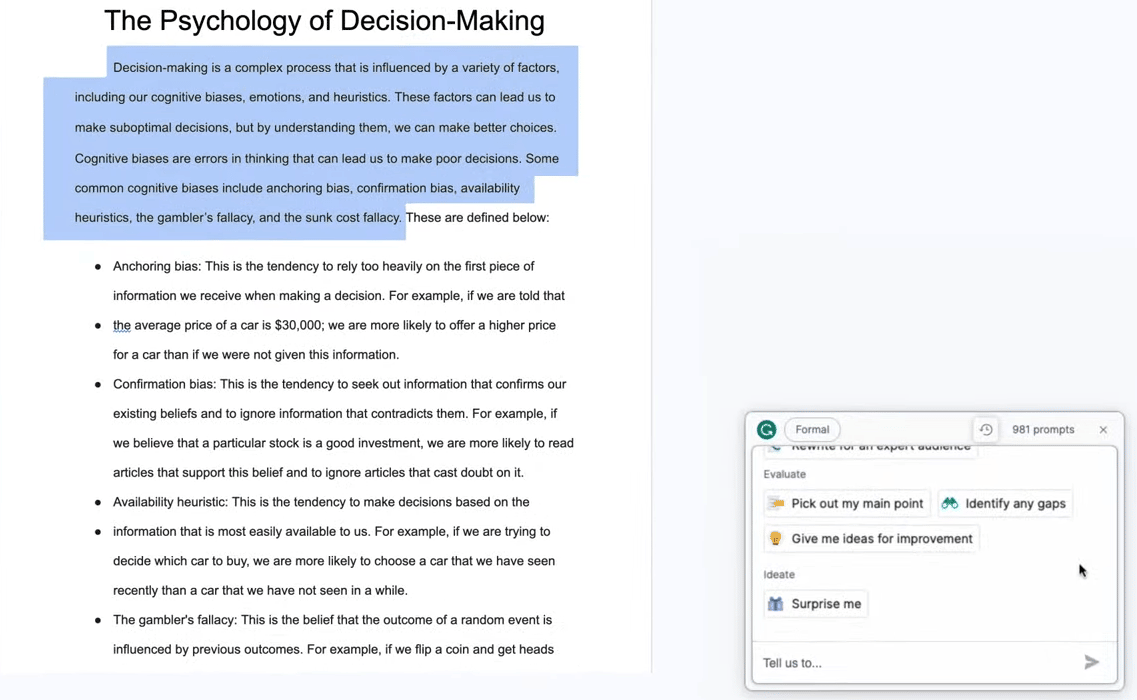
This first pass cleans up the raw text and ensures it meets a professional standard, preparing it for a deeper, more strategic edit.

3. The Second Pass: Deep Refinement with Claude
With the micro-edits complete, we move to the second layer: the "macro-edit." This is where we analyze the structure, flow, and argumentation of the piece. Our tool for this is Claude, which you're already familiar with. Its large context window and strong reasoning abilities make it an excellent partner for deep-level refinement.
Writer and technical communicator Tom Johnson has an excellent, iterative process for working with AI that we can adapt for our editing workflow.
My experience trying to write original, full-length human ...
In the article 'My experience trying to write original, full-length human ...', Tom Johnson outlines his step-by-step process. We'll focus on the steps related to editing and fine-tuning.
Please read the following three short sections from the 'Step-by-step walk through': 'Step 7: Edit the whole': Focus on the importance of evaluating the overall flow and structure. 'Step 8: Fine tune the article': Note how this stage moves to more nuanced work like language, transitions, and trimming verbosity. 'Step 10: Let the content sit a day or two before publishing': This highlights the value of stepping away to gain a fresh perspective.
To perform these "whole article" edits and fine-tuning with Claude, you need to be a good director. This involves using specific, advanced prompting techniques.
Goodbye ChatGPT 5... Ultimate Claude 4.1 Guide 2025 (How to use Claude AI for beginners)
The 'Ultimate Claude 4.1 Guide' from AI Master explains several advanced prompting techniques that are perfect for editing. Let's see how to apply them.
Watch the following segments with an editor's mindset: Advanced Prompting (04:15 - 07:11): Pay attention to assigning roles ('You are a world-class editor...'), providing examples, and telling it 'how to think' ('Think step-by-step...'). Interactive Problem-Solving (15:24 - 17:35): This is key. See how you can make 'surgical edits' by targeting specific paragraphs or asking for tonal shifts without rewriting the whole piece. Custom Styles (17:35 - 19:14): This is powerful for brand alignment. You can remind Claude of your brand voice by providing examples or describing the tone you want.
Applying Claude in Your Workflow
After your Grammarly pass, bring the text to Claude and perform these actions:
-
Structural Review: Paste the entire article and use a prompt like:
"You are a sharp, insightful editor for a B2B SaaS blog. Read the following draft.
- Does the argument flow logically from introduction to conclusion?
- What is the weakest paragraph and why?
- Suggest 3 ways to make the introduction more compelling for a busy founder."
-
Surgical Refinements: Based on the feedback, give specific commands:
"Rewrite the second paragraph to be more direct and use an analogy related to software development."
"This sentence feels clunky: '[paste sentence]'. Give me three more concise alternatives." -
Brand Voice Alignment: This connects back to our previous lesson. You can feed Claude the Brand Voice Guide you created for your custom GPT.
"Review this final draft against the following brand voice guidelines. Highlight any words or phrases that don't align and suggest replacements.
[Paste your brand voice guide here]"
4. Your AI-Assisted Editing Workflow
Let's combine these concepts into a simple, four-step workflow you can apply to any piece of content.
- Generate Draft (Custom GPT): Use the custom GPT you designed in the last lesson to produce your first draft. This content is already primed with your product info and brand voice.
- Polishing Pass (Grammarly): Paste the draft into Grammarly. Fix all technical errors and use the AI suggestions to improve clarity and tone at a sentence level.
- Refinement Pass (Claude): Take the polished text to Claude. Conduct a high-level structural review and then perform surgical, interactive edits to strengthen your arguments and perfect the flow.
- Final Human Review: The final say is always yours. Read the article aloud to catch awkward phrasing. If possible, let it sit for a few hours (or a day) before publishing to catch anything you missed. Your human intuition is the ultimate quality gate.
Test your understanding!
Imagine your custom GPT generated this paragraph for a blog post about your new SaaS, "CodeSentry," an automated code review tool:
“CodeSentry is a paradigm-shifting solution for modern development teams. It leverages synergistic AI algorithms to proactively identify vulnerabilities within your codebase, thereby mitigating risk and enhancing your security posture. Our platform integrates seamlessly into your existing CI/CD pipeline, offering a frictionless developer experience.”
Write two distinct prompts to improve this paragraph:
- A prompt for Grammarly's AI to fix the tone.
- A prompt for Claude to make the core message clearer and more benefit-driven.
Show answer
-
Grammarly Prompt: Highlight the paragraph and give a prompt like: "Make this sound less like corporate jargon and more like a helpful colleague explaining a tool." This focuses on the sentence-level tone adjustment that Grammarly excels at.
-
Claude Prompt: "Rewrite this paragraph to be more direct and focus on the main benefit for a CTO. Avoid buzzwords like 'paradigm-shifting' and 'synergistic'. Instead of saying 'mitigating risk', explain how it prevents a real-world problem, like a data breach. Start with the problem it solves." This is a macro-level prompt that asks Claude to restructure the paragraph around a core benefit for a specific persona.
Conclusion
You have now established a complete, end-to-end AI-assisted content workflow. You can go from a raw idea to a polished, on-brand, publication-ready article with incredible speed and quality control. This process of Generate -> Polish -> Refine -> Review is a cornerstone of scaling your marketing efforts as a solo founder or small team.
Key Takeaways:
- AI content is a first draft: Always assume AI output needs human refinement.
- Use a two-layer editing process: Use Grammarly for "micro" polishing (grammar, clarity, tone) and Claude for "macro" refinement (structure, flow, argumentation).
- Be the director: Your role is to guide the AI tools with specific, strategic prompts.
- The final review is human: Your intuition and strategic oversight are the most valuable parts of the process.
Preview of the Next Lesson:
With your content creation and editing machine fully operational, it's time to put it to work. In our next lesson, we will kick off Module 4: Launch Strategy & Distribution Channels by diving into one of the most important launch platforms for a new SaaS: Product Hunt. You'll learn how to identify top hunters and prepare the assets for your launch—assets that you are now perfectly equipped to write and refine using the workflow you mastered today.