
Welcome back. In the last lesson, we treated morphology as part of the computational problem: body geometry, sensors, joints, contact surfaces, and actuators determine both what the agent can know and what it can reliably do. Earlier, the POMDP formulation gave us the distinction between the world’s hidden state and the observation available to a policy.
This lesson turns those ideas into a precise simulator interface. You will learn to specify an observation space—the information presented to a controller at each decision point—and an action space—the commands it is allowed to issue. The important question is not merely “what arrays should my code return?” It is: what information and authority would this embodied system genuinely have at this point in the perception-action loop?
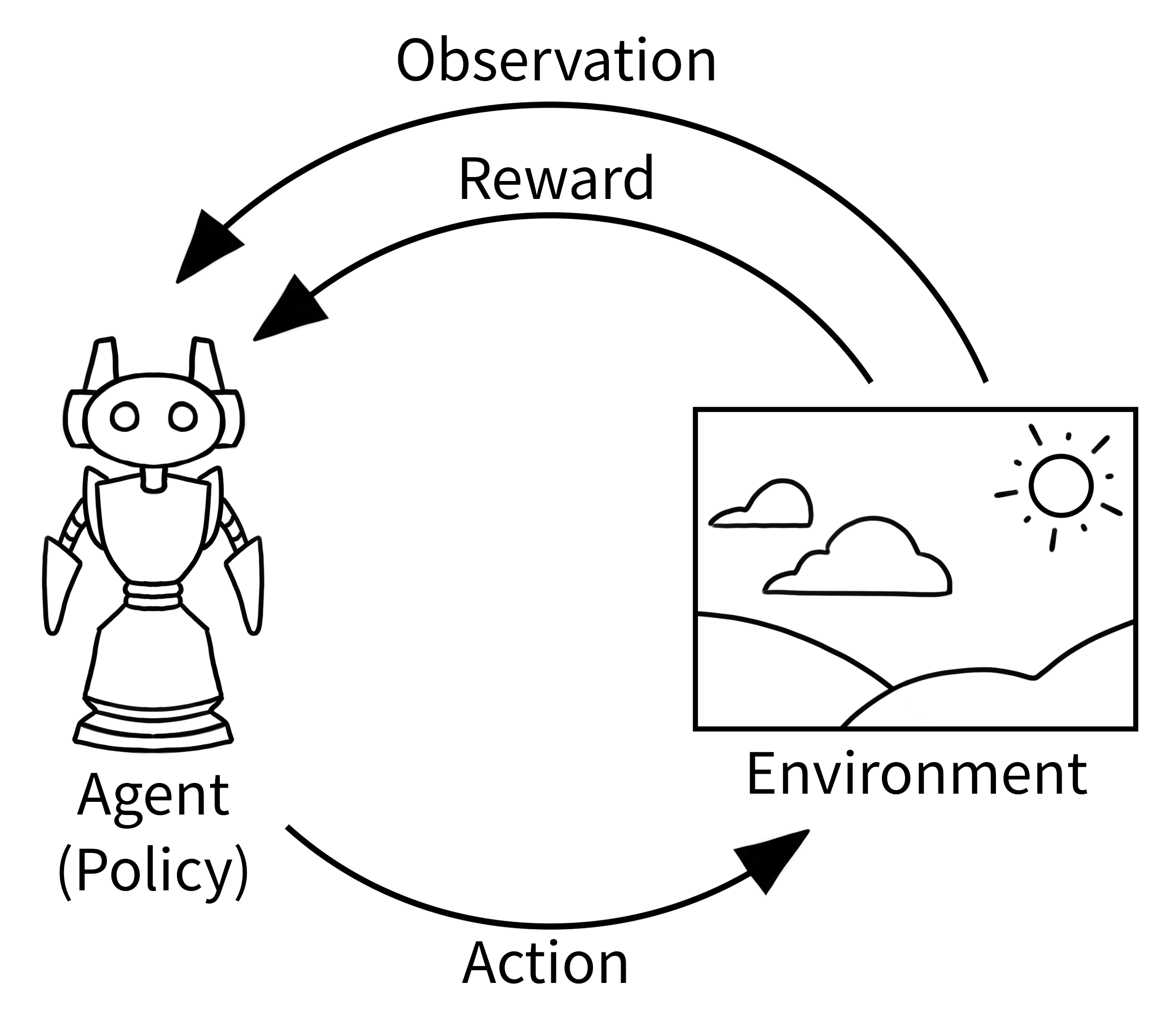
Observation and action spaces are interface contracts
Let the simulator’s full physical state be , the policy observation be , and the action selected by the policy be . A policy has the form
The simulator may contain extensive internal state: every rigid-body pose and velocity, contact impulses, actuator states, friction parameters, random-number-generator state, and so on. The policy should not automatically receive all of it. Instead, it receives an observation drawn from the designated observation space:
Likewise, the policy cannot issue an abstract instruction such as “pick up the block carefully.” It chooses a value from an action space:
The environment translates that value into physical control inputs—perhaps joint torques, target positions, wheel velocities, or gripper commands. Thus, it is useful to distinguish:
| Layer | Question | Example |
|---|---|---|
| Simulator state | What is physically true inside the simulation? | Exact object pose, contact forces, all joint states |
| Observation | What does the policy get to measure or infer now? | Camera image, joint encoders, IMU, target position |
| Policy action | What values may the policy choose? | Eight normalized motor commands |
| Actuator command | What is sent to the simulated mechanism? | Torque, velocity target, position target |
This separation prevents a common conceptual error: treating a simulator’s privileged internal state as if it were a robot sensor. Giving a policy the exact global position of every object may be useful for an early debugging baseline, but it creates an oracle observation that hardware may not be able to reproduce.
A space is more than a shape
A specification such as “observation shape (39,)” is incomplete. A usable specification states:
- Meaning: What does each component measure?
- Reference frame: Is position expressed in world, robot-base, camera, or end-effector coordinates?
- Units: Meters, radians, radians per second, newtons, pixels, or normalized values?
- Bounds: What values are valid, and what occurs outside the nominal range?
- Data type: Commonly
float32, but sometimes integer or Boolean. - Timing: At what rate is it sampled, and does it contain delayed, filtered, or previous-action information?
- Availability: Could the specified sensor or estimator produce it at decision time?
The same rigor applies to actions. “Four actions” might mean four symbolic moves, four target velocities, four torques, or three Cartesian motion commands plus a gripper command. These induce very different learning and control problems.
Make your own custom environment - Gymnasium Documentation
Read Gymnasium’s “Make your own custom environment” documentation for a compact example of how abstract task design becomes formal observation_space and action_space declarations.
Begin with “Subclassing gymnasium.Env” to orient yourself to the GridWorld task. Then, in “Declaration and Initialization,” read the space setup and inspect the code immediately below it. Notice that the documentation specifies both the meaning of each integer action and the allowed range and structure of each observation field.
Designing observations: expose decision-relevant, physically available information
An observation should provide information needed to choose a good next action, but only through a plausible sensing or estimation pipeline. A good design begins with the task, rather than with whatever the simulator makes convenient to retrieve.
For a robot that must move an object, its policy may need to know:
- where its end effector is relative to the object;
- whether its fingers are open, closed, or in contact;
- whether the object is moving or slipping;
- where the intended goal is;
- whether the arm is already moving quickly enough that braking is needed.
It does not necessarily need every global coordinate, every object material parameter, or the simulator’s contact solver output.
Choose representations that match the control problem
Suppose a mobile robot must drive toward a target. Giving the policy the robot’s global position and the target’s global position is mathematically sufficient in a simple simulation. But the more control-relevant representation is often the target’s displacement in the robot’s local frame:
This tells the policy directly whether the target is ahead, behind, left, or right. It also avoids forcing the policy to learn that a global position of and one of can demand the same local turning behavior.
Similarly:
- For a manipulator, the object position relative to the gripper is often more useful than two independent world-frame positions.
- For an IMU-equipped legged robot, a gravity direction expressed in the body frame is generally a better orientation representation than Euler angles, which wrap at angular boundaries.
- For a velocity-controlled system, velocities matter because identical positions can require different actions when the robot is moving in opposite directions.
- For a goal-conditioned task, the desired goal must be part of the observation; otherwise one policy input could correspond to incompatible objectives.
Structured observations versus one flat vector
Gymnasium supports structured spaces such as a dictionary. This can preserve meaning:
observation = {
    "proprioception": ...,
    "goal": ...,
    "image": ...,
}
A learning library may later flatten or encode those fields before passing them to a neural network. That is an implementation choice, not a reason to lose the semantic specification. During debugging, a structured observation makes it much easier to inspect missing fields, incorrect units, or coordinate-frame mistakes.
A flat vector is perfectly valid when its layout is documented, stable, and appropriate for the learning stack. The key is that every index must have a defined interpretation.
Designing actions: choose the agent’s level of control
The action space describes what the policy selects, not the behavior you hope it will produce. Its design determines how much low-level control the policy must learn.
Consider a robot arm moving a gripper. Several action abstractions are possible:
| Policy action | Meaning | Consequence |
|---|---|---|
| Joint torques | Motor effort at each joint | Physically direct; the policy must learn much of the dynamics and stabilization |
| Joint position targets | Desired joint configuration | A lower-level controller tracks targets |
| Cartesian displacement | Small end-effector movement in | Easier for task-level reaching; inverse kinematics or a motion controller is hidden beneath |
| Discrete skills | “Open,” “close,” “move left,” “move right” | Simple action selection, but limited behavior and coarse control |
None is universally correct. A torque action space is appropriate when learning dynamic locomotion or studying contact-rich control. Cartesian displacement may be better when the learning problem is object selection or grasp sequencing rather than low-level arm stabilization.
The action space must also specify its rate. A policy that emits one action every ms while the physics engine advances at ms usually holds the same action through twenty physics substeps. This is a zero-order hold: the high-level controller is slower than the simulator’s integration loop.
That timing is part of the task definition. The same normalized torque command held for 2 ms and 40 ms can lead to dramatically different behavior.
Continuous and discrete action spaces
Two Gymnasium space types cover many basic cases:
Discrete(n)represents one integer chosen from through . It fits mutually exclusive symbolic actions, such as four cardinal grid moves.Box(low, high, shape, dtype)represents a bounded continuous vector. It fits quantities such as motor torques, wheel velocities, or Cartesian displacements.
For an action vector
the values are often normalized policy outputs. The simulator then maps each component into its physical range. For torque control of joint ,
Here, is dimensionless, while has torque units. This mapping must be written down: otherwise a change in motor-strength settings silently changes what a learned policy’s actions mean.
Worked specification: an eight-joint simulated ant
The supplied ant diagram is a useful reminder that an action space should come from the body’s actuator structure, not from an arbitrary neural-network output size.

Suppose the task is:
Task: Control a simulated eight-joint ant to move in a commanded horizontal direction while remaining upright.
Assume a control update every s, while the physics engine performs smaller internal steps. We want a policy that could, in principle, be deployed on a robot with joint encoders, an IMU, foot-contact sensing, and known commanded direction.
Action-space specification
There are eight independently actuated hinge joints in the diagram. Let the policy issue one normalized torque command per joint:
A concise simulator declaration is:
action_space = spaces.Box(
    low=-1.0,
    high=1.0,
    shape=(8,),
    dtype=np.float32,
)
The semantic specification should accompany that code:
| Field | Specification |
|---|---|
| Shape and dtype | Eight float32 values |
| Action index | Index controls hinge actuator , for |
| Policy range | Each value lies in |
| Physical interpretation | Signed normalized torque request |
| Actuator mapping | Each request is scaled by the actuator’s maximum permitted torque |
| Control period | One vector is selected every s and held constant between control updates |
| Safety behavior | Out-of-range values are clipped before torque is applied; saturation events should be logged |
Notice what this does not claim. It does not claim that the ant can instantly move in any direction, that every torque command is equally useful, or that a sequence of feasible torque values will avoid falls. The action space defines available commands; morphology and physics define the consequences.
Observation-space specification
A policy needs information about posture, motion, contact, current motor context, and desired direction. The following observation is deliberately proprioceptive: it does not include the ant’s global map position or a privileged global camera.
| Component | Shape | Range and encoding | Why include it? |
|---|---|---|---|
| Body-frame gravity direction | Each component in | Indicates roll and pitch without Euler-angle wraparound | |
| Body-frame linear velocity | Clipped to m/s | Distinguishes accelerating, coasting, and moving backward | |
| Body-frame angular velocity | Clipped to rad/s | Helps stabilize turning and recover from rotation | |
| Normalized joint positions | Each joint mapped from its physical limits to | Identifies limb configuration | |
| Normalized joint velocities | Scaled and clipped to | Captures limb motion and oscillation phase | |
| Foot contact signals | Four values in | Indicates which feet bear load | |
| Previous policy action | Values in | Helps account for actuator hold and short-term command effects | |
| Goal direction in body frame | Unit horizontal direction, components in | Makes the policy goal-conditioned |
The total dimension is
A structured Gymnasium representation could be:
observation_space = spaces.Dict({
    "gravity_body": spaces.Box(-1.0, 1.0, shape=(3,), dtype=np.float32),
    "linear_velocity_body": spaces.Box(-5.0, 5.0, shape=(3,), dtype=np.float32),
    "angular_velocity_body": spaces.Box(-20.0, 20.0, shape=(3,), dtype=np.float32),
    "joint_position": spaces.Box(-1.0, 1.0, shape=(8,), dtype=np.float32),
    "joint_velocity": spaces.Box(-1.0, 1.0, shape=(8,), dtype=np.float32),
    "foot_contact": spaces.Box(0.0, 1.0, shape=(4,), dtype=np.float32),
    "previous_action": spaces.Box(-1.0, 1.0, shape=(8,), dtype=np.float32),
    "goal_direction_body": spaces.Box(-1.0, 1.0, shape=(2,), dtype=np.float32),
})
This specification encodes several design decisions:
- Body-frame quantities support behavior that generalizes across headings in the world.
- Velocities make the observation more nearly Markovian than positions alone.
- Contact signals give the policy information that a real robot could obtain from contact switches or force sensing.
- Previous action is included because held commands and actuator dynamics mean that physical behavior can depend partly on recent control history.
- No absolute global position is included, because it is not essential to direction-following locomotion and is often unavailable without localization.
If you instead gave the policy the exact pose and velocity of every rigid body in the simulator, you would be defining a valid simulation benchmark, but a substantially less realistic sensor model. That can be useful as a diagnostic baseline. It should be labeled clearly as privileged-state control.
A manipulation example: action semantics can hide substantial control structure
The Fetch Pick-and-Place environment demonstrates a different, high-level action design. Rather than requiring the policy to command each arm joint, its action has four continuous components: three Cartesian end-effector displacements and one gripper command.
Pick And Place - Gymnasium-Robotics Documentation
Read the Gymnasium-Robotics Fetch Pick-and-Place documentation as a concrete example of a goal-conditioned manipulation environment. It shows how a compact action vector can correspond to a sophisticated robot-control interface, and how a detailed observation vector documents state semantics.
In “Action Space,” read the four action coordinates, then inspect the accompanying table. Continue into “Observation Space,” focusing on the observation sources and the full 25-element observation table below it. Pay particular attention to the use of relative block-to-gripper position, and to the separate desired_goal and achieved_goal fields.
This environment’s action space is
but its four numbers should not be mistaken for direct four-dimensional robot physics. The first three specify end-effector displacement along Cartesian axes, and the fourth controls gripper opening or closing. Lower-level mechanisms translate those requests into arm and finger behavior.
Its observation is goal-aware:
The separation between achieved and desired goal is especially useful. It makes the target explicit, and it provides a consistent basis for later goal-conditioned learning methods. For now, the important design lesson is simpler: when task success depends on a changing goal, the policy needs access to a representation of that goal.
Reinforcement Learning for Robotics — Simulation to Real-World Deployment (Mujoco + Gymnasium)
Watch “Reinforcement Learning for Robotics — Simulation to Real-World Deployment (Mujoco + Gymnasium)” by Kevin Wood | Robotics & AI for a brief simulation-oriented view of constructing an observation function from robot data.
Watch observation design. Focus on the range of candidate inputs—joint state, IMU, end-effector information, object state, and images—and ask which ones are physically sensed, estimated, or merely available because the system is simulated.
A practical specification workflow
Before writing environment code, use this sequence to design the two spaces.
1. State the task and decision interval
Write one sentence defining the objective and one number defining the control period.
For example: “Every ms, the ant chooses eight torque requests to move in the currently commanded direction without falling.”
This prevents later ambiguity about whether a policy output means an instantaneous impulse, a velocity target, or a command held for a period.
2. List task-relevant physical variables
For locomotion, these may include body orientation, velocity, joint state, and contacts. For pick-and-place, they may include gripper pose, finger configuration, object pose, object velocity, and target pose.
At this stage, do not assume every variable belongs in the observation.
3. Classify each variable by availability
For each variable, ask whether it is:
- directly sensed, such as joint angle from an encoder;
- estimated, such as body velocity inferred from an IMU and filtering;
- observable only through history, such as an occluded object whose location was seen earlier;
- privileged simulator state, such as exact friction coefficient or perfect contact force;
- unavailable, meaning it should not appear in a deployable observation.
This is where the POMDP perspective becomes operational. Omitting a variable does not make it disappear from the physical system; it makes the task partially observable.
4. Choose a representation, frame, and bounds
Specify vector ordering, units, coordinate frame, clipping, normalization, shape, and dtype. Do not mix incompatible quantities without documenting them.
For example, “relative object displacement in gripper frame, measured in meters and clipped to per axis” is a specification. “Object state, three floats” is not.
5. Choose an action abstraction that matches the learning objective
Use lower-level action spaces when learning must directly handle dynamic effects and contacts. Use higher-level commands when the intended learning problem is task-level decision-making and an existing controller can reliably execute the lower-level behavior.
Then state the physical mapping, limits, update rate, and saturation behavior.
6. Test the contract, not just the code
At runtime, verify that every observation returned by reset() and step() belongs to the declared observation space, and every sampled action is accepted by the environment. More importantly, inspect rollouts:
- Are signs and coordinate frames correct?
- Are normalized values actually within their stated range?
- Does the agent receive any information from the future?
- Does an action visibly produce the documented physical effect?
- Are observations identical in states where the policy must act differently?
The final question identifies an important limitation. If two physically distinct states produce the same current observation but require different actions, the agent may need additional sensing, an active information-gathering action, or memory. We will address memory explicitly later in this module.
Common design failures
A few errors recur frequently in embodied simulation.
Using simulator truth as a sensor without labeling it. Exact object pose may make a benchmark easier, but it can conceal the real perception problem.
Leaving frames unspecified. “Object position” is ambiguous. A world-frame object coordinate and a gripper-frame relative displacement lead to different invariances and different learned behavior.
Using positions but omitting velocities in a dynamic task. A controller cannot reliably brake or stabilize if it cannot distinguish a stationary configuration from the same configuration moving rapidly.
Giving actions vague semantics. A number in is not meaningful until you state whether it maps to torque, target velocity, displacement, or position.
Ignoring timing. Control frequency, action hold, actuator delay, and sensor latency can change the task even when observation and action shapes remain identical.
Treating bounds as decoration. Bounds are part of the numerical contract. They support validation and help establish meaningful scaling for learning algorithms.
Flattening too early. A flat vector may be necessary for a particular neural-network interface, but retain the structured semantic design until you have validated the environment.
Key takeaways
An observation space defines the information available to the policy at each decision point; an action space defines the commands it may choose. Both must be grounded in the robot’s morphology, sensing, actuator interfaces, coordinate frames, and control timing.
A complete specification includes meaning, shape, dtype, bounds, units, reference frame, update rate, and the mapping between normalized policy actions and physical commands. Structured spaces such as dictionaries are valuable for preserving that meaning, even if the learning pipeline later flattens them.
For a simulated ant, eight actuated joints naturally motivate an eight-dimensional action vector, while IMU-like signals, joint state, contact sensing, previous action, and body-frame goal direction provide a plausible 39-dimensional observation. For manipulation, a higher-level Cartesian-displacement action space can shift low-level joint control beneath the environment interface.
Next, we will build on this interface by defining reward, success, and termination criteria—and by learning how to avoid reward definitions that accidentally incentivize the wrong behavior.
Can't find a good explanation? Sign up and we'll make it for you
Sign up