Introduction
In our last lesson, we dove into the weeds of performance analysis, using torch.profiler to dissect an inference run into its prefill and decode phases. You learned to identify their distinct signatures in a trace and measure core metrics like Time To First Token (TTFT) and Inter-Token Latency (ITL). So far, all our work has been within a single, local Python script.
This lesson takes the next logical step: moving our model out of a script and into a network service. This directly addresses the learning outcome: Serve the model behind a FastAPI endpoint and benchmark end-to-end request latency. We will wrap our small model in a web API, a foundational step for any production system. This will allow us to measure the full request-to-token latency, including all the overhead that a real-world application incurs—network communication, data serialization, and server processing.
You'll not only build the server but also confront a critical system design question: how to handle a long-running, synchronous, compute-heavy task (like LLM inference) within a modern asynchronous web framework.
1. Building a Basic Inference Server with FastAPI
Our first task is to create a web server that loads our model and exposes it through an API endpoint. FastAPI is a popular choice for this in the Python ecosystem due to its high performance (for I/O-bound tasks) and ease of use.
A crucial pattern for serving large models is to load the model into memory once when the server starts, not every time a request comes in. We can achieve this using FastAPI's startup event handler.
FareedKhan-dev/llm-scale-deploy-guide - Creating Fast API Server
This GitHub repository contains a well-structured example of an LLM inference server using FastAPI. We will use it as a reference for our own implementation.
In the linked GitHub repository, read the section titled 'Creating Fast API Server'. Pay close attention to the structure of the main.py file, specifically how the OptimizedLLM class is instantiated within the load_model function decorated with @app.on_event("startup") and how the model is accessed via app.state.llm in the /generate endpoint.
Now, let's adapt this pattern to our Phi-3 model. Below is a complete script to create a basic inference server. Save it as api_server.py.
# api_server.py
import torch
import time
from fastapi import FastAPI, HTTPException
from pydantic import BaseModel
from transformers import AutoModelForCausalLM, AutoTokenizer, pipeline


# --- 1. API Data Models ---
class GenerationRequest(BaseModel):
    text: str

class GenerationResponse(BaseModel):
    generated_text: str
    request_time: float


# --- 2. FastAPI App Initialization ---
app = FastAPI(
    title="Tiny LLM Inference Server",
    description="A simple API to serve a small LLM."
)


# --- 3. Model Loading ---
# This is where we load the model into memory.
# It will be executed only once, when the server starts.
@app.on_event("startup")
def load_model():
    print("--- Server is starting up, loading model... ---")
    if not torch.cuda.is_available():
        raise RuntimeError("No CUDA-enabled GPU found. This server requires a GPU.")

    model_id = "microsoft/Phi-3-mini-4k-instruct"

    tokenizer = AutoTokenizer.from_pretrained(model_id, trust_remote_code=True)
    model = AutoModelForCausalLM.from_pretrained(
        model_id,
        device_map="auto",
        torch_dtype="auto",
        trust_remote_code=True,
    )


    # Store the pipeline in the app's state
    app.state.pipe = pipeline("text-generation", model=model, tokenizer=tokenizer)
    print("--- Model loaded and ready to serve requests. ---")


# --- 4. API Endpoints ---
@app.get("/", summary="Health Check")
def read_root():
    """A simple health check endpoint."""
    return {"status": "ok"}


# We will discuss `async def` vs `def` in the next section.
# For now, we use a standard `def` which FastAPI runs in a thread pool.
@app.post("/generate", response_model=GenerationResponse, summary="Generate Text")
def generate_text(request: GenerationRequest):
    """Generates text using the pre-loaded model."""
    if not hasattr(app.state, 'pipe'):
        raise HTTPException(status_code=503, detail="Model is not loaded.")

    start_time = time.time()

    messages = [
        {"role": "user", "content": request.text},
    ]

    generation_args = {
        "max_new_tokens": 200,
        "return_full_text": False,
    }

    try:
        output = app.state.pipe(messages, **generation_args)
        generated_text = output[0]['generated_text']
    except Exception as e:
        print(f"Error during generation: {e}")
        raise HTTPException(status_code=500, detail=str(e))

    end_time = time.time()

    return GenerationResponse(
        generated_text=generated_text,
        request_time=end_time - start_time
    )
To run this server, you'll need fastapi and an ASGI server like uvicorn.
pip install "fastapi[all]"
uvicorn api_server:app --host 0.0.0.0 --port 8000
Once running, you can access the interactive API documentation at http://localhost:8000/docs.
2. Async vs. Sync: The Bottleneck in the API Layer
Our generate_text function performs a heavy, synchronous, CPU/GPU-bound computation. This poses a problem for an asynchronous framework like FastAPI. An async framework achieves high concurrency by using an event loop, which juggles many I/O-bound tasks (like waiting for a database or a network call) without blocking.
But what happens when a task isn't I/O-bound? What if it's a blocking, compute-intensive call like our app.state.pipe(...)?
How FastAPI Handles Requests Behind the Scenes
This video provides an excellent visual explanation of how FastAPI handles different types of functions and the critical performance implications.
Watch the video from 01:15 to 05:07. The key sections are: 01:15 - 01:43: How FastAPI handles a normal def function. 01:43 - 02:25: The difference between blocking (time.sleep) and non-blocking (asyncio.sleep) operations. 02:54 - 05:07: A summary of how the event loop processes async def functions versus offloading def functions to a thread pool, and the best practices for each.
As the video explains, here's the crucial takeaway for our use case:
async defwith a blocking call: If you place a blocking call liketime.sleep()(or ourpipe()call) inside anasync defendpoint, you block the entire event loop. The server becomes unable to process any other incoming requests until the blocking call is finished. This is catastrophic for concurrency.def(synchronous endpoint): To prevent this, FastAPI is smart. When it encounters a standarddefendpoint, it doesn't run it on the main event loop. Instead, it runs it in a separate thread pool. This allows the main event loop to remain free to handle other requests, giving you concurrency.
Our LLM inference call is a blocking, compute-bound operation. Therefore, the correct approach is to define our endpoint with def, as we have done in api_server.py. This offloads the blocking work to a worker thread, allowing the server to remain responsive.
3. Benchmarking End-to-End Latency
Now that we have a server, we can measure its end-to-end performance. This includes:
- Network latency (client to server and back).
- FastAPI request handling and validation.
- JSON serialization and deserialization.
- The actual model inference time (TTFT + total ITL).
This gives us a much more realistic picture of user-perceived latency than the local profiling we did previously. A key concept in benchmarking is the trade-off between latency (how long one request takes) and throughput (how many requests the system can handle per second).
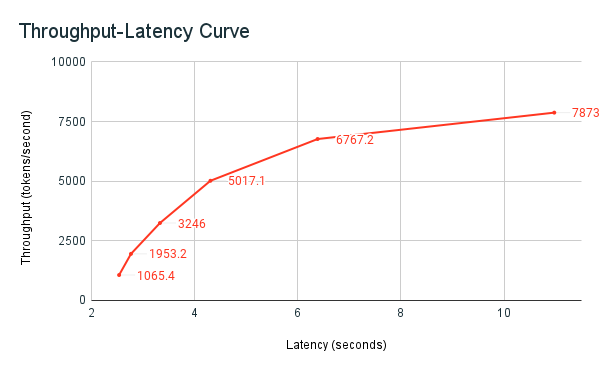
For our benchmark, we'll create a simple Python client script to send requests to our API and measure the response time. Save the following as benchmark.py:
# benchmark.py
import requests
import time
import concurrent.futures


# --- Configuration ---
API_URL = "http://localhost:8000/generate"
PROMPT = "Explain the difference between latency and throughput in the context of web servers."
NUM_REQUESTS = 10  # Total number of requests to send
CONCURRENCY = 2    # Number of requests to send in parallel


# --- Functions ---
def send_request(request_id):
    """Sends a single request and returns its latency."""
    payload = {"text": PROMPT}
    start_time = time.time()
    try:
        response = requests.post(API_URL, json=payload, timeout=300) # 5-minute timeout
        response.raise_for_status() # Raise an exception for bad status codes
        latency = time.time() - start_time
        print(f"Request {request_id}: Succeeded in {latency:.2f}s")
        return latency
    except requests.exceptions.RequestException as e:
        latency = time.time() - start_time
        print(f"Request {request_id}: Failed in {latency:.2f}s, Error: {e}")
        return None


# --- Main Execution ---
if __name__ == "__main__":
    latencies = []

    print(f"--- Starting Benchmark ---")
    print(f"URL: {API_URL}")
    print(f"Total Requests: {NUM_REQUESTS}")
    print(f"Concurrency: {CONCURRENCY}\n")

    overall_start_time = time.time()


    # Using a ThreadPoolExecutor to send requests concurrently
    with concurrent.futures.ThreadPoolExecutor(max_workers=CONCURRENCY) as executor:


        # map() runs the function for each item in the iterable
        # and returns the results in the order the calls were made.
        results = executor.map(send_request, range(NUM_REQUESTS))

        for result in results:
            if result is not None:
                latencies.append(result)

    overall_end_time = time.time()
    total_time = overall_end_time - overall_start_time

    num_successful = len(latencies)
    num_failed = NUM_REQUESTS - num_successful

    print("\n--- Benchmark Results ---")
    print(f"Total time: {total_time:.2f}s")
    print(f"Successful requests: {num_successful}")
    print(f"Failed requests: {num_failed}")

    if latencies:
        avg_latency = sum(latencies) / len(latencies)
        throughput = num_successful / total_time
        print(f"Average latency per request: {avg_latency:.2f}s")
        print(f"Throughput: {throughput:.2f} requests/sec")
Practical Exercise (15 minutes)
- Make sure your FastAPI server is running:
uvicorn api_server:app --host 0.0.0.0 --port 8000. - In a separate terminal, run the benchmark script:
python benchmark.py. - Observe the output. Note the average latency and the throughput.
- Analysis: How does the average end-to-end latency compare to the pure inference time you measured in the previous lesson's profiling script? The difference represents the overhead of the web stack (network, FastAPI, JSON handling).
- Experiment: Change
CONCURRENCYinbenchmark.pyto1and re-run. How do the average latency and total time change? Now try4. Do you see throughput increasing or latency degrading? This demonstrates the concurrency provided by FastAPI's thread pool.
4. FastAPI: A Great Start, But Not the Final Destination
You have successfully served and benchmarked an LLM. However, for demanding, high-throughput production scenarios, a general-purpose web framework like FastAPI has limitations. Specialized inference servers are designed to squeeze maximum performance from the hardware.
Hugging Face Transformer Inference Under 1 Millisecond Latency
This article, while aiming for sub-millisecond latency with highly optimized models, provides a crucial perspective on why generic web servers like FastAPI are not ideal for high-performance inference.
Read the sections titled '🍎 vs 🍎: 1st try, ORT+FastAPI vs Hugging Face Infinity' and '🍎 vs 🍎: 2nd try, Nvidia Triton vs Hugging Face Infinity'. The key insight is not the specific numbers, but the author's reasoning for moving away from FastAPI to a specialized server like Triton to reduce overhead and unlock performance features.
The core limitations of using a general-purpose server like FastAPI for LLM inference include:
- Naive Concurrency: The thread pool model is simple but inefficient. It doesn't understand GPU resources and can lead to contention or underutilization.
- No Batching: Each request is processed independently. Specialized servers implement continuous batching (which we will cover in Module 8), a technique that dynamically groups incoming requests into a single batch on the GPU, dramatically increasing throughput.
- High Overhead: As the article demonstrates and your own benchmark likely showed, the Python and web framework layers add significant latency, which becomes a major bottleneck for highly optimized models.
Our FastAPI server is an essential first step and a perfect baseline. In later modules, you will learn to implement the advanced techniques that make dedicated systems like vLLM, TensorRT-LLM, and Triton so powerful.
Conclusion
In this lesson, you successfully bridged the gap between a local script and a network service. You now have a working mental model for how to expose a model via an API and, critically, how to handle the synchronous nature of inference within an async framework.
Key Takeaways:
- Serving Pattern: Load models on server startup (
@app.on_event("startup")) to avoid reloading for every request. - Async vs. Sync: For blocking, CPU/GPU-bound tasks like LLM inference, use a standard
defendpoint in FastAPI to leverage its thread pool and avoid blocking the main event loop. - End-to-End Latency: Benchmarking a live API endpoint reveals the true user-perceived latency, which includes network, server, and serialization overhead on top of the raw model inference time.
- Limitations of Generic Servers: While excellent for many tasks, general-purpose frameworks like FastAPI lack specialized features (e.g., continuous batching) required for high-throughput LLM serving.
Preview of the Next Lesson:
We have now set up an environment, profiled a model, and served it over an API. We've treated the model as a black box provided by Hugging Face. To truly understand why a 70B model needs 140GB of VRAM or where exactly memory is consumed, we must go deeper.
In the next module, "LLM Internals," we will start this journey. Your first task will be to implement a minimal decoder-only transformer from scratch in PyTorch. This hands-on exercise will demystify the components you've been using—embedding layers, attention blocks, and feed-forward networks—and lay the foundation for calculating the memory and compute costs of any transformer architecture from first principles.