
Welcome back. In the previous lesson, you followed a C++ program from editable .cpp source code through compilation and linking to a runnable .exe file. Now you will write the central structure that makes a source file into a C++ program Windows can start: the main function.
By the end of this lesson, you will be able to write a valid main function, place statements inside its body, and predict the order in which those statements run. This is the basic structure behind every console project you build in this course.
The program’s starting point
A C++ program can eventually contain many functions, but it needs one special function named exactly main. When Windows runs your executable, execution begins with the statements inside main.
Here is a complete small program:
#include <iostream>

int main()
{
    std::cout << "Starting the program.\n";
    std::cout << "This message appears second.\n";
    return 0;
}
For now, treat this as a dependable template. Each part has a distinct job:
| Code | Meaning |
|---|---|
#include <iostream> | Makes the standard console-output tool std::cout available in this source file. This is a preprocessor directive, not a normal statement. |
int | Says that main finishes by giving an integer status value back to Windows. |
main | The required, lowercase name of the program’s entry-point function. C++ is case-sensitive: Main is not main. |
() | Indicates that this version of main receives no explicit inputs. |
{ and } | Mark the beginning and end of the function body. The statements between them belong to main. |
std::cout << ...; | A statement that displays text in the console. You will study std::cout properly in the next lesson. |
return 0; | Ends main and reports successful completion to the operating system. |
The lines inside the braces run sequentially: from top to bottom, one statement at a time.
For this program, the execution order is:
- The program enters
main. - The first
std::coutstatement displaysStarting the program. - The second
std::coutstatement displaysThis message appears second. return 0;finishes the function successfully.
The #include line appears before main, but it is handled while building the source code. It is not an instruction that runs when the executable starts.
A semicolon is required at the end of the statements you are writing here:
std::cout << "Hello.\n";
return 0;
Do not add semicolons after the main header or its braces:
int main()      // no semicolon here
{
    return 0;   // semicolon belongs to this statement
}               // no semicolon here
Indentation and blank lines generally do not change what the program does, but they make the structure visible to people reading it. Keep each statement indented one level inside the braces, as Visual Studio’s template does.
Watch the structure being built
The following short segment provides a visual walkthrough of the same template. It is useful for seeing the difference between the function header, the braces that define the body, and the semicolon-ended statements inside that body.
C++ Tutorial for Beginners - Learn C++ in 1 Hour
Watch “C++ Tutorial for Beginners - Learn C++ in 1 Hour” by Programming with Mosh for a compact construction of a first C++ program.
Watch main structure to see why main is the entry point, why its spelling and capitalization matter, and how braces contain its instructions. Continue with first statements for the use of #include <iostream>, std::cout, semicolons, and return 0. Focus on the distinction between the function’s structure and the executable statements placed inside it.
One small precision is worth retaining: in modern C++, reaching the closing brace of main also counts as returning success. Still, writing return 0; for now makes the final step in your program’s sequence explicit and easy to recognize.
Build a tiny “program introduction”
Open the .cpp file in your existing Visual Studio console project. You can replace the template contents with the following program:
#include <iostream>

int main()
{
    std::cout << "Welcome to my first C++ program.\n";
    std::cout << "It follows instructions in order.\n";
    std::cout << "The program is now complete.\n";
    return 0;
}
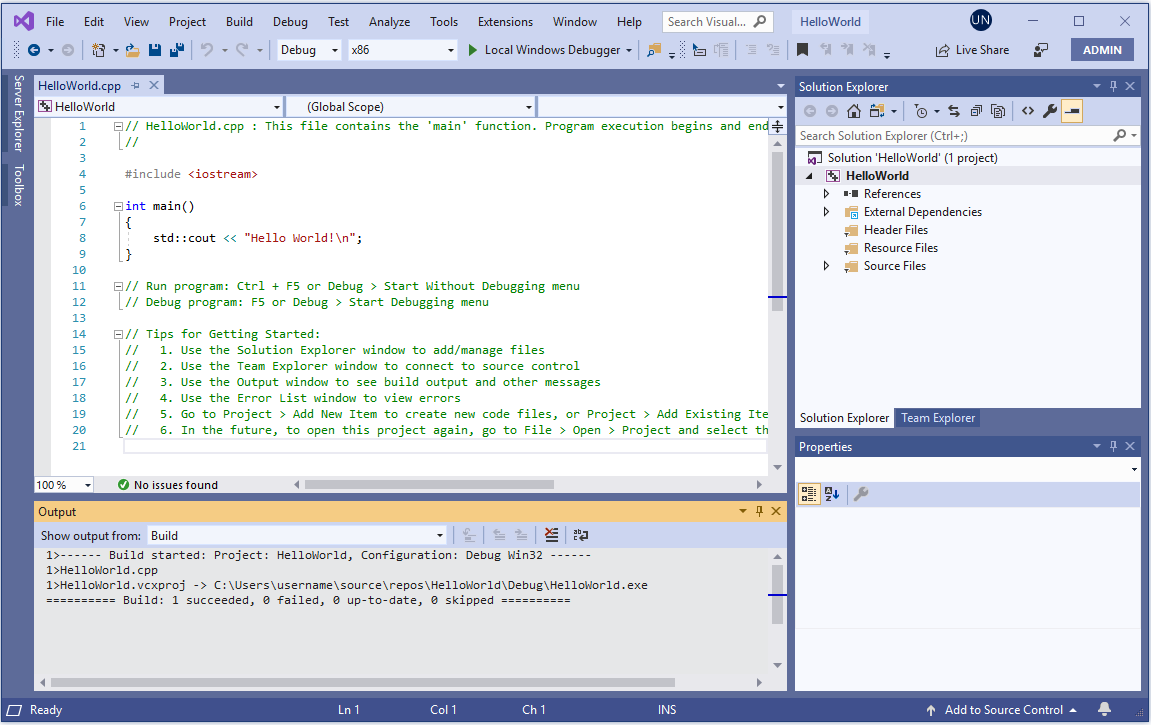
Save with Ctrl+S, then choose Build > Build Solution. A successful build means Visual Studio was able to interpret the function structure and create an updated executable. Run it with Ctrl+F5 (Start Without Debugging).
You should see:
Welcome to my first C++ program.
It follows instructions in order.
The program is now complete.
Now add one more output statement between the first and second ones:
std::cout << "I can change the sequence by changing the source.\n";
Save, build, and run again. The new line appears precisely where its statement occurs in the body of main. This is the central meaning of sequential execution: for now, source order inside main determines execution order.
How to recognize a valid main function
Use this checklist when starting a simple console program:
- Write the name as lowercase
main. - Begin the function with
int main(). - Put an opening
{after the function header and a matching}at the end. - Put executable statements inside those braces.
- End ordinary statements, such as output and
returnstatements, with;. - Add
#include <iostream>if your program usesstd::cout. - Keep
return 0;as the final statement for this stage of the course.
These errors are especially common at the beginning:
| Problem | What happens | Repair |
|---|---|---|
Writing int Main() | The build cannot find the required entry point named main. | Use lowercase main. |
Forgetting a semicolon after std::cout | The compiler reports a syntax error, often near the following line. | Add ; after the output statement. |
| Putting a statement outside the braces | The statement is not part of main and will not be accepted in this simple program structure. | Move it between { and }. |
Forgetting #include <iostream> while using std::cout | The compiler does not know what std::cout is. | Add #include <iostream> at the top. |
| Mismatching braces | The compiler cannot determine where the function body ends. | Check that every opening { has one closing }. |
When a build fails, read the first reported error, compare your code carefully with the template, correct the structural issue, and build again. A missing semicolon can make later lines look incorrect too, so fixing the first problem often resolves several messages at once.
Key takeaways
- Every C++ console program needs a special entry-point function named
main. int main()begins the function definition;{and}enclose its body.- Statements placed in the body run sequentially, from top to bottom.
- Most statements you write now end with semicolons; the
mainheader and braces do not. return 0;explicitly ends the program with a successful status.std::coutmakes the order of execution visible, though its output features are the focus of the next lesson.
Next, you will use std::cout more deliberately to display text and numeric values with clear formatting.
Can't find a good explanation? Sign up and we'll make it for you
Sign up