
Welcome to your next lesson. In our previous session, you gained hands-on experience with the "diagrams as code" workflow, learning to render and troubleshoot Mermaid diagrams in both the Live Editor and a local Markdown environment. You now have the essential mechanical skills to create diagrams. Today, we shift our focus from the how to the what.
We will begin our exploration of specific UML diagrams by tackling the conceptual foundation of requirements analysis. This lesson addresses the first learning outcome in our "Requirements and Business Workflows" module. You will learn to dissect a short requirements scenario to identify its four fundamental components: actors, their goals, the use cases a system provides, and the system boundary. This analytical skill is the crucial first step before any diagramming can begin.
A Map of System Functionality
At its core, requirements analysis is about understanding what a system should do from the perspective of those who will use it. A UML Use Case Diagram is a high-level visual map of this functionality. It doesn't show how the system works internally, but rather what it can be used for.
A use case diagram is built from a few simple but powerful concepts.
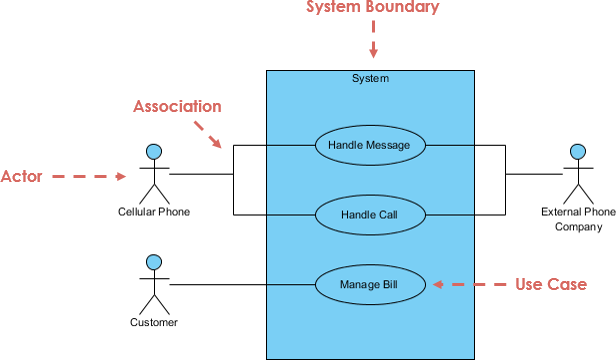
Let's define each of these components. We'll start with a quick video overview and then delve into each concept with more precision.
UML use case diagrams: Everything you need to know
The video "UML use case diagrams: Everything you need to know" by Lucid Software provides an excellent introduction to the core components.
Please watch the following segments: The System: Understand how the system boundary defines the scope of what you are modeling. Actors: Pay attention to the definition of an actor as a role (not a specific person) and the important distinction between primary and secondary actors. Use Cases: Note how use cases represent actions and the best practices for naming them.
As you saw in the video, these components provide a clear vocabulary for discussing system requirements. Let's formalize them.
-
System Boundary: This is the rectangle. It represents the scope of the system you are developing. Everything inside the boundary is part of your system; everything outside is not. Defining this boundary is the first step in any analysis, as it clarifies what you are and are not responsible for building.
-
Actor: An actor is any person, organization, or external system that interacts with your system to achieve a goal. Actors are always outside the system boundary.
- Primary Actors initiate an interaction to achieve a goal (e.g., a
Customerlogging into a banking app). They are typically drawn on the left. - Supporting (or Secondary) Actors provide a service to the system, often in response to an action initiated by a primary actor (e.g., a
Payment Gatewaysystem that processes a transaction). They are typically drawn on theright.
- Primary Actors initiate an interaction to achieve a goal (e.g., a
-
Use Case: This is an action or a set of actions the system performs to provide an observable result of value to an actor. Use cases are the functional requirements of your system. They represent the goals an actor can achieve using the system (e.g.,
Transfer Funds,Check Balance). By convention, they are named with a verb-noun phrase.
From User Goals to Use Cases
A frequent challenge is determining the correct level of detail for a use case. Is "Click Button" a use case? Is "Manage Corporate Finances" a use case? Probably not. The former is too low-level, and the latter is too high-level.
A useful heuristic is the Elementary Business Process (EBP) guideline. It helps you find the "user goal" level for defining use cases.
USE-CASE MODEL: WRITING REQUIREMENTS IN ...
This excerpt from Craig Larman's work provides a formal guideline for defining use cases at a useful level of abstraction.
Read the sections titled "Use Cases and Goals". Focus on understanding the definition of an Elementary Business Process (EBP) and how it helps you filter out use cases that are either too granular (single steps) or too broad. The key takeaway is to start by identifying user goals.
The EBP guideline encourages you to ask, "What is the user trying to accomplish?" rather than "What are the functions of the system?". Each goal you identify will likely correspond to a single, valuable use case.
The Process: Textual Analysis
Now that we have the concepts, how do we apply them? The most common starting point is a textual description of the system's requirements—a project brief, a feature request, or a problem statement. The process of extracting actors and use cases from such a text is called textual analysis.
In essence, you are looking for:
- Nouns that represent roles (people, other systems) -> These are your candidate Actors.
- Verb phrases that describe what users need to do -> These are your candidate Use Cases.
Let's watch this process in action. The following video demonstrates how to analyze a problem statement for a university library system and systematically identify actors and use cases.
Use Case Analysis - Lesson 1: Identifying Actors & Use Cases
The video "Use Case Analysis - Lesson 1: Identifying Actors & Use Cases" by VisualParadigm provides a detailed, step-by-step demonstration of textual analysis.
You'll see the analysis of a library system re-engineering project. Please watch the following segments carefully: The Problem Statement: First, listen to the requirements scenario that will be analyzed. Identifying Actors: Observe how candidate actors are identified by looking for nouns representing user roles in the text. Identifying Use Cases: Watch how candidate use cases are identified by looking for verb phrases that describe system functionalities and goals. Reviewing and Refining: This is a critical step. See how the initial candidates are cleaned up, renamed according to convention (singular nouns for actors, verb phrases for use cases), and confirmed as valid elements of the model.
Structuring Your Findings
After performing textual analysis, it's a best practice to organize your findings before you start drawing. This ensures clarity and provides a useful document for review. A simple table is often the best tool for this. As someone with extensive development experience, you'll recognize this as a form of preliminary design documentation.
The following resource provides a clear example of how to structure your identified actors and use cases.
UML - Use Case Diagram - Tutorial With Examples
This tutorial from SoftwareTestingHelp includes a practical example of documenting requirements for an "Online Training Website".
Scroll to the section titled "Project Document Sample". Review the tables under "List of Use Cases/Activities". Notice how each actor and use case is listed with a brief description and other relevant details. This structured format is the direct output of the kind of textual analysis you just learned about.

Conclusion
In this lesson, you've learned the fundamental concepts of use case modeling. We've moved beyond the mechanics of diagramming to the analytical work that precedes it. You now have a systematic process for reading a requirements scenario and identifying the key elements needed to describe its functionality from a user's perspective.
Here are the key takeaways:
- The four core components of a use case model are the System Boundary, Actors (primary and supporting), Use Cases, and the Goals they help achieve.
- Textual Analysis is the process of identifying candidate actors (nouns/roles) and use cases (verb phrases/goals) from a requirements document.
- The Elementary Business Process (EBP) guideline helps you define use cases at the right level of abstraction—they should correspond to a complete user goal.
- Organizing your findings in a structured format, like a table, is a crucial step before you begin to draw the diagram.
In our next lesson, you will apply this knowledge directly. We will take the actors and use cases we've learned to identify and translate them into a visual diagram using Mermaid's flowchart syntax, creating your first approximation of a UML use case diagram.
Can't find a good explanation? Sign up and we'll make it for you
Sign up