
Hello! Let's continue our journey into advanced Eloquent features.
Introduction
In our last lesson, we learned how to encapsulate query logic using local and global scopes, which made our code cleaner and more readable. We focused on adding reusable constraints to our queries.
Today, we shift from constraining queries to designing more flexible data structures. We'll tackle a common challenge in application development: what if you have a feature, like comments or tags, that needs to apply to different kinds of content? For example, users might want to comment on Posts, Videos, or Products. How do you handle that without creating separate post_comments, video_comments, and product_comments tables?
This lesson answers that question. Our goal is to define and query polymorphic relationships for flexible data structures. By the end of this lesson, you'll be able to design a database schema and write Eloquent code that allows one model to belong to several other model types, all using a single database table and association.
1. The "Why": The Problem Polymorphism Solves
Imagine your application has Post models and Product models. Now, a new requirement comes in: users should be able to leave comments on both posts and products.
The naive approach would be to create two separate tables:
post_commentswith apost_idforeign key.product_commentswith aproduct_idforeign key.
This works, but it's not scalable. What happens when you add Video models and they also need comments? You'd have to create a third video_comments table. This leads to code duplication and a cluttered database schema.
Polymorphic relationships solve this by allowing a model (e.g., Comment) to belong to more than one type of parent model (Post, Product, Video) using a single, clever association.
Laravel Advanced - Polymorphic Relationship
To understand the core problem and the polymorphic solution, watch the beginning of this video from Laratips. The creator uses a simple spreadsheet analogy to clearly explain why you'd choose a polymorphic structure over creating many redundant tables.
Watch from the start until 04:55. Focus on the two approaches presented for adding comments to posts and the scalability argument for the polymorphic approach.
The key idea is to have a single comments table that includes two special columns:
commentable_id: Stores the ID of the parent model (e.g., the ID of thePostorProduct).commentable_type: Stores the class name of the parent model (e.g.,App\Models\PostorApp\Models\Product).
Together, these two columns uniquely identify the parent of any given comment. Here is a visual representation of how comments and tags can relate to both videos and posts.
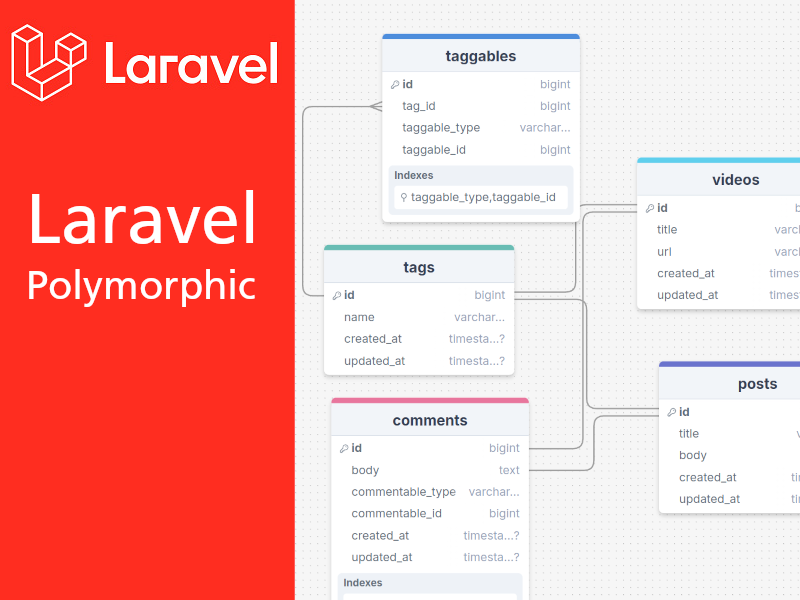
2. One-to-Many Polymorphic Relationships
This is the most common type of polymorphic relationship. A parent can have many "children," and these children can belong to different types of parents. Our Post/Video/Comment example is a perfect one-to-many polymorphic relationship.
Let's walk through how to set this up.
Database Migration
In your comments table migration, instead of adding a standard foreignId, you use the morphs() helper method.
// In database/migrations/xxxx_xx_xx_xxxxxx_create_comments_table.php

Schema::create('comments', function (Blueprint $table) {
    $table->id();
    $table->text('body');
    // This single line creates two columns:
    // `commentable_id` (an unsigned big integer)
    // `commentable_type` (a string)
    // It also adds an index on these columns.
    $table->morphs('commentable');
    $table->timestamps();
});
The name commentable is derived from the child model (Comment) and the suffix -able. This is a Laravel convention.
Model Relationships
Next, you define the relationships in your Eloquent models.
-
Parent Models (
Post,Product): The parent models use themorphMany()method to declare that they can have many comments.// In app/Models/Post.php public function comments() { // The first argument is the related model's class. // The second argument is the relationship name ('commentable'). return $this->morphMany(Comment::class, 'commentable'); } -
Child Model (
Comment): The child model uses themorphTo()method to define the inverse relationship. This tells Eloquent that it can belong to any model.// In app/Models/Comment.php public function commentable() { // The method name should match the prefix used in the migration. return $this->morphTo(); }
Eloquent: Relationships - Polymorphic Relationships
For a definitive guide on the model structure, please review the official Laravel documentation. It provides clear code examples for the morphMany and morphTo relationship definitions.
Read the subsections "Table Structure" and "Model Structure" under the "One to Many (Polymorphic)" heading. This will reinforce the migration and model setup we just discussed.
3. Working with One-to-Many Polymorphic Data
Now that the relationships are defined, you can interact with them just like any other Eloquent relationship.
Laravel Advanced - Polymorphic Relationship
Let's return to the Laratips video to see a detailed practical demonstration. The presenter uses Tinkerwell to create, retrieve, update, and delete comments for different parent models.
Watch from 04:55 to 28:46. This is a longer segment, but it's packed with practical, hands-on examples. Pay close attention to: The migration setup with morphs() (04:55 - 06:38). Defining morphMany and morphTo in the models (06:38 - 10:53). Creating comments for a post: $post->comments()->create(...) (11:24). Retrieving a comment's parent: $comment->commentable (22:40). Eager loading comments with a parent model (26:39).
Here's a summary of the key operations:
-
Creating a comment for a post:
$post = Post::find(1);
$post->comments()->create(['body' => 'This is a great post!']);
Laravel automatically sets
commentable_idto1andcommentable_typetoApp\Models\Post. -
Retrieving comments from a post:
$post = Post::find(1); $comments = $post->comments; // Returns a collection of Comment models -
Finding the parent of a comment:
$comment = Comment::find(5);
$parent = $comment->commentable; // Returns either a Post or Product instance
4. Many-to-Many Polymorphic Relationships
This relationship is slightly more complex. It's used when a model can have many instances of another model, and that other model can also belong to many different parent types. The classic example is tags.
- A
Postcan have manyTags. - A
Videocan have manyTags. - A
Tag(e.g., 'Laravel') can be applied to manyPosts and manyVideos.
This requires a pivot table, just like a standard many-to-many relationship. The pivot table (e.g., taggables) will contain the polymorphic columns.
tag_id: Foreign key for thetagstable.taggable_id: The ID of the parent model (PostorVideo).taggable_type: The class name of the parent model.
Model Relationships
-
Parent Models (
Post,Video): Use themorphToMany()method.// In app/Models/Post.php public function tags() { return $this->morphToMany(Tag::class, 'taggable'); } -
Child Model (
Tag): On theTagmodel, you must define the inverse for each possible parent, usingmorphedByMany().// In app/Models/Tag.php public function posts() { return $this->morphedByMany(Post::class, 'taggable'); } public function videos() { return $this->morphedByMany(Video::class, 'taggable'); }
Laravel 6 Advanced - e3 - Polymorphic Relationships
This video from Coder's Tape provides a clear explanation and demonstration of the many-to-many polymorphic relationship, which complements the previous video.
Watch from 14:40 to 21:09. The video explains the concept of tags and walks through setting up the taggables pivot table and the morphToMany/morphedByMany relationships.
5. Querying Polymorphic Relationships & Optimization
A key part of your goal is mastering query optimization. Polymorphic relationships, if not handled carefully, can lead to performance issues like the N+1 query problem.
Imagine fetching all comments and displaying their parent's title:
$comments = Comment::all();

foreach ($comments as $comment) {
    // This line runs one query for EACH comment!
    echo $comment->commentable->title;
}
If you have 100 comments, this loop will execute 101 queries (1 for all comments, and 100 more for each parent).
Eager Loading to the Rescue
You solve this using eager loading with the with() method, just as you would for regular relationships.
// Runs only 3 queries, regardless of the number of comments!
// 1. SELECT * FROM comments
// 2. SELECT * FROM posts WHERE id IN (...)
// 3. SELECT * FROM videos WHERE id IN (...)
$comments = Comment::with('commentable')->get();

foreach ($comments as $comment) {
    echo $comment->commentable->title;
}

Advanced Filtering: whereHasMorph
What if you want to retrieve only the comments that belong to posts with a title starting with "Laravel"? You can use the whereHasMorph method.
Eloquent: Relationships - Querying Morph To Relationships
The official documentation provides the best explanation for advanced querying techniques like whereHasMorph.
Read the section "Querying Morph To Relationships". Pay attention to the syntax of whereHasMorph and how you can use a wildcard * to query against all possible parent types.
Here's an example based on the documentation:
use App\Models\Comment;
use App\Models\Post;
use Illuminate\Database\Eloquent\Builder;

// Retrieve comments for Posts where the post's title starts with 'Laravel'.
$comments = Comment::whereHasMorph(
    'commentable',
    Post::class,
    function (Builder $query) {
        $query->where('title', 'like', 'Laravel%');
    }
)->get();
6. Best Practice: Custom Polymorphic Types
By default, Laravel stores the full class name (e.g., App\Models\Post) in the ...able_type column. This couples your database to your application's file structure. If you ever refactor and move the Post model, your existing polymorphic data will break.
A better approach is to define a "morph map". This lets you use a simple, stable alias (like 'post') in the database.
You define this map in the boot() method of your App\Providers\AppServiceProvider.
// In app/Providers/AppServiceProvider.php

use Illuminate\Database\Eloquent\Relations\Relation;

public function boot(): void
{
    Relation::enforceMorphMap([
        'post' => 'App\Models\Post',
        'video' => 'App\Models\Video',
        'product' => 'App\Models\Product',
    ]);
}
Now, when you create a comment for a post, Laravel will store 'post' in the commentable_type column instead of the full class name, making your application much more robust and maintainable.
Conclusion
You've learned how to design and use one of Eloquent's most powerful features for creating flexible and scalable applications.
Key Takeaways:
- Polymorphic relationships allow a model to belong to more than one type of parent model using a single association, avoiding table duplication.
- One-to-many (
morphMany/morphTo) is used for things like comments on posts/videos. - Many-to-many (
morphToMany/morphedByMany) is used for things like tags on posts/videos and requires a polymorphic pivot table. - The key database columns are
[relationship_name]_idand[relationship_name]_type. - Always eager load (
with('...able')) polymorphic relationships to avoid the N+1 query problem. - Use
whereHasMorphfor advanced filtering based on parent model attributes. - Use a morph map (
Relation::enforceMorphMap) as a best practice to decouple your database from your application structure.
Next Up:
We've just scratched the surface of advanced relationship queries with whereHasMorph. In the next lesson, we'll dive deeper into this topic by exploring subqueries and other advanced relationship query methods like whereHas and withCount, giving you even more power to fetch complex data efficiently.