
Good to see you again. Previously, you used destructuring to extract selected array elements and object properties. The same three dots, ..., now let you do the complementary work: create updated collections while preserving the originals.
This is a foundational habit for the React work ahead, but it is equally useful in Node.js services: preserving an original request object while building a safe response, applying an update to a database result, or preparing a new list of records for a client. By the end of this lesson, you should be able to distinguish spread from rest, update arrays and objects without mutation, and recognize the shallow-copy boundary.
One syntax, two opposite jobs
The meaning of ... depends on where it appears.
| Context | Name | What it does |
|---|---|---|
| Array or object literal | Spread syntax | Expands an existing collection into a new collection |
| Function call | Spread syntax | Expands an iterable into separate arguments |
| Destructuring pattern | Rest syntax | Collects the remaining items or properties |
| Function parameter list | Rest parameter | Collects remaining arguments into an array |
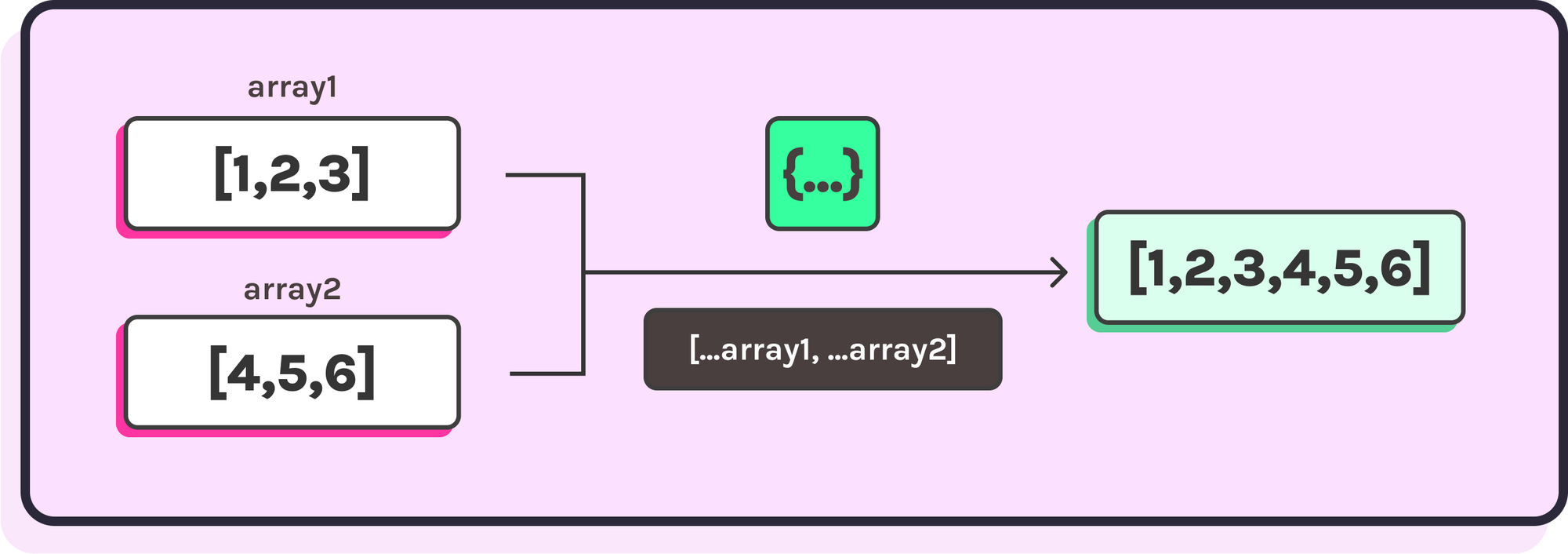
Spread takes a collection apart into its elements or properties:
const frontendSkills = ["HTML", "CSS", "React"];
const backendSkills = ["Node.js", "Express", "MongoDB"];

const fullStackSkills = [
  ...frontendSkills,
  ...backendSkills
];

console.log(fullStackSkills);
// ["HTML", "CSS", "React", "Node.js", "Express", "MongoDB"]
Rest collects the values that were not individually selected:
const [primarySkill, ...otherSkills] = fullStackSkills;

console.log(primarySkill); // "HTML"
console.log(otherSkills);  // ["CSS", "React", "Node.js", "Express", "MongoDB"]
In the first example, ...frontendSkills spreads individual values into a new array. In the second, ...otherSkills gathers the remaining values into a new array. Rest must always be the final part of an array or object destructuring pattern.
...spread operator and rest operator - Beau teaches JavaScript
Watch “...spread operator and rest operator - Beau teaches JavaScript” from freeCodeCamp.org for a compact visual introduction to the two roles of ....
Watch array expansion to see why spreading an array produces individual items rather than a nested array. Resume at copying and merging for array copies and merges. Finish with rest parameters; focus on how values after a fixed parameter are collected into a real array that supports methods such as map.
Why “without mutation” matters
A mutation changes an existing array or object. For example:
const tasks = ["Read API docs", "Build endpoint"];

tasks.push("Test endpoint");

console.log(tasks);
// ["Read API docs", "Build endpoint", "Test endpoint"]
push() changed the original tasks array. That may be fine for a short script when no other part of the program relies on the previous value. In application code, however, mutation often makes data flow difficult to reason about.
The safer default is to create a new collection:
const tasks = ["Read API docs", "Build endpoint"];

const nextTasks = [
  ...tasks,
  "Test endpoint"
];

console.log(tasks);
// ["Read API docs", "Build endpoint"]

console.log(nextTasks);
// ["Read API docs", "Build endpoint", "Test endpoint"]
The original collection remains available as a reliable before-state. nextTasks is a separate array.
A small but important detail: const prevents reassignment of the variable binding, not mutation of its contents.
const users = ["Asha", "Ravi"];

users.push("Meera"); // Allowed: the array itself is mutated.

// users = [];       // Not allowed: this would reassign the variable.
So immutability is a coding decision, not something const automatically gives you.
Read the relevant parts of React’s “Updating Arrays in State.” Although React state itself comes later in this course, the underlying JavaScript rule is immediately useful: treat existing application collections as read-only and derive a new version.
In the “Updating arrays without mutation” subsection, read the opening rationale. Focus on the distinction between mutating methods such as push and non-mutating patterns that return a new array. Then navigate to the “Updating objects inside arrays” subsection. Find the paragraph beginning “Bugs like this can be difficult to think about” and read the item update. Pay particular attention to why copying only the outer array is not enough when its items are objects.
Updating arrays with spread and non-mutating methods
Spread syntax is especially useful when adding items.
Add at the end, start, or middle
const productIds = ["p101", "p102"];

const withNewProduct = [
  ...productIds,
  "p103"
];

const withFeaturedProduct = [
  "p100",
  ...productIds
];
Neither operation changes productIds.
To insert at a known index, combine slice() and spread. Unlike splice(), slice() does not mutate the original array.
const middleware = ["auth", "validate", "controller"];
const insertAt = 1;

const nextMiddleware = [
  ...middleware.slice(0, insertAt),
  "requestLogger",
  ...middleware.slice(insertAt)
];

console.log(nextMiddleware);
// ["auth", "requestLogger", "validate", "controller"]
The new array contains:
- Items before the insertion index.
- The item being inserted.
- Items from the insertion index onward.
Remove an item with filter
Spread is not the best tool for every update. For removal, filter() expresses the intention more clearly and returns a new array.
const activeSessions = [
  { id: "s1", userId: "u10" },
  { id: "s2", userId: "u11" },
  { id: "s3", userId: "u10" }
];

const sessionIdToRemove = "s2";

const remainingSessions = activeSessions.filter(function (session) {
  return session.id !== sessionIdToRemove;
});
activeSessions is unchanged. remainingSessions holds every session except "s2".
Replace one item with map
When one array item needs an update, use map(). It builds a new array and substitutes a new object only for the matching item.
const tasks = [
  { id: "t1", title: "Design schema", done: true },
  { id: "t2", title: "Write controller", done: false }
];

const completedTaskId = "t2";

const updatedTasks = tasks.map(function (task) {
  if (task.id === completedTaskId) {
    return {
      ...task,
      done: true
    };
  }

  return task;
});
This preserves the original array and original task objects. The matching task is replaced with a new object whose done property has a new value.
Sort or reverse safely
sort() and reverse() mutate the array they run on. Make a new outer array first:
const products = [
  { name: "Mouse", price: 899 },
  { name: "Keyboard", price: 2499 },
  { name: "Cable", price: 299 }
];

const sortedByPrice = [...products].sort(function (a, b) {
  return a.price - b.price;
});
Here, sort() does mutate an array, but it mutates the newly created copy, not products.
Updating objects with object spread
Object spread follows the same principle as array spread: create a new outer object, then specify changed properties.
const product = {
  id: "p42",
  title: "Mechanical Keyboard",
  price: 2499,
  inStock: true
};

const discountedProduct = {
  ...product,
  price: 2199
};

console.log(product.price);           // 2499
console.log(discountedProduct.price); // 2199
Property order matters when keys overlap. Properties written later win:
const publishedPost = {
  ...draftPost,
  status: "published"
};
In this form, status: "published" overrides any existing status in draftPost.
This is useful for a focused update helper:
function applyProductChanges(product, changes) {
  return {
    ...product,
    ...changes
  };
}

const revisedProduct = applyProductChanges(product, {
  price: 2199,
  inStock: false
});
In a real API, do not blindly spread an untrusted request body into sensitive data. Validate input and choose the fields that a client is allowed to change. For now, the JavaScript principle is simply that applyProductChanges returns a new object rather than altering product.
The shallow-copy boundary
Spread creates a shallow copy. It copies the top-level array slots or object properties, but nested objects and arrays remain shared references.
Consider this incorrect update:
const nextTasks = [...tasks];

nextTasks[0].done = false;
nextTasks is a new array, but nextTasks[0] and tasks[0] still refer to the same task object. Changing nextTasks[0].done therefore also changes tasks[0].done.
When updating an object inside an array, make a new array and make a new object for the item that changes. The map() pattern from earlier does exactly that.
For nested objects, copy each level from the object being changed back to the top-level collection:
const order = {
  id: "o501",
  total: 3200,
  shippingAddress: {
    city: "Pune",
    postalCode: "411001"
  }
};

const updatedOrder = {
  ...order,
  shippingAddress: {
    ...order.shippingAddress,
    city: "Mumbai"
  }
};

console.log(order.shippingAddress.city);        // "Pune"
console.log(updatedOrder.shippingAddress.city); // "Mumbai"
The outer spread protects order; the inner spread protects order.shippingAddress. This “copy from the changed point upward” rule is the reliable way to handle nested updates.
Rest syntax: keep one part, collect the remainder
Rest syntax is particularly useful when shaping objects for a response.
Imagine a user record returned from a database. A client should receive public profile data, but never password-related fields:
const dbUser = {
  id: "u104",
  name: "Ravi",
  email: "ravi@example.com",
  role: "member",
  passwordHash: "stored-hash-value",
  resetToken: "temporary-secret"
};

const {
  passwordHash,
  resetToken,
  ...publicUser
} = dbUser;

console.log(publicUser);
// {
//   id: "u104",
//   name: "Ravi",
//   email: "ravi@example.com",
//   role: "member"
// }
passwordHash and resetToken are extracted individually. ...publicUser collects all remaining enumerable properties into a new object. dbUser itself is untouched.
The same idea works with arrays:
const queuedJobs = [
  "send-welcome-email",
  "generate-invoice",
  "notify-admin"
];

const [currentJob, ...remainingJobs] = queuedJobs;

console.log(currentJob);    // "send-welcome-email"
console.log(remainingJobs); // ["generate-invoice", "notify-admin"]
Rest parameters collect an unknown number of function arguments into a new array:
function createLogMessage(level, ...parts) {
  return `[${level}] ${parts.join(" ")}`;
}

console.log(
  createLogMessage(
    "INFO",
    "User",
    "u104",
    "updated",
    "their profile"
  )
);

// "[INFO] User u104 updated their profile"
The parts variable is an array, so array methods such as join, map, and filter are available. Like rest in destructuring, a rest parameter must be last:
function formatMessage(prefix, ...parts) {
  return `${prefix}: ${parts.join(" ")}`;
}
A compact implementation pass
Create a file named immutable-updates.js and type this code in stages. Run it with Node or in the browser console, checking both the values and the identities.
const cart = [
  { id: "p1", title: "Mouse", quantity: 1 },
  { id: "p2", title: "Keyboard", quantity: 1 }
];

function addToCart(items, item) {
  return [
    ...items,
    item
  ];
}

function changeQuantity(items, productId, quantity) {
  return items.map(function (item) {
    if (item.id === productId) {
      return {
        ...item,
        quantity: quantity
      };
    }

    return item;
  });
}

function removeFromCart(items, productId) {
  return items.filter(function (item) {
    return item.id !== productId;
  });
}

const cartWithCable = addToCart(cart, {
  id: "p3",
  title: "USB-C Cable",
  quantity: 1
});

const cartWithMoreMice = changeQuantity(cart, "p1", 2);

const cartWithoutKeyboard = removeFromCart(cart, "p2");

console.log(cart);
console.log(cartWithCable);
console.log(cartWithMoreMice);
console.log(cartWithoutKeyboard);
Then inspect the important identity checks:
console.log(cartWithCable !== cart);           // true
console.log(cartWithMoreMice !== cart);        // true
console.log(cartWithMoreMice[0] !== cart[0]);  // true: changed item was copied
console.log(cartWithMoreMice[1] === cart[1]);  // true: unchanged item was reused
Reusing unchanged objects is correct. Only the collection and the object that actually changed need new identities.
Key takeaways
- Spread syntax expands arrays or objects into a new array, object, or function call.
- Rest syntax gathers remaining array elements, object properties, or function arguments.
- To append or prepend without mutation, create a new array with spread.
- Use
filter()to remove items andmap()plus object spread to replace an item immutably. - Object spread makes a new outer object; later properties override earlier matching properties.
- Spread copies are shallow. When changing nested data, copy every level from the changed value up to the top-level object or array.
constdoes not make an object or array immutable; it only prevents reassignment of the variable.
Next, you will use these modern JavaScript patterns in a larger codebase by learning how to organize browser and Node.js code with ES modules.
Can't find a good explanation? Sign up and we'll make it for you
Sign up