
Good to see you again. In the previous lesson, ES modules gave your browser and Node.js code explicit boundaries: a file can keep implementation details private and export only its intended API. This lesson looks inside those boundaries. You will learn why a function can still use variables from the place where it was created, even when it runs later somewhere else.
By the end, you should be able to inspect a closure-based snippet and predict which value it reads, whether multiple functions share state, and why let avoids a classic callback-loop bug.
Scope comes from where code is written
Scope is the part of a program where a name can be accessed. JavaScript uses lexical scope, which means that scope is decided by the physical nesting of code in the source file, not by the place where a function happens to be called.
Consider this:
const appName = "Storefront";

function createMessage() {
  const feature = "checkout";

  function getMessage() {
    return `${appName}: ${feature}`;
  }

  return getMessage();
}

console.log(createMessage());
// Storefront: checkout
When getMessage() needs a value, JavaScript searches for it in a specific order:
- Its own local scope.
- The scope of the function in which it was defined.
- Each outer scope surrounding that function.
- The module or global scope.
So getMessage() finds feature in createMessage(), then finds appName outside createMessage().
The search only moves outward. Outer code cannot reach inward into a function’s local variables:
function createMessage() {
  const feature = "checkout";
}

console.log(feature);
// ReferenceError: feature is not defined
That one-way visibility is why helpers can safely use local implementation details without exposing them throughout an application.
Read the following MDN sections now. They establish the precise relationship between lexical scope, returned functions, and independent closures.
Closures - JavaScript - MDN Web Docs - Mozilla
Read MDN’s “Closures” guide for the core mental model used throughout this lesson. Its makeFunc, makeAdder, and counter examples are directly applicable to callback-heavy frontend code and stateful backend utilities.
In the “Lexical scoping” section, read the explanation and the init / displayName example. Focus on the lexical rule: a nested function can access variables declared around it. Then read the complete “Closure” section, from the makeFunc example through makeAdder. Start at why it survives, then continue through the explanation of why add5 and add10 retain different values. Finally, in “Emulating private methods with closures,” read both the immediate counter example and the later makeCounter version. Concentrate on counter independence: each call to a factory function can create a separate lexical environment.
A closure retains access to its lexical environment
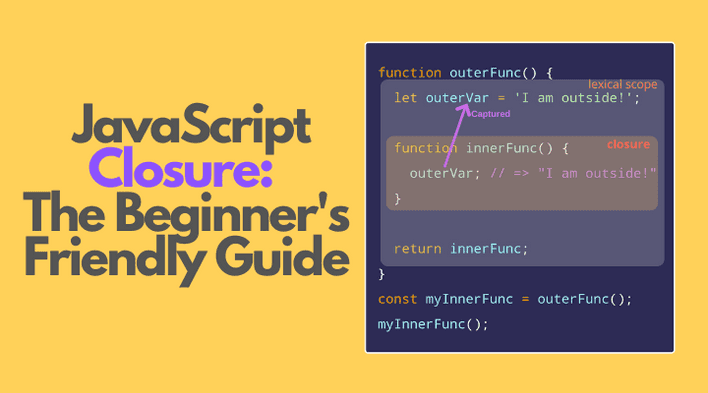
A closure is a function together with access to the variables that were in scope when the function was created.
The most visible closure pattern is an outer function returning an inner function:
function createOrderFormatter(prefix) {
  return function formatOrder(orderId) {
    return `${prefix}-${orderId}`;
  };
}

const formatOnlineOrder = createOrderFormatter("WEB");

console.log(formatOnlineOrder("4821"));
// WEB-4821
When createOrderFormatter("WEB") finishes, its execution has ended. Yet formatOnlineOrder can still read prefix. The returned function was created inside the environment where prefix exists, so JavaScript preserves the needed access.
A useful precision: a closure usually captures a binding, not a frozen copy of a value.
function createStatusTools() {
  let status = "draft";

  function publish() {
    status = "published";
  }

  function getStatus() {
    return status;
  }

  return {
    publish,
    getStatus
  };
}

const article = createStatusTools();

console.log(article.getStatus());
// draft

article.publish();

console.log(article.getStatus());
// published
publish and getStatus close over the same status binding. When publish() changes it, getStatus() observes the current value later.
This matters in full-stack work. A callback passed to an event listener, a timer, or a promise continuation commonly reads state when it eventually runs, not necessarily the value that existed when you registered the callback.
Creation location matters; call location does not
A common mistake is to assume that a function uses variables from the scope where it is called. JavaScript does not work that way. It uses the scope where the function was defined.
const environment = "production";

function createEnvironmentLogger() {
  const environment = "development";

  return function logEnvironment() {
    return environment;
  };
}

function runCallback(callback) {
  const environment = "test";

  return callback();
}

const logEnvironment = createEnvironmentLogger();

console.log(runCallback(logEnvironment));
// development
Here are the relevant facts:
logEnvironmentwas created insidecreateEnvironmentLogger.- Its nearest
environmentbinding is therefore"development". - The
"test"variable insiderunCallbackdoes not matter, even though that is where the callback runs. - The global
"production"binding is also hidden by the nearer"development"binding.
This behavior is called lexical, rather than dynamic, scoping. It makes functions predictable: moving the call site does not silently change the outer variables they can access.
Shadowing is the reason the nearest declaration wins:
const role = "guest";

function createRoleReader() {
  const role = "admin";

  return function readRole() {
    return role;
  };
}

console.log(createRoleReader()());
// admin
The inner role shadows the outer role. During lookup, JavaScript finds "admin" first and stops searching.
Factories can create shared private state
Closures are useful when several functions need controlled access to shared state without exposing the state variable itself.
function createCartCounter() {
  let itemCount = 0;

  function addItem() {
    itemCount += 1;
    return itemCount;
  }

  function removeItem() {
    itemCount = Math.max(0, itemCount - 1);
    return itemCount;
  }

  function getItemCount() {
    return itemCount;
  }

  return {
    addItem,
    removeItem,
    getItemCount
  };
}

const guestCart = createCartCounter();
const memberCart = createCartCounter();

guestCart.addItem();
guestCart.addItem();

console.log(guestCart.getItemCount());
// 2

console.log(memberCart.getItemCount());
// 0
There are two important predictions to make here:
| Function calls | Relationship to itemCount |
|---|---|
addItem, removeItem, and getItemCount from one createCartCounter() call | They share one itemCount binding. |
Functions returned from separate createCartCounter() calls | Each group has its own independent itemCount binding. |
The factory function runs twice, so JavaScript creates two separate environments. This is why guestCart does not alter memberCart.
The same idea appears in ES modules from the previous lesson:
// preferences.js
let currency = "INR";

export function setCurrency(nextCurrency) {
  currency = nextCurrency;
}

export function getCurrency() {
  return currency;
}
Both exported functions close over the module-scoped currency binding. Other files cannot access currency directly, but they can use the module’s public functions. This is a useful pattern for carefully controlled module state, though larger React applications will later use React state and dedicated state-management patterns for UI data.
Closures in callbacks: the var loop trap
Closures become especially important when a function is scheduled to run later. Consider a DOM rendering loop that registers callbacks:
for (var index = 0; index < 3; index += 1) {
  setTimeout(function () {
    console.log(index);
  }, 0);
}
The output is:
3
3
3
At first this can seem strange. There are three callback functions, but all three close over the same function- or global-scoped index binding created by var. Before any timer callback runs, the loop completes and leaves index equal to 3. Each callback later reads that same current value.
Modern JavaScript fixes this cleanly with let:
for (let index = 0; index < 3; index += 1) {
  setTimeout(function () {
    console.log(index);
  }, 0);
}
Now the output is:
0
1
2
A let loop variable gets a distinct binding for each iteration. Each callback closes over the binding for its own iteration.
For rendering collections or attaching UI handlers, prefer const where the loop item does not change:
const products = [
  { id: "p1", title: "Mouse" },
  { id: "p2", title: "Keyboard" }
];

for (const product of products) {
  setTimeout(function () {
    console.log(product.title);
  }, 0);
}
Each callback retains access to its corresponding product.
Watch this focused explanation of the var versus let behavior. It reinforces the exact debugging pattern you will encounter in asynchronous UI code.
Watch “Learn Closures In 13 Minutes” by Web Dev Simplified for a visual explanation of the classic timer-loop closure problem.
Watch the loop comparison. Focus on why the callbacks run after the loop completes, why var provides one shared binding, and why let supplies a separate binding for each iteration.
A reliable way to predict closure behavior
When you encounter a callback or returned function, avoid guessing based only on when it runs. Instead, use this short tracing method:
- Find where the function was created. That location determines its outer scopes.
- List each external variable it uses. Ignore variables that are local to the function itself.
- Find the nearest declaration of each name. A nearer declaration shadows outer ones.
- Decide whether the binding is shared or created per factory call or loop iteration.
- Check whether the binding changed before the function executes. Closures read the current value of a mutable binding.
For example:
function createDiscountCalculator(rate) {
  let enabled = true;

  return function calculateDiscount(price) {
    if (!enabled) {
      return 0;
    }

    return price * rate;
  };
}
The returned function has access to:
price, from its own parameter.enabled, from the specificcreateDiscountCalculator()call that created it.rate, also from that same factory call.
If enabled were changed by another closure from the same factory invocation, the calculator would see that updated value. If two calls create two calculators with different rates, they retain independent rate bindings.
Key takeaways
- JavaScript uses lexical scope: a function’s accessible outer variables are determined by where the function is written.
- A closure lets a function continue accessing its outer lexical environment after the outer function has returned.
- Closures retain access to bindings, so they observe the latest value of a mutable variable.
- Functions from one factory call can share private state; separate factory calls create independent state.
- A callback’s call site does not change its lexical scope.
- In delayed callbacks inside loops,
varcreates one shared binding, whileletcreates an iteration-specific binding.
Next, you will build on scope again by determining the value of this in regular functions and arrow functions.
Can't find a good explanation? Sign up and we'll make it for you
Sign up