
Welcome back. In the previous lesson, you built a terminal-boundary parser that turns a raw REPL line into an immutable ReplCommand. That parser deliberately knows about quotes, whitespace, and long options—but it knows nothing about instrumentation sessions or Frida.
This lesson moves one layer inward. You will implement application command handlers: use-case functions or objects that receive typed application input, coordinate application ports, and return typed outcomes. They must not parse terminal syntax, call console.log, depend on readline, or construct ANSI-coloured strings.
This is the central boundary that will later let both the interactive REPL and one-shot CLI commands invoke exactly the same behavior.
A useful 40-minute sequence is:
- Review the architecture distinction below.
- Read the short architecture excerpt and watch the focused refactoring segment.
- Implement the handler and its terminal adapter.
- Verify the handler directly with Vitest.
A command is three different things
The word command can blur three separate responsibilities. Keep them distinct.
| Layer | Example | Responsibility |
|---|---|---|
| Terminal input | attach --pid=8420 | User-facing syntax: tokens, quotes, options, aliases |
| Application request | { processId: ProcessId } | Typed intent to perform a use case |
| Application handler | AttachToProcessHandler.execute(...) | Coordinates the use case and returns a typed outcome |
The parser from the previous lesson produces the first layer’s structured representation:
type ReplCommand = Readonly<{
  name: CommandName;
  args: readonly string[];
  options: Readonly<Record<OptionName, OptionValue>>;
}>;
That is useful terminal-interface data, but it is not an application request. If an AttachToProcessHandler accepts ReplCommand, it must know:
- that the terminal calls its command
attach; - whether a PID can appear in
argsor in--pid; - that option values can be
true; - how to report malformed command usage.
Those are delivery concerns. They do not belong in the use case.
The handler should instead receive the smallest typed input that expresses the intent:
type AttachToProcessInput = Readonly<{
  processId: ProcessId;
}>;
This is a meaningful contract whether the request came from a REPL, a non-interactive CLI invocation, a future HTTP endpoint, or an automated test.
DDD, Hexagonal, Onion, Clean, CQRS, … How I put it all together – @hgraca
Read Herbert Graca’s explanation of the application core, driving adapters, and application-layer use cases. It provides the architectural rationale for keeping console commands thin while giving handlers ownership of application behavior.
In “Fundamental blocks of the system,” read the three-way separation between UI, application core, and infrastructure. Then, in “Primary or Driving Adapters,” read the adapter definition. Finally, in “Application Layer,” read the discussion of use cases, focusing on why several interfaces can trigger the same application behavior.
How to implement Clean Architecture in Node.js (and why it's important)
Watch “How to implement Clean Architecture in Node.js (and why it’s important)” by Web Dev Cody for a concrete refactoring from framework-bound request handling into a framework-independent interactor.
Watch the interactor refactor. Focus on the moment where business behavior stops receiving framework-specific request and response objects. For this project, substitute terminal parser structures and terminal output for Express request and response objects.
The hexagon is a dependency rule, not a folder diagram
The supplied Explicit Architecture map depicts the distinction visually. On the left, primary or driving adapters include console commands and user interfaces. On the right, secondary or driven adapters connect the core to infrastructure such as databases, queues, and external services.
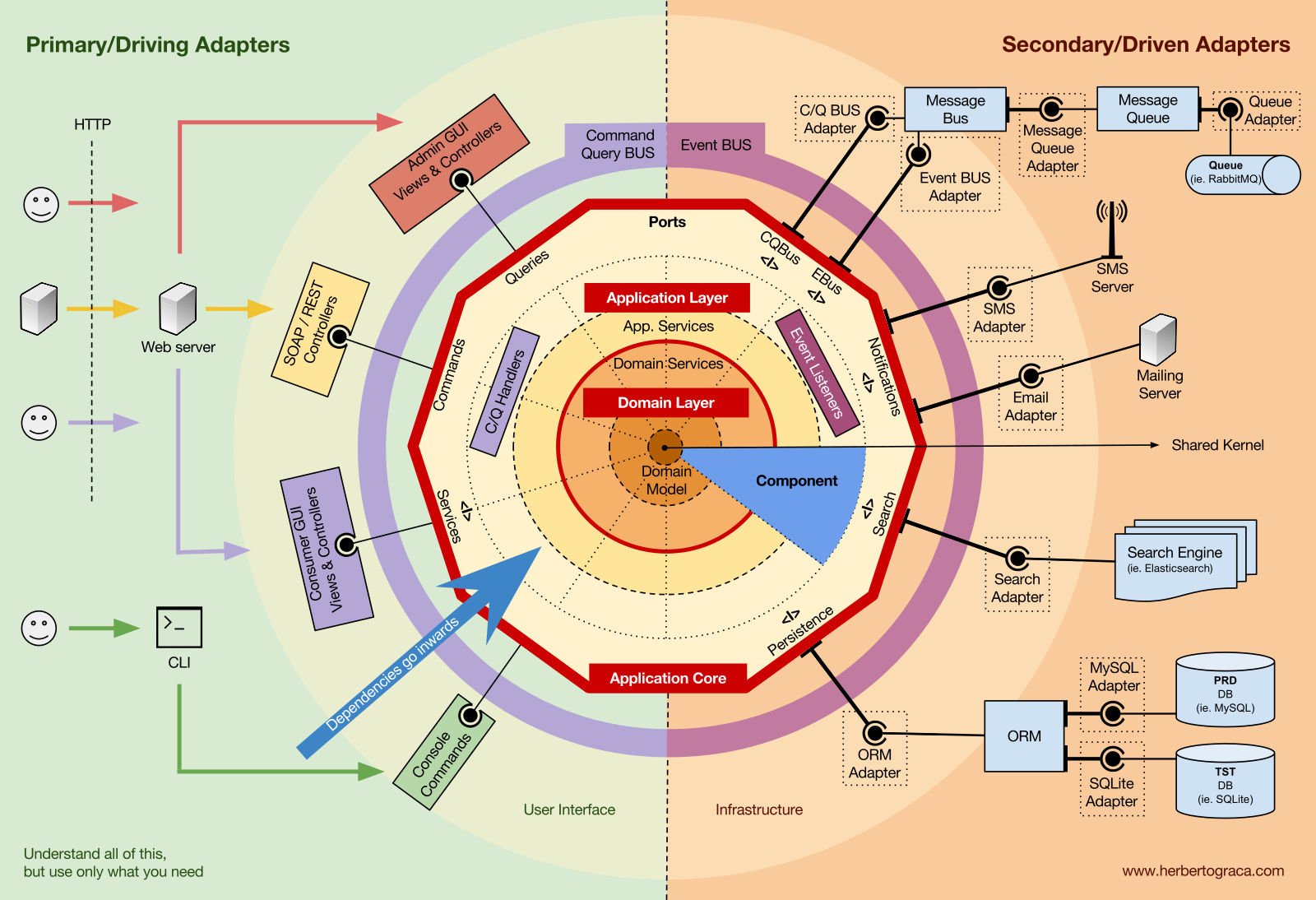
For the instrumentation tool, the equivalent structure is:
| Concern | Examples | Must it be visible to a handler? |
|---|---|---|
| Terminal delivery | readline, raw REPL text, process.argv, tab completion, ANSI styling | No |
| Application behavior | attach intent, session conflict rules, typed success and failure outcomes | Yes |
| Infrastructure | Frida Device and Session, filesystem, process enumeration, terminal stream | Only through application-owned ports |
A handler may be asynchronous and may cause real effects. “Independent of the terminal” does not mean “pure function with no dependencies.” It means that its dependencies describe application needs rather than delivery or framework details.
For example, the handler may depend on a port that can attach to a target process. It should not depend directly on Frida’s Device object. The future Frida adapter will implement that port.
Define a terminal-neutral attach use case
The actual Frida-backed attach operation comes in Module 4. For now, define the application contract that the future implementation must satisfy. This gives the CLI and REPL a stable target before the external technology arrives.
Keep the use case inside the instrumentation-session vertical slice:
src/
  features/
    instrumentation-session/
      application/
        attach-to-process.ts
      ports/
        active-session-query-port.ts
        process-attachment-port.ts
      domain/
        process-id.ts
        session-id.ts
The names can vary, but the ownership matters: the feature owns its use case and the ports it needs.
The input, output, and failure vocabulary
The handler should return data, not terminal sentences. Its success result contains facts the terminal can choose to render.
// src/features/instrumentation-session/application/attach-to-process.ts

import type { ProcessId } from "../domain/process-id.js";
import type { SessionId } from "../domain/session-id.js";
import {
  err,
  ok,
  toUnexpectedApplicationError,
  type Result,
  type UnexpectedApplicationError,
} from "../../../shared/result.js";

export type SessionSummary = Readonly<{
  sessionId: SessionId;
  processId: ProcessId;
  state: "attaching" | "attached";
}>;

export type AttachToProcessInput = Readonly<{
  processId: ProcessId;
}>;

export type AttachToProcessOutput = Readonly<{
  sessionId: SessionId;
  processId: ProcessId;
  state: "attached";
}>;

export type AttachmentFailure =
  | Readonly<{
      kind: "process-not-found";
      processId: ProcessId;
    }>
  | Readonly<{
      kind: "access-denied";
      processId: ProcessId;
    }>
  | Readonly<{
      kind: "session-already-active";
      activeSession: SessionSummary;
    }>
  | Readonly<{
      kind: "attachment-rejected";
      processId: ProcessId;
      reason: "unsupported-target" | "permission-restricted";
    }>;

export type AttachToProcessError =
  | AttachmentFailure
  | UnexpectedApplicationError;
Notice what is absent:
- No
ReplCommand - No
string[]arguments - No
--pid - No
readline.Interface - No
console.log - No
chalk - No Frida
Device,Session, orScript
The request uses the branded ProcessId introduced in the TypeScript baseline module. This prevents an arbitrary string from reaching the use case and makes the handler’s preconditions explicit.
Define ports in application language
A port should state what the application needs, not mirror a library API. The application needs to determine whether an instrumentation session is active and request attachment to a process.
export interface ActiveSessionQueryPort {
  findActive(): Promise<SessionSummary | undefined>;
}

export interface ProcessAttachmentPort {
  attach(
    input: AttachToProcessInput,
  ): Promise<Result<AttachToProcessOutput, AttachmentFailure>>;
}
These interfaces deliberately do not expose Frida concepts. A Frida-backed adapter can internally call Frida’s device enumeration and attachment API, but the application core only asks to “attach to this process.”
This protects the rest of the codebase if implementation details change—for example, if a controlled test adapter is used in integration tests, or if a future remote-device adapter is added.
Implement the handler as use-case coordination
A class is appropriate here because it groups one application operation with its dependencies. A function factory would also be valid; the architectural boundary matters more than the syntax.
export interface AttachToProcessHandler {
  execute(
    input: AttachToProcessInput,
  ): Promise<Result<AttachToProcessOutput, AttachToProcessError>>;
}

type AttachToProcessDependencies = Readonly<{
  activeSessionQuery: ActiveSessionQueryPort;
  processAttachment: ProcessAttachmentPort;
}>;

export class DefaultAttachToProcessHandler
  implements AttachToProcessHandler
{
  public constructor(
    private readonly dependencies: AttachToProcessDependencies,
  ) {}

  public async execute(
    input: AttachToProcessInput,
  ): Promise<Result<AttachToProcessOutput, AttachToProcessError>> {
    try {
      const activeSession =
        await this.dependencies.activeSessionQuery.findActive();

      if (activeSession !== undefined) {
        return err({
          kind: "session-already-active",
          activeSession,
        });
      }

      const attachment = await this.dependencies.processAttachment.attach(
        input,
      );

      if (!attachment.ok) {
        return attachment;
      }

      return ok(attachment.value);
    } catch (cause) {
      return err(
        toUnexpectedApplicationError("attach-to-process", cause),
      );
    }
  }
}
The handler contains a real business rule: one active instrumentation session prevents another attachment request.
It coordinates two application ports:
- It queries current session state.
- It asks the attachment port to attach only if the session rule allows it.
The handler never decides how terminal errors should appear. For example, session-already-active is an application fact. The REPL might render it as a concise sentence, while a future JSON mode could serialize it as structured data.
Expected versus unexpected failures
The typed error union distinguishes expected operational outcomes from unexpected faults:
| Failure | Meaning | Appropriate handling |
|---|---|---|
process-not-found | PID is no longer available | Tell the user to choose another process |
access-denied | Attachment is not permitted | Explain the permission limitation |
session-already-active | A lifecycle rule blocks the request | Show the active session identity |
attachment-rejected | Target is known but unsuitable | Report a structured diagnostic |
unexpected | A bug or unforeseen infrastructure fault | Render a safe failure message and preserve diagnostics |
Do not throw for ordinary operational outcomes such as a target process exiting between discovery and attachment. That is a normal possibility in a process-inspection tool. Return a typed failure that every interface can handle consistently.
There is also a subtle concurrency concern: checking for an active session and then attaching is not necessarily atomic. When the real lifecycle adapter arrives, it must also enforce the one-active-session invariant authoritatively. The handler gives an early, understandable failure; the underlying session lifecycle must remain correct under concurrent requests.
Decode terminal syntax outside the handler
The previous lesson’s parser has already transformed raw text into a ReplCommand. The next adapter converts that terminal-oriented envelope into the typed request expected by the handler.
This decoder belongs beside the REPL or CLI interface, not inside the instrumentation-session application package.
// src/interfaces/terminal/commands/decode-attach-command.ts

import type {
  OptionName,
  ReplCommand,
} from "../repl/parse-repl-line.js";
import type { ProcessId } from "../../../features/instrumentation-session/domain/process-id.js";
import {
  err,
  ok,
  type Result,
} from "../../../shared/result.js";

const PID_OPTION = "pid" as OptionName;

export type CommandUsageError =
  | Readonly<{
      kind: "wrong-command";
      expected: "attach";
      received: string;
    }>
  | Readonly<{
      kind: "unknown-option";
      name: string;
    }>
  | Readonly<{
      kind: "missing-option-value";
      name: "pid";
    }>
  | Readonly<{
      kind: "expected-one-process-id";
    }>
  | Readonly<{
      kind: "invalid-process-id";
      value: string;
    }>;

export type AttachToProcessInput = Readonly<{
  processId: ProcessId;
}>;

function parseProcessId(
  value: string,
): Result<ProcessId, CommandUsageError> {
  if (!/^[1-9][0-9]*$/u.test(value)) {
    return err({
      kind: "invalid-process-id",
      value,
    });
  }

  const numericValue = Number(value);

  if (!Number.isSafeInteger(numericValue)) {
    return err({
      kind: "invalid-process-id",
      value,
    });
  }

  return ok(numericValue as ProcessId);
}

export function decodeAttachCommand(
  command: ReplCommand,
): Result<AttachToProcessInput, CommandUsageError> {
  if (command.name !== "attach") {
    return err({
      kind: "wrong-command",
      expected: "attach",
      received: command.name,
    });
  }

  for (const optionName of Object.keys(command.options)) {
    if (optionName !== "pid") {
      return err({
        kind: "unknown-option",
        name: optionName,
      });
    }
  }

  const pidOption = command.options[PID_OPTION];

  if (pidOption === true) {
    return err({
      kind: "missing-option-value",
      name: "pid",
    });
  }

  const suppliedValues = [
    ...command.args,
    ...(typeof pidOption === "string" ? [pidOption] : []),
  ];

  if (suppliedValues.length !== 1) {
    return err({
      kind: "expected-one-process-id",
    });
  }

  const parsedProcessId = parseProcessId(suppliedValues[0]!);

  if (!parsedProcessId.ok) {
    return parsedProcessId;
  }

  return ok({
    processId: parsedProcessId.value,
  });
}
This gives your REPL two supported forms:
attach 8420
attach --pid=8420
It rejects ambiguous or unsupported forms:
attach
attach 8420 9912
attach --pid
attach --module=fixture.dll
The important distinction is:
decodeAttachCommand()owns command usage validation.DefaultAttachToProcessHandler.execute()owns application behavior.
The decoder can change if you later add aliases, revise option spelling, or introduce a one-shot CLI parser. The handler remains untouched.
Render outcomes outside the handler too
Rendering is another terminal concern. Keep it in the terminal adapter, where it can make human-friendly decisions without contaminating application results.
// src/interfaces/terminal/render-attach-outcome.ts

import type {
  AttachToProcessError,
  AttachToProcessOutput,
} from "../../../features/instrumentation-session/application/attach-to-process.js";
import type { Result } from "../../../shared/result.js";

export function renderAttachOutcome(
  outcome: Result<AttachToProcessOutput, AttachToProcessError>,
): string {
  if (outcome.ok) {
    return [
      "Attached session",
      String(outcome.value.sessionId),
      "to PID",
      String(outcome.value.processId),
    ].join(" ");
  }

  switch (outcome.error.kind) {
    case "process-not-found":
      return `No process exists with PID ${outcome.error.processId}.`;

    case "access-denied":
      return `Access was denied while attaching to PID ${outcome.error.processId}.`;

    case "session-already-active":
      return [
        "An instrumentation session is already active:",
        String(outcome.error.activeSession.sessionId),
      ].join(" ");

    case "attachment-rejected":
      return [
        "The target rejected attachment:",
        outcome.error.reason,
      ].join(" ");

    case "unexpected":
      return "Attachment failed unexpectedly. Inspect diagnostic logs for details.";
  }
}
The terminal adapter is now thin and straightforward:
export async function runAttachFromRepl(
  command: ReplCommand,
  handler: AttachToProcessHandler,
  terminal: Readonly<{ writeLine(line: string): void }>,
): Promise<void> {
  const decoded = decodeAttachCommand(command);

  if (!decoded.ok) {
    terminal.writeLine(renderCommandUsageError(decoded.error));
    return;
  }

  const outcome = await handler.execute(decoded.value);

  terminal.writeLine(renderAttachOutcome(outcome));
}
This adapter is allowed to know about REPL commands and terminal output. The handler is not.
At this point, do not introduce a global command bus or service locator merely to invoke one handler. The upcoming command registry can hold explicit handler references. Direct, typed composition is easier to follow and test.
Test behavior without a terminal
The clearest proof of independence is a test that never parses a string and never captures standard output.
// src/features/instrumentation-session/application/attach-to-process.test.ts

import { describe, expect, it, vi } from "vitest";
import {
  DefaultAttachToProcessHandler,
  type SessionSummary,
} from "./attach-to-process.js";
import type { ProcessId } from "../domain/process-id.js";
import type { SessionId } from "../domain/session-id.js";
import { ok } from "../../../shared/result.js";

describe("DefaultAttachToProcessHandler", () => {
  it("attaches when no session is active", async () => {
    const processId = 8420 as ProcessId;
    const sessionId = "session-001" as SessionId;

    const processAttachment = {
      attach: vi.fn(async function () {
        return ok({
          sessionId,
          processId,
          state: "attached" as const,
        });
      }),
    };

    const handler = new DefaultAttachToProcessHandler({
      activeSessionQuery: {
        async findActive() {
          return undefined;
        },
      },
      processAttachment,
    });

    const result = await handler.execute({ processId });

    expect(result).toEqual(
      ok({
        sessionId,
        processId,
        state: "attached",
      }),
    );

    expect(processAttachment.attach).toHaveBeenCalledWith({
      processId,
    });
  });

  it("does not attempt attachment while another session is active", async () => {
    const requestedProcessId = 8420 as ProcessId;

    const activeSession: SessionSummary = {
      sessionId: "session-active" as SessionId,
      processId: 4141 as ProcessId,
      state: "attached",
    };

    const processAttachment = {
      attach: vi.fn(),
    };

    const handler = new DefaultAttachToProcessHandler({
      activeSessionQuery: {
        async findActive() {
          return activeSession;
        },
      },
      processAttachment,
    });

    const result = await handler.execute({
      processId: requestedProcessId,
    });

    expect(result).toEqual({
      ok: false,
      error: {
        kind: "session-already-active",
        activeSession,
      },
    });

    expect(processAttachment.attach).not.toHaveBeenCalled();
  });
});
These tests are deterministic because they supply test doubles for the ports. They do not need:
- a running terminal;
- user input;
- a Frida installation;
- a real process;
- captured console output.
Later, when the Frida adapter exists, integration tests will verify the adapter independently. The application-handler tests should remain fast and focused on application decisions.
Boundary checklist
Before considering a command handler complete, inspect it for these rules:
- Its input is a typed use-case request, not
ReplCommand,string[],process.argv, orreadlinedata. - Its output is structured application data, not preformatted terminal text.
- Expected failures are discriminated union values, not thrown exceptions.
- It depends on application-owned ports, never on Frida or terminal concrete types.
- It contains use-case rules and coordination, not shell syntax interpretation.
- A unit test can invoke it directly without a terminal or a real external dependency.
A useful mental test is to imagine adding a JSON API or a scriptable batch mode. If either interface would need to duplicate the handler’s logic, that logic probably belongs in the application handler. If the handler would need to know HTTP status codes, ANSI colours, or quote syntax, a boundary has been crossed in the wrong direction.
Key takeaways
Application command handlers form the stable core between terminal delivery and infrastructure.
- The REPL parser produces terminal-oriented
ReplCommanddata; it does not invoke application behavior directly. - A command decoder translates that data into a typed use-case request such as
AttachToProcessInput. - The handler coordinates ports and enforces application rules while returning typed outcomes.
- Rendering belongs in the terminal adapter, where application facts become human-readable output.
- Direct handler tests with fake ports demonstrate genuine independence from parsing, rendering, Frida, and the operating system.
Next, you will route both one-shot CLI commands and interactive REPL commands through these same application handlers, so the tool has one behavioral path regardless of how the user invokes it.
Can't find a good explanation? Sign up and we'll make it for you
Sign up