
Reducing Presentation Anxiety with a Preparation Checklist
Welcome. This lesson opens the module on anxiety control and large-room delivery. The aim is not to eliminate every trace of nervous energy; it is to remove the preventable uncertainty that makes anxiety spiral: Will the technology work? What if my time is cut? Where do I stand? What exactly am I asking this executive group to decide?
For a Director-level technical or business briefing, preparation is part of executive presence. A calm delivery often begins well before the meeting, when you know your message, your room, your equipment, and your fallback options are ready. In about 30 minutes, you will build a reusable preparation checklist for a real upcoming presentation.
Preparation reduces uncertainty, not standards
Presentation anxiety is often treated as a purely internal problem: something to “get over” through confidence or willpower. But many common triggers are operational:
- You have not tested the deck on the room’s display.
- You are unclear on whether you have 5, 15, or 30 minutes.
- You have no concise version if an executive interrupts or the agenda changes.
- Your opening depends on reading a slide.
- You do not know who will introduce you, where to wait, or how the room is arranged.
These are not personality flaws. They are unresolved risks. A checklist converts each risk into one of three states:
| State | Meaning | What to do |
|---|---|---|
| Ready | You have verified the item. | Stop spending attention on it. |
| Planned | A risk remains, but you have a workable fallback. | Keep the fallback accessible. |
| Blocked | You cannot yet verify or solve it. | Escalate early to the meeting owner or support contact. |
This distinction matters. “I hope the projector works” produces background stress. “The projector is tested; the PDF backup is downloaded locally; I can brief without slides if necessary” gives your attention back to the audience and your recommendation.
The checklist should support the presentation, not become a perfectionism project. Prioritize items that affect:
- Decision quality — whether executives understand the recommendation and can act on it.
- Message reliability — whether you can deliver the central message even when interrupted.
- Delivery reliability — whether the room, technology, timing, and materials work.
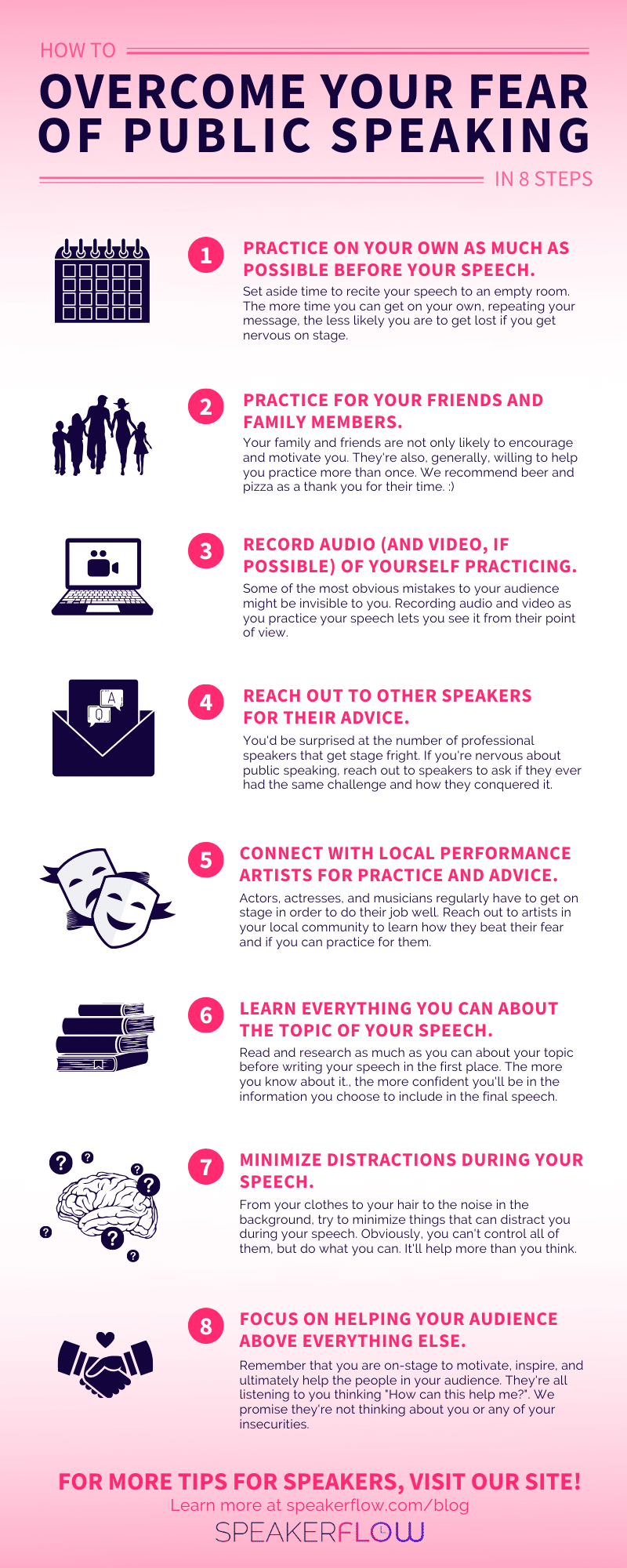
Build the content and rehearsal portion first
A strong checklist begins before logistics. When the content is clear in your own mind, you are less dependent on a script or slide sequence, and less likely to lose your thread if the meeting changes direction.
[PDF] Public Speaking Checklist
Read the “Public Speaking Checklist” from RHNTC for a concise model of content preparation, rehearsal, and immediate pre-speech readiness. Its emphasis on key points rather than memorized wording is particularly useful when executives interrupt, challenge, or shorten a briefing.
In the checklist’s “Create your presentation” material, begin with “Draft a list of key points” and read through the guidance on understanding rather than merely memorizing the material. Focus on key-point guidance: notes should prompt thinking, not replace it. Then continue through the “Practice, practice, practice!” passage. Read rehearsal guidance and notice the shift from vague practice to observable checks: filler words, pacing, and sections that drag. Finally, read the “Prepare to speak” passage for a short set of day-of actions; you will adapt these below for executive settings.
For executive presentations, add these checks to your content and rehearsal category:
- I can state the recommendation and desired executive action in one sentence.
- I know the one takeaway the audience should remember.
- I have a spoken opening that works even if the first slide is delayed.
- I have selected only the evidence needed for the decision, rather than every available technical detail.
- I have a shorter route through the presentation if time is reduced.
- My notes contain short cues for major points, examples, and data—not a full script.
- I have rehearsed aloud at least once while standing and advancing the actual deck.
- I have recorded one rehearsal and reviewed only two or three observable features, such as pace, pauses, eye line, or filler words.
The target is not a mechanically perfect performance. It is message command: you can explain the proposal in plain language without relying on the slides to tell you what you believe.
For a high-stakes executive decision, several complete rehearsals are sensible. For a routine update with little notice, one full rehearsal is still substantially better than reviewing slides silently at your desk.
10 Tips For Impressive Presentations To Senior Leadership And Executives
Watch “10 Tips For Impressive Presentations To Senior Leadership And Executives” from Moxie Institute | Fia Fasbinder CEO & Speaker for a brief, practical argument for full rehearsals. It is useful because it distinguishes what preparation can control from the interruptions and glitches that no speaker can fully prevent.
Watch rehearsal confidence. Focus on the practical test of readiness: could you still explain your recommendation and its reasoning if the slide deck were unavailable? For an important presentation, use the suggested five to seven dry runs as an aspiration when time allows, not as a reason to abandon practice when time is limited.
Plan the room, timing, and technology
In large rooms, anxiety rises when the physical environment feels unfamiliar. Arriving early is not merely courteous; it lets you replace assumptions with facts. You learn where you will stand, which screens people can see, how the microphone sounds, how far the back of the room feels, and who can help if something fails.
Toastmasters International -Be Prepared, Be Professional, Be Punctual
Read the relevant sections of Toastmasters International’s “Be Prepared, Be Professional, Be Punctual” for a practical approach to contingency planning and on-site setup. Treat the suggested 60-minute arrival as a useful default for an in-person, high-stakes presentation when venue access permits.
In Section 1, “Preparation, Preparation, Preparation,” begin at the paragraph starting “Good preparation includes a Plan B.” Read the Plan B passage. Focus on anticipating likely problems without trying to imagine every possible disaster. Then read Section 2, “You’re Onstage Even When You’re Not,” from “Arrive 60 minutes before the event” through the equipment checks. Use the room check as a model for your arrival routine: venue, host, agenda, notes, microphone, and projector.
For your own checklist, use the following venue and technology checks:
- I have confirmed the meeting format: in-person, hybrid, or virtual.
- I know the room, start time, planned duration, and expected audience size.
- I know the executive sponsor, meeting owner, and the person to contact for technical support.
- I have confirmed how I will be introduced—or prepared a one-sentence introduction for the host.
- My deck is available in its presentation format and as a locally saved PDF backup.
- I have tested the actual laptop, clicker, display connection, microphone, and any embedded media.
- I know where I will stand and can see the presentation screen without turning my back on the room.
- I have placed water, notes, and any adapter or charger where I can reach them without searching.
- Notifications are disabled on the presenting device.
- I know the final agenda position and have checked for late timing changes.
For a hybrid executive meeting, add two checks that are easy to overlook: confirm who monitors chat or remote questions, and ensure remote attendees can see both the slides and the speaker when needed. A presentation can feel composed in the room while being confusing to people joining remotely.
Create a Plan B for the failures that matter
A Plan B is not a giant disaster manual. It is a small set of pre-decided responses for the failures most likely to disrupt an executive briefing.
Consider this example: you are presenting a recommendation to invest in platform reliability. Your core message might be: Approve a two-quarter reliability investment to reduce customer-impacting incidents and protect planned revenue growth.
The following backups preserve that message under pressure:
| Likely disruption | Preparation action | Fallback you can use calmly |
|---|---|---|
| Display or deck fails | Save a PDF locally; print or retain a concise outline; rehearse without slides. | Deliver the recommendation, three reasons, and ask verbally; circulate the deck afterward. |
| Time is cut from 20 minutes to 7 | Prepare a full, short, and ultra-short version. | Give the recommendation, strongest evidence, principal trade-off, and decision request. |
| An executive interrupts early | Place the recommendation on your first cue card. | State the answer directly, then offer the evidence if useful. |
| A key metric is challenged | Verify the source, assumptions, and owner before the meeting. | State the verified fact and the assumption; do not improvise precision you do not have. |
| The room is larger than expected | Visit the room, test the microphone, and identify sight lines. | Slow down, pause at key boundaries, and deliberately include all areas of the room. |
Notice the principle: a fallback is not an apology. It is an alternative way to deliver the same decision-relevant message.
A useful rule for your checklist is: every major risk needs either a verification step or a fallback. For example, “test the clicker” is verification. “Keep a printed three-point outline” is a fallback. Together, they make a technology failure inconvenient rather than destabilizing.
Assemble your 30-minute executive readiness routine
Use this routine before your next meaningful executive presentation. Copy it into your notes system, then tailor it to the event.
Several days before
- Define the decision or action you need.
- Confirm the audience, format, duration, agenda placement, and meeting owner.
- Create the full version and at least one shorter version.
- Identify the three points that must survive any interruption.
- Schedule rehearsal time on your calendar rather than leaving it as an intention.
- Identify likely technical or timing failures and write the fallback for each.
Twenty-four to forty-eight hours before
- Freeze the core message and decision request; make only necessary edits after this point.
- Run the presentation aloud, timed, using the actual slides.
- Check that the opening, recommendation, and close are clear without reading.
- Record one rehearsal and review a limited set of delivery behaviors.
- Prepare local and PDF backups; confirm that you can open both.
- Send any necessary materials to the organizer in the required format.
About sixty minutes before an in-person presentation
- Arrive, locate the room, and confirm the final agenda.
- Meet the host, clarify introductions, and identify technical support.
- Test the screen, clicker, microphone, presentation view, and remote connection.
- Walk the space briefly: standing position, sight lines, movement constraints, and where to direct eye contact.
- Put only essential cue notes where you can access them.
- Complete practical needs: water, restroom, phone settings, charger, and a quiet place for final preparation.
The final ten minutes
- Stop making substantive slide edits.
- Reconfirm the first sentence, central recommendation, and final ask.
- Keep the short-version route and backup materials accessible.
- Review any new agenda or attendee changes.
- Move to a private, deliberate pre-speaking routine rather than scrolling email or reopening the deck repeatedly.
The final item is deliberately broad. The next lesson will give you a specific brief breathing and grounding routine for this window. For now, the key is to protect the last few minutes from avoidable distractions and last-minute content churn.
Practice activity: build and test the checklist
Choose one upcoming technical or business presentation, preferably one involving directors, VPs, or senior executives. Create a one-page checklist using the four time windows above. Mark every item Ready, Planned, or Blocked.
Then do a five-minute “failure walk-through.” Say aloud how you would continue if the deck failed, your time were cut in half, or an executive asked for the recommendation before your first slide. This is not a rehearsal of disaster; it is a rehearsal of continued control.
Key takeaways
A preparation checklist reduces anxiety by removing avoidable uncertainty. It should cover four areas: message readiness, rehearsal, room and technology readiness, and a small number of credible contingencies.
For executive communication, prepare the core recommendation so well that it survives a shorter agenda, an interruption, or a missing slide deck. Verify what you can, create simple fallbacks for what you cannot, and treat unresolved blockers as items to resolve early—not worries to carry into the room.
Next, you will build a brief breathing and grounding routine to use immediately before speaking, so the preparation you have done translates into a steadier first minute.
Can't find a good explanation? Sign up and we'll make it for you
Sign up