
Hello! Welcome to the fourth lesson in our course on building a secure ThinkPad.
Introduction
In our last lesson, we defined the Trusted Computing Base (TCB) and established a core principle for our project: the TCB must be minimized. We recognized that any component we are forced to trust is a potential point of failure, and that complexity is the enemy of verification.
Today, we will map out exactly where those potential failures lie. This lesson addresses the learning outcome: Analyze the attack surface of a typical consumer laptop, identifying potential points of compromise from hardware to software.
We will conduct a systematic survey of a laptop's vulnerabilities, starting from the physical environment and drilling down into the silicon of the CPU itself. This analysis will provide the "what" and "where" for the threats you modeled earlier, and it will make the case for why the radical steps we'll take later—like replacing firmware and using Qubes OS—are not just theoretical exercises, but necessary countermeasures.
This lesson should take approximately 60 minutes to complete.
1. Defining the Attack Surface
Before we dive in, let's clarify our terms. The attack surface of a system is the sum of all points where an unauthorized user (an "adversary") can try to enter data to or extract data from an environment. Think of it as the complete profile of a system's vulnerability to attack. It's the boundary of your TCB that is exposed to the outside world.
A smaller attack surface means fewer points for an adversary to target, which, according to the principle of TCB minimization, is our primary goal.
The image below provides an excellent high-level overview of the different facets of an attack surface. While it includes elements like servers and DNS which are beyond the scope of a single laptop, it effectively illustrates that the concept extends far beyond just software bugs.
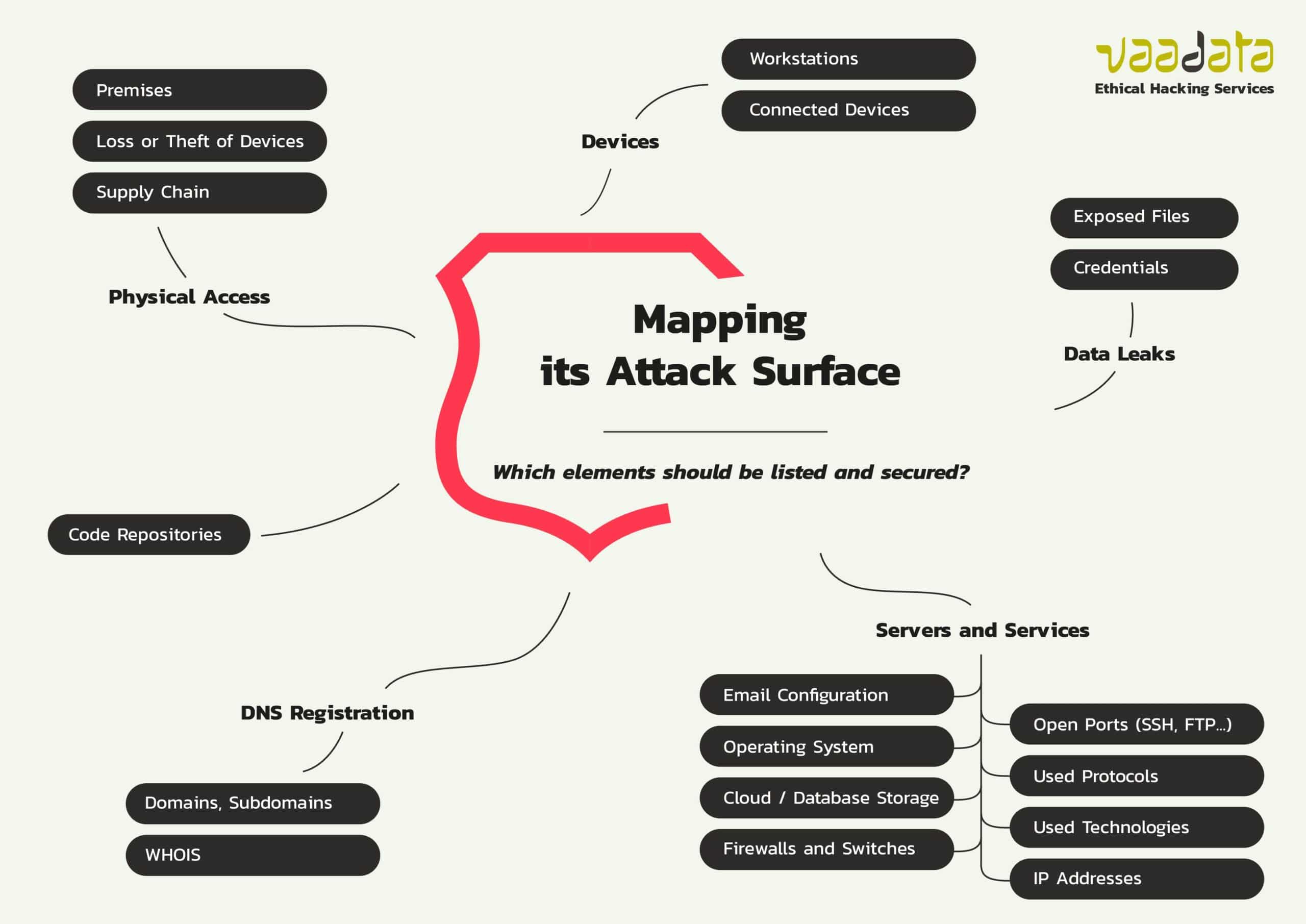
This mind map illustrates the broad scope of a system's attack surface. For our project, we are focusing on the "Physical Access" and "Devices" branches, but this gives a sense of the full context.
2. The Outer Layers: Physical and Proximal Attacks
Let's begin with the most tangible attack vectors—those that can be exploited by an adversary with physical or close proximity to your laptop. These are particularly relevant to your "Opportunist" and "Evil Maid" threat models. These attacks often exploit side-channels, where information is leaked unintentionally.
Reading: Unintended Broadcasts (15 mins)
Please read the following sections from the Wikipedia article "Computer security compromised by hardware failure". These parts describe how seemingly innocuous peripherals can betray sensitive information.
As you read, focus on:
- Monitor Emanations (TEMPEST): The idea that your screen's content can be reconstructed from a distance by capturing its electromagnetic radiation.
- Compromising Reflections: How reflections from eyeglasses or a nearby teapot can be used to spy on your screen.
- Keyboard Emanations: The different ways—electromagnetic and acoustic—that the act of typing can be monitored to reconstruct keystrokes.
These examples highlight a crucial point: the attack surface isn't just about network ports and software vulnerabilities. It includes the physical phenomena generated by the hardware itself. While defending against a state-level TEMPEST attack is likely outside your threat model, being aware of acoustic and reflection-based attacks is a practical OpSec consideration.
3. The Inner Layers: Core Hardware and Firmware
Now we move inside the case. This is where the most persistent and powerful adversaries, like your "Evil Maid," will operate. The vulnerabilities here are deeply embedded in the hardware and firmware, making them part of the TCB that is hardest to change or audit.
Memory and Direct Memory Access (DMA)
Your computer's RAM is supposed to be volatile, but this isn't always the case. Furthermore, many high-speed ports have direct, unmediated access to system memory.
Reading: Memory Vulnerabilities (10 mins)
Please read the following sections from the same Wikipedia article.
Focus on these key concepts:
- Temperature Effects (Cold Boot Attack): Understand how cooling RAM chips can dramatically increase the time they retain data after power is cut off. An "Evil Maid" could use this to reboot your machine from a USB stick and dump the entire contents of your RAM—including encryption keys.
- Read/Write Exploits via FireWire (DMA Attack): Note how peripherals connected via ports like FireWire (and more modernly, Thunderbolt) can be granted full read/write access to the computer's memory by design. This allows a malicious device to bypass all OS-level security.
- Timing Attacks on Network Cards: This is a more subtle attack, but it shows how observing the timing of network packets can leak information about encrypted sessions, like password lengths.
These vulnerabilities demonstrate that even with full disk encryption protecting data "at rest," your secrets are exposed in RAM when the machine is running or even shortly after it's turned off.
The CPU: A Universe of Vulnerabilities
The CPU is the brain of the computer and the heart of the TCB. For decades, the focus of CPU design has been on performance. To achieve this, manufacturers have built incredibly complex features like speculative execution, out-of-order execution, and multiple layers of caching.
This complexity, as Hayek might have predicted, has led to a cascade of unintended consequences. The relentless optimization created a vast, unforeseen landscape of vulnerabilities that were not designed, but simply emerged from the system's intricacy. The result is a TCB so complex that even its creators cannot fully reason about its security.
Reading: The Age of Speculative Execution Attacks (15 mins)
The following article from CSO Online catalogues the explosion of hardware vulnerabilities discovered since 2018. It's a long list, so we'll focus on the foundational examples. Please read the introduction and the descriptions for the following specific attacks.
- Introduction: Sets the stage with Meltdown and Spectre.
- CPU Side-Channel Attacks:
* Spectre (variants 1 & 2): Understand that Spectre tricks a program into speculatively accessing memory it shouldn't, leaking data through a side-channel (the CPU cache).
* Meltdown (variant 3): Understand that Meltdown breaks the fundamental isolation between user applications and the operating system kernel, allowing a user program to read kernel memory.- DRAM Memory Attacks:
* Rowhammer: Grasp the core concept that rapidly accessing memory rows can cause bits to flip in adjacent rows. This is a physical attack, not a logical one, that exploits the density of modern RAM chips.
These attacks are devastating because they break the most fundamental security boundaries (user/kernel, process/process) that we assume are enforced by the hardware. They are a powerful argument for why we must be able to modify the low-level firmware that mitigates them, a topic we will begin exploring in the next module.
4. The Software Layer
Finally, we arrive at the most commonly understood part of the attack surface: the software. This includes:
- The Operating System Kernel: The core of the OS. A single bug here can lead to total system compromise.
- System Services and Drivers: Code, often from third parties, that runs with high privileges.
- Applications: Every application you install, especially web browsers, PDF readers, and office suites, represents a significant attack surface.
- Configuration: Weak passwords, misconfigured firewalls, or unnecessary network services.
While we won't dive deep into this layer today, it's crucial to acknowledge its place in the overall picture. Much of the latter half of this course, particularly our work with Qubes OS, is designed specifically to manage and minimize the software attack surface through compartmentalization.
Conclusion
You have now surveyed the attack surface of a typical laptop, from physical emanations down to the microarchitectural flaws in the CPU. This analysis moves us from abstract threat models to concrete points of failure.
Key Takeaways:
- The attack surface is the sum of all points where an adversary can attack a system. It spans from the physical world to the deepest layers of hardware and software.
- Peripherals can leak vast amounts of data through side-channels like electromagnetic or acoustic emanations.
- Core hardware contains profound vulnerabilities. Cold Boot attacks threaten data in RAM, DMA attacks bypass OS security via external ports, and the very design of modern CPUs (e.g., Spectre, Meltdown) and DRAM (e.g., Rowhammer) has introduced fundamental security flaws.
- The complexity of modern hardware has created a massive, often unknowable, attack surface within the TCB, validating our principle of TCB minimization.
Preview of the Next Lesson:
We have seen that firmware and low-level hardware are a critical part of the attack surface. Our journey to shrink the TCB and secure your x230 must therefore start at the very bottom. In the next lesson, we will begin Module 2 by exploring the first piece of code that runs when you press the power button: the BIOS/UEFI. We will learn its role in the boot process and set the stage for understanding the risks of proprietary firmware.
Can't find a good explanation? Sign up and we'll make it for you
Sign up