
Hello again. In the previous lesson, you turned repeated combat calculations into functions: some returned values, such as damage, while others changed game state, such as awarding pistol bullets.
Now we add the decision-making layer. A game constantly checks its current state—health, ammunition, cooldowns, and later enemy perception—and chooses what to do. By the end of this lesson, you will be able to write if, elif, and else statements that select the correct behavior from those values.
From game state to a decision
A game-state value is information your game stores right now:
var enemy_health: int = 60
var pistol_bullets: int = 0
var melee_attack_ready: bool = true
A conditional turns that stored information into a yes-or-no question. For example:
enemy_health <= 0
This expression evaluates to a Boolean value:
truewhen the enemy has no health leftfalsewhen the enemy is still alive
An if statement runs an indented block only when its condition is true:
if enemy_health <= 0:
	print("Enemy defeated")
The colon and indentation are essential. In GDScript, indentation tells Godot which instructions belong to the condition.
Before building the combat example, watch this short explanation of conditionals in action.
How to program in Godot - GDScript Tutorial
Watch “How to program in Godot - GDScript Tutorial” by Brackeys for a visual introduction to conditions as the part of a game that reacts to changing variables.
Watch if statements. Focus on the distinction between a condition—such as health reaching zero—and the code block that runs only when that condition is true. Notice the examples of comparison operators, and, or, else, and elif.
Comparison operators
Most game decisions compare two values. These are the operators you will use most often:
| Operator | Meaning | Combat example |
|---|---|---|
== | equal to | pistol_bullets == 0 |
!= | not equal to | weapon_name != "pistol" |
< | less than | enemy_health < 25 |
> | greater than | pistol_bullets > 0 |
<= | less than or equal to | enemy_health <= 0 |
>= | greater than or equal to | player_health >= 100 |
Be especially careful with = and ==:
pistol_bullets = 1
This assigns 1 to the variable.
pistol_bullets == 1
This compares the variable to 1 and produces either true or false.
Choosing between two outcomes with if and else
Many mechanics have two meaningful outcomes. A pistol either has ammunition or it does not. if plus else makes both cases explicit:
func try_fire_pistol() -> void:
	if pistol_bullets > 0:
		pistol_bullets -= 1
		print("Pistol fired. Bullets remaining: ", pistol_bullets)
	else:
		print("Pistol is empty. Defeat an enemy with melee first.")
Read this as a rule:
If the player owns more than zero bullets, consume one and fire. Otherwise, do not fire; communicate why.
This matters for your intended kill-to-bullet loop. The else branch protects the ammunition value from becoming negative. Without the condition, this line would run regardless:
pistol_bullets -= 1
If the player began at zero, the result would incorrectly become -1.
else has no condition of its own. It means: “if the earlier condition was false, do this instead.”
Selecting among health states with if, elif, and else
Sometimes a mechanic has more than two outcomes. Enemy health is a useful example:
- Health at or below zero means defeat.
- Low positive health means the enemy is wounded.
- Any other positive value means it is still fighting normally.
Use elif, short for “else if,” to add another condition:
if enemy_health <= 0:
	print("Enemy defeated")
elif enemy_health <= 25:
	print("Enemy is wounded")
else:
	print("Enemy is still fighting")
Godot checks these branches from top to bottom. Once one branch is selected, it skips the rest of that chain.
The order is important. This version is correct because a defeated enemy is checked first:
if enemy_health <= 0:
	print("Enemy defeated")
elif enemy_health <= 25:
	print("Enemy is wounded")
If you reversed those checks, a health value of 0 would be described as “wounded,” because 0 is also less than or equal to 25. Put the most specific or highest-priority case first.
The official GDScript reference is useful here because it shows both the syntax and the comparison and Boolean operators available in the language.
GDScript reference — Godot Engine (stable) documentation in English
Read the official Godot reference to confirm the precise structure of conditional branches and the operators used inside their conditions.
In the “if/else/elif” subsection, read from the explanation that explains indentation and elif through the examples below it. You do not need parentheses around a normal GDScript condition, though they are allowed. Then find the “Operators” section and scan the operator table. For this lesson, focus on comparison operators (==, !=, <, >, <=, >=) and Boolean operators (not, and, or); the bitwise and assignment operators can wait.
Build a small combat decision test
Open your existing scripts/arena.gd. Replace its contents with the script below. It keeps the function structure you learned last lesson, but each action now decides whether it is allowed and reports the resulting game state.
extends Node3D


const MELEE_DAMAGE: int = 25
const KILL_REWARD_BULLETS: int = 1

var enemy_health: int = 60
var pistol_bullets: int = 0
var player_health: int = 100
var melee_attack_ready: bool = true


func _ready() -> void:
	print("=== Combat decision test ===")

	try_fire_pistol()

	apply_melee_damage(MELEE_DAMAGE)
	apply_melee_damage(MELEE_DAMAGE * 2)

	award_pistol_bullets(KILL_REWARD_BULLETS)
	try_fire_pistol()

	if player_health > 0 and melee_attack_ready:
		print("Player may perform a melee attack.")
	else:
		print("Player cannot perform a melee attack.")


func apply_melee_damage(damage: int) -> void:
	if enemy_health <= 0:
		print("Attack ignored: enemy is already defeated.")
		return

	enemy_health -= damage

	if enemy_health <= 0:
		enemy_health = 0
		print("Enemy defeated by melee damage.")
	elif enemy_health <= 25:
		print("Enemy wounded. Health remaining: ", enemy_health)
	else:
		print("Enemy is still fighting. Health remaining: ", enemy_health)


func try_fire_pistol() -> void:
	if pistol_bullets > 0:
		pistol_bullets -= 1
		print("Pistol fired. Bullets remaining: ", pistol_bullets)
	else:
		print("Pistol is empty. Use melee to earn one bullet.")


func award_pistol_bullets(amount: int) -> void:
	pistol_bullets += amount
	print("Reward granted. Bullets available: ", pistol_bullets)
Save and run the scene with F6. Your Output panel should show the same sequence of decisions, though the exact formatting may vary:
=== Combat decision test ===
Pistol is empty. Use melee to earn one bullet.
Enemy is still fighting. Health remaining: 35
Enemy defeated by melee damage.
Reward granted. Bullets available: 1
Pistol fired. Bullets remaining: 0
Player may perform a melee attack.
Follow the sequence carefully:
- The first pistol attempt selects the
elsebranch becausepistol_bulletsis0. - The first melee hit reduces enemy health from
60to35, so the finalelsebranch inapply_melee_damage()runs. - The second melee hit takes health below zero. The first branch clamps it back to
0and announces defeat. - A kill reward grants one bullet.
- The second pistol attempt now selects its
ifbranch and consumes that one bullet.
return can end an action early
At the top of apply_melee_damage(), notice this pair:
if enemy_health <= 0:
	print("Attack ignored: enemy is already defeated.")
	return
The return immediately ends the function. That means no damage is subtracted and no later health messages are evaluated.
This is a practical guard against an invalid game action: damaging an enemy that has already died. Later, the reusable Health component will enforce this kind of rule more formally.
Combining requirements with and, or, and not
A single condition can contain more than one requirement.
and: every requirement must be true
if player_health > 0 and melee_attack_ready:
	print("Player may perform a melee attack.")
The player may attack only if:
- their health is above zero, and
- the attack is ready.
If either condition is false, the whole condition is false.
or: at least one requirement must be true
if pistol_bullets == 0 or enemy_health <= 0:
	print("Do not fire the pistol.")
This selects the block if the pistol is empty, if the enemy is defeated, or if both are true.
not: reverse a Boolean value
if not melee_attack_ready:
	print("Melee attack is cooling down.")
Since melee_attack_ready is already a Boolean, not reads naturally: “if the attack is not ready.”
For conditions involving health and ammunition, write the comparison explicitly:
if pistol_bullets > 0:
For a variable that already stores true or false, use it directly:
if melee_attack_ready:
That keeps the code readable.
A preview: selecting behavior from named states
Health and ammunition use numerical ranges, so if and elif are the natural choice. Sometimes, however, a game stores one of several named states, such as "idle", "run", "jump", or "fall".
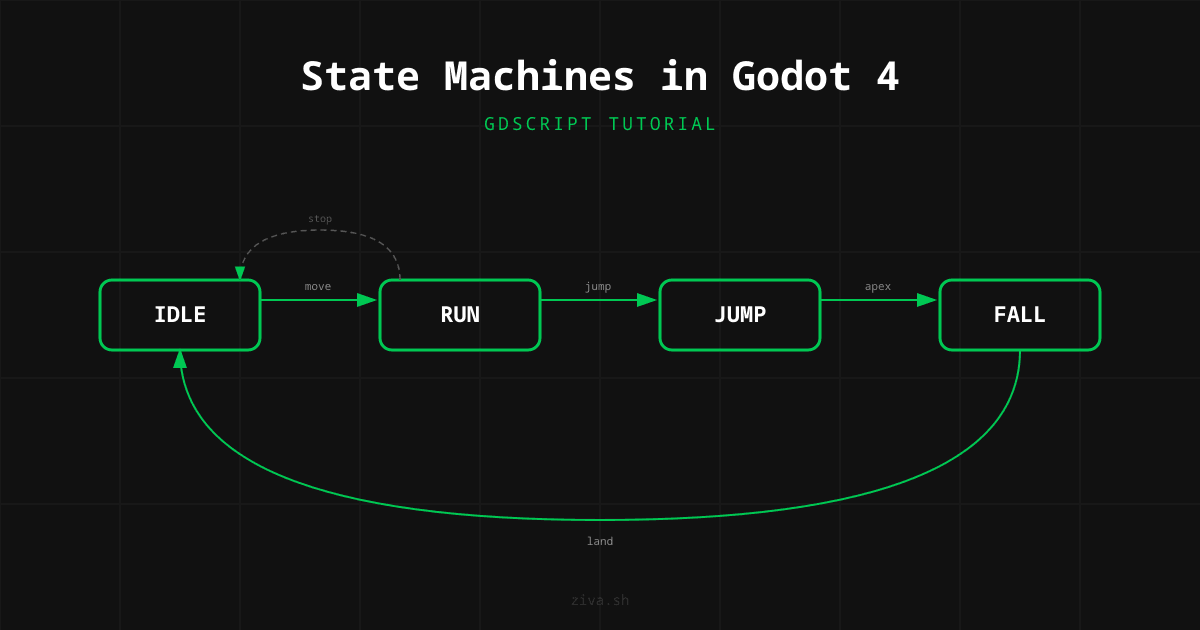
Later, you will build systems like this explicitly. For now, the key idea is simple: a state value lets the game select a suitable block of behavior.
For several exact values, GDScript also provides match:
var movement_state: String = "idle"


func describe_movement_state() -> void:
	match movement_state:
		"idle":
			print("Player is standing still.")
		"run":
			print("Player is moving across the arena.")
		"jump", "fall":
			print("Player is airborne.")
		_:
			print("Unknown movement state.")
match tests one value against a list of possible patterns. The _ is a fallback: it handles any value not listed above.
For this course stage, use this guideline:
- Use
if/elif/elsefor ranges and combined requirements, such as health, ammunition, range checks, cooldowns, and whether a target is visible. - Use
matchwhen choosing among several exact, named categories.
You do not need to build a full movement state machine yet. The diagram is a useful glimpse of how many small game decisions eventually combine into organized player and enemy behavior.
Key takeaways
A conditional asks a question that evaluates to true or false, then selects code to run:
if condition:
	# Runs when condition is true.
else:
	# Runs when condition is false.
Use comparison operators to test stored game-state values. Use elif for additional mutually exclusive outcomes, and order your branches from highest priority to lowest priority.
Use Boolean operators to express fuller game rules:
andrequires every condition to be true.orrequires at least one condition to be true.notreverses a Boolean value.
You now have the basic structure for essential combat rules: an enemy cannot keep taking meaningful damage after defeat, an empty pistol cannot fire, and a living player can act only when their attack is ready.
Next, you will work with arrays and for loops, which let you process collections of game data—such as a group of enemies or a list of spawn positions—without copying the same code repeatedly.
Can't find a good explanation? Sign up and we'll make it for you
Sign up