
Hello, and welcome to the first lesson in your system-design preparation. This opening module establishes the network vocabulary behind nearly every architecture diagram: clients, services, databases, load balancers, and caches can communicate only because the network can identify where traffic should go and which program should receive it.
Today’s goal is to explain precisely how IP addresses, ports, and sockets identify communicating processes. By the end, you should be able to look at an address such as 203.0.113.8:443, explain what it identifies, and explain how thousands of users can concurrently connect to that same service without their traffic becoming mixed together.
One machine is not one application
A physical or virtual machine may run many networked programs at once:
- a web server,
- a database,
- a metrics collector,
- an administrative service,
- several application instances.
The network therefore needs two levels of addressing.
- An IP address identifies the network destination: broadly, the machine or network interface to which IP should deliver traffic.
- A port number identifies the service or application endpoint on that IP destination to which the transport protocol should deliver the traffic.
A useful systems-design shorthand is:
IP address: port
For example:
10.0.2.17:8080
might mean “the application service listening on port 8080 at the host with IP address 10.0.2.17.”
An IP address alone is insufficient. If a packet merely arrived at a machine, the operating system would still not know whether it belongs to the web server, database, or some other program. Ports solve that delivery problem.
Ports are logical identifiers, not physical holes in a computer. TCP and UDP carry port information in their transport-layer headers, and the operating system uses it to demultiplex incoming traffic to the appropriate application.
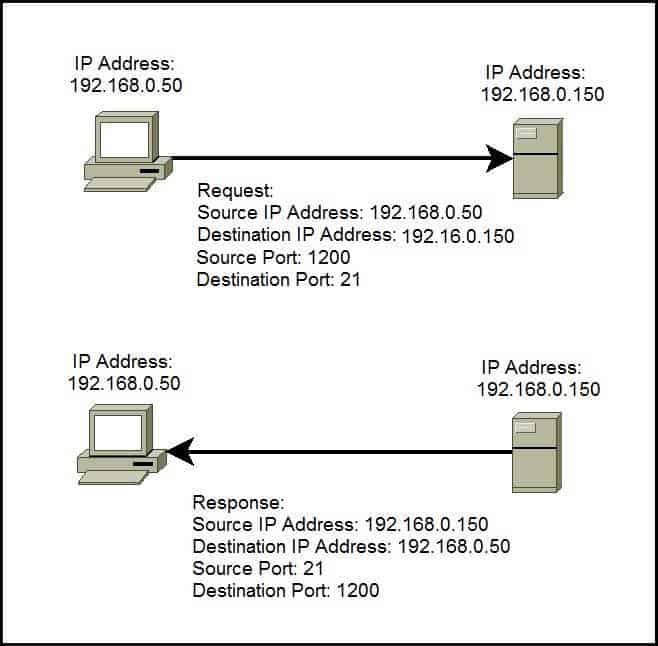
The image illustrates an essential rule: a request contains both a source and a destination IP address and port. On the response, the roles reverse. The server replies from its service port, and the client receives the reply at the temporary port it used for that connection.
IP addresses: identifying the network destination
An IP address is used by the Internet Protocol to get packets to the intended network destination. IPv4 addresses, such as 192.168.0.150, contain 32 bits; modern production systems also commonly use the much larger IPv6 address space.
For system design, avoid treating an IP address as a permanent identity for one particular machine:
- A hostname such as
api.example.comcan resolve to different IP addresses over time. - A load balancer may expose one public IP while forwarding work to many private application-server IPs.
- Containers and virtual machines can be created, replaced, and assigned new private IP addresses quickly.
- Network address translation can let many private machines share a public IP address.
So an IP address answers a routing question: which network destination should receive this traffic at this moment? It does not identify a user, an API route, or a specific business operation.
Those distinctions become important later. For example, a load balancer may receive all public HTTPS traffic on port 443, while an HTTP request’s host and path determine which backend service actually handles it.
Ports: selecting the service on that destination
A port is a 16-bit number, so its possible values range from 0 through 65,535. In practice, some port numbers have conventional meanings:
| Typical port | Common convention | Meaning in an architecture diagram |
|---|---|---|
| 80 | HTTP | Unencrypted web traffic |
| 443 | HTTPS | Encrypted web traffic |
| 22 | SSH | Remote administration |
| 5432 | PostgreSQL | A common default database port |
| 3306 | MySQL | A common default database port |
| 8080 | Application HTTP | A frequent development or internal-service convention |
These are conventions, not guarantees. A process can often be configured to use a different port. Conversely, a service on port 443 is not automatically secure simply because of its port number; HTTPS requires a correctly configured TLS connection, which is a later topic.
The lower port range, 0 through 1023, contains many well-known service ports. On many operating systems, binding to one of these ports requires elevated privileges. Higher port ranges include registered ports and ports commonly used as temporary client ports.
A key distinction:
- A server deliberately binds and listens on a port, such as port 443.
- A client usually receives a temporary, automatically selected ephemeral port from the operating system when it initiates a connection.
The exact ephemeral range is operating-system configurable. Often it is drawn from high-numbered ports, but you should not assume one universal client-port range when diagnosing a real system.
The following short video provides a visual introduction to the IP-plus-port distinction, then connects it to active connections visible on a machine.
Watch “Network Ports Explained” by PowerCert Animated Videos for a compact visual account of ports as software-level endpoints, then see how local and remote IP addresses and ports appear in an active connection.
Watch the core concepts to distinguish the role of a port from that of an IP address. Then watch the web example, paying particular attention to the local temporary port and the remote service port displayed by the network utility. Treat the familiar port numbers as conventions, rather than as rules that identify a service with certainty.
From an address to a socket
The word socket is used in two closely related ways, which can initially cause confusion.
At the programming and operating-system level, a socket is an abstraction through which a process sends or receives network data. A Java application, for example, can use a ServerSocket to listen for incoming TCP connections and a Socket to communicate over one accepted connection.
At the network-addressing level, an endpoint is commonly described by:
protocol, IP address, port
For example:
TCP, 10.0.2.17, 8080
That means “the TCP service endpoint at IP 10.0.2.17, port 8080.”
The protocol matters. TCP port 8080 and UDP port 8080 are distinct namespaces: it is possible for one process to use TCP port 8080 while another uses UDP port 8080 on the same host. In everyday system-design discussion, people often shorten an endpoint to just IP:port when the protocol is clear from context.
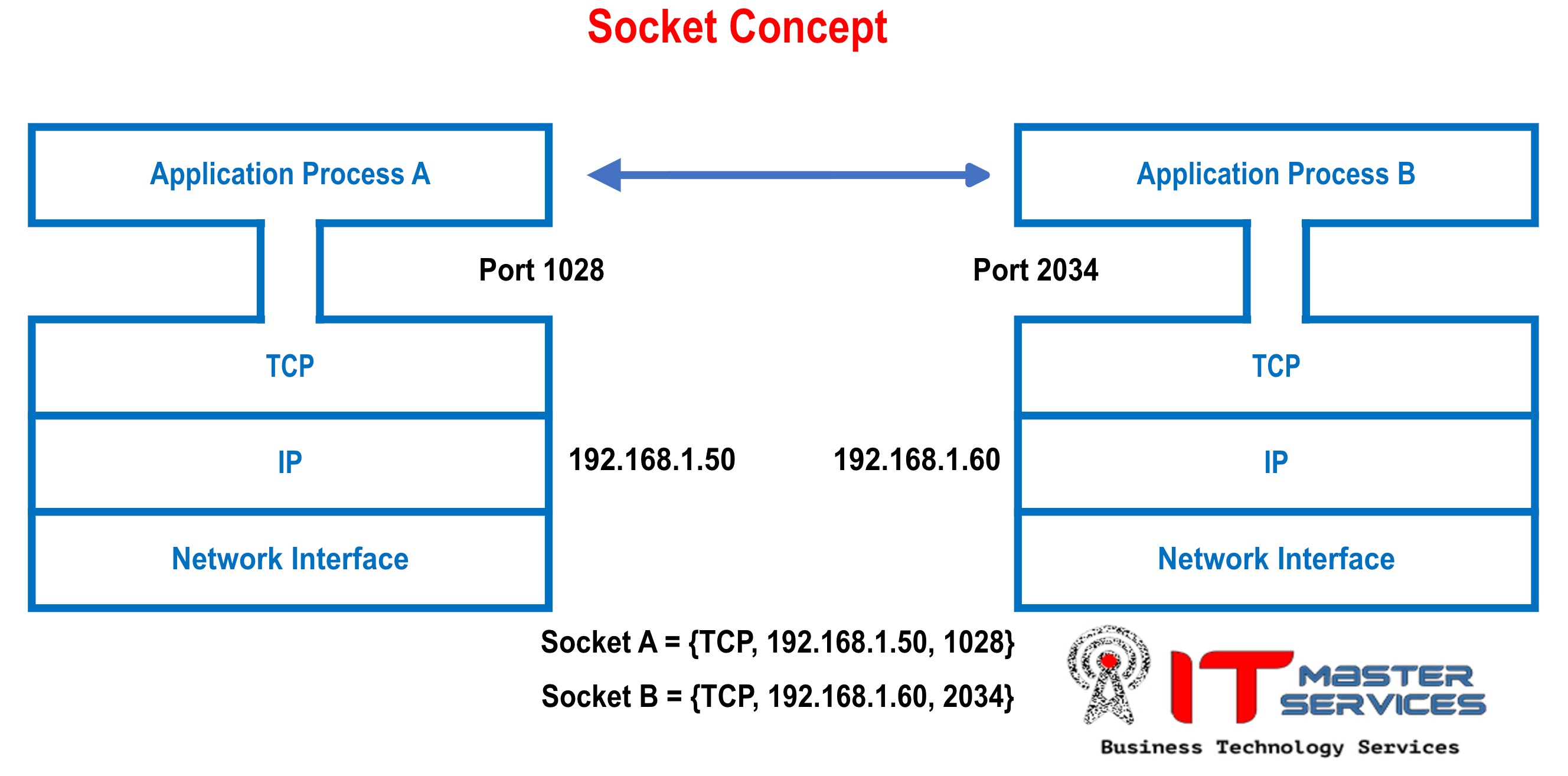
A socket is therefore not “the connection” in the broad, vague sense of a cable between two computers. It is the operating system’s communication interface for one program endpoint. A complete TCP connection involves two endpoints: one on the client and one on the server.
Oracle’s Java networking tutorial uses exactly this server-and-client model. Although the page’s Java API examples target an older JDK, its explanation of binding, listening, accepting, and endpoints remains useful.
Read Oracle’s “What Is a Socket?” to connect the network concepts to the Java server model: a server binds a listening socket, a client connects using a host and port, and the server accepts a separate socket for that particular client.
On the page titled “What Is a Socket?”, read from the server and client explanation. Focus on why the original server socket continues listening after a connection is accepted, while a new socket represents the conversation with one client.
Why a port alone cannot identify one conversation
Suppose an API server listens at:
TCP, 198.51.100.20, 443
At 9:00 a.m., many browsers may connect to it simultaneously. All of them use the same destination IP and destination port. The server still has to keep every browser’s bytes and responses separate.
For an established TCP connection, the operating system distinguishes the communication using the five-tuple:
protocol, source IP, source port, destination IP, destination port
Consider two users connecting to the same API:
| Connection | Five-tuple |
|---|---|
| User A | TCP, 203.0.113.10, 52134, 198.51.100.20, 443 |
| User B | TCP, 203.0.113.11, 60802, 198.51.100.20, 443 |
Both connections target the same server endpoint, 198.51.100.20:443. They remain distinct because their source IP addresses and source ports differ.
Even a single laptop can open multiple simultaneous connections to the same destination. Its operating system assigns distinct ephemeral source ports, such as 52134 and 52135. This allows the browser, its multiple tabs, and other local programs to use the same remote web service concurrently.
In the reverse direction, the response for the first connection has this addressing:
TCP, 198.51.100.20, 443, 203.0.113.10, 52134
The source and destination values are reversed, but it is still the same conversation. The operating system matches it to the connection state it already holds.
This is the practical hierarchy to remember:
| Identifier | What it distinguishes |
|---|---|
| IP address | A reachable network destination or interface |
| Protocol plus IP address plus port | A service endpoint on that destination |
| Five-tuple | One active transport-level conversation between two endpoints |
The terms are occasionally used loosely in industry. If an interviewer says “socket,” clarify whether they mean a local endpoint, the operating-system socket object, or an established TCP connection. Then state the precise model you are using.
The next clip reinforces why the full five-tuple is needed when many connections share a destination.
99% of Developers Don't Get Sockets
Watch selected portions of “99% of Developers Don't Get Sockets” by The Coding Gopher for a clear operating-system perspective on sockets and the five-tuple that separates concurrent connections.
First watch socket foundations, which distinguishes application code from the networking work delegated to the operating system. Then skip ahead to connection identity and connect the five-tuple to the case of many browser connections reaching the same server port.
The server lifecycle: listen once, accept many times
A common misconception is that a server “uses one socket per port” and therefore can serve only one client. The actual TCP server pattern is more subtle.
A server process first creates a listening socket and binds it to a local endpoint, such as 0.0.0.0:8080 or a specific interface address such as 10.0.2.17:8080.
Binding to 0.0.0.0:8080 typically means: “accept connections sent to port 8080 on any IPv4 interface of this host.” It does not mean that 0.0.0.0 is a public address that clients use.
When a client connects:
- The client chooses the server IP address and destination port.
- The client operating system selects a local source IP address and usually an ephemeral source port.
- The server’s listening socket receives the connection request because its local port matches the destination port.
- The operating system creates connection state associated with that specific client-server pair.
- The server application accepts a new connected socket to communicate with that client, while its original listening socket remains available for later connection requests.
Thus a server can have one listening endpoint on port 443 and many connected sockets serving individual clients at the same time. The server’s operating system performs the initial routing of arriving traffic; the server program reads and writes through the appropriate connected sockets.
This distinction will recur throughout system design:
- A load balancer may listen on a public port and establish separate connections to backend servers.
- An API service may listen on an internal port, such as 8080.
- A database may listen on its own port and accept connections from many application instances.
- Each layer can use source and destination endpoints to establish distinct conversations.
What this means when reading a system-design diagram
When you see a box labeled:
API service
10.0.4.12:8080
interpret it as a claim about network reachability: the service can accept traffic addressed to that endpoint, subject to network rules and health.
It does not by itself answer several other architectural questions:
- Which HTTP endpoint or business feature is requested?
- Which authenticated user is making the request?
- How does the system distribute traffic among many API instances?
- Is the service reachable from the public Internet or only a private network?
- Is the connection encrypted?
Those questions are handled by layers above or around IP and transport addressing. But every later design decision depends on this basic delivery chain: IP gets traffic to the destination; the transport protocol and port direct it to the intended process; the complete connection identity keeps concurrent conversations separate.
Key takeaways
- An IP address identifies the network destination to which IP delivers traffic.
- A port is a logical 16-bit identifier that TCP or UDP uses to direct traffic to a service or process on that destination.
- A socket is an operating-system communication abstraction associated with an endpoint; in system-design shorthand, an endpoint is often expressed as protocol, IP address, and port.
- A server binds a listening socket to a service port. Clients generally use operating-system-assigned ephemeral source ports.
- An established TCP connection is uniquely distinguished by its five-tuple: protocol, source IP, source port, destination IP, and destination port.
- This is why one service port, such as 443, can handle many simultaneous users safely.
Next, we will compare TCP and UDP. You will use the addressing model from this lesson to reason about why different protocols make different reliability, ordering, and latency trade-offs.
Can't find a good explanation? Sign up and we'll make it for you
Sign up