
Good to see you again. In the previous lesson, you separated latency, throughput, bandwidth, and concurrency. Those measures tell you where capacity is limited; scaling is about changing the system so it can handle more work while preserving acceptable latency and error rates.
This lesson compares the two fundamental scaling moves: vertical scaling—making one machine more powerful—and horizontal scaling—adding machines and distributing work among them. This distinction appears constantly in entry-level system-design interviews, especially when discussing an application tier, database, cache, or message-processing workers.
Two ways to increase capacity
Suppose a Java web application runs on one server and starts struggling at peak traffic. The server’s CPU is saturated, requests queue up, and p95 latency rises.
There are two broad responses:
- Vertical scaling, also called scaling up, gives the existing server more resources.
- Horizontal scaling, also called scaling out, adds more servers that can share the workload.
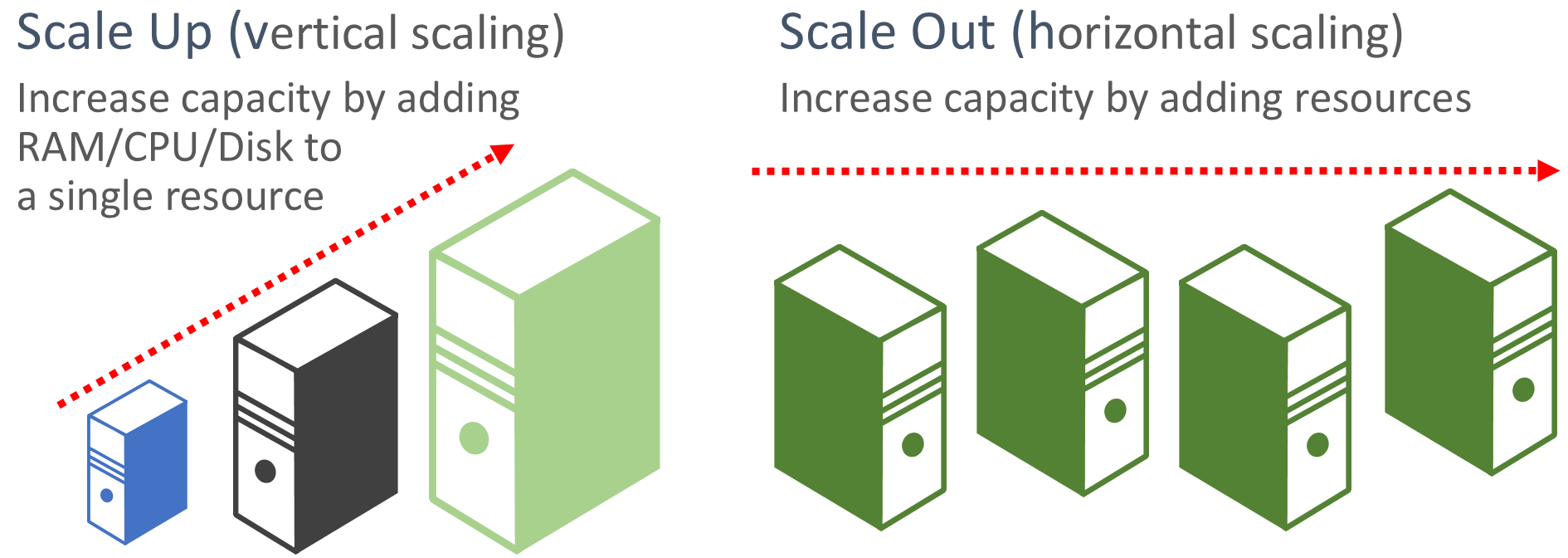
The key difference is the unit whose capacity changes:
| Strategy | What changes? | Typical example |
|---|---|---|
| Vertical scaling | Capacity of one machine | Resize an 8-core VM to a 32-core VM with more RAM and faster storage |
| Horizontal scaling | Number of machines serving the workload | Run six application-server instances instead of two |
Neither strategy is automatically “better.” They make different trade-offs in simplicity, fault tolerance, cost, and engineering complexity.
Vertical Vs Horizontal Scaling: Key Differences You Should Know
Watch Vertical Vs Horizontal Scaling: Key Differences You Should Know from ByteByteGo for a concise visual grounding in the two options and their trade-offs.
Watch continuously from 00:00:18 to 00:03:14. In vertical scaling, focus on which resources can be increased and why a single powerful machine has a ceiling. Then watch horizontal scaling, noting the additional requirements: distributing traffic, synchronizing distributed state, and operating multiple nodes.
Vertical scaling: make one machine stronger
With vertical scaling, a team increases the resources available to one server. In a cloud environment, this often means changing to a larger instance type. For example, a database might move from:
- 8 CPU cores, 32 GB RAM, standard SSD storage
to - 32 CPU cores, 128 GB RAM, faster SSD storage, and a higher-capacity network interface.
More CPU can process more computation. More memory may allow a larger working set to stay in memory rather than being read from disk. Faster storage can improve database I/O. More network capacity can help when large amounts of data enter or leave the machine.
Why scale up first?
Vertical scaling is often the simplest capacity fix:
- There may be little or no application-code change.
- A single-server application does not need a load balancer to distribute requests.
- Data does not need to be divided across several machines merely because the server grew.
- Monitoring, deployment, and debugging can initially be simpler.
For a small internal tool or an early product with modest traffic, these benefits matter. If a service is comfortably handled by one larger machine, introducing distributed-system complexity prematurely may be a poor trade-off.
But vertical scaling has important limits.
The ceilings and risks of one large server
A machine cannot grow forever. Cloud providers offer increasingly large instances, but the biggest instances are finite and often disproportionately expensive. A larger machine also may require a restart or maintenance window when resized, depending on the platform and workload.
More importantly, a single server can be a single point of failure. If it crashes, loses network access, or needs maintenance, the entire service may become unavailable.
Vertical scaling also does not guarantee that every operation becomes faster by the same factor. A database query limited by disk access, lock contention, or inefficient code may not benefit much from more CPU. You should measure the actual bottleneck before assuming that a bigger instance solves it.
A concise interview statement is:
Vertical scaling is a simple way to increase the capacity of a component by giving one instance more CPU, memory, storage, or network resources. It works well initially or for workloads that cannot easily be divided, but it has a hardware ceiling and leaves a single-instance availability risk.
Horizontal scaling: add replicas and share work
Horizontal scaling adds instances to a pool. For a typical web application, these instances run the same application version and are called replicas.
A load balancer sits in front of the pool and distributes incoming requests among healthy replicas. One request is normally handled by one application instance; horizontal scaling does not usually mean that one ordinary HTTP request is split across several servers. Instead, many independent requests from many users can be handled in parallel by different servers.
Imagine that benchmarking shows one application instance can sustain about 600 requests per second while keeping p95 latency within the target. At a peak of 3,000 requests per second, five instances provide roughly the required raw application capacity:
That is not enough redundancy to survive an instance failure: losing one server would leave capacity for only 2,400 requests per second. Six instances provide 3,600 requests per second of nominal capacity, so the remaining five could still serve the 3,000-RPS peak if one fails.
This is a simplified estimate. Real capacity depends on request mix, load-balancer distribution, CPU usage, connection pools, and downstream limits. Still, the reasoning is valuable in an interview: capacity should include failure headroom, not merely enough servers for normal traffic.
Benefits of scale-out
Horizontal scaling is attractive for workloads that have many independent units of work:
- HTTP requests to a web API
- image-processing jobs
- background email workers
- search queries
- content delivery at many edge locations
Its major benefits are:
- Growth headroom: adding another instance can add capacity without replacing all existing machines.
- Resilience: if one replica fails, traffic can be directed to the others—provided there are healthy replicas and enough spare capacity.
- Elasticity: instances can be added during traffic spikes and removed when demand falls.
- Cost flexibility: several commodity instances can be more economical and easier to grow incrementally than a single premium machine.
The scalability may be roughly proportional at first, but never assume it is perfectly linear. Shared dependencies, coordination, network overhead, and uneven traffic can eventually limit the benefit of more application servers.
The cost of distributing a system
Horizontal scaling solves a capacity problem by making the system distributed. That creates new responsibilities.
First, requests must be routed. A load balancer needs to know which instances are available, and unhealthy instances must be removed from traffic.
Second, the application cannot safely rely on state that lives only in one server’s memory. Consider a user who logs in on application server A. If their session exists only in A’s local memory, a later request routed to server B may appear unauthenticated. A common short-term workaround is sticky sessions, where the load balancer tries to keep a user on the same server. This limits the flexibility of scale-out and makes failures harder to handle.
Third, every layer must be considered separately. Adding application servers does not solve a database bottleneck. If six replicas all send queries to one overloaded database, the application tier has scaled but the end-to-end system has not. The database may need vertical scaling, caching, replicas, or partitioning—topics you will develop later in the course.
Read the following Microsoft guidance for the core selection rule and the main application-design implication of horizontal scale-out.
Architecture strategies for optimizing scaling and partitioning
Read this Microsoft Azure Well-Architected guidance to connect the two definitions to a practical architectural question: can the workload be divided into independently running parts?
In “Choose a scaling strategy,” read the vertical- and horizontal-scaling discussions. Pay particular attention to vertical-scaling guidance, then compare it with horizontal-scaling guidance. Then move to “Design application to scale.” Read from the opening explanation through the routing principle. Focus on why merely adding replicas is insufficient when session state or client affinity binds users to one server.
A direct comparison
| Design concern | Vertical scaling | Horizontal scaling |
|---|---|---|
| Capacity method | Make one instance more powerful | Add more instances |
| Deployment complexity | Usually lower initially | Requires traffic distribution and instance management |
| Failure behavior | One active machine can be a single point of failure | A replica failure can be tolerated if other replicas have capacity |
| Growth limit | Limited by the largest practical machine | Can grow further, though shared bottlenecks eventually constrain it |
| State management | Local in-memory state is straightforward | Local state causes routing and consistency problems |
| Best fit | Workloads not easily divided, modest systems, early-stage capacity increases | Independent, repeatable workloads such as web/API application tiers |
| Typical trade-off | Simplicity now, limited resilience and headroom later | Resilience and flexible growth, more distributed-system complexity |
Two cautions make this comparison more accurate:
- Horizontal scaling is not automatically highly available. It needs redundant instances, health checks, routing, and capacity headroom.
- Vertical scaling is not inherently unreliable. A system can use backups, standby systems, or managed failover. But relying on a single active machine concentrates risk.
Choosing a strategy in a system-design interview
When asked how a system should handle more traffic, do not answer “use horizontal scaling” by reflex. First identify the component under pressure and its constraint.
A useful sequence is:
- Locate the bottleneck. Is the application CPU-bound, is the database overloaded, is a cache full, or is the network saturated?
- Ask whether the workload can be divided. Independent HTTP requests are typically easy to distribute. A component requiring one shared in-memory state is harder to distribute.
- State the availability requirement. If the service must remain available when one machine fails, a single active server is insufficient.
- Consider expected growth and traffic variability. Long-term or spike-driven growth often favors scale-out for the application tier.
- Name the trade-off. More replicas increase capacity and resilience, but require load balancing and careful state management.
For example:
For a public read-heavy API, I would first make the application servers horizontally scalable. I would run multiple identical instances behind a load balancer because requests are independent and a single-instance failure should not take down the API. I would verify that session state is externalized and then measure whether the database becomes the next bottleneck. If the database alone is CPU- or memory-constrained, I might vertically scale it as an immediate step while evaluating longer-term database scaling options.
This answer is stronger than treating “the system” as one indivisible box. Real systems often combine both approaches: powerful individual nodes, replicated horizontally where replication is useful.
Key takeaways
- Vertical scaling means increasing the capacity of one machine: more CPU, memory, storage performance, or network capacity.
- Horizontal scaling means adding machines and distributing independent work across them.
- Scaling out improves resilience only when replicas, health-aware routing, and spare capacity are present.
- A horizontally scaled application tier can still be limited by a shared database, cache, network, or third-party dependency.
- Scale-up is usually simpler at first but has practical hardware and cost ceilings.
- Scale-out offers flexible growth and failure tolerance but requires load balancing and distributed-state discipline.
- In an interview, identify the bottleneck and explain why a component can—or cannot—be divided across instances.
Next, you will examine the distinction that makes horizontal scaling much easier: stateless versus stateful services, including why externally storing session state lets any healthy server handle a request.
Can't find a good explanation? Sign up and we'll make it for you
Sign up