
Hello! Welcome back to our module on SEO and Organic Search Foundations.
In our last lesson, we focused on using tools like Surfer SEO to create a comprehensive, topically-relevant article. You now have a process for writing content that is fundamentally sound and covers a subject in the depth Google expects. But having great content is only half the battle. The next step is to format it to win the most valuable real estate on the search results page.
This lesson directly addresses the learning outcome: Structure content using headings, lists, and tables to target Featured Snippets and 'People Also Ask' boxes. We will explore how specific formatting choices can make your content the source for Google's direct answers, dramatically increasing your visibility and establishing your authority right from the search page. For your goal of scaling SaaS companies, this is a crucial tactic for capturing top-of-funnel awareness.
1. Understanding "Position Zero": Featured Snippets & PAA
Before users even click a link, Google often tries to answer their query directly on the Search Engine Results Page (SERP). This prime real estate is often called "Position Zero." The two most common forms are:
- Featured Snippets: A block at the very top of the results that pulls an answer directly from a webpage.
- People Also Ask (PAA): An interactive box of related questions, where each dropdown reveals an answer sourced from a webpage.
Winning these spots means your content is presented as the definitive answer. The key to winning them lies in making your answers easy for Google to find and extract.
There are three main types of Featured Snippets you'll be targeting. This video provides a great overview.
How To Optimize For The Featured Snippets | Step By Step Process
The video 'How To Optimize For The Featured Snippets' by Matt Diggity clearly introduces the three most common snippet types you will be working with.
Watch the first part of the video from 00:00 to 02:30. Focus on understanding the visual differences and common use cases for paragraph, list, and table snippets.
2. The Core Principle: Structure for Extraction
To win a snippet, your content strategy should follow two rules:
- Answer the question immediately.
- Use clear, simple HTML structure.
This is often called the Inverted Pyramid Method, a concept borrowed from journalism. You lead with the most important information (the direct answer) and then follow with supporting details and context. Google's algorithms are designed to reward this structure.
Given your background in computer science, you'll appreciate that the "how" comes down to clean, semantic HTML. Google doesn't just read your text; it parses the underlying code (<h2>, <ul>, <table>) to understand the hierarchy and relationship between different pieces of information.
The following resource explains this formatting principle well.
How To Win Featured Snippets: A Step-by-Step Guide
The article 'How To Win Featured Snippets' by Niu Matrix provides excellent guidance on formatting. We'll focus on the section that details how to use HTML structure to your advantage.
Read the section titled 'Step 3: Format for Google’s Preferences'. Pay close attention to the subsections on 'Use subheadings and bullet points' and 'Add tables for comparison data'. Notice the specific emphasis on HTML tags like H2, H3, <ol>, <ul>, and <table>.
3. Tactical Guide: Optimizing for Each Snippet Type
Let's break down the specific formatting you need for each snippet type.
A. Paragraph Snippets (Definitions)
These are the most common snippets, often triggered by "what is," "who is," or "why is" queries.
- Strategy:
- Place the target question in an
<h2>or<h3>tag (e.g.,<h2>What is Product-Led Growth?</h2>). - Immediately below the heading, write a concise, direct answer in a single paragraph.
- Aim for 40-60 words. This is the optimal length for extraction.
- Start the sentence by rephrasing the question as an answer. For example, "Product-led growth (PLG) is a go-to-market strategy..."
- Place the target question in an
The Semrush Live video you'll see next reinforces the importance of proper heading structure for making your content machine-readable.
How to Optimize Content for the Featured Snippets
In this clip from 'How to Optimize Content for the Featured Snippets', the speaker emphasizes how crucial a logical heading structure is for both users and search engines.
Watch from 15:36 to 16:29. The key takeaway is the simple hierarchy: H1 -> Content -> H2 -> Content -> H3. This organization is fundamental to helping Google identify potential snippet content.
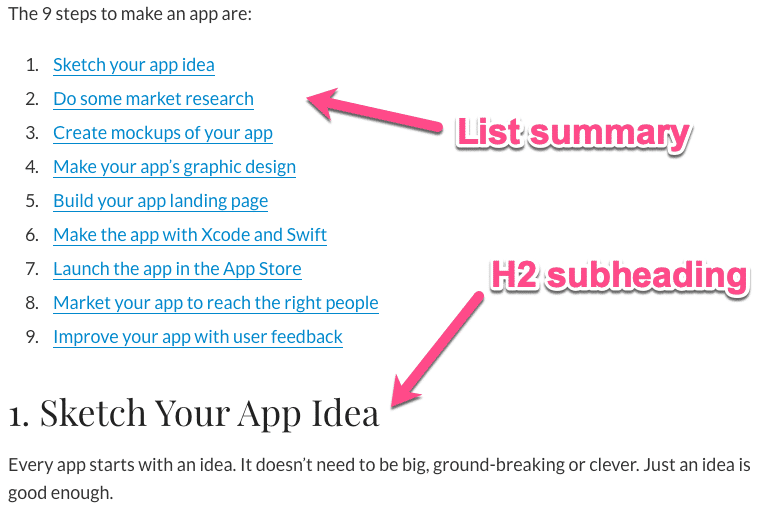
B. List Snippets (Steps & Features)
These are triggered by "how to," "steps to," or "best of" queries. They can be numbered (ordered lists) or bulleted (unordered lists).
- Strategy:
- Use a descriptive heading (
<h2>or<h3>) like "How to Set Up a Google Ads Campaign." - Use a proper HTML ordered list (
<ol>) for sequential steps or an unordered list (<ul>) for non-sequential items. - Keep each list item (
<li>) concise and start with a clear action verb (e.g., Create, Select, Define) or noun. - Aim for 4-8 list items for the best chance of being featured.
- Use a descriptive heading (
C. Table Snippets (Comparisons & Data)
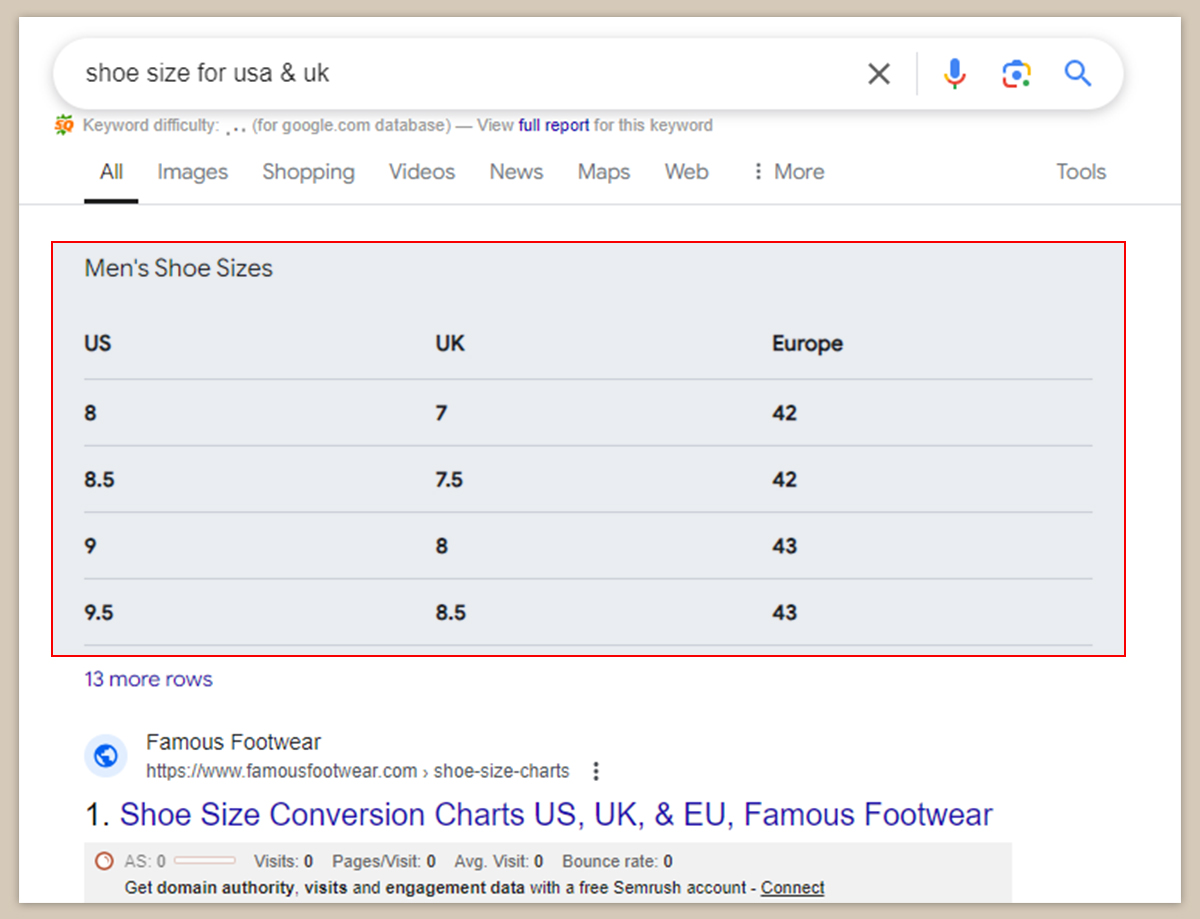
These are perfect for queries involving comparisons, pricing, or structured data. For a SaaS business, this is ideal for pricing pages or feature comparison articles.
- Strategy:
- Use a proper HTML
<table>element. - Use
<th>tags for column and row headers to give your data context. - Keep the table focused and easy to read. Tables with 3-5 columns are most effective.
- Ensure the data is accurate and clearly labeled.
- Use a proper HTML
4. Targeting "People Also Ask" (PAA)
The PAA section is a goldmine for traffic. The optimization strategy is nearly identical to that for Featured Snippets.
Your goal is to become the source for multiple PAA questions within a single article.
- Strategy:
- During your research, identify the common PAA questions related to your main keyword.
- For each relevant PAA question, create a dedicated
<h2>or<h3>section in your article. - Immediately below each heading, provide a concise, well-structured answer (paragraph, list, or table) exactly as you would for a Featured Snippet.
By doing this, you're not just optimizing for one keyword; you're creating a comprehensive resource that answers a whole cluster of related queries.
5. A Practical Workflow for Snippet Optimization
Think of this as the final "polishing" step after you've used a tool like Surfer SEO (from our previous lesson) to ensure your content is comprehensive.
- Draft Complete: You have an article with a high Content Score.
- Snippet Pass: Before publishing, review the article with this checklist:
- Paragraph: Does my article directly answer the primary "what is" query in a 40-60 word paragraph right under a heading?
- List: Are there any step-by-step instructions or lists of features that can be formatted with
<ol>or<ul>tags? - Table: Is there any comparative data (e.g., pricing, features vs. competitor) that would be clearer in a
<table>? - PAA: Have I identified 2-3 key PAA questions and created dedicated heading sections to answer them directly?
You can even use AI tools to accelerate this process. Given your interest in AI, here's a practical prompt you can adapt for ChatGPT or Claude.
// AI prompt for snippet optimization

Analyze the following article content and help me restructure parts of it to win Featured Snippets and PAA boxes for the target query "[your target query]".

Article Content:
"""
[Paste your article text here]
"""

Instructions:
1.  Identify the main "what is" definition. Rewrite it to be a concise 40-60 word paragraph that could serve as a Paragraph Snippet.
2.  Find any step-by-step processes or lists of features. Format them as a clean HTML ordered list (<ol>) or unordered list (<ul>).
3.  Look for any data comparisons. Suggest how to structure this into a simple HTML table (<table>).
4.  Suggest 2-3 "People Also Ask" questions this article could answer, and write a concise answer for each under an H3 heading.
This prompt, adapted from the 'Featured Snippets Optimization' guide, provides a template for leveraging AI to perform a snippet optimization pass on your content.
Test your understanding!
You've written a blog post about "Customer Onboarding". A section reads:
"There are several key stages in a good onboarding process. First, you should send a welcome email to greet the new user. After that, it's important to guide them through the initial product setup. Then you can show them how to achieve their first 'aha!' moment by completing a key task. Finally, you should check in with a follow-up email a few days later."
How would you restructure this text using headings and HTML to optimize it for a list snippet?
Show answer
You would structure it like this:
<h3>Key Stages of Customer Onboarding</h3>
<ol>
  <li>Send a personalized welcome email.</li>
  <li>Guide the user through initial product setup.</li>
  <li>Help the user achieve their first "aha!" moment.</li>
  <li>Follow up to offer further assistance.</li>
</ol>
This structure uses a clear heading (<h3>) and a semantic ordered list (<ol>) with concise, action-oriented list items, making it easy for Google to extract as a snippet.
Conclusion
You've now learned that how you say something in your content is just as important as what you say. Structuring your content with clear headings, lists, and tables isn't just good for user experience—it's a technical requirement for winning the most prominent positions on Google. By making this "snippet pass" a standard part of your publishing workflow, you give every piece of content the best possible chance to capture valuable, high-visibility organic traffic.
Key Takeaways:
- Featured Snippets and PAA boxes ("Position Zero") offer immense visibility.
- Winning them requires structuring content for easy extraction: answer first, then elaborate (the Inverted Pyramid).
- Use clean, semantic HTML:
<h2>/<h3>for questions,<ol>/<ul>for lists, and<table>for data. - Optimize for specific formats: concise paragraphs (40-60 words), clear lists (4-8 items), and simple tables (3-5 columns).
- Incorporate PAA optimization by creating dedicated sections that answer related user questions.
Preview of the Next Lesson:
With your on-page SEO skills now covering both content depth and structural optimization, we'll turn our attention to off-page factors. In the next lesson, you will learn how to Analyze a competitor's backlink profile using Ahrefs to identify link-building opportunities. This is critical for building the authority and trust signals that Google uses to rank content in competitive niches.