
Welcome back. In the previous lesson, you inspected the runtime contract of ARM64 ELF programs: a dynamically linked executable requires its interpreter and shared libraries, while a static executable carries its required library code within the file. We now use that distinction to construct the smallest useful Linux userspace.
The goal is not to create a production gateway image yet. It is to assemble an ARM64 initramfs-style root filesystem that contains BusyBox, boot-critical device support, minimal configuration, and a first user process. In the next lesson, this archive will become the userspace payload booted under QEMU, where its boot messages will be treated as evidence.
What a minimal root filesystem must provide
A Linux kernel can initialize CPUs, memory, interrupts, and drivers without a traditional disk filesystem. To become a usable system, however, it must eventually execute a userspace program as PID 1. For an initramfs, the conventional choice is /init.
The kernel unpacks an initramfs into RAM, mounts it as its initial root filesystem, and executes /init. If that operation fails, the system cannot transition into normal userspace. Common causes include:
/initdoes not exist;/initis not executable;/initis a script with a missing interpreter;/initis dynamically linked but its ELF interpreter or libraries are absent;- the console device is unavailable, leaving a working system with no visible output.
For this lab, /init will be a symbolic link to a statically linked BusyBox binary. That is intentionally conservative: the kernel can execute it without needing ld-linux-aarch64.so.1, libc.so.6, or any other shared object in the initial filesystem.
BusyBox is not merely a shell. It is one executable that implements many small utilities, called applets. When a symlink named mount, sh, or init points to BusyBox, BusyBox examines the invoked name and runs the corresponding applet.
A minimal root filesystem is therefore a small contract between kernel and userspace:
| Root filesystem item | Why it exists in this lab |
|---|---|
/init | Initial program executed as PID 1 |
/bin/busybox | Statically linked implementation of shell, mount, init, and basic tools |
/bin/sh, /sbin/init, and similar links | BusyBox applet entry points |
/dev/console | Boot-critical character device for PID 1 and serial output |
/dev/null | Conventional sink device required by many Unix programs |
/dev | Mount point for devtmpfs, which exposes kernel device nodes |
/proc | Mount point for process and kernel-state information |
/sys | Mount point for the kernel device model and driver state |
/etc/inittab | BusyBox init policy: startup script, console shell, shutdown actions |
/etc/init.d/rcS | Early startup script that mounts pseudo-filesystems |
/tmp, /run, /var | Writable runtime locations, with deliberately limited roles |
/root | Root user’s home directory for this controlled lab |
Do not confuse the archive directories /proc, /sys, and /dev with ordinary stored filesystems. They are initially empty mount points. Their useful contents appear when the kernel filesystems proc, sysfs, and devtmpfs are mounted.
Observe the structure before building it
The following Bootlin demonstration uses RISC-V rather than ARM64, but the root-filesystem concepts are architecture-independent: static BusyBox avoids early dynamic-library deployment, the installation step creates applet symlinks, and /dev, /proc, /sys, inittab, and rcS turn a binary collection into a usable system.
Embedded Linux from Scratch in 45 minutes, on RISC-V
Watch “Embedded Linux from Scratch in 45 minutes, on RISC-V” by Bootlin for a compact visual walkthrough of BusyBox installation and the missing pieces that appear only at boot.
Watch BusyBox assembly, focusing on static linking, the generated installation hierarchy, and the fact that the many command names are symlinks to one binary. Then watch startup configuration, focusing on why /dev, /proc, and /sys must exist and why the startup script needs both a shebang and execute permission. The video uses allnoconfig; for this first ARM64 lab, start from defconfig so that essential applets are not accidentally omitted.
A complementary reference is Embedded Greg’s Creating a BusyBox Root Filesystem For Zybo (Zynq). Its UART name, ttyPS0, is specific to that Xilinx platform; do not copy it into an ARM64 QEMU configuration. The useful transferable pattern is its separation of filesystem declarations, init policy, and early startup actions.
Creating a BusyBox Root Filesystem For Zybo (Zynq)
Read the root-filesystem configuration portion of Embedded Greg’s article to see a practical fstab, inittab, and rcS arrangement. Compare the roles of those files with the design used in this lesson.
In the page’s root-filesystem configuration portion, begin at the fstab example after the /init symlink discussion. Read the fstab explanation, then continue through the immediately following inittab and rcS listings. In the inittab discussion, read the init actions. Focus on the division of responsibility: inittab selects what init starts, while rcS performs early one-time setup.
Choose the bootstrap model deliberately
There are two workable models for PID 1:
-
Static BusyBox model, used here.
/initlinks to a BusyBox binary that has no dynamic ELF interpreter. The root filesystem needs no C library or dynamic loader merely to begin userspace. -
Dynamic BusyBox model.
BusyBox may be smaller, but/initthen requires the target ELF interpreter and every runtime library named by itsNEEDEDentries. For an ARM64 glibc system, that commonly includes an interpreter path such as/lib/ld-linux-aarch64.so.1andlibc.so.6. Exact names and locations are properties of the chosen toolchain and must be inspected, not guessed.
The static choice reduces initial bring-up variables. It does not establish a general production policy: later gateway services will normally be dynamically linked so that a system library update does not require rebuilding every application. A recovery environment, an initramfs, and a normal package-managed root filesystem have different constraints.
Device support: static nodes and dynamic nodes
Before /init can mount devtmpfs, the initial archive should contain at least:
/dev/console, character device, major , minor ;/dev/null, character device, major , minor .
These are static device nodes stored in the cpio archive. Once the startup script mounts devtmpfs on /dev, the kernel exposes registered device nodes dynamically. This later allows serial ports, block devices, GPIO character devices, and other devices to appear according to kernel driver state.
BusyBox mdev is a small optional userspace device manager. Its mdev -s cold-plug scan can apply BusyBox device rules after /sys is mounted. It is useful as a learning and small-system mechanism. A full industrial distribution may instead use systemd-udevd, but that belongs to a later system-design decision.
Build and install static ARM64 BusyBox
Use the ARM64 SDK environment from the earlier toolchain lessons. In particular, do not use Ubuntu’s native gcc; it would produce an x86-64 BusyBox that QEMU’s ARM64 kernel cannot run.
Start a private lab directory. This is an implementation artifact, so keep the complete filesystem, binaries, and logs in the private gateway repository.
cd ~/gateway-private
mkdir -p labs/04-busybox-rootfs
cd labs/04-busybox-rootfs

export LAB="$PWD"
export ROOTFS="$LAB/rootfs"
export OUT="$LAB/out"

mkdir -p "$OUT"

: "${TARGET_PREFIX:?Source the ARM64 SDK environment first; TARGET_PREFIX is unset.}"
command -v "${TARGET_PREFIX}gcc"

export BUSYBOX_SRC=/absolute/path/to/your/busybox-source
test -f "$BUSYBOX_SRC/Makefile"
Replace /absolute/path/to/your/busybox-source with the actual extracted BusyBox source directory. The final test command should exit silently; an error means the path is wrong.
Build from BusyBox’s default configuration first. It includes a practical baseline of applets, including init, ash, mount, and filesystem utilities. A later size-optimization activity can begin with allnoconfig and enable only explicitly justified applets.
cd "$BUSYBOX_SRC"

make distclean

make ARCH=arm64 \
    CROSS_COMPILE="$TARGET_PREFIX" \
    defconfig

scripts/config --enable CONFIG_STATIC

make ARCH=arm64 \
    CROSS_COMPILE="$TARGET_PREFIX" \
    olddefconfig

make ARCH=arm64 \
    CROSS_COMPILE="$TARGET_PREFIX" \
    -j2

cp .config "$LAB/busybox-static.config"
The -j2 setting is intentionally modest for the current 16 GB workstation. BusyBox is small enough that aggressive parallelism offers little practical benefit here.
Now verify the most important property of the build:
"${TARGET_PREFIX}file" busybox

"${TARGET_PREFIX}readelf" -lW busybox \
    | grep 'Requesting program interpreter' || true
Expected evidence:
fileidentifies an ARM aarch64 executable;- the output says statically linked, or equivalent wording;
readelfprints no requested interpreter.
If the static link fails with an error such as cannot find -lc, stop and record the result. Your SDK likely lacks the target static C library archives. Do not replace the cross compiler with host gcc, and do not copy x86-64 libraries into the ARM64 root filesystem. A dynamic BusyBox is possible, but it requires a deliberate target-side loader and shared-library deployment step.
Install BusyBox into the root filesystem:
rm -rf "$ROOTFS"

make CONFIG_PREFIX="$ROOTFS" install

find "$ROOTFS" -maxdepth 3 -type l -ls | head -20

ls -l "$ROOTFS/bin/busybox" \
      "$ROOTFS/bin/sh" \
      "$ROOTFS/sbin/init"
The installer creates a hierarchy such as /bin, /sbin, /usr/bin, and /usr/sbin. Most command entries are links pointing back to BusyBox. This is why a tiny root filesystem can still contain familiar commands such as ls, cat, mount, dmesg, and sh.
Add directories, boot-critical devices, and configuration
Create the mount points and writable locations. The permission on /tmp is deliberately 1777: all users may create files there, but the sticky bit prevents one user from deleting another user’s file. Avoid the tempting but unsafe habit of applying chmod -R 777 to a filesystem.
install -d -m 0755 \
    "$ROOTFS/dev" \
    "$ROOTFS/etc" \
    "$ROOTFS/etc/init.d" \
    "$ROOTFS/proc" \
    "$ROOTFS/sys" \
    "$ROOTFS/run" \
    "$ROOTFS/var" \
    "$ROOTFS/var/log" \
    "$ROOTFS/root" \
    "$ROOTFS/mnt" \
    "$ROOTFS/tmp"

chmod 1777 "$ROOTFS/tmp"
Create the two device nodes. mknod is privileged because a device node is an authority-bearing reference to a kernel driver, not an ordinary file.
sudo mknod -m 600 "$ROOTFS/dev/console" c 5 1
sudo mknod -m 666 "$ROOTFS/dev/null" c 1 3

ls -l "$ROOTFS/dev/console" "$ROOTFS/dev/null"
The leading characters in ls -l output should be c, indicating character devices. Confirm the major and minor numbers shown beside each node.
Next, make /init explicit. BusyBox often installs a historical linuxrc link, but this lab deliberately supplies the modern initramfs convention.
ln -snf bin/busybox "$ROOTFS/init"

ls -l "$ROOTFS/init"
The target of the relative link must be bin/busybox, not an absolute path from the development workstation. Relative links remain valid after the filesystem is archived and unpacked by the target kernel.
Minimal account and mount declarations
Create basic identity files. This system has no network login service and no password management; the files simply establish a conventional root identity for utilities that consult them.
cat > "$ROOTFS/etc/passwd" <<'EOF'
root:x:0:0:root:/root:/bin/sh
EOF

cat > "$ROOTFS/etc/group" <<'EOF'
root:x:0:
EOF

cat > "$ROOTFS/etc/fstab" <<'EOF'
devtmpfs  /dev      devtmpfs  mode=0755,nosuid        0 0
proc      /proc     proc      defaults                0 0
sysfs     /sys      sysfs     defaults                0 0
devpts    /dev/pts  devpts    mode=0620,gid=5         0 0
tmpfs     /run      tmpfs     mode=0755,nosuid,nodev  0 0
EOF
fstab records the intended mount topology. In this intentionally small system, the rcS script performs the mounts explicitly so that the ordering is obvious and failures are easy to locate in serial output.
Define BusyBox init policy
Create /etc/inittab:
cat > "$ROOTFS/etc/inittab" <<'EOF'
::sysinit:/etc/init.d/rcS
console::respawn:-/bin/sh
::restart:/sbin/init
::ctrlaltdel:/sbin/reboot -f
::shutdown:/bin/umount -a -r
EOF
Interpret the essential entries:
::sysinit:/etc/init.d/rcSruns the one-time startup script before interactive work.console::respawn:-/bin/shstarts a login-style BusyBox shell attached to/dev/console; if it exits, BusyBox init starts another shell.::shutdownattempts to remount and unmount filesystems safely when shutdown is requested.
Using console avoids hard-coding a board-specific device such as ttyPS0. In the next QEMU ARM64 lab, the kernel command line will identify the actual serial console, while /dev/console remains the portable kernel-selected endpoint.
Create the startup script:
cat > "$ROOTFS/etc/init.d/rcS" <<'EOF'
#!/bin/sh

PATH=/sbin:/bin:/usr/sbin:/usr/bin
export PATH

echo "rcS: mounting pseudo-filesystems" > /dev/console

mount -t devtmpfs -o mode=0755,nosuid devtmpfs /dev
mkdir -p /dev/pts

mount -t proc proc /proc
mount -t sysfs sysfs /sys
mount -t devpts -o mode=0620,gid=5 devpts /dev/pts
mount -t tmpfs -o mode=0755,nosuid,nodev tmpfs /run

if [ -x /sbin/mdev ]; then
    echo "rcS: scanning devices with mdev" > /dev/console
    mdev -s
fi

echo "rcS: minimal BusyBox rootfs ready" > /dev/console
EOF

chmod 0755 "$ROOTFS/etc/init.d/rcS"

ls -l "$ROOTFS/etc/init.d/rcS"
The shebang selects BusyBox sh; its execute bit allows BusyBox init to run it. The order is meaningful:
- Mount
devtmpfsso kernel-created device nodes become visible. - Create
/dev/pts, which must exist afterdevtmpfshides the archive’s original/devcontents. - Mount
procandsysfs, exposing process state and the kernel device model. - Mount
devptsfor pseudoterminals and a smalltmpfsfor volatile runtime state. - Run
mdev -sonly after/sysis available.
Package and inspect the initramfs archive
An initramfs is conventionally a newc cpio archive, optionally compressed. Create the archive in a stable lexical order, then compress it without embedding a gzip timestamp.
cd "$LAB"

(
    cd "$ROOTFS"
    find . -print0 \
        | LC_ALL=C sort -z \
        | cpio --null -o --format=newc --owner=0:0
) > "$OUT/rootfs.cpio"

gzip -n -9 -c "$OUT/rootfs.cpio" > "$OUT/rootfs.cpio.gz"

ls -lh "$OUT/rootfs.cpio" "$OUT/rootfs.cpio.gz"
The sorted file list makes archive entry ordering repeatable. It does not by itself make the entire build reproducible: source revisions, ownership, file timestamps, tool versions, and build paths remain future concerns. This small gap is one reason manually assembled root filesystems do not scale well into a long-lived product build.
Inspect the archive before trying to boot it:
cpio -itv < "$OUT/rootfs.cpio" \
    | grep -E '(^| )(\./init|\./dev/console|\./dev/null|\./etc/inittab|\./etc/init.d/rcS)$' \
    || true

find "$ROOTFS" -xtype l -print
Your inspection should establish all of the following:
./initexists and is a symbolic link tobin/busybox;./dev/consoleand./dev/nullare character devices, not regular files;./etc/inittaband./etc/init.d/rcSare present;rcSis executable;- no BusyBox applet links are dangling.
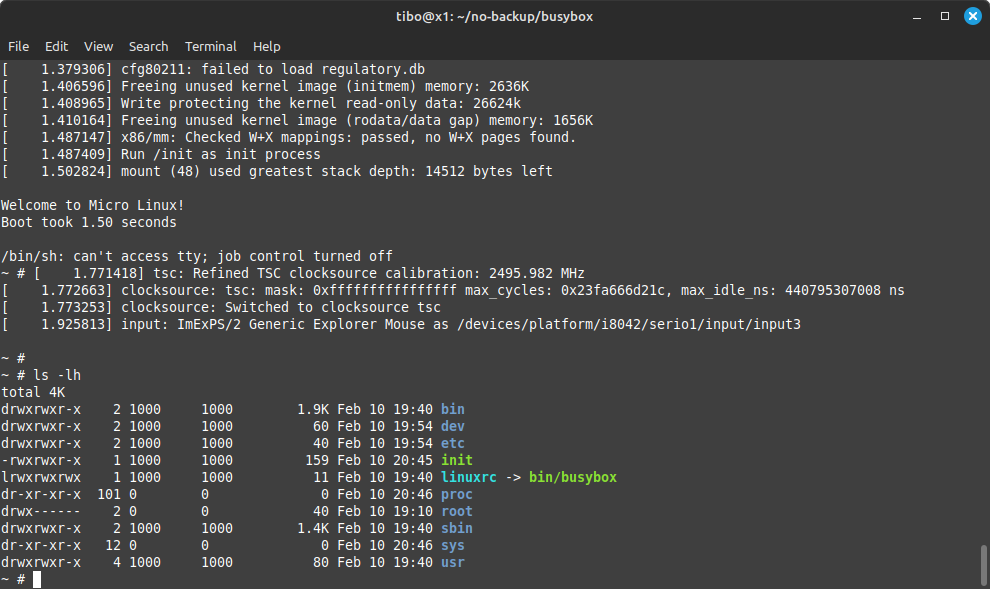
The QEMU terminal shown below illustrates the kind of outcome this archive is intended to support: the kernel reaches a BusyBox shell, and the resulting root filesystem contains the familiar top-level directories.
Keep these items together in the private repository:
labs/04-busybox-rootfs/
├── busybox-static.config
├── rootfs/
└── out/
    ├── rootfs.cpio
    └── rootfs.cpio.gz
For the eventual public showcase, publish a sanitized directory tree, a short design note, and a boot screenshot. Do not publish internal SDK paths, proprietary binaries, credentials, or any future production security material.
Key takeaways
A minimal BusyBox root filesystem is a carefully bounded boot contract, not simply a directory containing executables.
- A static BusyBox binary removes the initial dynamic-loader and shared-library dependency chain.
/initmust exist and be executable because it becomes PID 1./dev/consoleand/dev/nullare essential initial device nodes;devtmpfsthen provides dynamic device visibility./proc,/sys,/dev/pts, and/runneed both mount points and correct startup mounting.- BusyBox
inittabstates the process policy, whilercSperforms early system setup. - A
newccpio archive preserves the filesystem hierarchy, symlinks, modes, and device nodes needed by an initramfs.
Next, you will boot this ARM64 BusyBox system under QEMU and use its boot output to diagnose the four high-value failure classes: missing console, missing dynamic loader, missing shared library, and missing or broken init.
Can't find a good explanation? Sign up and we'll make it for you
Sign up