
Welcome back. In the previous lesson, you mapped AI capabilities to workflows in sales, customer service, operations, and finance. You also learned that a viable AI opportunity needs a defined user, workflow, permitted data, output, business metric, and control.
This final lesson in the module adds an essential commercial discipline: deciding when not to lead with AI. By the end, you will be able to assess a business problem and recommend one of four credible paths: process redesign, conventional automation, AI, or a deliberately designed combination of them.
Begin with the work, not the technology
A customer may say, “We need an AI solution for this process.” Treat that as a starting hypothesis, not a requirement. The business may have a real problem, but the best remedy could be a simplified policy, a standard workflow, an API integration, a rules engine, or AI applied only to the messy exceptions.
The costly mistake is to automate an inefficient process exactly as it exists. If a workflow contains redundant approvals, unclear ownership, inconsistent inputs, or unnecessary handoffs, adding AI can make the inefficiency occur faster and at greater scale.
A sound recommendation starts with three questions:
-
Should this work exist in its current form?
If the task is created by avoidable rework, duplicate data entry, unclear policy, or poor handoffs, redesign comes first. -
Can the required decision be stated as stable, explicit logic?
If the answer is yes, conventional automation is often more reliable, cheaper, and easier to audit than AI. -
Does the work require interpretation, prediction, perception, or generation from variable information?
If it does, AI may be justified—provided the organization can evaluate it, control it, and act on its outputs.
This is not an “old technology versus new technology” debate. It is a fit-for-purpose decision.
Select the right AI use case for your business
Watch “Select the right AI use case for your business” from IBM Technology. It makes the central commercial point clearly: generative AI is valuable, but it is not automatically the best technical or economic answer.
Start with the reality check, which explains the cost of applying generative AI indiscriminately. Continue through matching tool to problem, especially the examples of forecasting and optimization. Finish with four selection factors: requirements, existing capabilities, integration, and team skills.
The four possible recommendations
Think of the options as a hierarchy of intervention, not a menu of competing products.
| Recommendation | Core idea | Best signals | Typical examples |
|---|---|---|---|
| Process redesign | Change or remove unnecessary work before digitizing it | Rework, unclear ownership, excessive approvals, inconsistent inputs, no agreed standard | Simplify approval policy; introduce a standard request form; remove duplicate data entry |
| Conventional automation | Execute known steps and explicit rules consistently | Structured inputs, stable logic, repeatable cases, low ambiguity | Workflow routing, API integration, calculations, notifications, rules-based eligibility |
| AI-supported workflow | Interpret variable information, make predictions, or create useful drafts | Unstructured data, patterns too complex to code, language or image understanding required | Document extraction, demand forecasting, case classification, agent assist |
| Hybrid design | Use redesign, rules, automation, AI, and people at their appropriate points | A process contains both routine cases and meaningful exceptions | Invoice handling, claims triage, service requests, onboarding |
The most mature answer is often hybrid. For example, an invoice process may use:
- a redesigned supplier onboarding process to reduce nonstandard invoices;
- rules to validate purchase-order numbers, amounts, and approval thresholds;
- AI to extract fields from varied PDF layouts;
- API-based integration to post approved records into the finance system;
- human review for mismatches, high-value invoices, or suspected fraud.
Calling the whole solution “an AI invoice-processing system” would be technically incomplete and commercially misleading.
First test: does the process need redesign?
Process redesign means changing how work is done, not merely digitizing existing steps. It can involve eliminating a task, consolidating handoffs, defining a policy, standardizing the input, or moving a decision closer to where the relevant information exists.
Look for these warning signs:
| What you observe | What it usually means | Better first move |
|---|---|---|
| Staff enter the same information into several systems | The systems or ownership model are poorly connected | Integrate systems or establish a system of record |
| Teams repeatedly correct incomplete requests | Inputs are not standardized | Redesign the intake form and required fields |
| Managers approve almost every low-risk request | The approval policy is too broad | Introduce thresholds and delegated authority |
| Different teams handle the same case differently | Policy or decision criteria are unclear | Define standard decision rules and exception paths |
| A “high-volume” problem is mostly preventable rework | The source of failure is upstream | Fix the upstream process before automating downstream cleanup |
| Nobody can explain the desired outcome consistently | The business requirement is not ready | Clarify ownership, policy, and success measures |
Consider a travel-expense process in which employees email receipts, finance staff manually ask for missing information, managers approve every claim, and accounting re-enters data into an expense system.
An AI receipt-reading tool might reduce data entry, but it does not resolve the underlying causes of delay. A redesign might first require employees to submit claims through one standardized channel, set mandatory fields, establish a low-value approval threshold, and clarify expense policy. AI can later extract receipt information or flag unusual claims—but it should not be used to compensate for an incoherent process.
Why Process Automation Won’t Cure Inefficiency | APQC
Read this APQC article for a concise distinction between forms of automation and a useful challenge to the assumption that every inefficient workflow should be automated.
In the opening numbered list, read the three automation types. Focus on how human judgment, business rules, and AI can occupy different roles in a process. Then continue to the paragraph beginning “Organizations recognize” and read the diagnostic questions. Notice that streamlining the process is a question to answer before selecting a tool.
A useful business-development response is therefore sometimes:
“Before we estimate an AI solution, we should establish whether the current handling time comes from interpretation of complex information or from avoidable rework, unclear policy, and repeated handoffs. If it is the latter, simplifying the workflow may produce value faster than an AI deployment.”
That is not resisting the sale. It is protecting the customer from a poorly scoped project and building credibility for the opportunity that remains.
Second test: is conventional automation enough?
Conventional automation means software follows predefined instructions. The instructions may be implemented in workflow software, business rules, scripts, APIs, or robotic process automation (RPA).
The underlying principle is deterministic: given the same valid inputs and conditions, the system should produce the same output.
A rules engine is appropriate when the business can state the logic explicitly:
- If a refund is requested within the allowed period and the item is not final sale, approve it.
- If an invoice matches its purchase order and goods receipt within the permitted tolerance, send it for payment.
- If a prospect is in a prohibited geography, do not route it to that sales campaign.
- If a payment exceeds a defined amount, require a second approver.
These decisions need policy clarity more than machine learning. Their main advantages are predictable results, straightforward testing, low operating cost, and a clear audit trail.
Prefer APIs before RPA where possible
If systems offer secure, permitted APIs, API-based integration is normally the best route for high-volume work. It exchanges data directly between systems, is generally more resilient to interface changes, and is easier to monitor at scale.
RPA has a different role. An RPA bot imitates what a person does on a user interface: logging into an application, copying fields, pressing buttons, downloading a report, or entering data into a legacy system. It can be useful when APIs do not exist or cannot be accessed.
RPA fits best when work is:
- repetitive and rule-based;
- performed across legacy or disconnected applications;
- sufficiently stable that changes to the screen layout will be manageable;
- valuable enough to automate, but not valuable enough to justify replacing or deeply reengineering a legacy system.
RPA is usually a poor foundation for a highly complex, frequently changing, high-throughput end-to-end process. It is task automation, not a substitute for good process design and integration architecture.
For instance, copying a daily sales figure from a legacy portal into a report is a sensible RPA candidate. Asking an RPA bot to coordinate a multi-department customer-onboarding process with changing policies, exceptions, approvals, and several human decisions is usually not.
Third test: is AI genuinely required?
AI becomes appropriate when the system must work with information that cannot be fully handled by fixed logic.
Typical signals include:
- emails, documents, call transcripts, images, or free-text case notes;
- categories or judgments that vary with context;
- forecasts based on historical patterns rather than fixed calculations;
- anomaly detection, such as unusual transaction or equipment behavior;
- a need to summarize, retrieve, explain, or draft content;
- many possible case variations that would create an impractical number of rules.
The relevant question is not “Can AI do this?” It is:
What judgment or interpretation is AI contributing that rules and ordinary software cannot provide economically or reliably?
For example, a customer-service team may receive thousands of free-text messages each week. Routing a message that says “My parcel has not moved for days and I urgently need it for a wedding” requires interpretation of topic, sentiment, urgency, and account context. AI classification can help triage such messages. A fixed rule can then determine whether a compensation request exceeds a permitted threshold, while a human handles sensitive or unusual cases.
AI is valuable here because of the variable language. It should not replace the deterministic policy check.
AI Agents vs Business Rules: Which Should Make Decisions?
Watch “AI Agents vs Business Rules: Which Should Make Decisions?” from IBM Technology. The video sharply distinguishes predictable rules from probabilistic AI behavior, then shows why a blended design is often safer.
Watch deterministic versus probabilistic to understand why rules produce repeatable outcomes while AI can vary. Continue with rules fit for well-defined, structured, compliance-sensitive decisions, then AI fit for messy inputs and contextual judgment. Finish with the hybrid pattern; focus on the idea of letting low-cost rules resolve clear cases and escalating ambiguous cases to AI and, where needed, human review.
The video discusses AI agents specifically, but the broader decision applies to predictive and generative AI as well: AI output is often probabilistic, so the required level of consistency, explanation, and control matters.
Design the boundary: routine cases, exceptions, and accountability
Most real processes contain at least two populations:
- Routine cases, where inputs are complete and decisions are clear.
- Exceptions, where information is missing, unusual, ambiguous, or high risk.
The best design treats these populations differently. It does not send every case to an expensive AI model, and it does not attempt to encode every unusual human situation in thousands of rules.
The workflow below illustrates that division of labor.
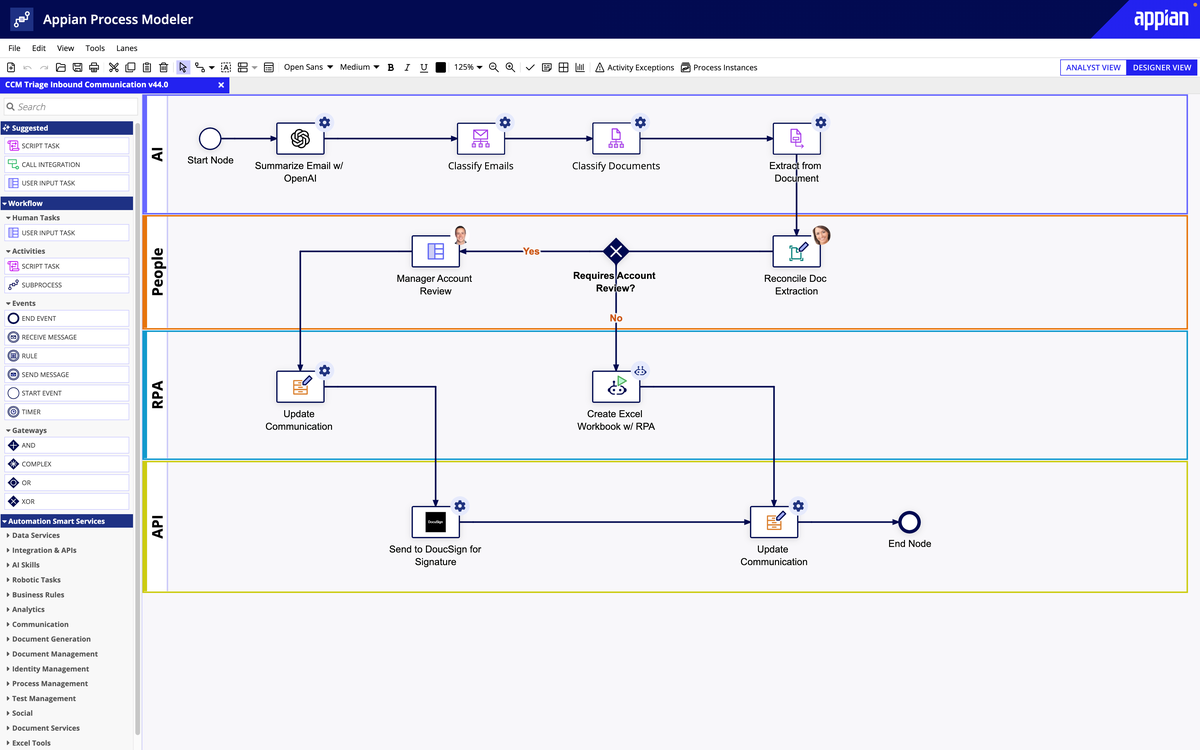
Notice what this process model does not imply: that AI is in control of the whole workflow. AI handles tasks such as summarization, classification, and extraction. People handle account review and document reconciliation. RPA and APIs perform defined transactional actions. A workflow layer coordinates the handoffs and exception routes.
This is a strong pattern for enterprise proposals because it makes accountability visible.
| Process element | Appropriate mechanism | Example |
|---|---|---|
| Known eligibility or compliance condition | Rule | Route any contract above a specified value for legal review |
| Repetitive transfer between systems | API or RPA | Create a record in a legacy application |
| Text, image, or document interpretation | AI | Extract supplier name and invoice number from a PDF |
| Fuzzy recommendation | AI with confidence threshold | Suggest the most likely issue category for a support case |
| High-impact exception | Human review, supported by AI evidence | Approve an unusual refund or payment exception |
| End-to-end coordination | Workflow and orchestration | Track status, ownership, deadlines, escalation, and audit trail |
A practical rule of thumb is: automate the predictable path, assist the ambiguous path, and preserve human authority for consequential decisions.
Worked diagnosis: “We need AI to automate invoice processing”
Suppose an accounts-payable leader says, “Our team spends too much time handling invoices. We want AI automation.”
A weak response would jump directly to document AI. A stronger diagnosis separates the work.
| Discovery finding | Interpretation | Recommended response |
|---|---|---|
| Suppliers submit invoices through email, PDF, paper scans, and several portals | Intake is fragmented | Redesign intake and encourage standardized electronic invoicing where feasible |
| Many invoices lack purchase-order numbers | The issue is upstream process compliance | Redesign procurement and supplier communication; make the PO requirement clear |
| Matching invoice, purchase order, and goods receipt follows agreed tolerances | Logic is explicit | Use rules-based matching |
| Invoice layouts differ widely and include scanned documents | Interpretation is required | Use AI-assisted extraction with confidence scoring |
| The finance system has a supported interface | Direct integration is available | Use APIs to post validated invoices |
| A legacy subsidiary system has no accessible integration | A limited desktop task remains | Consider RPA as a controlled interim bridge |
| High-value invoices or mismatches can affect cash and supplier relationships | Error impact is significant | Require human review and retain audit evidence |
The recommendation might sound like this:
“We recommend a phased invoice-processing workflow, rather than a standalone AI tool. First, standardize intake and reduce invoices without valid purchase orders. Second, automate deterministic matching and approval routing through rules and system integration. Use AI only for variable document extraction and exception classification, with confidence thresholds and finance review for material exceptions.”
This statement is more persuasive because it identifies where AI creates unique value and where simpler mechanisms are better.
A repeatable triage method for discovery
When qualifying any proposed use case, collect evidence in this order:
-
Define the business outcome.
Ask what must improve: cycle time, cost per case, accuracy, customer response time, working capital, conversion, risk exposure, or employee capacity. -
Map the current workflow.
Identify triggers, inputs, handoffs, decisions, systems, exceptions, and end state. Do not accept “the process is manual” as a complete description. -
Locate avoidable work.
Ask which steps create no customer, control, or operational value. Check for duplicate entry, unclear policy, rework, and preventable exceptions. -
Classify the inputs and decisions.
Determine whether inputs are structured or unstructured, whether decisions are explicit or contextual, and whether the business can explain the intended result in advance. -
Assess consequences of error.
A wrong grammar suggestion has a different consequence from a wrong credit, medical, hiring, payment, or compliance decision. Higher consequence usually means stronger rules, thresholds, oversight, and testing. -
Check feasibility.
Confirm data permission and quality, available integrations, process ownership, operational skills, and the ability to measure results after deployment.
The final recommendation should state the dominant intervention, not just name a technology:
- “Redesign the intake and approval policy first.”
- “Use API-based workflow automation because the logic is stable.”
- “Use AI to classify and summarize unstructured requests, but retain rules for entitlement.”
- “Use a hybrid model: rules for routine cases, AI for interpretation, human review for high-risk exceptions.”
This language helps a buyer see that you understand operations, not only AI features.
Key takeaways
A business problem is not automatically an AI problem.
- Choose process redesign when inefficiency comes from unnecessary work, bad handoffs, unclear policy, inconsistent inputs, or upstream rework.
- Choose conventional automation when inputs are structured and decisions can be expressed as stable, explicit rules. Prefer APIs for dependable system-to-system automation; use RPA thoughtfully where legacy interfaces make integration impractical.
- Choose AI when the work requires interpretation of language, documents, images, patterns, or contextual variation that cannot be reasonably captured in fixed rules.
- Choose a hybrid workflow when routine cases are predictable but exceptions require interpretation or judgment. This is common in enterprise operations.
- In every proposal, specify the process boundary, data, decision rights, exception path, controls, and success metric.
You have now completed the foundations for enterprise AI conversations. The next module moves beneath the workflow level: you will trace how data travels from an enterprise source through an AI system to a user-facing output.
Can't find a good explanation? Sign up and we'll make it for you
Sign up