
Hello! Welcome back to our course on the composers of Sega.
In our last lesson, we investigated how composers simulated spatial effects like delay and reverb by dedicating multiple channels to a single sound or using rapid note re-triggering. This established a key theme: the creative trade-off between polyphony and sonic richness.
Today, we build directly on that foundation. This lesson addresses the learning outcome: Analyze methods for creating thick, layered textures and pseudo-chorus effects despite six-channel FM limitations. We'll explore how composers made individual instruments sound fuller, richer, and more complex than a single FM channel would normally allow.
The techniques for creating these effects—layering and detuning oscillators—are fundamental principles of synthesis. Your physics background will be useful here, as the core concept behind a chorus effect is directly related to the phenomenon of wave interference and beat frequencies, where slightly detuned oscillators create a perceptible periodic variation in amplitude.
1. The Need for "Thickness"
A single channel on the YM2612, with its four sine-wave operators, can often sound thin on its own. To create the lush pads, powerful leads, and rich bass sounds characteristic of the best Genesis soundtracks, composers needed to find ways to increase sonic density. The two primary methods were layering and detuning.
2. Layering: The Brute-Force Approach
The most straightforward way to create a thicker sound is to use multiple FM channels to play the exact same musical line.
Imagine a composer wants a rich, sustained pad chord. They could program the chord on one channel, but it might lack presence. A common solution was to duplicate that same musical data onto one or two additional channels, all using the same (or very similar) instrument patch.
To see a modern producer using this exact technique to replicate the Genesis sound, let's turn to a short video segment.
How to make Sega Genesis Music (in a DAW)
In this clip from the video 'How to make Sega Genesis Music (in a DAW)' by Pete Frogs, the presenter breaks down the layers of his track. Notice how he explicitly mentions using three separate voices for the pad to make it fuller.
Please watch the segment from 07:28 to 08:24. Focus on how the pad sound is constructed from three identical synth instances.
As you saw, dedicating three of the six available FM channels to a single pad creates a powerful, thick texture. The obvious and significant drawback is the cost in polyphony. This left only three channels for everything else—bass, lead, and any percussion. This technique was therefore used judiciously for critical elements of a composition.
3. The Pseudo-Chorus Effect
While simple layering adds weight, detuning is the key to creating a true sense of richness and movement. The "chorus" effect, ubiquitous in modern music, makes a single instrument sound like an ensemble of players. It works by creating one or more copies of a signal and slightly modulating their pitch and timing. On the Genesis, this had to be programmed manually.
There were two main ways to achieve this.
Method 1: Inter-Channel Detuning
This method combines the layering technique with slight pitch and time variations. A composer would:
- Use two FM channels for one instrument.
- Play the same melody on both.
- Keep one channel perfectly in tune.
- Slightly detune the second channel. This was done by the sound driver, which would calculate and send a slightly different frequency value to the second channel's registers.
- Often, the second channel would also be slightly delayed and panned to the opposite stereo side to enhance the effect.
The following video demonstrates this classic technique.
How to make Sega Genesis Music (in a DAW)
Let's return to Pete Frogs' tutorial. Here, he demonstrates exactly how to create a chorus effect by using two channels, delaying one slightly, and using pitch bend to detune it.
Watch from 08:24 to 10:42. Pay close attention to his explanation of using two channels, a slight delay, and subtle pitch bend to create the 'coursing effect'.
This approach is effective but, like simple layering, expensive. It consumes two channels for a single monophonic line.
Method 2: Intra-Patch Detuning (The Efficient Method)
A more sophisticated and channel-efficient method creates the chorus effect within a single FM channel. This leverages the YM2612's architecture of four operators and eight algorithms.
First, let's look at the operator algorithms.
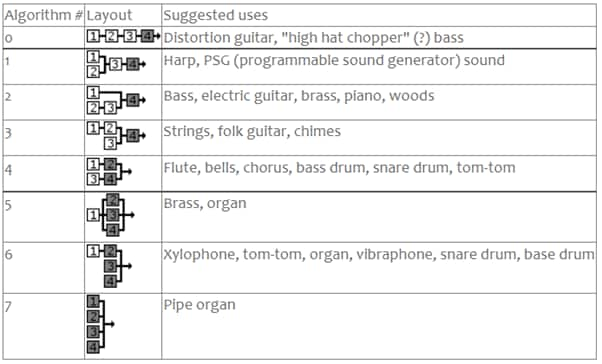
Algorithms with multiple parallel carriers (like 4, 5, and 7) are ideal for this technique. In these configurations, multiple operators are outputting sound directly, rather than just modulating each other.
A composer could select an algorithm with parallel carriers and then apply a tiny amount of detuning to each carrier operator individually. The YM2612 provides a specific parameter for this.
The 'SEGA FM DRIVE TECH MANUAL' provides a low-level look at the chip's parameters. We'll focus on the 'Detune' parameter.
Please read the 'LIST OF PARAMETERS' under the 'OPERATOR CORE' section. Find the parameter 'DT1: Fine detune' and note its function. You'll find this on page 4 of the PDF.
Using the DT1 parameter, a composer could set, for example, Operator 1 to DT1 = 1 (+1 unit), Operator 2 to DT1 = 0 (no detune), and Operator 3 to DT1 = 5 (-1 unit). When a single note is played on this channel, three slightly out-of-tune sine waves are generated simultaneously, creating a rich chorus effect without using any extra channels.
This next video shows this principle in action.
How to Make 16-Bit SEGA Genesis / Mega Drive Music With DefleMask
This clip from Matthew Ivic's DefleMask tutorial demonstrates creating a 'thick brassy sound' using Algorithm 5, which has three parallel carriers, and applying detuning.
Watch the short segment from 10:14 to 10:44. The key takeaway is how running three operators in parallel with detuning creates the thickness.
This intra-patch detuning was a hallmark of advanced Genesis programming, allowing for rich textures while preserving precious polyphony for other musical parts.
4. Advanced Textures with Channel 3 Special Mode
The YM2612 had one more powerful feature for creating unique textures: Channel 3's "Special Mode." In normal operation, all four operators in a channel derive their frequency from a single root note. In Special Mode, each of the four operators on Channel 3 could be set to a completely independent frequency.
Let's consult the 'SEGA FM DRIVE TECH MANUAL' again for a description of this unique mode.
Please read the section 'NORMAL/SPECIAL MODE' on page 7 of the PDF. Focus on the description of 'SPECIAL MODE' and how it allows each operator on channel 3 to have a different root frequency.
This feature opened up several possibilities for creating thick textures:
- Single-Channel Chords: A composer could set three operators to the specific frequencies of a C-major chord (C, E, G). Playing a single note on that channel would trigger the full chord, an incredibly efficient way to create harmonic density.
- Inharmonic Textures: By setting the operators to frequencies that are not harmonically related, composers could create dense, dissonant, and metallic textures, perfect for sound effects or aggressive, industrial-sounding instruments.
This mode required very precise, low-level programming but was a powerful tool in the hands of expert composers for pushing the chip beyond its standard capabilities.
Conclusion
In this lesson, we've dissected the methods Genesis composers used to fight against the hardware's limitations and create sounds with body and richness.
Key Takeaways:
- Layering multiple FM channels playing the same part was a direct but polyphony-expensive way to create thicker sounds.
- Pseudo-chorus effects were achieved by detuning layered sounds. This could be done by:
- Inter-channel detuning: Using two channels with one slightly pitch-shifted.
- Intra-patch detuning: A more efficient method using an algorithm with parallel carriers and applying the
DT1(Fine Detune) parameter to operators within a single channel.
- Channel 3's Special Mode offered an advanced technique to create harmonically dense textures, or even full chords, on a single channel by assigning independent frequencies to each operator.
Preview of the Next Lesson:
We've now covered how to create the illusion of space (delay/reverb) and how to build rich, layered timbres (layering/chorus). But static sounds can be lifeless. In our next lesson, we will address the learning outcome: "Identify innovative uses of LFO and envelope manipulation for expressive, dynamic performances." We will explore how composers used the Low-Frequency Oscillator (LFO) and detailed envelope programming to add vibrato, tremolo, and other evolving characteristics to make these thick sounds come alive.
Can't find a good explanation? Sign up and we'll make it for you
Sign up