
Hello! Welcome to the next lesson in our module on "Modular and Reusable Workflows."
In the last lesson, we focused on making your workflows more flexible and maintainable by using workflowStaticData to centralize configuration. This is great for managing state within a single execution. But what happens when an entire workflow is triggered multiple times with the same initial data? This is a common scenario in real-world automation, often caused by:
- A service sending the same webhook multiple times due to a network error and retry logic.
- A schedule trigger firing before the previous run has fully completed.
Without proper safeguards, this could lead to duplicate database entries, multiple charges to a customer, or repeated notifications. Today, we'll address this fundamental challenge. Your background in software development has already exposed you to the importance of building robust and predictable systems, and this lesson applies that principle directly to automation.
By the end of this lesson, you will be able to build idempotent workflows to safely handle duplicate trigger events.
1. Understanding the Problem: Duplicate Executions
Imagine a workflow scheduled to run every 5 minutes. If one execution takes 7 minutes to complete due to a slow API, it will overlap with the next scheduled run.
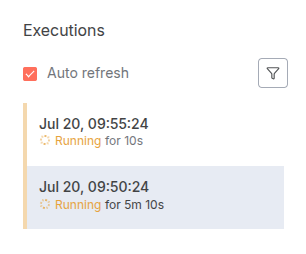
This overlap can cause significant problems. To build reliable automations, we need to design them to be idempotent.
2. What is Idempotency?
An operation is idempotent if the result of performing it once is the same as the result of performing it multiple times. For example, setting a user's email address to new@example.com is idempotent; no matter how many times you run the update, the final state is the same. However, an operation like "add $10 to a user's balance" is not idempotent, as running it twice results in a different outcome than running it once.
To get a solid conceptual foundation from a general software engineering perspective, let's watch a short video.
Idempotency - What it is and How to Implement it
The video 'Idempotency - What it is and How to Implement it' by Alex Hyett provides a clear definition of idempotency in the context of APIs and explains the core pattern for implementing it.
Watch the sections from 00:00 to 01:31 and 03:39 to 05:02. Focus on: The formal definition of idempotency. The concept of an 'idempotency key' as a unique identifier. The general logic of using this key to check if an operation has already been performed.
As the video explains, the key to making non-idempotent operations safe is to use a unique identifier, often called an idempotency key.
3. The Core Idempotency Pattern
The general pattern for implementing idempotency in a workflow is a "check-then-act-then-log" sequence:
- Identify a Key: When a trigger event occurs, find a unique piece of data within it that can serve as an idempotency key. This could be an
event_idfrom a webhook, anorder_id, or a hash of the incoming data. - Check for the Key: Before performing any actions, check a persistent state store (like a database or a simple key-value store) to see if you have already processed an event with this key.
- Branch Logic:
- If the key exists, it means this is a duplicate event. Stop the workflow immediately to prevent side effects.
- If the key does not exist, it's a new event. Proceed with the main workflow logic.
- Log the Key: After successfully completing the primary actions, add the idempotency key to your state store to mark it as processed. This is a critical step to ensure future duplicate events are caught.
This article on n8n error handling reinforces this exact pattern.
Advanced n8n Error Handling and Recovery Strategies
The article 'Advanced n8n Error Handling and Recovery Strategies' by Wednesday connects the general concept of idempotency directly to n8n best practices.
Read the section titled 'Idempotency and safe retries'. Pay attention to how it describes using business identifiers (like an order ID) as the key and the importance of checking for existing records before creating new ones.
Now, let's implement this pattern in n8n using two different methods.
4. Method 1: The "Check and Set" Pattern with Data Tables
This method is ideal for event-driven workflows, like those triggered by a webhook, where you process one event at a time. We will use n8n's built-in Data Tables node as our persistent state store.
The following video demonstrates a powerful feature of the Data Tables node that is perfect for this pattern.
n8n Data Tables Just Levelled Up: 4 Game-Changing Updates
In 'n8n Data Tables Just Levelled Up', Bart Slodyczka demonstrates how to use the 'If row does not exist' operation to build an idempotent workflow. This is a direct, practical example of the pattern we just discussed.
Watch from 06:27 to 08:13. The video uses a Stripe payment example to show how to check for an existing event ID in a data table to prevent duplicate charges. Notice how the workflow logic branches based on whether the ID is found.
Let's build this out.
Workflow Steps:
-
Create a Data Table:
- From the n8n main menu, go to Data -> Data Tables and create a new table called
processed_events. - Add a single String field named
event_id.
- From the n8n main menu, go to Data -> Data Tables and create a new table called
-
Build the Workflow:
- Start with a Manual trigger. We'll use this to simulate a webhook firing.
- Add a Set node to create our idempotency key. Name it "Set Event ID" and add a field
eventIdwith a value likeevt_12345. - Add a Data Tables node.
- Resource: Data Table
- Data Table:
processed_events - Operation:
If Row Does Not Exist - Under Conditions, set the Field to
event_id, Operation toEqual, and for the Value, use an expression to get the ID from the previous node:{{ $json.eventId }}.
- The node now has two outputs:
true(row does not exist) andfalse(row exists). - Connect a NoOp node to the
trueoutput. Name it "Process Payment". This represents your main business logic. - After the "Process Payment" node, add another Data Tables node.
- Resource: Data Table
- Data Table:
processed_events - Operation:
Insert Row - Under Columns to Add, set
event_idto the expression{{ $json.eventId }}.
How it Works:
- The first time you run this workflow, the first Data Tables node finds no row with
event_id=evt_12345. It outputs totrue. The payment is "processed," and then theevent_idis inserted into the table. - The second time you run it, the first Data Tables node finds the row. It outputs to
false, and since nothing is connected to that output, the workflow stops. The payment is not processed again.
Test your understanding!
What would be the risk if you placed the "Insert Row" Data Tables node before the "Process Payment" NoOp node?
Show answer
If you log the event_id before processing the payment, you create a failure scenario. Imagine the workflow logs the ID, but then the "Process Payment" step fails (e.g., the payment API is down). The event_id is already marked as processed, so any future retries of the same event will be incorrectly ignored, and the payment will never be processed. This is why you should only log the key after the critical operation has succeeded.
5. Method 2: The "Deduplication" Pattern with Remove Duplicates
This method is better suited for polling workflows that fetch a list of items and need to identify which ones are new since the last run (e.g., "get new emails," "get new rows from a spreadsheet").
n8n has a built-in node specifically for this purpose.
Remove Duplicates node templates and Examples
The n8n documentation for the Remove Duplicates node provides examples of its different modes of operation. We will focus on the mode that remembers items from previous executions.
Read the section 'Keep items where the value is new'. This explains how the node can compare the current input against items it has seen in previous runs and separate them into 'Kept' and 'Discarded' outputs.
Workflow Example:
Imagine a workflow that runs on a schedule, fetches a list of contacts, and adds them to a CRM.
- Schedule Trigger: Starts the workflow every hour.
- HTTP Request node: Fetches a list of contacts from an API. Let's assume each contact has a unique
id. - Remove Duplicates node:
- Operation:
Remove Items Processed in Previous Executions - Value to Compare:
All Fields(to detect duplicate items) or specify a unique key with an expression like{{ $json.id }}.
- Operation:
- Process New Items: Connect your main logic (e.g., a "HubSpot" node to create contacts) to the Kept output of the Remove Duplicates node. The Discarded output contains items that have been seen before, so you can ignore it.
This node handles the state management for you, making it a very simple way to ensure you only process each item once across multiple workflow runs.
Conclusion
You now have a solid understanding of idempotency and two practical methods for implementing it in your n8n workflows. Building idempotent automations is a critical step toward creating professional, production-grade systems that are resilient to the inevitable duplicates and retries of the real world.
Key Takeaways:
- Idempotency ensures that running an operation multiple times has the same effect as running it once, preventing unwanted side effects from duplicate triggers.
- The core pattern involves using a unique idempotency key, checking a persistent store for that key, and only logging the key after the critical action is complete.
- For event-driven workflows (like webhooks), the "Check and Set" pattern using a Data Tables node with the
If Row Does Not Existoperation is highly effective. - For polling workflows that process lists of items, the Remove Duplicates node with the
Remove Items Processed in Previous Executionsoperation provides a simple, powerful solution.
Preview of the Next Lesson:
So far in this module, we've learned to create modular sub-workflows, manage shared configuration, and now, make our workflows idempotent. We're building increasingly sophisticated automations. In the next lesson, we will explore how to have your workflows interact with n8n itself. You will learn to use the n8n API node to programmatically interact with your n8n instance, opening up possibilities like starting other workflows, retrieving execution data, and managing credentials via an API.