
Hello! Welcome back to our module on Event-Driven Architecture with Kafka.
In the previous lesson, we explored the "what" and "why" of Event-Driven Architecture (EDA). We established that by decoupling services with an event broker, we can build systems that are more resilient, scalable, and evolvable. We contrasted the command-oriented nature of synchronous APIs with the fact-based notification style of events.
Today, we move from theory to practice. Your goal is to implement event publishers and consumers for Apache Kafka using Spring Cloud Stream. This lesson is all about writing the code that brings an event-driven system to life. For your interviews, being able to fluently write and explain this code demonstrates practical, hands-on experience that companies highly value.
1. What is Spring Cloud Stream?
Instead of using the low-level Kafka client libraries directly, we'll use a powerful abstraction: Spring Cloud Stream. Its primary purpose is to let you, the developer, focus on your business logic while it handles the "plumbing" of connecting to a message broker like Kafka or RabbitMQ.
This is achieved through a few core concepts:
- Binder: A dependency you add to your project that knows how to communicate with a specific message broker. For us, this will be the Kafka binder (
spring-cloud-stream-binder-kafka). - Binding: A bridge between your application code and the external messaging system. In simple terms, a binding connects your code to a specific Kafka topic.
- Functional Programming Model: The modern, recommended way to write producers and consumers. You simply define beans of type
java.util.function.Supplier,Function, orConsumer.
Let's look at what these functional types represent:
Supplier<T>: A producer (or source). It has no input but produces an output. Think of it as a source of events.Consumer<T>: A consumer (or sink). It takes an input but produces no output. It's the final destination for an event.Function<T, R>: A processor. It takes an input, performs some logic (transformation, filtering, enrichment), and produces an output. It's both a consumer and a producer.
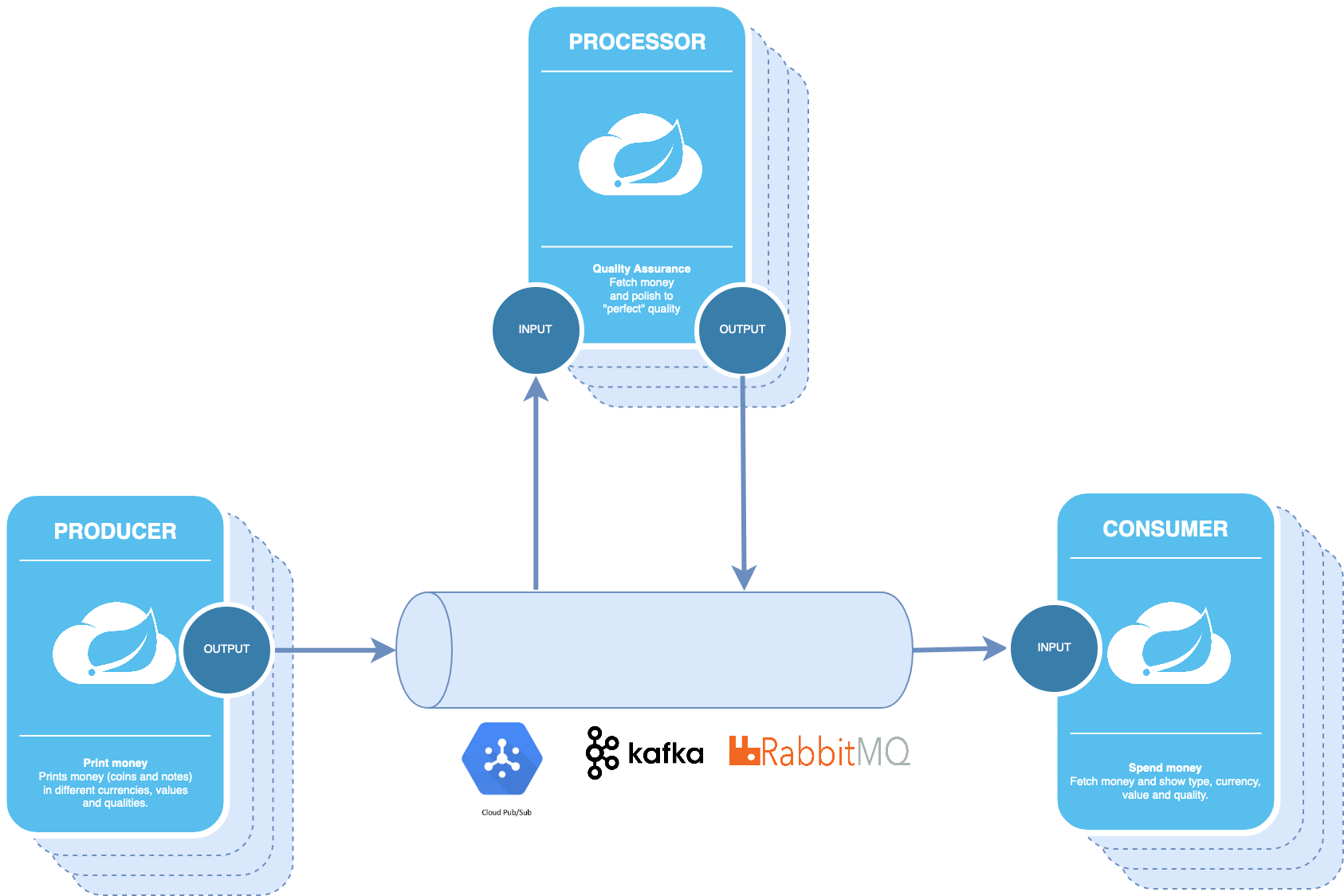
2. The Functional Approach: Consumers and Processors
The cleanest way to handle incoming messages is by defining Consumer or Function beans. Spring Cloud Stream automatically discovers these beans and binds them to Kafka topics based on your configuration.
To see how this works, let's look at a practical guide.
Processing Messages with Spring Cloud Stream and Kafka
The article 'Processing Messages with Spring Cloud Stream and Kafka' from Avenue Code provides excellent, straightforward examples of implementing a processor and a consumer using the functional approach. It clearly shows both the Java code and the required YAML configuration.
Please read the sections 'Plane Event Processor' and 'Flight Event Consumption'. As you read, focus on: How a Function<PlaneEvent, FlightEvent> bean is used to implement a message processor. How a Consumer<FlightEvent> bean is used to implement a message consumer. The corresponding application.yml configuration that links these beans to specific Kafka topics (the destination) and consumer groups (the group). Notice the spring.cloud.stream.function.definition property, which tells Spring Cloud Stream which beans to activate.
As you saw, the pattern is simple:
- Write the Logic: Create a
@Beanof typeConsumerorFunction. - Configure the Bindings: In
application.yml, define the function and map its input (-in-0) and output (-out-0) to Kafka topics.
The naming convention is <functionName>-<in/out>-<index>. For a bean named process, the input binding is process-in-0 and the output is process-out-0.
Now, let's watch a video that builds a complete, multi-service application using this pattern.
Kafka Streams using Spring Cloud Stream | Microservices Example | Tech Primers
The video 'Kafka Streams using Spring Cloud Stream' from Tech Primers demonstrates building a producer, processor, and consumer as separate microservices. This is a realistic architecture you might be asked to design.
Please watch the following segments: Processor Implementation (18:44 - 24:50): See how a Function bean is created to consume from one topic, filter messages, and publish to another. Pay attention to the YAML configuration that defines the input (web-domains) and output (active.web-domains) topics. Consumer Implementation (24:50 - 29:00): Observe the creation of a Consumer bean to subscribe to the final topic and log the results. Again, note how simple the configuration is. Note: This example uses the Kafka Streams API (KStream), which is a more advanced library for stateful stream processing. However, the core Spring Cloud Stream concept remains identical: you are still just defining a Function or Consumer bean and mapping it via configuration.
3. Programmatic Publishing with StreamBridge
The Supplier and Function beans are great when the logic is self-contained within the stream. But what if you need to publish an event from another part of your application, like in response to a REST API call? This is a very common requirement.
For this, Spring Cloud Stream provides a utility class called StreamBridge. You can inject it anywhere in your application (like a Controller or Service) and use it to send messages to any topic programmatically.
The official Spring Cloud Stream documentation has the definitive guide on this.
Producing and Consuming Messages :: Spring Cloud Stream
This section from the official documentation explains how to use StreamBridge to send data to an output binding from anywhere in your application.
Read the section titled 'Sending arbitrary data to an output (e.g. Foreign event-driven sources)'. Focus on how StreamBridge is autowired and how its send(bindingName, data) method is used within a REST controller. Notice that you don't need a Supplier bean for this pattern.
Here's a concise example combining what you just read. Imagine a UserController that handles new user registrations:
UserController.java
@RestController
@RequiredArgsConstructor // Lombok for constructor injection
public class UserController {

    private final StreamBridge streamBridge;

    @PostMapping("/users/register")
    @ResponseStatus(HttpStatus.ACCEPTED)
    public void registerUser(@RequestBody UserRegistrationEvent event) {
        System.out.println("Sending event for user: " + event.getEmail());
        // The first argument is the 'binding name'
        streamBridge.send("userRegistration-out-0", event);
    }
}
Note: UserRegistrationEvent would be a simple POJO with fields like userId, email, timestamp etc.
application.yml
spring:
  cloud:
    stream:
      bindings:
        # Define the binding that our code uses
        userRegistration-out-0:
          # Map it to a physical Kafka topic
          destination: user-registrations-topic
      kafka:
        binder:
          brokers: localhost:9092
In this setup:
- The
UserControllerreceives a REST request. - It uses
streamBridge.send()to publish the event. - The binding name
userRegistration-out-0acts as a logical alias. - Spring Cloud Stream's configuration maps this logical binding to the physical Kafka topic
user-registrations-topic.
This pattern is extremely powerful and is a go-to solution for integrating event publishing into traditional Spring applications.
Test your understanding!
You are tasked with creating a microservice that listens for OrderPlacedEvent objects on a Kafka topic named orders. For each event, it should check if the order total is over $1000. If it is, the service should publish a new HighValueOrderEvent to a different topic named high-value-orders.
Which java.util.function type would you use for this? Write the @Bean method signature (you don't need to implement the logic inside). Also, write the essential spring.cloud.stream configuration in YAML to wire everything up.
Show answer
You would use a java.util.function.Function because you are consuming an event, processing it, and potentially producing a new one.
Java Bean Definition:
@Configuration
public class OrderProcessorConfiguration {

    @Bean
    public Function<OrderPlacedEvent, HighValueOrderEvent> highValueOrderProcessor() {
        return order -> {
            if (order.getTotalAmount() > 1000.00) {
                // Logic to transform OrderPlacedEvent to HighValueOrderEvent
                return new HighValueOrderEvent(order.getOrderId(), order.getCustomerId(), order.getTotalAmount());
            }
            // Return null to filter out events that don't meet the criteria
            return null;
        };
    }
}
YAML Configuration (application.yml):
spring:
  cloud:
    function:
      definition: highValueOrderProcessor
    stream:
      bindings:
        highValueOrderProcessor-in-0:
          destination: orders
          group: order-processor-group
        highValueOrderProcessor-out-0:
          destination: high-value-orders
      kafka:
        binder:
          brokers: localhost:9092
Conclusion
You have now learned the fundamental mechanics of building event-driven microservices with Spring Cloud Stream and Kafka. This is a core competency for any senior developer working with microservices.
Key Takeaways:
- Abstraction is Key: Spring Cloud Stream lets you focus on business logic by abstracting away the specifics of the message broker.
- Functional Beans: Use
@Beans of typeConsumer,Supplier, andFunctionto create message handlers in a clean, declarative way. - Programmatic Publishing: Use
StreamBridgewhen you need to publish events from imperative code, such as a REST controller or a service method. This is a critical pattern. - Configuration is the Glue: Your
application.ymlfile is where you connect your functional beans (logical bindings) to physical Kafka topics (destination).
In an interview, you should be prepared to explain these concepts and sketch out a simple producer/consumer pair, including both the Java code and the YAML configuration.
Next Up
So far, we've been sending simple Java objects or Strings, which Spring automatically converts to JSON. In a real production system, this can be brittle. What happens if the producer adds a field that the consumer doesn't know about? In the next lesson, we will address this by learning to explain the role of a schema registry and compare the trade-offs of using JSON vs. Avro for event serialization. This is a crucial step toward building robust, production-ready systems.
Can't find a good explanation? Sign up and we'll make it for you
Sign up