
Hello! Welcome to the final lesson in our module on Event-Driven Architecture with Kafka.
Throughout this module, we've taken a deep dive into Kafka, exploring how to build scalable and resilient systems using consumer groups, idempotent consumers, and Dead-Letter Topics for error handling. We've treated Kafka as our go-to message broker. But in a real-world system design interview, you'll be expected to justify your technology choices, not just assume them.
This brings us to today's crucial learning outcome: Describe the differences between RabbitMQ (queues) and Kafka (logs) and when to choose one over the other. Mastering this comparison is essential for any senior microservices role, as "Kafka vs. RabbitMQ" is a classic system design question that tests your understanding of architectural trade-offs.
1. Two Fundamental Models: Task Queues vs. Event Logs
At a high level, the choice between RabbitMQ and Kafka comes down to understanding two different patterns of asynchronous processing.
- Background Workers (Task Queues): A producer sends a specific task (e.g., "send this email") to a queue. A worker consumes the task, completes it, and the task is removed. The goal is to get work done.
- Event-Driven Processing (Event Logs): A producer publishes a fact that something happened (e.g., "an order was placed"). This event is recorded in a durable log. Multiple, independent services can then react to this event, possibly at different times. The goal is to broadcast information.
RabbitMQ vs Kafka: A Practical Guide
The article 'RabbitMQ vs Kafka: A Practical Guide' by Abdulmateen Tairu provides an excellent framing for this distinction. Understanding the difference between 'Background Workers' and 'Event-Driven Processing' is the key to choosing the right tool.
Read the introductory section and the parts titled 'Understanding Asynchronous Systems', 'Background Workers', and 'Event-Driven Processing'. Focus on the core idea: RabbitMQ is primarily for getting work done, while Kafka is for reacting to events.
This conceptual difference is a direct result of their fundamentally different architectures.
2. Core Architectural Philosophies
Let's break down how each system is built, as this dictates their behavior and ideal use cases. A great way to think about this is the "smart broker" vs. "dumb broker" model.
RabbitMQ: The Smart Broker
RabbitMQ is a traditional message broker. Think of it as a smart postal service. You give it a letter with some routing instructions, and it figures out which mailboxes it needs to go to.
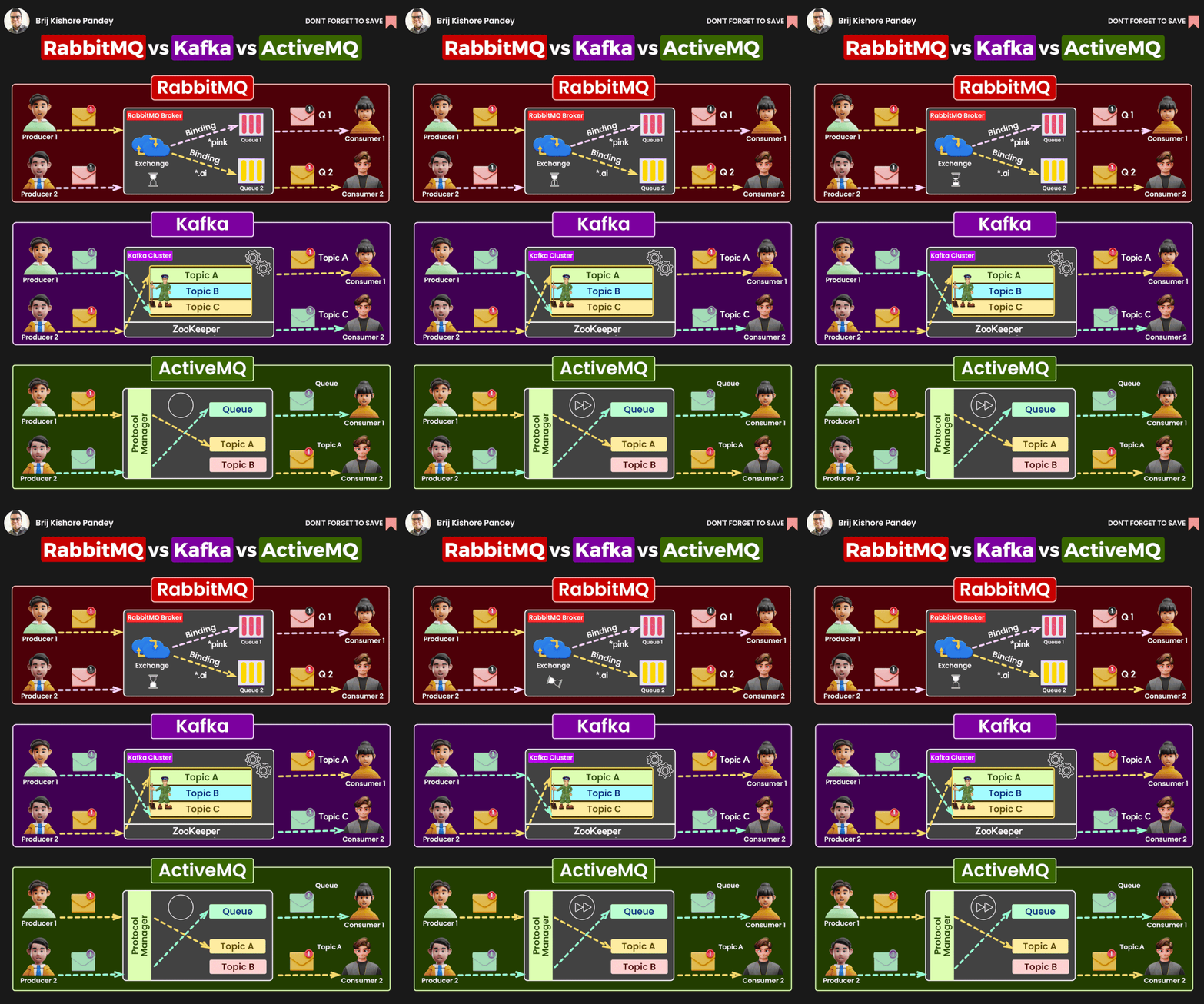
- Architecture: Producers send messages to an Exchange. The exchange is the "smart" part; it has rules (bindings) that determine how to route messages to one or more Queues. Consumers then listen to these queues.
- Consumption Model: It uses a push model. The broker actively pushes messages to consumers that are connected and ready.
- Message Lifecycle: Consumption is destructive. Once a consumer acknowledges that it has successfully processed a message, the message is deleted from the queue.
Kafka: The Dumb Broker (as a Distributed Log)
Kafka is better described as an event streaming platform. Think of it less like a post office and more like a durable, append-only journal or a log file.
- Architecture: Producers append records to Topics (which are split into partitions). That's it. The broker is "dumb"—it doesn't know or care about how messages should be routed or who is listening. The intelligence lies with the consumers.
- Consumption Model: It uses a pull model. Consumers are responsible for asking (polling) the broker for new messages. They keep track of their own position in the log using an offset.
- Message Lifecycle: Consumption is non-destructive. Messages are retained in the topic for a configurable period (e.g., 7 days) regardless of whether they have been read. This allows messages to be re-read.
RabbitMQ vs Kafka Explained for Interviews | When to Use What?
The video 'RabbitMQ vs Kafka Explained for Interviews' uses excellent analogies to explain these core differences. It compares RabbitMQ to a postman (destructive, push-based) and Kafka to a WhatsApp group (retainable, pull-based).
Watch from 03:51 to 09:19. Pay close attention to: The analogies used for destructive vs. retained consumption. The explanation of RabbitMQ's 'smart broker' (exchanges, routing) vs. Kafka's 'dumb broker' (topics, offsets). The push vs. pull model distinction.
3. Key Technical Differences and Their Trade-offs
The architectural philosophies we just discussed lead to critical differences in performance, scalability, and features. Understanding these trade-offs is what will set you apart in an interview.
Message Retention and Replayability
This is arguably the most significant difference.
- RabbitMQ: Messages are transient. Once consumed and acknowledged, they are gone forever.
- Kafka: Messages are durable and retained. This enables replayability—a consumer can "rewind" to an earlier offset and re-process messages.
This single feature is a game-changer. Imagine you deploy a bug in a consumer service. With Kafka, you can fix the bug, reset the consumer's offset, and re-process the last few hours or days of events to correct the data. With RabbitMQ, that historical data is lost from the broker.
RabbitMQ vs Kafka: A Practical Guide
Let's return to the 'RabbitMQ vs Kafka' article to reinforce this point.
Read the sections 'Kafka and RabbitMQ' and the subsections under 'The Key Technical Differences' ('Message Retention', 'Replay Capability', 'Consumer Model'). This will solidify your understanding of how data retention directly impacts the capabilities of each system.
Throughput vs. Latency
- Kafka: Built for extremely high throughput. By writing sequentially to disk-based logs, it can handle millions of messages per second. The latency for a single message is low (milliseconds), but its main strength is in processing massive streams of data.
- RabbitMQ: Optimized for very low latency. It's generally faster for individual, transactional messages where near-instantaneous delivery is required (sub-millisecond). However, its throughput is more moderate (tens to hundreds of thousands of messages per second), and performance can suffer if queues become very long.
Scalability and Ordering
- Kafka: Scales by adding partitions to a topic. Throughput increases linearly with partitions. However, ordering is only guaranteed within a partition. This is a critical trade-off: more parallelism comes at the cost of global ordering.
- RabbitMQ: To scale processing for a single queue, you add more consumers (a "competing consumers" pattern). This provides no ordering guarantees, as messages are delivered round-robin. To guarantee order, you must use a single consumer, which limits throughput.
Kafka vs. RabbitMQ - who wins and why? | Systems Design Interview 0 to 1 with Ex-Google SWE
The video 'Kafka vs. RabbitMQ - who wins and why?' does a fantastic job of explaining the architectural models that lead to these scalability and ordering trade-offs.
Watch from 01:25 to 08:02. The video details the 'in-memory' (RabbitMQ-style) and 'log-based' (Kafka-style) broker architectures. Focus on how round-robin delivery in RabbitMQ maximizes throughput but loses order, while Kafka's offset-based consumption per partition guarantees order but means a slow message can block others in the same partition.
Here is a summary table that captures these key differences at a glance.

4. When to Choose Which? A Framework for System Design Interviews
Now for the most important part: applying this knowledge. Given a problem, you need to justify your choice.
Choose RabbitMQ if...
- Your use case is a traditional task queue: Sending emails, processing images, running a report. These are fire-and-forget jobs.
- You need complex routing: You want to send the same message to different queues based on a routing key or header. RabbitMQ's exchanges are built for this.
- Low-latency, transactional messaging is key: Your services need to communicate quickly in a request/response-like async pattern.
- Operational simplicity is a priority: For smaller-scale applications, RabbitMQ is often easier to set up and manage.
Interview Example: "For a hotel booking system, when a user books a room, we need to process the payment and send a confirmation email. This is a transactional workflow. We don't need to replay these events later. RabbitMQ is a good fit here due to its low latency and simple task-oriented nature."
Choose Kafka if...
- Your use case is event-driven and you need a durable log: You're building a system of record where events must be stored reliably.
- You need to replay events: For analytics, bug recovery, or hydrating new services with historical data. This is a classic use case for event sourcing.
- You have multiple, independent consumer groups: A single event (e.g.,
OrderPlaced) needs to be consumed by the shipping service, the notification service, and a fraud detection service, all at their own pace. - High throughput is a primary requirement: You're handling massive event streams like IoT sensor data, user clickstreams, or application logs.
Interview Example: "For a ride-sharing app, we need to track location data from millions of drivers in real-time. This high-volume stream needs to be consumed by multiple services: a live map service, a dynamic pricing engine, and an analytics platform. Kafka is the ideal choice due to its high throughput, durability, and ability to serve multiple independent consumer groups from the same data stream."
Test your understanding!
You are designing the back-end for an e-commerce platform. When an order is shipped, a ShipmentCreated event is generated. This event must trigger three actions:
- An immediate, low-latency call to a third-party shipping provider's API to get a tracking number.
- An email notification sent to the customer (standard background job).
- A daily batch job run by the data analytics team to analyze shipping trends.
Which broker would you choose and why? Can you justify it based on the trade-offs we've discussed?
Show answer
Kafka is the better choice here.
Here's the justification:
The core requirement is that a single event (ShipmentCreated) needs to be processed by three different consumers with vastly different needs:
- Shipping API Service: Needs to react in real-time.
- Notification Service: Can process the event as a standard background task.
- Analytics Service: Needs to process events in batches, hours after they occurred.
Kafka's architecture is perfectly suited for this. The ShipmentCreated event is written once to a Kafka topic.
- The three services can act as three separate consumer groups.
- Each group maintains its own offset, allowing them to read the event stream independently and at their own pace.
- Kafka's message retention ensures the events are still available for the analytics service to process hours later.
While you could use RabbitMQ with a fanout exchange to deliver the message to three different queues, you would lose the critical replayability and easy retention needed for the batch analytics job. The analytics consumer would have to read and store the data itself, effectively re-implementing part of what Kafka provides out of the box.
Conclusion
You've now completed the entire module on event-driven architecture with Kafka! You've gone from the fundamentals of EDA to implementing consumers, handling schemas, ensuring idempotency, managing errors with DLTs, and now, making strategic architectural choices between major messaging platforms.
Key Takeaways:
- RabbitMQ is a smart message broker, using a push model and complex routing via exchanges. It's best for transient tasks where messages are deleted after consumption. Think of it as a task queue.
- Kafka is a dumb broker acting as a distributed log, using a pull model where consumers track their own offsets. It's built for durable event streams that can be replayed. Think of it as an event log.
- The choice is not about which is "better," but which is right for the problem.
- Choose RabbitMQ for simple task processing, complex routing, and low-latency transactional workflows.
- Choose Kafka for high-throughput data pipelines, event sourcing, and systems where multiple independent services must react to the same stream of events.
Next Up
This discussion on architectural trade-offs is the perfect bridge to our next module, "Distributed Transactions & Data Management." We'll begin by exploring the "database-per-service" pattern, a cornerstone of microservices architecture. You'll quickly see that this pattern introduces significant challenges with data consistency, and the event-driven concepts we've just mastered—using tools like Kafka—are the key to solving them with advanced patterns like the Saga pattern. See you in the next lesson
Can't find a good explanation? Sign up and we'll make it for you
Sign up