
Hello! Welcome to your first lesson in the System Design in Java course.
Given your goal of mastering system design for interviews, we're starting with the absolute bedrock of Low-Level Design (LLD): Object-Oriented Programming (OOP). While you've been working with Java and Spring Boot, this module is designed to formalize the core principles that underpin all good object-oriented design.
Today's lesson focuses on the "four pillars" of OOP: encapsulation, abstraction, inheritance, and polymorphism. A solid grasp of these concepts isn't just academic; it's what separates clean, maintainable system design from code that's difficult to manage and extend. We'll explore what each pillar means and why it's crucial for building robust software.
Let's begin!
1. A High-Level Overview of OOP
Before we dive into the specifics of each pillar, it's helpful to understand why OOP became such a dominant paradigm. At its core, it's about managing complexity.
To get a quick, conceptual overview of the four pillars and their benefits, please watch the following video from the Programming with Mosh channel. It does an excellent job of explaining the "why" behind OOP.
Object-Oriented Programming, Simplified
This video provides a concise and clear explanation of the four core concepts of OOP and their benefits.
Watch the entire video (about 7 minutes). Pay close attention to the analogies used (like the DVD player and HTML elements) and the summary of benefits at the end.
Now that you have a high-level picture, let's deconstruct each pillar with practical Java examples.
2. The Four Pillars in Practice
We'll now work through a more detailed, code-centric video. This will help connect the theoretical concepts to the Java code you're already familiar with. We'll build a simple inventory system for a game, and as we add features, we'll see each of the four pillars in action.
Encapsulation: Protecting Your Data
Encapsulation is the practice of bundling an object's data (attributes) and the methods that operate on that data into a single unit, or "capsule." A key part of this is data hiding—restricting direct access to an object's internal state from the outside.
Why is this important?
- Control: It prevents external code from putting an object into an invalid or inconsistent state.
- Security: It protects sensitive data from unauthorized access or modification.
- Maintainability: You can change the internal implementation of a class without breaking the code that uses it, as long as the public methods (the "API") remain the same.
Let's see this in action. The first part of the next video demonstrates encapsulation by creating an Item class with private fields and public methods (getters) to access them.
Learn Java Object-Oriented Programming (with actual code)
The video starts by creating an Item class, immediately introducing encapsulation with private attributes and public methods.
Watch from the beginning until 03:13. Focus on how the private keyword is used to protect name and quantity, and how public getter methods provide controlled access.
As you saw, the balance in a BankAccount or the quantity of an Item can't be set to an arbitrary or invalid value from outside the class. Any interaction must go through public methods like deposit() or getQuantity(), which can contain validation logic.
Inheritance: Reusing Code and Creating Hierarchies
Inheritance allows a new class (the subclass or child class) to derive properties and behaviors from an existing class (the superclass or parent class). This creates an "is-a" relationship (e.g., a Car is a Vehicle).
Why is this useful?
- Code Reusability: Avoids duplicating code by placing common attributes and methods in a superclass. This adheres to the "Don't Repeat Yourself" (DRY) principle.
- Logical Structure: Creates a natural hierarchy of classes that is easy to understand and extend.
Now, watch how our inventory system is extended to include more specific types of items, Fruit and Weapon, which inherit from the base Item class.
Learn Java Object-Oriented Programming (with actual code)
This segment shows how to use the extends keyword in Java to create subclasses (Fruit, Weapon) that inherit from a superclass (Item).
Watch from 07:49 to 12:28. Notice how Fruit and Weapon automatically get the name and quantity fields from Item but can also add their own unique attributes like type or damage.
Test your understanding!
Imagine you are designing a system for a university. You have a Person class with attributes like name and email. You need to model Student and Professor objects. How would you use inheritance here, and what specific attributes might belong to Student and Professor respectively?
Show answer
You would create a Person superclass with common attributes like name and email.
Then, you would create two subclasses:
Student extends Person: This class would inheritnameandemailand add student-specific attributes likestudentIdandmajor.Professor extends Person: This class would also inheritnameandemailand add professor-specific attributes likeemployeeIdanddepartment.
This "is-a" relationship (Student is a Person, Professor is a Person) is a classic use case for inheritance.
Polymorphism: One Interface, Many Actions
Polymorphism, which means "many forms," allows objects of different classes to be treated as objects of a common superclass. It enables a single action or method name to behave differently depending on the object it is called on.
There are two main types in Java:
- Runtime Polymorphism (Method Overriding): A subclass provides a specific implementation for a method that is already defined in its superclass. The decision on which method to execute is made at runtime.
- Compile-time Polymorphism (Method Overloading): A class has multiple methods with the same name but different parameters (either number, type, or order of parameters). The compiler decides which method to call based on the arguments provided.
Let's see both in our video example.
Learn Java Object-Oriented Programming (with actual code)
This part of the video covers both runtime and compile-time polymorphism.
Watch from 12:28 to 20:56. The first part (until 16:24) explains method overriding by implementing the toString() method differently in each subclass. The second part (from 16:24) demonstrates method overloading by creating multiple addItem() methods in the Inventory class.
Polymorphism is incredibly powerful. As the Mosh video mentioned, it helps eliminate long if-else or switch statements. Instead of checking an object's type and calling a specific method, you can simply call a single method, and polymorphism ensures the correct implementation is executed. For example:
// Without polymorphism
for (Item item : inventory) {
    if (item instanceof Fruit) {
        // print fruit details
    } else if (item instanceof Weapon) {
        // print weapon details
    }
}

// With polymorphism (using the overridden toString() method)
for (Item item : inventory) {
    System.out.println(item.toString()); // Java figures out which version to call!
}
Abstraction: Hiding Complexity
Abstraction is about hiding the complex implementation details and exposing only the essential functionalities to the user. It focuses on what an object does rather than how it does it. Think of the car analogy: you press the accelerator pedal without needing to know the intricacies of the internal combustion engine.
In Java, abstraction is achieved using abstract classes and interfaces.
- Abstract Class: A class that cannot be instantiated on its own and may contain abstract methods (methods without a body). It's a template for other classes. Subclasses must provide implementations for any abstract methods.
- Interface: A completely abstract "contract" that only contains abstract method signatures (and static/default methods in modern Java). A class
implementsan interface, thereby agreeing to provide implementations for all its methods.
The final segment of the video explains this distinction clearly.
Learn Java Object-Oriented Programming (with actual code)
The video concludes by explaining abstraction, first by making the Item class abstract, and then by contrasting abstract classes with interfaces.
Watch from 20:56 to 28:45. Pay close attention to the difference between an abstract class (which can have state and concrete methods) and an interface (which is a pure contract).
A key takeaway is that a class can extend only one superclass, but it can implement multiple interfaces. This makes interfaces a flexible tool for defining common capabilities across different class hierarchies.
3. Tying It All Together
We've covered a lot of ground. Each pillar serves a distinct but related purpose in creating well-structured, object-oriented systems.
This infographic provides a fantastic visual summary of the four concepts, their goals, and how they are implemented in Java.
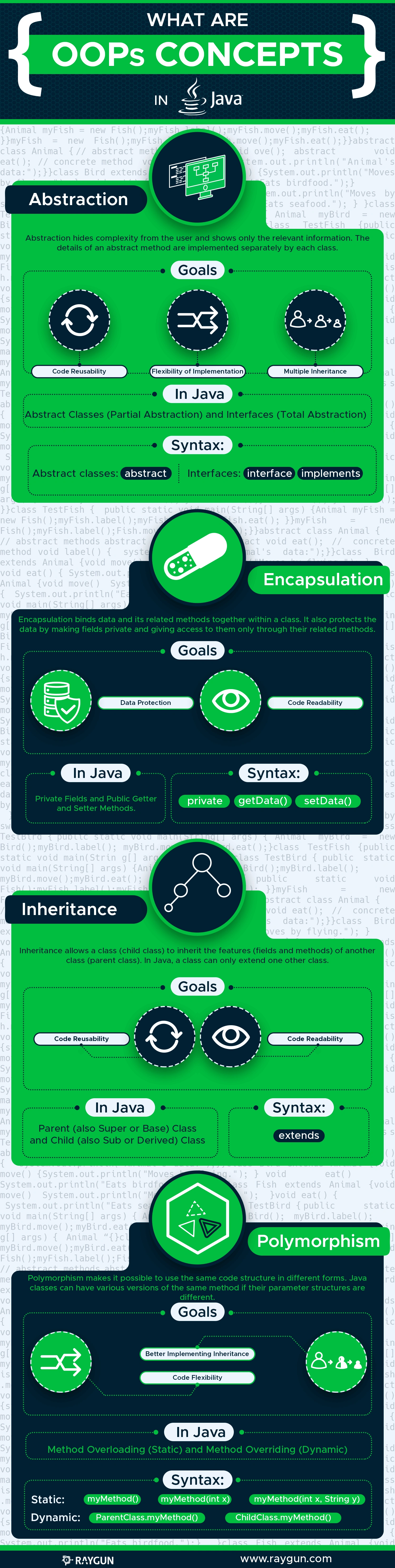
To solidify your understanding, please review this short article which provides clean, alternative code examples for each concept.
Java OOP Explained: Principles, Examples, and Best Practices
This article from Udacity provides another clear, concise explanation of the four pillars with simple and effective code examples for each one.
Read the main section titled 'Core Principles of Object-Oriented Programming', including the subsections for Encapsulation, Inheritance, Polymorphism, and Abstraction. Compare the BankAccount, Vehicle, Animal, and Printer examples to the inventory system we just saw.
Conclusion
In this lesson, you've revisited the four fundamental pillars of Object-Oriented Programming, connecting them to practical Java code and their importance in system design.
Key Takeaways:
- Encapsulation: Bundles data and methods together, protecting an object's state via access control (e.g.,
privatefields). - Inheritance: Allows classes to inherit properties from other classes, promoting code reuse and establishing "is-a" relationships.
- Polymorphism: Enables objects to be treated as instances of their superclass but behave according to their specific implementation, often through method overriding.
- Abstraction: Hides implementation complexity by exposing only essential features through abstract classes and interfaces.
These concepts are not just interview buzzwords; they are the tools you will use to build modular, flexible, and maintainable systems in the LLD case studies ahead.
In our next lesson, we will dive deeper into encapsulation by examining Java's access modifiers (public, private, protected, and default) to understand precisely how we control visibility and protect the state of our objects.