
Assign Decision Rights with a Lightweight Notion Framework
Hello again. In the previous lesson, you created the human layer of the company operating system: stable roles, reporting lines, recurring outputs, and backup coverage. That answered, “Who owns this area of work?”
This lesson answers a narrower but equally important question: when a choice must be made, who moves it forward, who has the final say, whose input is required, and who merely needs the result? In a small e-commerce company, unclear decision rights create delays around stockouts, refunds, campaign changes, and spending—even when everyone is working hard.
You will build a lightweight decision-rights system in Notion using DACI: Driver, Approver, Contributors, and Informed. The aim is not to document every minor choice. It is to make recurring, meaningful decisions fast, traceable, and appropriately controlled.
Decision ownership is different from work ownership
Your role directory might say that the Fulfillment & Inventory Lead owns replenishment. That is a statement of ongoing responsibility.
But replenishment contains several decisions:
- Should this SKU be reordered now?
- How many units should be ordered?
- Should the company use standard or expedited shipping?
- Is the purchase within the approved budget?
- Should a promotion be paused because stock is too low?
These choices can involve inventory, marketing, cash, and customer promises. A role owner should not have to guess who can make each choice.
A decision-rights framework makes the route explicit. For each recurring decision type, it records:
- The trigger: What event or condition creates the decision?
- The decision statement: What exactly must be decided?
- The Driver: Who organizes the decision process?
- The Approver: Who makes the final choice?
- Contributors: Whose informed input is needed before approval?
- Informed parties: Who needs the outcome, without being asked to approve it?
- Guardrails: What limits apply, such as a budget, customer-service policy, or escalation threshold?
- The record requirement: When should the individual decision be logged?
This avoids two damaging extremes:
- Accidental centralization: the Founder becomes the bottleneck for routine operational choices.
- Accidental autonomy: employees make commitments beyond their authority because no boundary is documented.
Use DACI for decisions, not every task
DACI is a practical framework for decision-making:
- Driver: runs the decision process from start to finish. They define the question, gather evidence, request input, recommend a path, and record the outcome.
- Approver: makes the final decision. There should be one actual person with this authority for a decision instance.
- Contributors: supply relevant data, expertise, or consequences before the decision. They advise; they do not have a veto.
- Informed: receive the final outcome because their work, customers, or plans are affected.
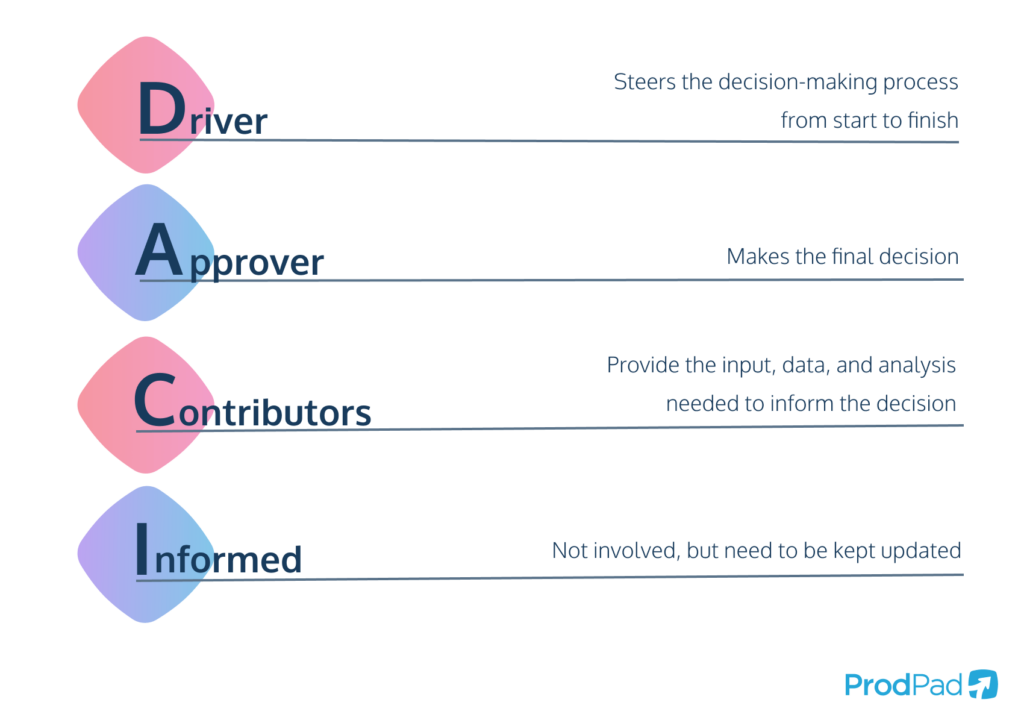
The distinction between Driver and Approver matters. The Driver is not necessarily the most senior person, the person who does the eventual work, or the person who signs off. They are the person responsible for preventing the decision from drifting.
For example, a campaign may be causing a stockout risk:
- The Fulfillment & Inventory Lead supplies the stock facts.
- The E-commerce & Growth Lead may drive the choice because they can assess the campaign and execute a change.
- The Founder / General Manager may be the Approver only if the decision exceeds a pre-agreed commercial limit.
- The Customer Experience Lead is informed so affected customers receive consistent communication.
The work that follows—pausing ads, updating the storefront, or contacting customers—will later become tasks. DACI governs the choice, not the complete execution plan.
The DACI method: how to make better decisions during projects - Inside Atlassian
Read Atlassian’s overview to establish the meaning of each DACI role and the minimum contents of a useful decision record. It is especially useful for distinguishing a final approver from people who provide input.
In “Introducing: The DACI Method,” read the explanations of Driver, Approver, Contributors, and Informed, including the guidance on using DACI for consequential cross-team choices rather than minor decisions. Then, in “How To Use The DACI Method: Make Your Project Plan,” read the list of recommended decision-document sections, from Details through Outcome. Pay particular attention to action items: unanswered questions should be visible rather than buried in chat.
Choose the right amount of process
A small company should not create a formal decision page for changing a product photo or choosing a social-media caption. Over-documenting routine work slows the business and teaches people to ignore the system.
Use this simple classification when deciding what belongs in your decision-rights catalog.
| Situation | Appropriate control | Example |
|---|---|---|
| A standard action within an existing policy | The role owner acts through the SOP or workflow | Support specialist reships an order under the normal service policy |
| A recurring choice with clear limits | A documented decision type with DACI roles and guardrails | Fulfillment Lead proposes a reorder within the approved purchasing plan |
| A cross-team, high-impact, or exception decision | A DACI decision record with evidence, options, and an outcome | Decide whether to pause a campaign because stock is constrained |
| An urgent incident | Use the emergency authority immediately; document the decision afterward | Stop a promotion that is selling stock the company cannot fulfill |
The key is proportionality. A decision is worth recording when it changes a customer commitment, cash exposure, operating plan, risk level, or another team’s work.
Keep normal authority separate from exceptions
Suppose a customer asks for a refund.
A standard refund inside the published policy does not require a new DACI record. The support team follows the policy and records the case in the customer-service workflow.
An exceptional refund might require a decision record when it is unusually large, outside policy, tied to a public complaint, or connected to a possible carrier or supplier claim. In that case, the company needs a clear decision statement, evidence, and an explanation of why it made an exception.
This principle will keep future systems clean:
The workflow records the routine transaction; the decision log records the meaningful choice, exception, or trade-off.
Do not create a decision log entry for every purchase order, support case, or marketing adjustment. Instead, record the policy that governs normal cases and log the exceptions that deserve later review.
A DACI role is not automatically transferred by backup coverage
The previous lesson assigned backup coverage so routine work continues during absence. But a backup for operational work does not automatically inherit approval authority.
For example, the Fulfillment Associate may cover daily dispatch monitoring while the Fulfillment & Inventory Lead is away. That does not automatically mean they can approve an unusually expensive supplier order.
For each recurring decision type, define one of these arrangements:
- Named delegated approver: another role may approve within stated limits during absence.
- Escalation approver: a different role takes the decision when the normal Approver is unavailable.
- Defer unless urgent: the decision waits, except where customer, cash, safety, or legal risk requires immediate action.
This prevents an absence from quietly changing the company’s financial or commercial authority.
Build a Decision Rights Catalog in Notion
Create a new top-level page called Decisions & Authority. Its first database is the Decision Rights Catalog.
This is the company’s reference for recurring decision types. It is not a list of individual decisions. Think of it as the operating policy that tells the team how to handle a particular class of choice.
Decision Rights Catalog: recommended properties
| Property | Type | Why it matters |
|---|---|---|
| Decision type | Title | A stable name, such as “Replenishment purchase order approval” |
| Decision code | Text | A short reference such as INV-PO-01 |
| Area | Select | Growth, Customer Experience, Fulfillment, Finance, People, or Company |
| Decision statement | Text | The exact question the company is deciding |
| Trigger | Text | The event that requires a decision |
| Frequency | Select | Event-driven, Weekly, Monthly, Quarterly |
| Impact level | Select | Routine, Material, or Critical |
| Default Driver role | Relation to Roles, limited to one | The role that runs the decision process |
| Default Approver role | Relation to Roles, limited to one | The role with final authority under the normal rule |
| Contributor roles | Relation to Roles | Roles whose input is required before approval |
| Informed roles | Relation to Roles | Roles that need the final result |
| Guardrails and limits | Text | Budget limits, policy limits, timing rules, or conditions |
| Escalate to role | Relation to Roles, limited to one | Who decides when the normal guardrail is exceeded |
| Required evidence | Text | The facts and source records needed before approval |
| Record requirement | Select | Always log, Log exceptions only, or No individual log |
| Related operating flow | Relation to Operating Flow Map | Connects the decision to the real work it affects |
| Review date | Date | Prompts a check when the company changes |
| Status | Select | Active, Under review, or Retired |
Use the Roles database you built previously for DACI assignments. This keeps your organization model consistent: “Fulfillment & Inventory Lead” remains a stable authority even if the person filling that role changes.
Set both Driver and Approver relations to allow only one related role. At the individual-decision level, you will also assign one actual Driver and one actual Approver.
Populate a useful starter catalog
Start with a small set of decisions that repeatedly affect an eight-person e-commerce company. The role assignments below are examples of an operating design, not universal rules. Adjust the guardrails to fit the company’s real authority and risk tolerance.
| Decision type | Trigger and decision | DACI default | Guardrail |
|---|---|---|---|
| Replenishment purchase order approval | Stock plan indicates a purchase is needed; decide quantity, supplier, and delivery option | Driver: Fulfillment & Inventory Lead. Approver: Operations & Finance Manager. Contributors: E-commerce & Growth Lead. Informed: Founder | Escalate to Founder when spend is outside the approved purchasing plan or requires an unusual commitment |
| Pause or reduce a campaign for stock risk | Available stock or delivery capacity cannot support forecast demand; decide whether to change campaign activity | Driver: E-commerce & Growth Lead. Approver: E-commerce & Growth Lead. Contributors: Fulfillment & Inventory Lead. Informed: Customer Experience Lead and Content & Creative Specialist | The Growth Lead may act within pre-agreed campaign limits; escalate significant revenue or brand-impact trade-offs |
| Customer refund or compensation exception | A request falls outside normal customer-service policy; decide whether to make an exception | Driver: Customer Experience Lead. Approver: Operations & Finance Manager. Contributors: Fulfillment & Inventory Lead when delivery or damage is involved. Informed: Founder for material cases | Standard policy cases remain in the support workflow; log only defined exceptions |
| New supplier or material supplier change | Supplier performance, cost, quality, or availability creates a need to choose a supplier | Driver: Fulfillment & Inventory Lead. Approver: Founder / General Manager. Contributors: Operations & Finance Manager and E-commerce & Growth Lead. Informed: Customer Experience Lead | Always log; supplier changes can affect stock, product quality, cash, and customer experience |
| Campaign spend outside the approved plan | The team wants additional budget or a major reallocation; decide whether to fund it | Driver: E-commerce & Growth Lead. Approver: Founder / General Manager. Contributors: Operations & Finance Manager and Fulfillment & Inventory Lead. Informed: Content & Creative Specialist | The plan specifies the amount or percentage that can be shifted without escalation |
| Open a vacancy or make a hire | Capacity or coverage gap requires a role to be filled; decide whether to open the role or make an offer | Driver: Hiring manager role. Approver: Founder / General Manager. Contributors: Interviewers and Operations & Finance Manager. Informed: relevant team lead | Link the decision to the approved role record and budget availability |
Notice the difference between the first two examples. A purchase order normally consumes cash, so it has a finance approval step. A quick campaign reduction may be delegated to the Growth Lead because delaying the choice could create more overselling and customer-service problems.
That is the practical purpose of decision rights: the right person can act at the right speed, within explicit limits.
Add a Decision Log for important instances
The catalog tells people the standard rule. A Decision Log records the individual decisions that meet your logging rule.
Create a second database called Decision Log. Each page is one decision instance, such as:
Approve June reorder for SKU-TRAIL-BAG in light of supplier delay
Avoid titles such as “Inventory issue” or “Need input.” A good title makes clear what choice is being requested.
Decision Log: recommended properties
| Property | Type | Purpose |
|---|---|---|
| Decision title | Title | The specific choice being made |
| Decision ID | Text or ID | A stable reference for discussion and follow-up |
| Decision type | Relation to Decision Rights Catalog | Connects this instance to the standing policy |
| Status | Select | Draft, Gathering input, Ready for approval, Decided, Implementing, Closed, or Superseded |
| Decision due date | Date | The latest useful date for the decision |
| Effective date | Date | When the choice takes effect |
| Impact level | Select | Routine, Material, or Critical |
| Driver role | Relation to Roles, limited to one | The intended organizational owner |
| Driver person | Relation to People, limited to one | The person coordinating this instance |
| Approver role | Relation to Roles, limited to one | The authority required |
| Approver person | Relation to People, limited to one | The one person making the final choice |
| Contributor roles / people | Relations | Required sources of input |
| Informed roles / people | Relations | Required recipients of the outcome |
| Affected records | Relations or URL fields | SKU, campaign, supplier, support case, purchase order, or external-system reference |
| Outcome summary | Text | The selected option and its rationale |
| Decision date | Date | When approval occurred |
| Implementation actions | Relation to Tasks, later | Work that follows from the decision |
| Review date | Date | Date to assess whether the decision worked |
Use both role and person fields for important decisions:
- The role shows the intended authority defined by the company.
- The person shows who actually fulfilled that role for this decision.
If a different person acts because of approved delegation or absence coverage, document the reason in the page. Do not silently change the Approver person just because someone is available.
Use templates to preserve the right level of detail
Create three Decision Log templates.
1. Routine exception decision
Use this for cases such as a refund exception or a small reorder outside the normal pattern.
Include:
- Decision statement
- Trigger and customer or operational impact
- Required facts and source-system links
- Proposed action
- Approver outcome
- Communication note
Keep it short. The objective is a defensible, visible choice—not an essay.
2. Material cross-team decision
Use this for supplier changes, campaign spend outside plan, a major stock decision, or a process change.
Include these page sections:
- Decision statement — one clear question.
- Background and constraints — why now, what cannot change, and what is at risk.
- Relevant data — linked source records, reports, forecasts, customer feedback, or supplier evidence.
- Options considered — usually two or three realistic alternatives.
- Driver recommendation — the preferred option and reasoning.
- Contributor input — brief dated input from each required contributor.
- Outcome — choice, Approver, date, rationale, and effective date.
- Implementation and communication — actions, owners, and people informed.
- Review — what will show whether the choice worked.
3. Urgent decision after-action record
Use this after an immediate operational intervention, such as stopping a campaign that risks selling unavailable inventory.
Document:
- What happened and when
- Who used emergency authority
- What immediate action was taken
- Why waiting for normal approval was unsafe or impractical
- Who was informed
- What must change in the policy, stock alert, or workflow to reduce recurrence
Urgency should shorten the approval path, not eliminate accountability.
Walk through one decision before building every template
Consider this realistic situation:
The inventory system shows that a popular bag will run out before the next expected supplier delivery. A paid campaign is increasing orders. The company must decide whether to place a larger or expedited replenishment order, pause the campaign, or accept a temporary stockout.
The Driver should frame the decision precisely:
Which combination of replenishment quantity, supplier delivery option, and campaign adjustment best protects customer commitments while staying within the purchasing plan?
The Driver is not asking the team to “look into inventory.” They are asking for a decision by a specific date.
The Decision Log page should link, rather than copy, the authoritative facts:
- Current available and incoming stock from the inventory system
- Demand trend and campaign forecast from the commerce and marketing systems
- Supplier quotes and lead times
- Available cash or purchasing-plan context
- The affected SKU and campaign references
Then compare realistic options:
| Option | Benefit | Main risk or cost |
|---|---|---|
| Standard reorder; reduce campaign now | Protects cash and lowers overselling risk | Reduced sales momentum |
| Expedited partial reorder; reduce campaign slightly | Balances availability and demand | Higher unit or freight cost |
| Continue campaign; accept stockout risk | Preserves immediate demand | Backorders, cancellations, refunds, and customer dissatisfaction |
The Fulfillment & Inventory Lead contributes reliable supply information. The E-commerce & Growth Lead contributes the commercial impact. The Operations & Finance Manager checks cash and spending limits. The Approver selects one option, and the Driver records why.
After the decision, the company may need to create a purchase-order action, campaign-change action, customer-service briefing, and follow-up review. Those are implementation actions, not additional approval debates.
Create views that support action instead of bureaucracy
On the Decisions & Authority page, create these linked views.
Decision Rights Catalog: active authority map
Filter for Status = Active. Group by Area and show:
- Decision type
- Default Driver role
- Default Approver role
- Guardrails and limits
- Escalate to role
- Review date
This becomes the quick reference employees consult before asking, “Who can approve this?”
Decision Log: awaiting my action
Create separate views for:
- Driver queue: decisions where the current viewer is Driver person and status is Draft or Gathering input.
- Approval queue: decisions where the current viewer is Approver person and status is Ready for approval.
- Input requested: decisions where a contributor’s input is still required.
- Recently decided: decisions decided in the current month or quarter.
- Overdue decisions: decisions past the due date that are not Decided, Closed, or Superseded.
For now, until you build the formal task system in Module 2, keep implementation actions as a clear checklist or linked work record inside the Decision Log page. Later, replace that temporary list with a relation to your shared Tasks database.
Review the authority map monthly
Decision rights are not permanent. Review the catalog when:
- A role changes or becomes vacant
- A decision repeatedly escalates unexpectedly
- A threshold proves too low or too high
- The company launches a new product line, supplier relationship, market, or sales channel
- A decision causes a costly delay, customer problem, or unclear handoff
A simple monthly review question is:
“Which decisions took too long, involved the wrong people, or produced surprise consequences for another team?”
The answer may reveal a missing guardrail, not a weak employee.
Build sequence for this lesson
Complete the system in this order:
- Create the Decisions & Authority page with the Decision Rights Catalog and Decision Log databases.
- Connect both databases to your existing Roles and People databases.
- Add the catalog properties, especially one Driver role, one Approver role, contributor roles, informed roles, and escalation authority.
- Enter the six starter decision types above, but customize their limits to the company’s actual policy.
- Create the three Decision Log templates: routine exception, material decision, and urgent after-action.
- Test the system with the stock-risk scenario. Confirm that every person knows whether they are driving, approving, contributing, or simply being informed.
- Build the active authority map, Driver queue, approval queue, and overdue-decision views.
- Add a review date to every active decision type so the system evolves with the company.
Key takeaways
A role directory clarifies who owns an area of work. A decision-rights system clarifies who can make consequential choices within that area.
- DACI separates coordination, final authority, expert input, and communication.
- The Driver moves the decision forward; the Approver makes the final choice.
- Each decision instance needs one actual Approver, even when several people provide input.
- Routine work should follow policies and workflows; record only important, exceptional, cross-team, or urgent decisions.
- Use a Decision Rights Catalog for standing rules and a Decision Log for meaningful individual outcomes.
- Assign authority by role and record the actual person involved, especially when delegation is necessary.
- Link evidence back to authoritative systems rather than copying changing operational facts into Notion.
Next, you will turn these role and decision structures into a weekly operating cadence: meetings and asynchronous updates connected to metrics, decisions, follow-up actions, and accountable owners.
Can't find a good explanation? Sign up and we'll make it for you
Sign up