
Hello! Welcome to the final module of our course.
In the previous module, we focused on optimizing our models for deployment. Our last lesson, in particular, equipped you with the skills to analyze performance bottlenecks, using tools like the PyTorch Profiler to determine if a pipeline is CPU-bound, GPU-bound, or I/O-bound. This is a critical step in ensuring your speech AI system is efficient.
Now that we know how to build and optimize a model, the next logical step is to make it accessible to the outside world. This module, Building and Deploying Speech Services, will guide you through the process of taking a trained model and turning it into a robust, scalable service.
Today, we begin this journey with the foundational component of any modern service: the API. Our learning outcome is to design a REST API for a speech service (e.g., ASR or TTS) using FastAPI, defining request and response models. We'll learn how to create a well-defined interface that allows other applications to communicate with our speech model over the network.
1. From Model to Microservice: The Role of a REST API
A trained model file on its own is not very useful. To integrate it into a larger application—be it a web app, a mobile app, or another backend service—we need to expose its functionality through an interface. A REST (Representational State Transfer) API is the architectural standard for building such web services.
For this task, we will use FastAPI, a modern, high-performance web framework for Python. Given your background in backend development with Flask, you'll find the decorator-based routing familiar. However, FastAPI brings three key advantages that make it exceptionally well-suited for AI services:
- Asynchronous Support: Natively supports
asyncandawait, which is perfect for I/O-bound operations like receiving large audio file uploads without blocking the entire application. - High Performance: It's one of the fastest Python frameworks available, built on top of Starlette (for the web parts) and Pydantic (for the data parts).
- Automatic Interactive Documentation: It automatically generates interactive API documentation (using Swagger UI and ReDoc) from your code, which is invaluable for development and collaboration.
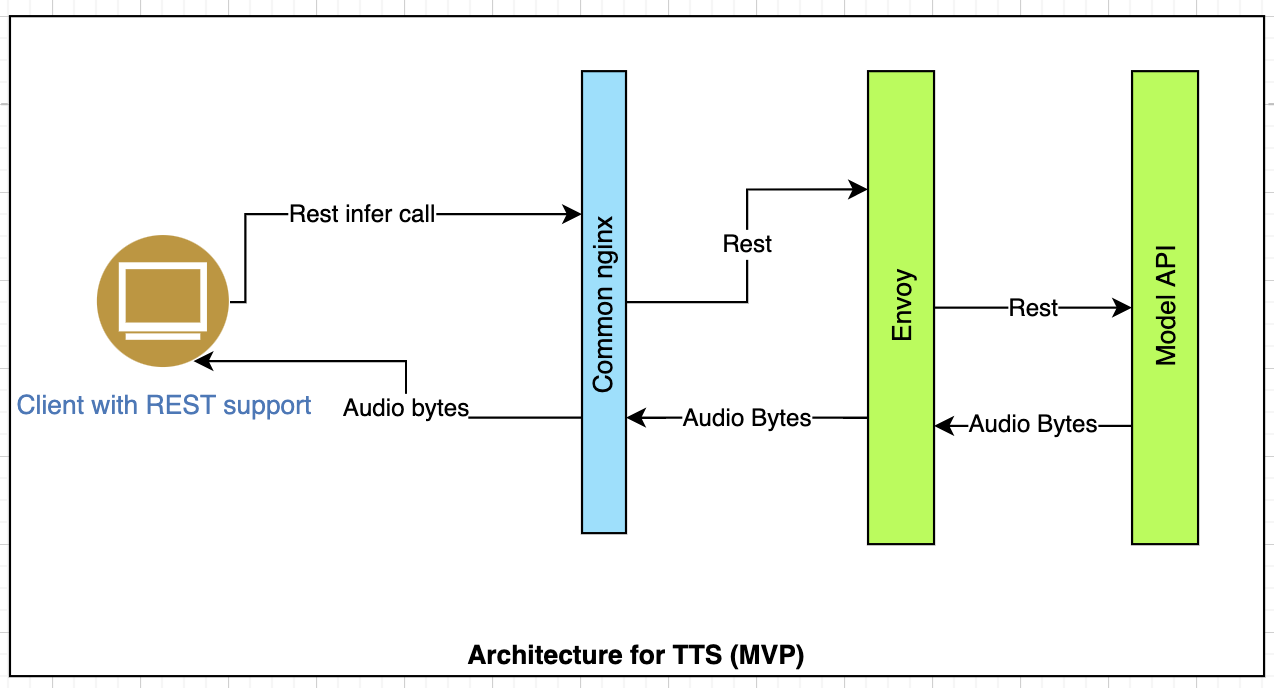
A high-level view of where our API fits is shown below. The client sends a request, and our API (the "Model API") is responsible for receiving it, processing it with the model, and returning the result.
2. Anatomy of a Basic Speech API
Let's start by building a minimal, functional API for an Automatic Speech Recognition (ASR) service. The goal is simple: accept an audio file and return the transcribed text.
How to Run Whisper (Speech-to-Text) in Docker
This article from OneUptime provides a very clean and concise example of a server script for a Whisper-based ASR API. We will use this as our starting point.
Please read the Python code in the section under the heading 'Create the API server:'. Focus on understanding these key components: The instantiation of the FastAPI app: app = FastAPI(...) The path operation decorator: @app.post("/transcribe") The function signature, which uses UploadFile for the audio and Form for other parameters. The use of tempfile to temporarily store the uploaded audio on disk. The final return statement using JSONResponse.
The code you just reviewed is a great first step. It works, but it has some weaknesses. The request parameters (language, task) are received as simple form data, and the structure of the JSON response is defined "manually" as a dictionary. This approach lacks formal validation and a clear, enforceable contract for what the API expects and returns. If a client sends an invalid parameter or if we accidentally change the response structure, errors can occur silently.
3. Defining the API Contract with Pydantic
To build a robust and maintainable API, we need to strictly define its "contract": the exact structure and data types for both incoming requests and outgoing responses. FastAPI uses Pydantic for this purpose.
Pydantic is a data validation library that uses standard Python type hints to validate, serialize, and deserialize data. When integrated with FastAPI, it provides:
- Request Validation: Automatically validates that incoming JSON bodies match the defined schema. If not, it returns a clear 422 (Unprocessable Entity) error.
- Response Serialization: Ensures that the data you return from your endpoint conforms to the defined response schema, filtering out any extraneous data.
- Enhanced Documentation: The schemas are used to generate rich, detailed interactive documentation showing exactly what data to send and what to expect in return.

To learn how to use Pydantic, we'll watch a tutorial that, while using a blog post example, perfectly explains the concepts we need.
Python FastAPI Tutorial (Part 4): Pydantic Schemas - Request and Response Validation
This video from Corey Schafer is an excellent deep dive into using Pydantic schemas with FastAPI. It will teach you how to define models for request and response validation.
Please watch the following two segments: Introduction to Pydantic (00:56 - 02:14): This will give you a clear understanding of what Pydantic is and why it's so integral to FastAPI. Creating Schemas (03:31 - 10:33): This is the core section. Pay close attention to how BaseModel is used to create classes that define data fields with type hints. Notice the use of inheritance (PostBase, PostCreate, PostResponse) to avoid repetition, and how Field can be used to add constraints like min_length.
Activity: Designing Pydantic Models for Speech Services
Now, let's apply these concepts to our speech services.
1. TTS Request Model:
A Text-to-Speech (TTS) service is a perfect candidate for a Pydantic request model. The client needs to send not just the text to be synthesized but also various parameters to control the generation.
Using Dia 1.6B to Build a Text-to-Speech Application
Let's examine a real-world Pydantic model for a TTS service from a tutorial on deploying a Dia TTS model.
Find the code block that defines the GenerateRequest class. Notice how it defines not just the required text_input but also optional generation parameters like max_new_tokens, temperature, and top_p, all with their types and default values. This is a perfect example of a well-defined request contract.
This GenerateRequest model ensures that any POST request to a generation endpoint will be automatically validated. The client must provide a text_input string, and can optionally override the floating-point values for temperature, top_p, etc.
2. ASR Response Model:
For our ASR service, the most important contract is the response. A good ASR response is more than just a single string of text; it often includes a language prediction and time-stamped segments.
Let's formalize the structure from the oneuptime.com example into Pydantic models. In a new Python file, say schemas.py, you would define the following:
from pydantic import BaseModel
from typing import List, Optional

class Segment(BaseModel):
    start: float
    end: float
    text: str

class TranscriptionResponse(BaseModel):
    text: str
    language: Optional[str] = None
    segments: List[Segment]
This defines a clear, nested structure. TranscriptionResponse must contain a text string, an optional language string, and a list of Segment objects, each of which must have a start time, end time, and text.
4. Integrating Pydantic into FastAPI Endpoints
Now that we have our models, let's see how to use them to create a robust API.
Python FastAPI Tutorial (Part 4): Pydantic Schemas - Request and Response Validation
Let's return to Corey Schafer's video to see how to integrate these Pydantic models into FastAPI's decorators and function signatures.
Continue watching these key segments: Using response_model (11:16 - 12:46): Learn how adding the response_model argument to the decorator enforces the output schema. Using Schemas for Request Body (12:46 - 15:36): See how type-hinting the request body parameter with a Pydantic model triggers automatic validation. The Payoff: Auto-Documentation (15:42 - 19:31): This demonstrates how all your hard work translates into beautiful, functional, interactive API documentation.
Let's see how we would apply this to our two speech services.
1. TTS Endpoint (Request Body Validation)
Using the GenerateRequest model is straightforward. The API endpoint would look like this, based on the LINK tutorial:
# In your main app file
from schemas import GenerateRequest # Assuming you put the model in schemas.py

@app.post("/api/generate")
async def run_inference(request: GenerateRequest):


    # 'request' is now a Pydantic object, validated by FastAPI.
    # You can access its fields like request.text_input, request.temperature, etc.


    # ... (call your TTS model using the parameters from 'request')


    # Return an audio file
    return FileResponse(...)
FastAPI handles the parsing and validation of the incoming JSON body before your run_inference function is even called.
2. ASR Endpoint (Response Model Validation)
To upgrade our initial ASR endpoint, we would add the response_model to the decorator:
# In your main app file
from schemas import TranscriptionResponse


# Note: The 'language' and 'task' parameters are still form data,
# as they are sent alongside a file, not in a JSON body.
@app.post("/transcribe", response_model=TranscriptionResponse)
async def transcribe(file: UploadFile = File(...), ...):


    # ... (code to run Whisper transcription)


    # result = model.transcribe(...)


    # Instead of manually creating a dict, you can return a dictionary
    # that matches the structure of TranscriptionResponse.
    # FastAPI will validate it and serialize it correctly.
    return result
By adding response_model=TranscriptionResponse, you guarantee that the API will always return JSON that conforms to your Pydantic model. It also provides a crystal-clear schema in the /docs page, so any developer consuming your API knows exactly what to expect.
Conclusion
In this lesson, you have taken the first and most crucial step in deploying a speech service: designing its public interface. You've learned how to create a well-defined, validated, and self-documenting REST API using the powerful combination of FastAPI and Pydantic.
Key Takeaways:
- REST APIs are the standard for exposing AI models as network services.
- FastAPI is a modern, high-performance Python framework ideal for this task, offering async capabilities and automatic documentation.
- Pydantic models are used to define a strict "contract" for your API. They validate incoming request bodies and serialize outgoing responses.
- For file uploads (like in ASR), you use
UploadFile. For structured data (like in TTS requests), you use a Pydantic model as a type hint for the request body. - The
response_modeldecorator argument ensures your API's output is consistent and provides a clear schema in the automatically generated documentation.
Preview of the Next Lesson:
Today, we designed the API's structure and defined its contracts. In the next lesson, we will build on this foundation. Our learning outcome will be to build a functional API endpoint that encapsulates a trained speech model for inference. We'll move from design to implementation, writing the complete logic to load a model, handle the incoming request, perform inference, and return the result through the API we've just designed.