
Hello again. Last time, you built readable Output messages with concatenation and interpolation. This lesson gives Output a second job: helping you find and fix code that cannot run yet because its writing structure is incomplete.
A missing quotation mark, parenthesis, or operator can make a script invalid. This is a syntax error. Rather than guessing, you will read the red Output message, locate the line it identifies, fix the missing code, and test again.
Output is your script’s report panel
When you test a game, Roblox Studio’s Output window can show:
- messages from
print(); - warnings from
warn(); - messages from Roblox itself;
- errors from your scripts.
The red messages deserve attention. They do not mean you have failed; they are Studio telling you what it could not understand.
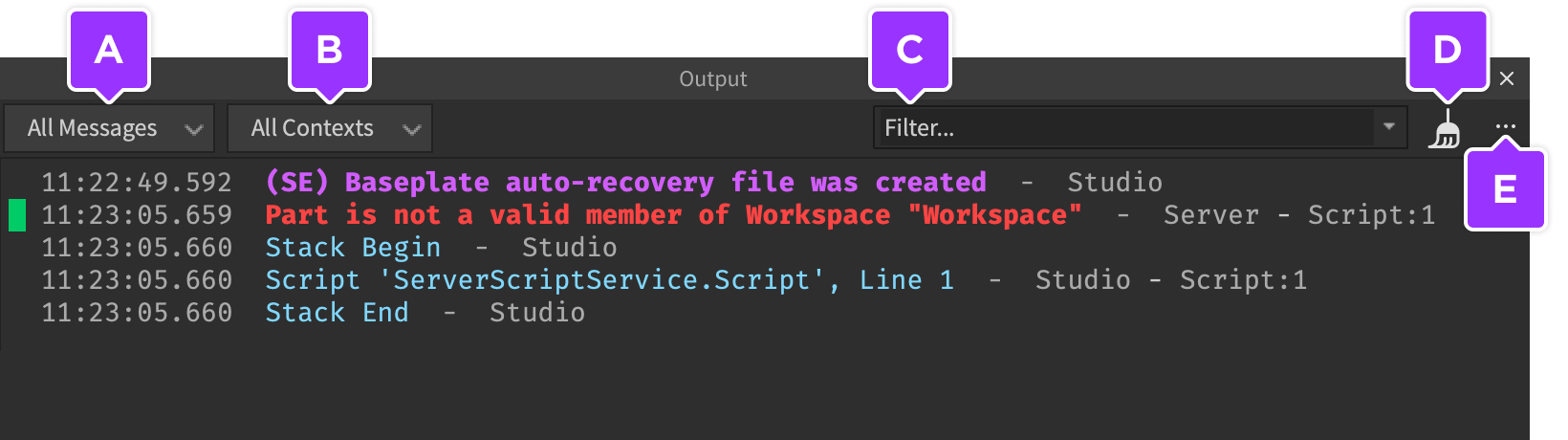
If Output is not visible, open it from Window in the Studio menu. Then use Play to run your place; click Stop when you are done testing.
How to find output in Roblox Studio!
Watch “How to find output in Roblox Studio!” by OnFireRobloxScripting for a quick visual demonstration of opening Output and using an error message to reach the problematic code.
First watch opening Output to confirm where the panel is in Studio. Then watch fixing syntax errors. Focus on the routine: run the game, read the error, click it to reach the relevant location, correct the code, and test again.
What “syntax” means
Syntax is the set of rules for arranging code so Luau can read it. It is similar to punctuation and grammar in a written instruction: if a sentence begins a quotation but never closes it, the reader cannot reliably tell where that quotation ends.
For example, this is valid Luau:
local coins = 25
print("Coins: " .. coins)
It has:
- a closing quotation mark for
"Coins: "; - two dots,
.., to join text and the number; - a closing parenthesis for
print(.
Now remove the last parenthesis:
local coins = 25
print("Coins: " .. coins
The print( call began with an opening parenthesis, but it never closed. Luau cannot finish reading the instruction, so the script has a syntax error.
A useful rule is:
Open something, then close it.
Common pairs include:
| Open | Close | Example |
|---|---|---|
( | ) | print("Hello") |
" | " | "Hello" |
` | ` | `Coins: {coins}` |
{ | } | `{coins}` |
This pairing check catches many beginner mistakes.
Read the error as a clue, not as a verdict
Test the broken script:
local coins = 25
print("Coins: " .. coins
Output will show a red syntax error. The exact wording and position can vary between Studio versions, but it will usually communicate the same idea: Luau expected a closing ) and reached the end of the script without finding one.
An error message normally gives you three important clues:
-
What Luau expected
For this example, it may say it expected). -
Where Studio noticed the problem
You will see a script name and line number, such asPracticeScript:2. -
What was happening when it failed
A phrase such as “expected” or “unfinished” tells you that the code’s structure is incomplete.
Click the red error in Output when possible. Studio will take you to the relevant script location.
One subtle but important point: the line reported is where Luau noticed the structure was wrong. It is not always exactly where you made the omission. If you forget a closing quote on line 2, Studio may only be certain something is wrong on line 3 or at the end of the file. Check the reported line and the code immediately above it.
The Roblox Creator Hub also notes that Output displays errors captured while scripts run, while the Script Analysis panel can point out active errors in the editor before testing.
Script Editor | Documentation - Roblox Creator Hub
Read this short official overview to distinguish Studio’s two feedback tools: Script Analysis for code currently being edited, and Output for messages produced during a test.
In the “Real-time feedback” section, read the Script Analysis description, then continue through the Output description. Notice that both tools can help, but this lesson’s debugging loop uses Output after a playtest.
A repeatable four-step debugging loop
When you see a red error, use this process.
1. Read the full message
Do not only read the first few red words. Look for:
- the script name;
- the line number;
- the expected symbol or description;
- whether the error says the file ended unexpectedly.
For our broken line, the key question is: Which opening symbol is missing its matching close?
2. Go to the line, then inspect nearby code
Click the Output error, or locate the named script in Explorer and go to the stated line.
Compare:
-- Broken
print("Coins: " .. coins
-- Fixed
print("Coins: " .. coins)
The line includes one opening ( after print and now one matching ) at the end.
3. Make the smallest sensible correction
Change only what the error suggests first. Here, add a single closing parenthesis. Avoid rewriting the whole script while you are still identifying the problem; a large rewrite can introduce a different error.
4. Test again and verify the result
Press Play again. A successful Output result is:
Coins: 25
The previous red error should not appear from this new test. If it still appears, reread the message. You may have corrected the wrong location, missed another issue, or be running a different script than the one you edited.
A syntax error prevents the script from starting
Add a print() before the broken line:
print("Starting coin check")

local coins = 25
print("Coins: " .. coins
You might expect Output to show:
Starting coin check
But with a syntax error, it usually will not. Luau first has to read the script’s overall structure. Since it cannot understand the missing ), the script cannot begin execution.
After fixing the parenthesis:
print("Starting coin check")

local coins = 25
print("Coins: " .. coins)
Output should show:
Starting coin check
Coins: 25
This distinguishes two ideas:
- A syntax error means Luau cannot understand the code’s form, so the script cannot start.
- A runtime error happens after a script has started but encounters a problem while running.
You will investigate runtime errors more deeply later. For now, treat a missing quote or parenthesis as a structural problem: make the code complete first.
Two common syntax mistakes in message code
Because you have recently worked with strings and Output messages, these are useful patterns to recognize.
Missing a closing quotation mark
Broken code:
local playerName = "Nova
print(playerName)
The opening quotation mark before Nova has no partner. Luau may describe this as an unfinished string or report a problem later in the script, because it cannot determine where the string should end.
Fix it by adding the matching quote:
local playerName = "Nova"
print(playerName)
Output:
Nova
Leaving out a concatenation operator
Broken code:
local coins = 25
print("Coins: " coins)
Two values are placed together, but Luau needs an operator telling it how to combine them. Since you want one message, use ..:
local coins = 25
print("Coins: " .. coins)
Output:
Coins: 25
The correction should match your intention. Parentheses fix the shape of a print() call; .. tells Luau to join text and a value.
Guided mini-project: repair the quest report
Create or reuse your PracticeScript, then enter this code exactly as shown. It contains one intentional syntax mistake:
local playerName = "Nova"
local coins = 27

local report = `{playerName} has {coins} coins.`
print(report
- Open Output if needed.
- Press Play.
- Read the red error and identify the missing symbol.
- Click the error to locate the line.
- Correct the script.
- Press Play once more.
Your corrected version should be:
local playerName = "Nova"
local coins = 27

local report = `{playerName} has {coins} coins.`
print(report)
The successful Output message is:
Nova has 27 coins.
Before moving on, deliberately make one small mistake of your own: delete the final backtick from the report line, test it, and read the new error. Then restore the backtick and run the script successfully. The purpose is not to memorize exact error wording; it is to practice matching an unfinished opening symbol with the closing symbol that is missing.
A quick checklist for red syntax errors
When code does not start and Output shows red text, ask:
- Which script and line does Output name?
- What did Luau expect? A
), quote, operator, or another symbol? - Is an opening symbol missing its matching close?
- Could the real mistake be on the line just before the reported one?
- After fixing it, did I test again and see the intended
print()message?
Key takeaways
A syntax error means Luau cannot read the structure of your code. Missing closing parentheses and quotation marks are common examples.
Output helps you debug by showing a red message with the script name, line number, and a description of what Luau expected. Click the message when possible, inspect the named line and nearby code, make the smallest correction, then run the script again.
For the common broken line:
print("Coins: " .. coins
the necessary correction is:
print("Coins: " .. coins)
You now have the basic debugging habit that will support every later scripting project: read the error, locate the code, correct the structure, and retest. The next module moves from individual values and messages into conditions—code that can compare values and choose what happens next.
Can't find a good explanation? Sign up and we'll make it for you
Sign up