
Hello again. In the previous lesson, we separated the model from the application around it, and distinguished a user-facing assistant from an autonomous agent. The practical difference is delegated authority: an agent can choose and execute some steps toward a goal, rather than only generate an answer.
This lesson examines the mechanism that makes that possible: the perceive–reason–act–observe loop. You will learn to trace one complete agent workflow, identify what information enters at each stage, and see why every iteration of the loop is a potential security-relevant decision point.
The agent loop: a controlled cycle, not a single answer
A conventional chatbot interaction is often one pass: a person supplies text, the model generates text, and the exchange ends. An agent may begin the same way, but it can also use the model’s output to select a tool, perform a task in another system, inspect the result, and decide what to do next.
The core cycle is:
- Perceive: receive information from the environment.
- Reason: interpret the task and available context; decide whether and how to proceed.
- Act: invoke an available tool or produce a final response.
- Observe: collect the outcome of the action and add it to the working context.
The agent then either begins another cycle or stops.
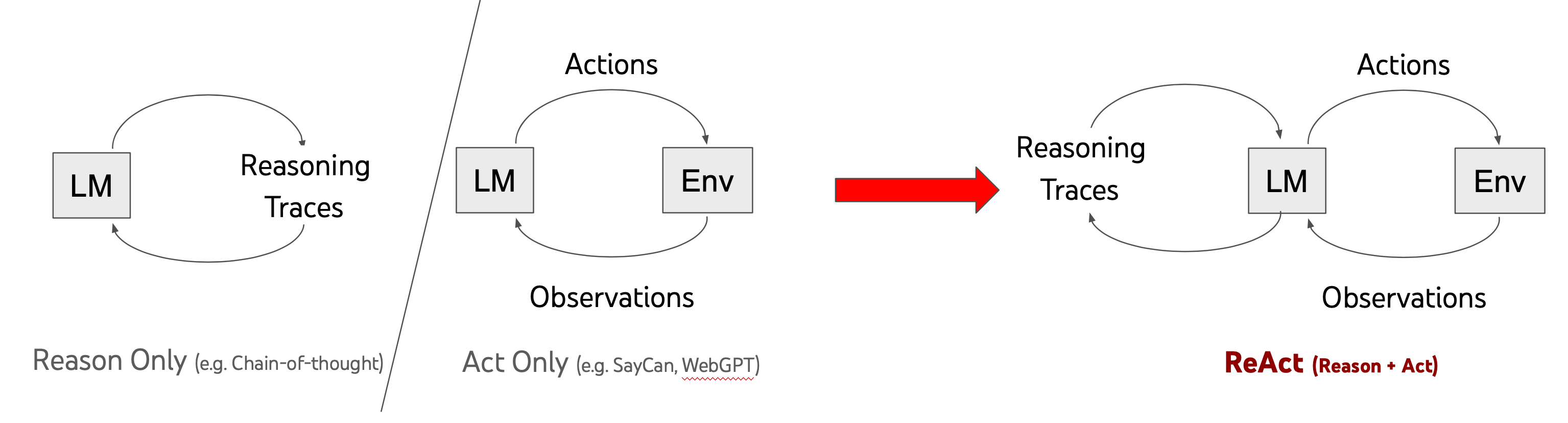
The right-hand pattern in the diagram is often called ReAct, meaning reason plus act. It is a useful conceptual model, but do not take the visible “reasoning traces” literally as a requirement to expose an LLM’s private chain of thought. In a production agent, the model may produce a concise plan, a structured tool call, or a policy-relevant explanation rather than a detailed internal monologue. What matters operationally is that the system uses available context to select an action and incorporates the result before deciding its next step.
What is OpenClaw? Inside AI Agents, LLMs and the Agentic Loop
Watch “What is OpenClaw? Inside AI Agents, LLMs and the Agentic Loop” from IBM Technology for a compact walkthrough of the full cycle: incoming task, assembled context, model decision, tool use, tool output, and final response.
Watch the agentic loop. Focus on the distinction between the task arriving at the agent, the context assembled for the model, the tool call itself, and the tool result that returns to context. Notice that the loop ends only when the model determines that no further tool use is needed.
What each stage really means
The four labels are compact, but each represents a distinct system operation. Separating them prevents a common analytical mistake: treating “the agent” as though it were only the LLM.
1. Perceive: collect relevant inputs
Perception is how the agent receives new information. For a chat-based enterprise agent, the first perceived input is often a user message. But it may also receive:
- an event, such as a new support ticket or a failed payment notification;
- a document retrieved from an approved knowledge source;
- an email or chat message;
- a record returned by a CRM or database;
- the output of a prior tool call;
- system state, such as the current user identity, time, task status, or available budget.
The agent’s orchestration layer gathers some of this material and constructs a prompt or working context for the model. This context commonly includes system and developer instructions, the user’s task, conversation history, tool descriptions, policy constraints, and relevant retrieved data.
Perception does not mean trust. A webpage, a support-ticket comment, and a tool response can all enter the model’s context, but they may have very different trust levels. The agent needs information from the environment to do useful work; security design must ensure that receiving information does not automatically grant that information authority as an instruction.
2. Reason: select the next meaningful step
During reasoning, the model interprets the goal in light of the assembled context. It may decide that it can answer immediately, that it needs more information, that it should ask the user a clarifying question, or that it should invoke one of its available tools.
For example, consider an internal IT support agent given this request:
“I cannot access the payroll portal. Can you help?”
A sensible next step is not necessarily “reset the password.” The agent may need to establish which employee is requesting help, determine whether the portal is currently unavailable, check whether the employee’s account is locked, and identify the permitted recovery procedure.
Reasoning here is decision-making under constraints, not omniscient planning. The model only knows what it is given in its context. It cannot reliably infer facts absent from the available data, and it can misunderstand facts that are present. The surrounding application should therefore constrain which actions can follow from a model decision.
3. Act: do something outside the model
An action is an operation performed through the agent’s permitted interfaces. It might be read-only, such as querying an account status, or consequential, such as changing a record or sending a message.
Typical actions include:
| Action category | Example | External effect |
|---|---|---|
| Retrieve information | Search an approved IT knowledge base | Returns data to the agent |
| Inspect a system | Check whether an account is locked | Reads a record |
| Communicate | Draft or send a reply | May affect a recipient |
| Modify a record | Open a support ticket or update a CRM entry | Changes system data |
| Execute a transaction | Reset a password or issue a refund | Produces a consequential outcome |
The agent does not directly operate the database or SaaS application. Its orchestration layer normally validates and executes a tool call: a structured request naming a permitted tool and supplying parameters. The tool returns a result to the orchestration layer.
A key security implication follows:
Model output is a proposal; the application and tool layer determine what actually happens.
If a model proposes a password reset for the wrong person, a properly designed tool should reject it unless deterministic identity, authorization, and policy conditions are satisfied.
4. Observe: incorporate the action’s result
After a tool runs, the tool’s result becomes an observation. The agent does not assume an action worked merely because it requested it. It receives evidence from the environment and incorporates that evidence into the next round of reasoning.
Observations may say that:
- the requested record was found;
- an account is locked;
- a required field is missing;
- authorization was denied;
- an API timed out;
- a requested operation succeeded;
- an action is pending human approval.
An observation may be helpful, incomplete, misleading, or maliciously crafted. It is data, not automatically a trusted instruction. This will become especially important when we study indirect prompt injection: a tool can return text that attempts to influence the model rather than merely report a result.
Trace a simple agent workflow
Let us trace the IT support example in detail. Assume the agent is allowed to consult the company’s support knowledge base and account-status service, but it cannot reset a password without user verification and a policy-approved request.
The employee writes:
“I cannot access the payroll portal. Can you help?”
Iteration 1: understand the problem
| Loop stage | What happens |
|---|---|
| Perceive | The system receives the employee’s message, authenticated session identity, conversation history, system instructions, and descriptions of available tools. |
| Reason | The model identifies an access issue and determines that it needs account status before offering a resolution. |
| Act | It requests the check_account_status tool using the authenticated employee identifier. |
| Observe | The tool returns: “Account active; not locked. Payroll portal reports scheduled maintenance until 10:30.” |
At this point, the original request is not fully resolved, but the agent has a much better basis for its next choice.
Iteration 2: verify guidance
| Loop stage | What happens |
|---|---|
| Perceive | The orchestration layer adds the account-status result to the working context. |
| Reason | The model recognizes that a password reset is inappropriate and decides to look up the official maintenance communication process. |
| Act | It calls the approved knowledge-base search tool with a query related to payroll portal maintenance and access. |
| Observe | The tool returns an approved notice: maintenance is expected to end at 10:30, and employees should retry afterward; urgent payroll questions go to a named support queue. |
Iteration 3: finish without an external action
| Loop stage | What happens |
|---|---|
| Perceive | The agent now has the user’s issue, verified account status, and approved operational guidance. |
| Reason | It judges that no additional tool calls are necessary. |
| Act | Instead of invoking another external tool, it generates a final response. |
| Observe | There is no required tool result. Control returns to the employee, who can retry later or contact the escalation channel. |
The final message could be:
“Your account is active and is not locked. The payroll portal is undergoing scheduled maintenance until 10:30. Please try again afterward. If the issue is urgent, contact the payroll support queue.”
Notice what the agent did not do:
- It did not treat a lack of access as proof that the account needed a reset.
- It did not choose a high-impact tool merely because the tool was available.
- It did not silently alter an account record.
- It did not continue looping once it had sufficient verified information.
That restraint is a core part of secure agent design.
The loop is iterative, but it must be bounded
The agent loop may repeat several times within one user request. A coding agent might inspect files, edit one, run a test, observe a failure, revise the edit, and run the test again. A travel agent might check availability, compare options against policy, request approval, then place a booking after approval.
However, an agent must have explicit conditions for ending the loop. Common termination conditions include:
- the model produces a final response rather than a tool call;
- the goal has been verified as complete;
- a policy requires human approval before the next action;
- a tool fails or returns insufficient information;
- a time, cost, or iteration limit is reached;
- a safety or authorization check rejects the intended action.
Read IBM’s explanation of ReAct agents to reinforce the alternating thought, action, and observation pattern, then see why deliberate stopping conditions are part of the design.
In the section “How do ReAct agents work?”, begin with the packing example. Read through the explanation of thoughts, actions, and observations, focusing on how new results revise the next decision rather than simply confirming a fixed plan. Then, in “ReAct agent loops,” read the loop limits. Focus on why a maximum iteration count and explicit completion conditions protect against unnecessary, costly, or endless cycles.
A bounded loop is not merely an efficiency feature. It limits the number of opportunities for an agent to encounter misleading content, make an inappropriate tool call, or create external effects. A system that keeps trying after failures can turn a transient error into repeated API calls, duplicated messages, or an escalating sequence of side effects.
A security-oriented way to trace the loop
When you encounter a proposed agent, do not stop at “it uses an LLM and several tools.” Trace at least one realistic task through the four stages. At every stage, record the input, decision, action, output, and enforcement point.
For the support workflow, a compact security trace looks like this:
| Stage | Main question | Example concern |
|---|---|---|
| Perceive | What entered the context, and from where? | A ticket comment includes untrusted instructions disguised as troubleshooting text. |
| Reason | What decision did the model make from that context? | The model mistakes a user request for authorization to take a privileged action. |
| Act | Which tool was requested, with which parameters and identity? | The agent attempts a password reset for an account other than the authenticated user’s. |
| Observe | What did the tool return, and how is it handled? | A tool error is misread as success, or untrusted returned text influences the next decision. |
| Stop | Why does the workflow end or escalate? | The agent acts despite missing evidence rather than asking for verification or human review. |
This approach separates two kinds of control:
- Probabilistic judgment: the model decides what appears relevant or what it should attempt next.
- Deterministic enforcement: software checks identity, authorization, tool parameters, policy conditions, limits, and approvals before an action is executed.
An agent can use model judgment to identify that an account-status check might help. It should not rely solely on model judgment to decide whether a payroll account may be changed. The closer an action is to money, access rights, sensitive data, irreversible change, or external communication, the more important deterministic checks and human approval become.
A useful habit is to distinguish the requested action from the executed action. The former may be generated by the model. The latter should occur only after the orchestration and tool layers confirm that it is permitted.
Key takeaways
An agent operates through a repeating perceive–reason–act–observe loop:
- Perceive gathers user input, events, retrieved material, tool output, identity, and system context.
- Reason uses that context to select a next step, ask for clarification, invoke a tool, or finish.
- Act uses an allowed tool or produces a final response.
- Observe incorporates real-world results so the next decision is based on evidence rather than assumption.
A single user request can contain several iterations of this loop. The loop should end when the task is complete, a policy requires escalation, an action cannot be authorized safely, or a defined resource limit is reached.
For security, trace each loop stage separately. Ask what information is entering, what decision is being made, what authority the action uses, what result returns, and what prevents unsafe repetition. In the next lesson, we will look more closely at the components that supply this loop: prompts, tools, memory, retrieval, and orchestration.
Can't find a good explanation? Sign up and we'll make it for you
Sign up