
Understanding the Yocto Ecosystem and Its Components
Hello, and welcome to the course. We begin with a vocabulary lesson because Yocto terminology is often used casually in ways that create real engineering mistakes: treating Poky as a product OS, calling BitBake a compiler, or assuming “Yocto” names the image running on a board.
The central idea for this module is that Yocto is an ecosystem for describing and producing embedded Linux systems. Before installing anything or issuing a build command, you should be able to separate the organizations and projects involved, the build engine, the reference starting point, and the binary system that ultimately boots in QEMU.
The five names: give each one a job
At a high level, an embedded Linux build has two different worlds:
- The development world on your Ubuntu host: source repositories, metadata, configuration, build tools, downloads, and caches.
- The target world: the kernel, root filesystem, drivers, libraries, applications, and configuration that boot under QEMU or on a physical board.
The Yocto Project helps you turn carefully versioned descriptions in the development world into artifacts for the target world. It is therefore not comparable to Ubuntu or Fedora as something you download and install directly on the target.
Start with this role map:
| Term | What it is | Its primary job | What it is not |
|---|---|---|---|
| Yocto Project | A Linux Foundation collaborative project, toolset, release process, documentation set, and ecosystem | Makes it practical to create and maintain custom embedded Linux systems | A ready-made target operating system or a single Git repository |
| OpenEmbedded | A long-running community project and build ecosystem | Develops technology and metadata foundations used to build embedded Linux systems | Simply another name for the Yocto Project |
| OpenEmbedded-Core (OE-Core) | A shared, curated metadata layer | Supplies foundational recipes, classes, configuration, and associated files | The entire OpenEmbedded ecosystem |
| BitBake | A generic task scheduler and execution engine | Parses metadata, resolves dependencies, schedules tasks, and runs them | A C/C++ compiler, package manager, or Linux distribution |
| Poky | The Yocto Project reference distribution and reference integration | Gives you a tested, known-good starting point containing BitBake, OE-Core, and Yocto-specific metadata | A product-ready distribution or the final binary image |
| Generated Linux distribution / image | The build output for a particular machine and use case | Boots QEMU or hardware and contains the selected kernel, root filesystem, and software | The Poky source checkout, BitBake, or a metadata layer |
The distinction between OpenEmbedded and OE-Core deserves particular care. OpenEmbedded is the broader project and community. OE-Core is a specific common, quality-assured set of foundational metadata maintained for use by OpenEmbedded-derived systems, including Yocto Project systems.
For the moment, think of metadata as the complete set of build descriptions: recipes, configuration files, classes, patches, and auxiliary files. A recipe is an especially important kind of metadata. It states where source code comes from, how to configure and compile it, what it depends on, and how its output is packaged.
For a C/C++ comparison, a CMakeLists.txt primarily describes how one software project is configured and built. A BitBake recipe has a broader system-integration role: it can describe source retrieval, patches, cross-compilation, dependencies, installation, packaging, and licensing information for one logical unit of a target distribution.
Introduction to Embedded Linux Part 2 - Yocto Project | Digi-Key Electronics
Watch “Introduction to Embedded Linux Part 2 - Yocto Project” from DigiKey. It gives a concise visual introduction to the vocabulary you will use throughout the course, especially the distinction between metadata, layers, machine configurations, distributions, and images.
Begin with the key terms. Focus on the speaker’s separation of recipes, layers, BSPs, machine configurations, distributions, and final images. Then watch Poky clarified, which explicitly distinguishes Poky from the Yocto Project. Finish with BitBake's role to reinforce that BitBake reads metadata and produces build artifacts rather than being the operating system itself.
Yocto Project and OpenEmbedded: ecosystem and foundation
The Yocto Project is an open-source collaboration that brings together tools, validated components, documentation, release engineering, testing infrastructure, and common practices for embedded Linux development. Its purpose is to let a team create a Linux system tailored to a specific product rather than adapting a general-purpose desktop distribution after the fact.
A useful precise sentence is:
The Yocto Project provides a framework and ecosystem for constructing custom Linux distributions from source and metadata.
That sentence does not mean a build is automatically suitable for production. A product still needs its own policy, machine support, application stack, security maintenance, licensing decisions, testing, release evidence, and ownership of custom layers. The Yocto Project provides the machinery and conventions for doing that work in a structured way.
OpenEmbedded predates the Yocto Project and is a crucial partner rather than a competing product. Its community developed the metadata-driven approach and the technologies around it. The two projects co-maintain OE-Core, the shared core of metadata that many systems rely on.
2 Introducing the Yocto Project — The Yocto Project ® 5.2.3 documentation
Read the relevant parts of the Yocto Project Overview and Concepts Manual. This is the official terminology baseline for the course, and it is worth establishing these definitions before working with a source tree.
In Section 2.1, “What is the Yocto Project?”, read the opening definition. Identify the distinction between a collaboration project and an image that eventually runs on a device. Next, in Section 2.3.3, “Open-Embedded Build System Components”, read the BitBake explanation, then the OE-Core explanation. Focus on the fact that BitBake is maintained separately and that OE-Core is shared metadata, not a compiler. In Section 2.3.4, “Reference Distribution (Poky)”, read the Poky passage. Finally, in Section 2.7, “Some Basic Terms”, read the metadata definition. Keep a mental distinction between instructions for producing software and the produced software itself.
The relationship diagram below is useful, provided it is read as an ecosystem map, not as a build sequence.
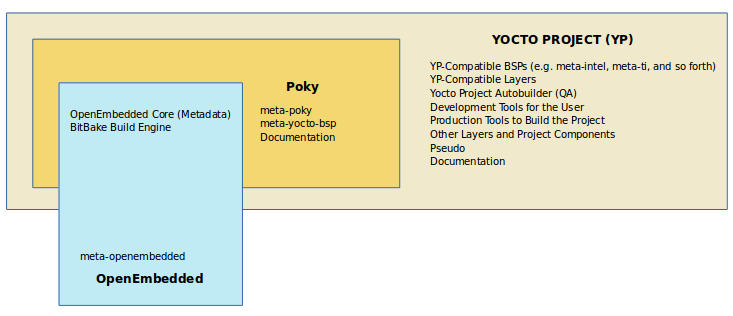
Notice two important details:
- OE-Core is shared. It is used by the Yocto Project, but it is also common to other OpenEmbedded-derived systems.
- Poky is only part of the broader Yocto Project ecosystem. Hardware-vendor BSP layers, community layers, QA systems, documentation, and development tools extend beyond the Poky checkout.
A common beginner error is to see directories named meta-* and assume each one is a Linux package, a running service, or a final filesystem component. It is better to read meta-* as a naming convention for a metadata layer: a directory tree containing instructions that affect a build.
Later in the course, you will create a proprietary application layer rather than edit the contents of Poky. That separation is a core maintainability practice: upstream reference material can be updated independently while your product-specific decisions remain reviewable and under your team’s control.
BitBake: the engine that turns metadata into work
BitBake is the engine that performs the build. It reads configuration and recipes, determines what is required, constructs dependency information, and runs tasks in an order that respects those dependencies. It can execute shell and Python tasks, often in parallel where dependency constraints permit it.
BitBake is deliberately more general than an embedded Linux tool. It does not inherently know that a particular task compiles a kernel or creates a root filesystem. Instead, the metadata tells it what tasks exist and how they relate. This is why the same basic engine can be used across many types of source builds.
When you eventually run:
bitbake core-image-minimal
you are not “compiling Yocto.” You are asking BitBake to build the target named core-image-minimal using the active metadata and configuration. BitBake will then determine the recipes, packages, tools, tasks, and dependencies needed for that request.
At a deliberately high level, a build works as follows:
- BitBake reads configuration files, layers, classes, and recipes.
- It decides which version and provider of each required component should be used.
- It creates and schedules a graph of tasks, respecting build dependencies.
- Tasks fetch sources, apply changes, configure and cross-compile software, and stage installed files.
- Package outputs are created and selected packages are assembled into a target image.
The later modules will examine every part of that pipeline. For now, retain the division of responsibility:
- Recipes and configuration describe desired work.
- BitBake analyzes and executes that work.
- The image is an artifact created by the work.
This also explains why calling BitBake “a compiler” is too narrow. A compiler is one tool that BitBake may invoke while executing a compile task. BitBake coordinates the larger build process, including fetching source, patching, cross-toolchain construction, packaging, image generation, and many validation steps.
Poky: a reference starting point, not your product
Poky is the Yocto Project’s reference embedded distribution and reference test configuration. It is designed to demonstrate an integrated, working configuration and to validate the components released by the Yocto Project.
A Poky checkout includes the essential material needed to begin building, notably:
- BitBake, the task engine;
- OE-Core, commonly found in the
metadirectory; - Yocto-specific reference metadata, including
meta-poky; - reference BSP metadata, including QEMU-oriented machine support;
- helper scripts and documentation.
Poky is extremely useful for this course because it lets us build a QEMU image from a tested baseline before introducing custom product layers. But it is not intended to be copied unchanged and labeled as a commercial device OS.
The official documentation makes this explicit: Poky does not contain prebuilt target binaries. It is a source-and-metadata-based example of how a distribution can be constructed. Once we clone Poky in a later lesson, we will still need to select a machine, choose a distribution policy, specify an image target, and ask BitBake to perform the build.
There is a subtle terminology issue here. In Yocto work, distribution can refer to both:
- A set of policy decisions expressed as metadata, such as package format, feature choices, init system, and preferred providers.
- The resulting Linux system, delivered through one or more images and packages.
Similarly, Poky names a reference distribution configuration, while a “Poky build” often informally means an image built using that configuration. In professional documentation and bug reports, be explicit about which meaning you intend.
For example:
- “We use Poky as our starting point” refers to a reference build configuration and source setup.
- “Our custom distribution enables systemd” refers to distribution policy metadata.
- “The QEMU image boots successfully” refers to a produced target artifact.
- “The deployed root filesystem contains our application” refers to the content of that artifact.
The following phrasing is imprecise:
“Yocto is installed on the target.”
A more accurate replacement is:
“We built a custom embedded Linux image using Yocto Project tools and deployed it to the target.”
That wording identifies the producer, the process, and the artifact separately.
The generated system: what actually boots
The final output is a generated Linux system for a particular target and purpose. It may include:
- a Linux kernel;
- a root filesystem;
- selected user-space packages and libraries;
- configuration files;
- device-specific drivers;
- boot files or bootloader-related artifacts, when the selected machine requires them;
- image formats suitable for QEMU, an SD card, flash storage, or another deployment method.
The exact output depends on three broad choices:
| Choice | Question it answers | Typical consequence |
|---|---|---|
| Machine | What hardware or emulator am I targeting? | Architecture, kernel provider, device configuration, boot method, and hardware capabilities |
| Distribution policy | What system-wide rules and features apply? | Init system, security and feature policy, package format, providers, and defaults |
| Image | What should this deployable system contain? | Installed package set, image features, filesystem format, and intended use case |
For this course, the target will be an ARM QEMU machine. QEMU gives us a reproducible target that can be booted, inspected, networked, and tested without requiring physical hardware. The same mental model later applies when a QEMU machine configuration is replaced by a vendor BSP layer for a real board.
Keep one final distinction sharp:
- A distribution is the system-level policy and coherent software collection you define.
- An image is a deployable binary realization of that distribution for a selected machine and use case.
Documentation sometimes uses “image” and “distribution” loosely in introductory descriptions. In day-to-day engineering, treating them as separate concepts will help you diagnose configuration problems and communicate precisely with teammates.
A compact mental model to retain
If you hear a colleague say, “We need to make a Yocto image for our board,” translate it internally into something more precise:
- The Yocto Project supplies the collaborative ecosystem, releases, tooling, and practices.
- OpenEmbedded supplies much of the underlying build technology and metadata tradition.
- OE-Core supplies a shared foundation of validated metadata.
- Poky supplies a tested reference integration and a practical starting point.
- BitBake reads the selected metadata and executes the required task graph.
- The generated image is the target artifact that will boot in QEMU or on hardware.
A concise version is: Yocto Project and OpenEmbedded provide the ecosystem and metadata foundation; Poky provides a reference setup; BitBake performs the build; the image is the result.
In the next lesson, we will make an early professional decision: selecting a maintained Yocto release branch and pairing it with the correct version of the documentation, release notes, and migration guidance.
Can't find a good explanation? Sign up and we'll make it for you
Sign up