
Hello, and welcome. This course is designed to turn your existing React, Next.js, Flutter, and UI-development experience into a stronger job-search profile and a progressively more full-stack portfolio. We begin with a practical foundation: learning to read vacancies as specifications for what to show in your résumé, GitHub, portfolio, and applications.
This lesson focuses on extracting recurring skills and keywords from React and Next.js job postings. You already have relevant evidence in React, Next.js, TypeScript, Tailwind CSS, REST API integration, Git, Agile collaboration, and accessible UI work. The objective is not to collect random buzzwords. It is to identify which capabilities repeatedly matter to employers, distinguish required skills from optional ones, and spot where your current experience provides credible proof.
Keywords are signals, not magic phrases
A job description is a compact description of the employer’s problem: what they need built, how they expect it to be built, and how they expect the developer to work. Keywords reveal those priorities.
For frontend roles, a useful keyword is usually one of these:
| Category | Examples | Why it matters |
|---|---|---|
| Core technologies | React, Next.js, TypeScript, JavaScript | Often used by recruiters and applicant-tracking systems to filter applicants. |
| Implementation skills | responsive design, reusable components, REST API integration | Shows what you can do with the technologies. |
| Quality practices | accessibility, performance optimization, testing, cross-browser compatibility | Distinguishes production frontend work from basic UI building. |
| Tools and workflow | Git, Agile, code review, Figma, Tailwind | Shows that you can work effectively in a team. |
| Evidence expectations | public portfolio, live URL, documented trade-offs | Tells you what proof an employer expects to see. |
| Constraints | location, experience range, work mode, English level | Helps decide whether a vacancy is worth targeting. |
A phrase matters more when it appears in a Requirements, Mandatory Skills, or Qualifications section than when it appears once in company marketing text. It also matters when it is repeated in several parts of the same posting: for example, React might appear in the role title, responsibilities, and requirements.
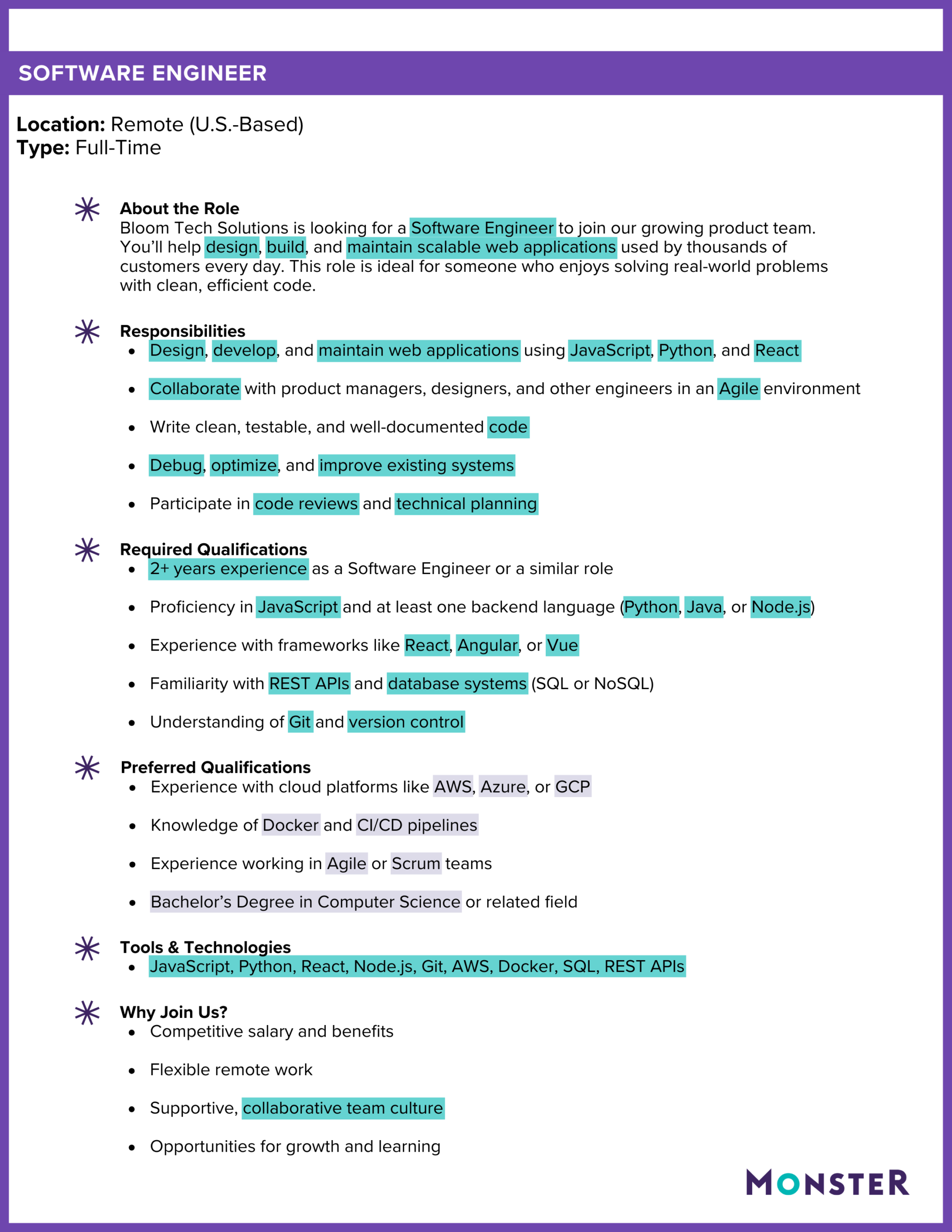
The sample advertisement below illustrates the basic technique. The highlighted terms include technologies, action verbs, engineering practices, and collaboration language. Notice that the most useful résumé terms are usually specific and demonstrable: “React,” “REST APIs,” “Git,” “code reviews,” and “responsive” are more useful than generic terms such as “growth” or “supportive culture.”
A key rule for your job search:
Add a keyword to your résumé only when you can support it with a real project, responsibility, or learning outcome.
For example, you can truthfully use “REST API integration” because you have integrated APIs in React and Flutter work. You should not add “Redux” or “Cypress” merely because a posting mentions them unless you have actually used them or have built a small project demonstrating them.
A repeatable extraction method
Use the same process for every target vacancy. It should take about 10 minutes per posting once you become familiar with it.
-
Read the title, role summary, and requirements first.
These sections usually reveal the seniority, core framework, and primary work type. Ignore benefits and company branding for the first pass. -
Copy exact technical phrases into a tracker.
Preserve the employer’s wording. Record “Next.js,” not only “Next”; record “responsive design,” not only “CSS.” -
Separate skills from responsibilities.
“TypeScript” is a skill. “Build reusable components” is a responsibility. Both are useful, because a strong résumé bullet combines them: Built reusable TypeScript React components… -
Classify each item by importance.
Use four labels:- Required: explicitly mandatory or listed in requirements
- Core responsibility: central to the day-to-day work
- Preferred: helpful but not essential
- Constraint: location, experience, availability, interview format, language level
-
Normalize related terms before comparing postings.
Employers may use different wording for the same capability:- “responsive layouts,” “responsive design,” and “mobile-friendly UI”
- “component libraries,” “design systems,” and “reusable UI components”
- “performance,” “high-performance,” and “performance optimization”
Keep the original phrase in your tracker, but group the related terms under one normalized label.
-
Compare postings by posting, not just by raw word frequency.
If “React” occurs five times in one advertisement and appears in only one posting, it is less persuasive than a skill that appears in four separate postings. Repetition across employers is the stronger signal. -
Map recurring keywords to evidence you already have.
Your final tracker should distinguish:- skills you can already prove,
- skills that need clearer portfolio evidence,
- genuine gaps to learn next.
This is more reliable than copying a long “Skills” list into your résumé. A recruiter needs evidence, and an ATS can recognize a relevant skill only if it appears naturally in a coherent context.
Watch: use tools carefully, then verify manually
The Teal video presents three ways to speed up keyword discovery: automatic skill extraction, word-frequency visualisation, and an AI-assisted ranking approach. These can be useful for a long posting, but they do not replace reading the requirements yourself. A frequency tool can overemphasize an employer name, a framework mentioned only as an alternative, or generic words such as “work.”
3 Ways to Find the Keywords In a Job Description
Watch “3 Ways to Find the Keywords In a Job Description” from Teal. It introduces keyword extraction methods and, importantly, frames job-description language as a guide for tailoring your application.
Start with the first method to see why recurring terms and emphasis language matter. Then watch AI ranking for an example of asking an AI tool to rank the most important entities in a posting. Treat any automated result as a draft list: verify every item against the job’s Requirements and Responsibilities sections before using it.
When using an AI assistant for this task, give it a constrained request such as:
“Extract technical skills, responsibilities, quality practices, and work constraints from this frontend job description. Rank each by required, preferred, or contextual. Quote the exact phrase from the posting. Do not infer skills that are not stated.”
That final instruction matters. For example, a vacancy that requests React does not necessarily require Redux, unit testing, or GraphQL unless it says so.
Read two target postings as a small market sample
Two postings are not enough to describe the whole frontend market, but they are enough to practice a disciplined comparison. The first vacancy is senior for its advertised range, so treat it primarily as a source of expectations and keywords rather than as the only role to target. The second is closer to the broad frontend roles where a public portfolio and strong implementation proof are decisive.
TALPRO INDIA PRIVATE LIMITED - UI Developer (React + Next.js + TypeScript) freelance job | Twine
Read the TALPRO INDIA PRIVATE LIMITED UI Developer posting on Twine to identify how a React and Next.js role separates core responsibilities, mandatory skills, and nice-to-have capabilities.
In the “Key Responsibilities” section, read the responsibility list. Mark technologies, implementation work, quality expectations, and collaboration practices separately. Then read the “Mandatory Skills,” “Nice to Have,” and “Soft Skills” sections, beginning with the skills list. Pay particular attention to which items are explicitly mandatory versus merely useful additions.
Frontend Web Developer, JavaScript And TypeScript - OpenTrain AI
Read OpenTrain AI’s Frontend Web Developer posting to compare its framework requirements with its emphasis on visual quality, accessibility, responsive UI, and a publicly accessible portfolio.
In “What You’ll Do,” read the responsibilities, noting the relationship between design mockups and production components. Then move to “Requirements” and “Portfolio Requirement.” Read the requirements list. Distinguish framework alternatives such as React, Next.js, Vue, or Angular from requirements that apply regardless of framework, such as accessibility and cross-browser compatibility.
Compare the two postings: what recurs?
Here is a model extraction from the two postings. The “recurrence” column counts how many of these two postings name the capability directly or clearly describe it.
| Normalized keyword | Evidence in the postings | Recurrence | Priority for a React/Next.js search |
|---|---|---|---|
| React | Named as a development framework in both roles | 2 of 2 | Core |
| Next.js | Named directly in both roles | 2 of 2 | Core for Next.js-targeted applications |
| TypeScript | Required or strongly expected in both | 2 of 2 | Core |
| JavaScript | Named directly in both | 2 of 2 | Core |
| HTML5 and CSS3 | Required in both | 2 of 2 | Core |
| Responsive design | Responsive web applications, responsive layouts, responsive components | 2 of 2 | Core |
| Accessibility | WCAG/accessibility standards; accessible UI and UX best practices | 2 of 2 | Core quality signal |
| Performance optimization | Performance and scalability; high-performance interfaces | 2 of 2 | Core quality signal |
| Cross-browser compatibility | Explicitly requested in both | 2 of 2 | Important production skill |
| Reusable components | Component libraries; production-ready components | 2 of 2 | Core implementation evidence |
| UI/UX implementation | Wireframes and mockups; Figma or Sketch mockups | 2 of 2 | Strong portfolio focus |
| Tailwind or design systems | Tailwind as a UI library; Tailwind/Bootstrap/Material UI design systems | 2 of 2 | High-value supporting skill |
| REST API integration | Explicitly required in the TALPRO role | 1 of 2 | Important, especially for full-stack growth |
| Git and Agile/Scrum | Explicitly requested in the TALPRO role | 1 of 2 | Important workflow evidence |
| Testing | Jest, Cypress, React Testing Library listed as nice-to-have | 1 of 2 | Valuable differentiator |
| Public live portfolio | Explicit requirement in the OpenTrain role | 1 of 2 | Crucial evidence requirement |
The central pattern is clear: employers do not only want someone who knows React syntax. They want someone who can turn designs into responsive, accessible, maintainable interfaces, connect those interfaces to real APIs, and deliver reliably with a team.
For your immediate goal of landing a Flutter or frontend role, prioritize these phrases in portfolio descriptions and résumé bullets:
- React, Next.js, TypeScript, JavaScript
- responsive design and reusable components
- Tailwind CSS or design systems
- REST API integration
- accessibility-focused UI development
- Git/GitHub and Agile collaboration
- Figma-to-code implementation
- deployed, public projects
You already have direct experience supporting many of these claims. The practical issue is presenting them with enough specificity. For instance, “React Developer” is weaker than a truthful evidence-based statement such as:
Developed reusable React and TypeScript UI components for a web platform, implemented responsive layouts with Tailwind CSS, and integrated REST API endpoints in an Agile team workflow.
This wording includes technologies, actions, and context. Later in the course, you will refine such statements with outcomes and project-specific evidence rather than relying on a generic skills section.
Build your first keyword tracker
Create a simple spreadsheet or note with these columns:
| Posting | Exact phrase | Normalized keyword | Category | Importance | Your evidence |
|---|---|---|---|---|---|
| TALPRO UI Developer | “React.js” | React | Core technology | Required | React web components at VALL India |
| TALPRO UI Developer | “REST API integration” | REST APIs | Implementation | Required | API integration in React/Flutter work |
| OpenTrain Frontend Developer | “responsive, accessible, performant” | Responsive design; accessibility; performance | Quality | Required | Responsive UI and accessibility improvements; performance evidence to strengthen |
| OpenTrain Frontend Developer | “public, live portfolio URL” | Public deployment | Evidence expectation | Required | To build during this course |
For this lesson, add the two curated postings to your tracker and extract at least:
- 10 technical or implementation keywords,
- 4 quality or workflow keywords,
- 3 role constraints or evidence expectations.
Then mark each item with one of these honest labels:
- Proven: You can point to work experience, a project, or a repository.
- Present but needs clearer evidence: You have used it, but your résumé or portfolio does not show it well.
- Learning gap: It is relevant, but you cannot yet support the claim.
Based on your current background, React, Next.js, TypeScript, Tailwind CSS, REST APIs, Git/GitHub, Agile, Figma collaboration, and accessible UI improvements belong in the first two groups. Testing, formal performance measurement, and explicit cross-browser testing are likely areas where a focused portfolio project can create stronger evidence. The next modules intentionally build that proof.
Key takeaways
Keywords are not a checklist to copy into a résumé. They are a way to identify the repeated capabilities employers value and to decide what evidence your applications need.
For the two sample React and Next.js postings, the strongest recurring signals are:
- React, Next.js, TypeScript, JavaScript, HTML, and CSS
- responsive, reusable, accessible frontend components
- performance and cross-browser quality
- UI/UX implementation from design mockups
- design systems such as Tailwind
- a public, live portfolio that demonstrates real work
Keep your keyword tracker. It will become the source material for your résumé, LinkedIn positioning, portfolio project decisions, and tailored applications.
Next, you will create or secure a professional GitHub account with multi-factor authentication and recovery options. That account will be the public home for the proof-of-work your target roles expect.
Can't find a good explanation? Sign up and we'll make it for you
Sign up